Loopy Pro: Create music, your way.
What is Loopy Pro? — Loopy Pro is a powerful, flexible, and intuitive live looper, sampler, clip launcher and DAW for iPhone and iPad. At its core, it allows you to record and layer sounds in real-time to create complex musical arrangements. But it doesn’t stop there—Loopy Pro offers advanced tools to customize your workflow, build dynamic performance setups, and create a seamless connection between instruments, effects, and external gear.
Use it for live looping, sequencing, arranging, mixing, and much more. Whether you're a live performer, a producer, or just experimenting with sound, Loopy Pro helps you take control of your creative process.
Download on the App StoreLoopy Pro is your all-in-one musical toolkit. Try it for free today.
STEREOSUN : New LINK App
I found this app by total happenstance the other day. Ironically, the developer just released update with Audioshare like a day ago.
This app is surely going to be front and center for me. Being that I am a performance type person, even in the studio. I am about the one take, capturing the live vibe.
That is where this app is looking like I may really have a use for it.
I only have it like 3 days so please understand, I am no means mastering this app.
It is like ROTOR and Samplr had a baby on an XY platform.
It is technically a DJ app I guess, but, more for me a perfomance and loop player and manipulator. It allows you to get in depth with the wave form unlike ROTOR.
It is not modular, just laid out like that.
I think it is really cool and I thought I would let you know my newes discovery.
Comments
Looks interesting
Looks interesting. Do you already own it. And if yes, what do you think of it?
The answers to your questions are in post 1.
Yes, I own it.
I buy any LINK apps.
It is a rare app that I like more and discover something new each time.
If you have a DJ way of thinking this app is awesome.
If you make music, you can use this as a tool.
I really like it. I feel it does alot that other similar styled apps have tried.
The dev is super responsive as well. Answered each of my questions.
Thx for the info. Sounds really interesting. Would like to see some more video's or a nice video review before I pull the trigger. The price is for me just a little bit high for a try out app. So if you come across something related to this app like to hear it.
App store link: https://itunes.apple.com/app/id989174876
Free version: https://itunes.apple.com/us/app/stereosun-dj-free/id1147727363?mt=8 Not sure the limitations.
Thx. Looking at the free version LINK and AB are missing and a lot more. But hey it's free so 'll give it a try
Just tried the free version and it only has a single sound to play with.. stingy
I think it could be cool but I can't really get a good idea of how it works with only one loop
Hmmm, curious how robust 'Reroute your output via AudioBus' is. Multiple outs? Probably not... Hmmm... Could be cool if it had it.
what's the black friday sale price?
What do you mean 1 Loop?
I have had multiple loops playing?
when using without Link, what is the lowest bpm the app can do?
The free version only has one loop and I can't seem to get anymore into it, I think AudioShare is only for the pro version
60
gracias
is it possible to audition the audio from the iTunes library before you load it into one of the 6 tracks?
how many cue points available in one track/loop?
Haven't found a way to audition the audio from the iTunes library in the free version. It lets you sort by bpm though.
Still not sure what to make of this app.
ok thank you.
I will check for you this am.
@mireko_2 The Free version has max 2 sounds, each sound can have up to 6 loops/cue points. The Pro has max 6 sounds with up to 6 loops/cue points.
For adding two sounds in Free version, just swipe and open the library and drag one in or drag it onto an existing sound to replace (you will se a grey marker arround it).
To edit loops/cuepoints drag down the surface and they will appear on the right. If you drag again you will go into detail of a specific track.
Lowest BPM is 60.
@amusing_Grace You mean to edit playlists in itunes and then import them into Stereosun? Currently not yet available (it only imports all tracks from iTunes Library, flat) but we wish to implement it. Currently we are figuring out what is the best way to port the app to smaller screens so that is the focus.
No, i/ we mean an option to listen to a sample before we load it into a track.
I would love to see a recent video of the app in action.
no not having to do with playlist, just before you drag a track over to the play screen from the iTunes library, can you audition the audio?
@amusing_Grace To have a preview function in the playlist? Not available yet, but might come in in some next releases as it is not too hard to implement (we had more of an UX argument about it in the team). It would be cool, I agree.
All the videos we have are here https://www.youtube.com/channel/UCVQu9qtO4W5-5u7QxnMZBVQ including the tutorials. In recent times we didn't have time to do any new videos but will try to do our best. Here are also some sets I recorded with it:
https://beta.mixcloud.com/bojlerstudio/bojler-podcast-11-šuljo/
https://beta.mixcloud.com/shuljotekochee/šuljo-live-glas-podzemlja/ (my instrumentals only)
https://beta.mixcloud.com/shuljotekochee/šuljo-dj-seansa-rš-1192015-/
If you have any questions about specific features please let me know.
@kobamoto If you are also talking about the preview of tracks in the library, no, currently not supported but is definitely one thing we want to do when we decide how to do it. If you want to edit your tracks you must add them to the board and swipe the board down to get to the track detail, explained here: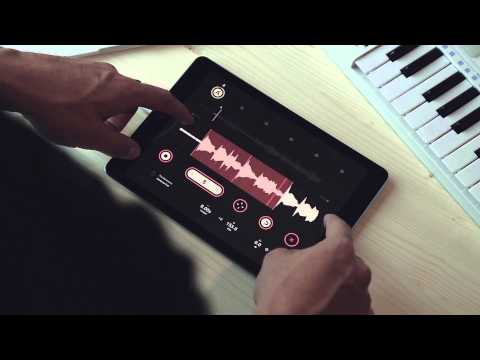
Hope it helps.
Welcome to the forum @smukdp.
thanks!