Loopy Pro: Create music, your way.
What is Loopy Pro? — Loopy Pro is a powerful, flexible, and intuitive live looper, sampler, clip launcher and DAW for iPhone and iPad. At its core, it allows you to record and layer sounds in real-time to create complex musical arrangements. But it doesn’t stop there—Loopy Pro offers advanced tools to customize your workflow, build dynamic performance setups, and create a seamless connection between instruments, effects, and external gear.
Use it for live looping, sequencing, arranging, mixing, and much more. Whether you're a live performer, a producer, or just experimenting with sound, Loopy Pro helps you take control of your creative process.
Download on the App StoreLoopy Pro is your all-in-one musical toolkit. Try it for free today.
Comments
MIDI triggering wouldn't really work as Impacktor uses the input sound to synthesize the drum sound and it's not a simple on/off switch like MIDI.
what if it had a system to where the incoming midi notes, and velocity trigger a sound within impaktor, ( maybe a small wave table
that selects the waves it play by the velocity
of the incoming midi note) and then impaktor processes that sound like it currently does. ?
That would be cool. i wish i could code, i'd try it myself
Impaktor doesn't work as output in audiobus so you will need more mess until v2 came.
Did you checked the first page of the topic? We were discussing something similar (if not the same) but it was a bit large to quote it again...
I think it'd be more useful if Impaktor could be used as an effect and then you could feed whatever sounds controlled by MIDI into it.
VoxSyn and Jam Synth have this sort of functionality but you don't have they same level of access to the synth as you do in Impaktor. ZedSynth has the ability to incorporate audio into its synthesis and you can edit the different components of the synth and it provides you with a flow diagram for each patch. None of the presets which incorporate audio sound anything like Impaktor.
SpringSound is another app which can create some percussive sounds with audio input but it's not very stable on the current iOS version.
There are of course the various modular apps which can use audio in to synthesize percussive sounds.
Well,
After build myself a cheap piezo to test I found some "issues" that I will love to share with anyone interested.
First about building, go for it. I
I've done mine with regular piezos, some foam-like material, water bottle cap, glue, duct tape and the jack cable.
Tutorial frw!
http://nickbriz.com/blog/?p=272
If you still get retriggering then this maybe could help:
http://www.toontrack.com/forum/e-drum-workshop/design-piezo-piezo-to-piezo-switch-adaptor-by-keith-raper/
So...
I was testing (later I will upload a short clip) and I found Impaktor seems keeping alive the internal microphone even you have plugged something in the headset socket. Maybe I'm wrong (due to my cable or anything I've missed) so I'll appreciate someone testing or remembering their experiences.
ITOH using an external sound interface works as expected so for the simplest setup I wonder some guitar audio usb/lightning interface will do the job.
Hope it helps someone
You definitely need a circuit in between your piezo mic and your iOS device to prevent cross talk between the incoming signal from the mic and the outgoing signal to the headphones. Here's a very simple circuit that does the job and also allows you to vary the resistance to maximize the input signal and to eliminate noise in your input signal. I've used this setup for over 6 years with no problems. If your input signal is too strong, you will get double hits but this is easily adjusted using the resistor and the sensitivity settings in Impaktor. The setup will also work for electric guitar or other similar mono input sources.


So your setup disconnect internal iDevice mic as expected? I'm not sure if it's a used cable or related to the app...
Yes, in AUM it's listed as Headset microphone and in Audiobus it's System Audio input. One issue you may be having is that not all 4 pin 3.5mm input jacks are wired to work correctly with iOS devices as some may have the mic, left, and right outputs wired differently. I'd look at the link for the circuit in the previous post as well as it has more information about this.
It's an issue at the system level and not with Impaktor or any app you may be hosting it in. When I have the piezo mic connected via the altoid tin circuit box, I can yell directly into the built in device mic and won't hear a thing. I get sound from Impaktor standalone, when Impaktor is hosted in an app or just the raw sound of the piezo mic when it's used as input in AUM or Audiobus but no sound whatsoever from the built-in device mic.
If you plug your piezo mic into your device and use it as input in Audiobus or AUM, you shouldn't be able to hear anything from the built-in mic either.
Ok! I've seen the dplug before but I will look deep into it, thanks!
About retriggering related to piezos what do you find in your own experience?
I've found the piezo mics work very well as they can be very sensitive and produce a wide range of dynamics plus they create very discrete waveforms. They're a lot better for Impaktor than a conventional or built in mic.

This thread makes me feel so lo-fi. I'm not a DIY electronics person at all. I use a rubber Vater practice pad, placed about 5 inches from my StudioConnect-ed iPad, and I've been quite happy with the results so far. The practice pad provides a much better playing experience than tabletops and tupperware, IMO.
Not knocking the various piezo/epad solutions already discussed at all. Just tossing out an analogue alternative that works for me. I suppose if I used it more often – and knew which end to grab a soldering gun by – I might feel more experimental
But you use it on stage?> @InfoCheck said:
Thanks for the detailed info but I was asking more about the issue about retrigggering on stage due to high volumen that others users pointed. I can reproduce it with my setup for the soundcard path but I'm intrigued about irig/dplug to completely discard the internal mic issue or not from the equation. Thanks a lot mate.
@eustressor said:
I started with a DIY piezo solution with impaktor and it was fine. I have since evolved to a drum pad and it's superior in every way for my live application.
There's not sufficient demand to hear my music so there's no need for stage volume testing. It should be fairly easy to experiment with some different setups to isolate the piezo from ambient bass rumble present in a live stage performance.
Even on stage there will be zero chance of getting sound input from the built-in iOS device mic(s) with the dplug plugged in as it switches off the connection to the built-in mic.
Commercial drum pads with embedded piezo mics as @lukesleepwalker has mentioned would seem to be the easiest solution as they're only activated when you hit them with force rather than unintentionally via bass rumble. Here's a recording from a Yamaha drum pad plugged into the iPad via the dplug circuit which still has similar dynamics and discrete waveforms.

@eustressor if learning how to solder should ever be of interest to you, doing a project like the dplug would be a reasonable place to start. The biggest challenge to soldering is getting a soldering iron that maintains its temperature once you start soldering. There are many good resources on the web about how to solder and it's fairly straight forward to learn.
@InfoCheck thanks once again for share your thoughts and experience.
another option beside piezo is a lab mic. I wanted to have a quiet option to use impaktor after my kids had gone to sleep. I took a lav mic i found online. soldered it up to a plug that has a splitter for headphones, and mic input at headphone jack( pre-headphone plugless devices obviously). I cut a small pocket out of a piece of closed cell foam pad( basically yoga mat material). I squished the lav mic tightly into the foam pad, and put a little gaffer tape over the pocket to secure the mic inside. then i just sit the foam on my lap, and lightly tap on the foam to trigger impaktor. it's very quiet, and surprisingly dynamic.
So I just received an eBay piezo mic(the red/black one) with a female connection. I have impaktor and an apogee jam.
What should I do now?
Use a guitar cable to connect the piezo mic to the Apogee Jam and connect the Apogee Jam to your iOS device, open up Impaktor and adjust the input sensitivity level to your liking.
I did that but didn't end up having any fun

Will try other things when I get home.
Thank you for the advice - it does almost look doable for me, thanks to all the great run-throughs you and others have provided in this thread. However, Mrs. Eustressor (whose name is on our shop downstairs) most likely would walk in, catch me about to press the History Eradicator button, and save us all - she's quite handy
I wonder if a piezo strapped to the bottom of the drum pad would do the trick live - I wasn't even thinking about live applications in my original post. And there is something to be said about the responsiveness of a good practice pad.
If you're not opposed to finger drumming or using pencils or pens versus traditional drumsticks, you can use a plastic coated piezo mic very easily. If you want the more traditional drum pad option you could strap or tape the piezo somewhere on your practice pad too. Alternatively, look for a drum pad from an instrument in a thrift store to salvage for this purpose. If you already have a USB interface for your iOS device you could use it and forego any DIY or commercial analog guitar interface and plug the piezo directly into an instrument line in of the USB interface.
A lot of good ideas there to chew on. Starting to wish I'd kept just ONE pad from my old Yamaha electronic drumkit before trading it for my analogue Mapex drums ...
Did you know about this, guys?
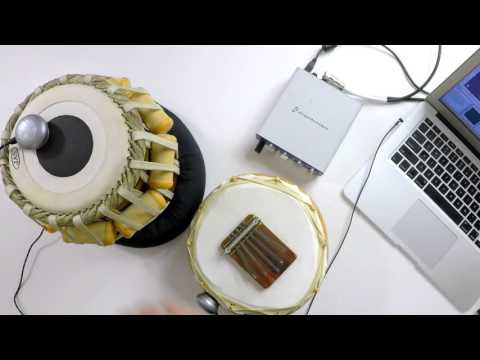
http://www.mogees.co.uk/
With a pad from an electronic kit that has a 1/4" output plug, could I just use an adaptor to go into the iOS headphone jack, or would I need to consider matching impedence as well?
A circuit in between the 1/4" plug from the drum pad and your iOS headphone jack input is needed to deal with impedance issues, noise, and to prevent signal bleed back/crossover from the mono mic input to the stereo output via the iOS headphone jack. I've done this with a Yamaha electronic drum pad and it works very well with Impaktor.
Thanks @InfoCheck. I went back through the thread and found the simple circuit. Now to find some time!
That looks cool and the apps are free but it looks like you need to buy and register the mic thingy for 98€ before you can do anything in the app at all.
There is a cheaper (and limited) version about 50€ too.
I think sometimes one needs to let a man to do the growing up himself to come to his own conclusions. I guess it is all in the process as much as the final result