Loopy Pro: Create music, your way.

What is Loopy Pro?Loopy Pro is a powerful, flexible, and intuitive live looper, sampler, clip launcher and DAW for iPhone and iPad. At its core, it allows you to record and layer sounds in real-time to create complex musical arrangements. But it doesn’t stop there—Loopy Pro offers advanced tools to customize your workflow, build dynamic performance setups, and create a seamless connection between instruments, effects, and external gear.

Use it for live looping, sequencing, arranging, mixing, and much more. Whether you're a live performer, a producer, or just experimenting with sound, Loopy Pro helps you take control of your creative process.

Download on the App Store

Loopy Pro is your all-in-one musical toolkit. Try it for free today.

Future Drummer by Lumbeat / on sale today 4/9/20!

24567

Comments

  • @DrChris said:
    It's in the German appstore already: „Future Drummer“ von Luis Martinez
    https://appsto.re/de/hgM7hb.i

    Weird thing is i cant find future drummer in the dutch app store, but it does when i use your link, without any redirection to the german app store.

  • I hope Funk Drummer gets an update with the MIDI Out functionality, Please :)

  • the fact that this has midi out and also comes with a ton of grooves has made me want it so bad. will probably buy it as soon as i can.

  • @gonekrazy3000 said:
    the fact that this has midi out and also comes with a ton of grooves has made me want it so bad. will probably buy it as soon as i can.

    I've spent the last couple of weeks trying to 'build' something like this using AB3, Midiflow randomiser, and ModStep with Gadget as the soundsource.....If only I'd known this was on its way :D

  • I thouhght I should probably post this here too
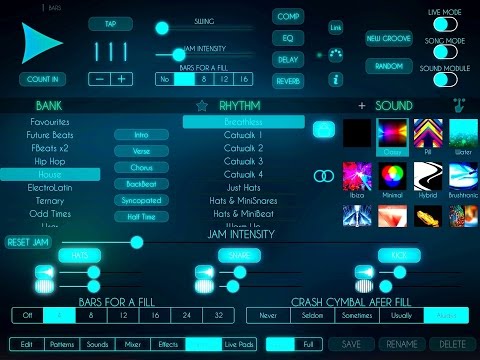
  • Hoping to see and hear more but almost went to the App Store for this one last night. Waiting to see if Dougs video will drive me over the top today.

  • @Tritonman said:
    Hoping to see and hear more but almost went to the App Store for this one last night. Waiting to see if Dougs video will drive me over the top today.

    Hows that for timing B)

  • Hahaha, perfectly timed. When I went back to the forum after posting my last comment ! Dougs video was on the top of the page. I am also looking for a million dollars perhaps I had best go refresh the forum page Again?

  • @Tritonman said:
    Hahaha, perfectly timed. When I went back to the forum after posting my last comment ! Dougs video was on the top of the page. I am also looking for a million dollars perhaps I had best go refresh the forum page Again?

    hehehe :D...I tried that trick with a Novation Peak and Circuit Mono station...but it didn't work :(

  • Hi, thanks for the post.

    There are lot of new things on it, I'l try to make a video next week. But for now I will explain some new tricks:

    • Reverse works better on hats or snares (high frequencies), I prefer unaccented notes. And it sound rounded before an accented note . On kicks it could sound a bit weird, specially fat sounds. That's why it's very low on the jam config by default. But you can experiment whatever you want.
    • I think the same with slicing. Works nice on high frequencies, but a bit bothering on kicks for me.

    • On song Mode, now is possible to add or remove fills and cymbals on the main screen, not need to join the part setup.

    • Live Mode contains lot of controls to apply on the way. 2 Delay sends for individual tracks ( 3 subdivisions (2 on ternary) and 1 subdivision). It will be perfectly synced when swing is at minimum. When swinging could sound a bit displaced.

    • To fix delays , slices, etc... press and drag out.
    • The quarter note on kick is a toggle button and will play quarter notes on kick and make unaccented others notes, except special.
    • Similar on hats, you can apply up hats patterns.
    • On Mix, there is a button to select/unselect these last 2 controls. It will "house" any rhythm.
    • To reverse a note on live need to press before it time, at least one subdivision.

    • I thought needed to have jamming control on main screen. When a fill is played, the control will be highlighted. I wanted to do this because I realized some people didn't understand what happened when a fill was playing.

    • Lot of people asked about control Live Pads with Blueboard. Ssimply set Live Pads on Program Change mode ( midi config)

  • Future plans for this app?

  • @LuisMartinez said:
    Hi, thanks for the post.

    There are lot of new things on it, I'l try to make a video next week. But for now I will explain some new tricks:

    • Reverse works better on hats or snares (high frequencies), I prefer unaccented notes. And it sound rounded before an accented note . On kicks it could sound a bit weird, specially fat sounds. That's why it's very low on the jam config by default. But you can experiment whatever you want.
    • I think the same with slicing. Works nice on high frequencies, but a bit bothering on kicks for me.

    • On song Mode, now is possible to add or remove fills and cymbals on the main screen, not need to join the part setup.

    • Live Mode contains lot of controls to apply on the way. 2 Delay sends for individual tracks ( 3 subdivisions (2 on ternary) and 1 subdivision). It will be perfectly synced when swing is at minimum. When swinging could sound a bit displaced.

    • To fix delays , slices, etc... press and drag out.
    • The quarter note on kick is a toggle button and will play quarter notes on kick and make unaccented others notes, except special.
    • Similar on hats, you can apply up hats patterns.
    • On Mix, there is a button to select/unselect these last 2 controls. It will "house" any rhythm.
    • To reverse a note on live need to press before it time, at least one subdivision.

    • I thought needed to have jamming control on main screen. When a fill is played, the control will be highlighted. I wanted to do this because I realized some people didn't understand what happened when a fill was playing.

    • Lot of people asked about control Live Pads with Blueboard. Ssimply set Live Pads on Program Change mode ( midi config)

    Congratulation Luiz on a fantastic app.

    I bought it and had a lot of fun (especially with midi out) last night.

    One question: why do almost all the
    Factory grooves only contain hits for the kick, snare and hat. No notes seem to be in the factory patterns for the additional two instruments (TT1 and TT3).

    Any help on rectifying this most appreciated.

  • Is anyone else having issues with crashes on iPhone? It happens when I go to change the groove and sometimes when changing patterns.

  • Love funkdrummer and softdrummer, may have to cave and get this

  • @RedSkyLullaby said:
    Love funkdrummer and softdrummer, may have to cave and get this

    I loved funkdrummer and softdrummer and this is just best of both with a future twist and lots of awesome sauce on top.

  • It certainly has some nice possibilities. Had a few crashes, nothing earth shattering. The layout is still a little elliptical to me here and there, and this despite having all of these apps at this point, but I'm already getting some stuff here I don't seem to be able to (easily) elsewhere. Am struggling with getting it working via AB into Blocs using Link. Doesn't seem to want to work (the connection to AB, not Link), but I have been on the road for three days and am full of airline grime and unnecessary pie so will give it another run in the morning...

  • edited April 2017

    @JohnnyGoodyear said:
    It certainly has some nice possibilities. Had a few crashes, nothing earth shattering. The layout is still a little elliptical to me here and there, and this despite having all of these apps at this point, but I'm already getting some stuff here I don't seem to be able to (easily) elsewhere. Am struggling with getting it working via AB into Blocs using Link. Doesn't seem to want to work (the connection to AB, not Link), but I have been on the road for three days and am full of airline grime and unnecessary pie so will give it another run in the morning...

    Host in AUM=>ab3=>blocs. Actually never mind. Seems like blocs broke in audiobus3 with the latest update. @blocsxnovation please fix this.

  • Have. Every. Drum. App. He. Has. Made... stop making apps for god's sake…

    Or try and make something other than a drum app :)

  • @LuisMartinez said:
    Hi, thanks for the post.

    There are lot of new things on it, I'l try to make a video next week. But for now I will explain some new tricks:

    • Reverse works better on hats or snares (high frequencies), I prefer unaccented notes. And it sound rounded before an accented note . On kicks it could sound a bit weird, specially fat sounds. That's why it's very low on the jam config by default. But you can experiment whatever you want.
    • I think the same with slicing. Works nice on high frequencies, but a bit bothering on kicks for me.

    • On song Mode, now is possible to add or remove fills and cymbals on the main screen, not need to join the part setup.

    • Live Mode contains lot of controls to apply on the way. 2 Delay sends for individual tracks ( 3 subdivisions (2 on ternary) and 1 subdivision). It will be perfectly synced when swing is at minimum. When swinging could sound a bit displaced.

    • To fix delays , slices, etc... press and drag out.
    • The quarter note on kick is a toggle button and will play quarter notes on kick and make unaccented others notes, except special.
    • Similar on hats, you can apply up hats patterns.
    • On Mix, there is a button to select/unselect these last 2 controls. It will "house" any rhythm.
    • To reverse a note on live need to press before it time, at least one subdivision.

    • I thought needed to have jamming control on main screen. When a fill is played, the control will be highlighted. I wanted to do this because I realized some people didn't understand what happened when a fill was playing.

    • Lot of people asked about control Live Pads with Blueboard. Ssimply set Live Pads on Program Change mode ( midi config)

    Another great-fantastic app, thank you Luis. Two questions about the MIDI implementation:

    • what can we do with the midi in ? I have seen that we can start-stop the sequence using G2 but I also would like to use an external sequencer and play the internal songs in FD. Is it possible?
    • I faced some issues with MIDI out, the app is crashing when I am selecting an external app. Is there something to do here?
  • @cuscolima said:

    @LuisMartinez said:
    Hi, thanks for the post.

    There are lot of new things on it, I'l try to make a video next week. But for now I will explain some new tricks:

    • Reverse works better on hats or snares (high frequencies), I prefer unaccented notes. And it sound rounded before an accented note . On kicks it could sound a bit weird, specially fat sounds. That's why it's very low on the jam config by default. But you can experiment whatever you want.
    • I think the same with slicing. Works nice on high frequencies, but a bit bothering on kicks for me.

    • On song Mode, now is possible to add or remove fills and cymbals on the main screen, not need to join the part setup.

    • Live Mode contains lot of controls to apply on the way. 2 Delay sends for individual tracks ( 3 subdivisions (2 on ternary) and 1 subdivision). It will be perfectly synced when swing is at minimum. When swinging could sound a bit displaced.

    • To fix delays , slices, etc... press and drag out.
    • The quarter note on kick is a toggle button and will play quarter notes on kick and make unaccented others notes, except special.
    • Similar on hats, you can apply up hats patterns.
    • On Mix, there is a button to select/unselect these last 2 controls. It will "house" any rhythm.
    • To reverse a note on live need to press before it time, at least one subdivision.

    • I thought needed to have jamming control on main screen. When a fill is played, the control will be highlighted. I wanted to do this because I realized some people didn't understand what happened when a fill was playing.

    • Lot of people asked about control Live Pads with Blueboard. Ssimply set Live Pads on Program Change mode ( midi config)

    Another great-fantastic app, thank you Luis. Two questions about the MIDI implementation:

    • what can we do with the midi in ? I have seen that we can start-stop the sequence using G2 but I also would like to use an external sequencer and play the internal songs in FD. Is it possible?
    • I faced some issues with MIDI out, the app is crashing when I am selecting an external app. Is there something to do here?

    I have noticed the crashing of the app as well when selecting an external apps midi ports. On the bright side future drummers own port works with no issues. Feeding the midi into gadget is a blast. The jamming mutation and the included grooves are lovely fed into Recife and London. And thanks to link the midi is rock solid in time recorded in gadget.

  • I love the jam and fills features in this, really useful for crap drummers like me. Only thing holding me back is the fact I've got a ton of drum apps already, and it's twenty quid.

  • @MonzoPro said:
    I love the jam and fills features in this, really useful for crap drummers like me. Only thing holding me back is the fact I've got a ton of drum apps already, and it's twenty quid.

    remember that these same jams and fills can be redirected to ruismaker, elastic drummer, gadgets drummers and whatever drum apps you have that have midi input. its awesome for a live context :)

  • @gonekrazy3000 said:

    @MonzoPro said:
    I love the jam and fills features in this, really useful for crap drummers like me. Only thing holding me back is the fact I've got a ton of drum apps already, and it's twenty quid.

    remember that these same jams and fills can be redirected to ruismaker, elastic drummer, gadgets drummers and whatever drum apps you have that have midi input. its awesome for a live context :)

    Are the MIDI out notes assignable or are they restricted to standard MIDI mapping? Man, I wish Patterning had MIDI in since all my good drum samples are in there and it has the best sorting/preview.

  • @oat_phipps said:

    @gonekrazy3000 said:

    @MonzoPro said:
    I love the jam and fills features in this, really useful for crap drummers like me. Only thing holding me back is the fact I've got a ton of drum apps already, and it's twenty quid.

    remember that these same jams and fills can be redirected to ruismaker, elastic drummer, gadgets drummers and whatever drum apps you have that have midi input. its awesome for a live context :)

    Are the MIDI out notes assignable or are they restricted to standard MIDI mapping? Man, I wish Patterning had MIDI in since all my good drum samples are in there and it has the best sorting/preview.

    they're assignable. although all notes send to the exact same midi channel (which is selectable)

  • @gonekrazy3000 said:

    @oat_phipps said:

    @gonekrazy3000 said:

    @MonzoPro said:
    I love the jam and fills features in this, really useful for crap drummers like me. Only thing holding me back is the fact I've got a ton of drum apps already, and it's twenty quid.

    remember that these same jams and fills can be redirected to ruismaker, elastic drummer, gadgets drummers and whatever drum apps you have that have midi input. its awesome for a live context :)

    Are the MIDI out notes assignable or are they restricted to standard MIDI mapping? Man, I wish Patterning had MIDI in since all my good drum samples are in there and it has the best sorting/preview.

    they're assignable. although all notes send to the exact same midi channel (which is selectable)

    Was about to click buy, then saw this....so is it one channel for the whole app ? or a channel for each drum ?

  • @AndyPlankton said:

    @gonekrazy3000 said:

    @oat_phipps said:

    @gonekrazy3000 said:

    @MonzoPro said:
    I love the jam and fills features in this, really useful for crap drummers like me. Only thing holding me back is the fact I've got a ton of drum apps already, and it's twenty quid.

    remember that these same jams and fills can be redirected to ruismaker, elastic drummer, gadgets drummers and whatever drum apps you have that have midi input. its awesome for a live context :)

    Are the MIDI out notes assignable or are they restricted to standard MIDI mapping? Man, I wish Patterning had MIDI in since all my good drum samples are in there and it has the best sorting/preview.

    they're assignable. although all notes send to the exact same midi channel (which is selectable)

    Was about to click buy, then saw this....so is it one channel for the whole app ? or a channel for each drum ?

    channel per app sadly :/ still. i worked around this in ruismaker by building my own single drum instances in aum each responding to a single note. this can also be done in gadget by unloading the drum sounds you dont want. so you can still do multitrack drums in either gadget or aum. its still a fantastic tool. and for my volca sample the Mf-Vs works wonders.

  • @gonekrazy3000 said:

    @AndyPlankton said:

    @gonekrazy3000 said:

    @oat_phipps said:

    @gonekrazy3000 said:

    @MonzoPro said:
    I love the jam and fills features in this, really useful for crap drummers like me. Only thing holding me back is the fact I've got a ton of drum apps already, and it's twenty quid.

    remember that these same jams and fills can be redirected to ruismaker, elastic drummer, gadgets drummers and whatever drum apps you have that have midi input. its awesome for a live context :)

    Are the MIDI out notes assignable or are they restricted to standard MIDI mapping? Man, I wish Patterning had MIDI in since all my good drum samples are in there and it has the best sorting/preview.

    they're assignable. although all notes send to the exact same midi channel (which is selectable)

    Was about to click buy, then saw this....so is it one channel for the whole app ? or a channel for each drum ?

    channel per app sadly :/ still. i worked around this in ruismaker by building my own single drum instances in aum each responding to a single note. this can also be done in gadget by unloading the drum sounds you dont want. so you can still do multitrack drums in either gadget or aum. its still a fantastic tool. and for my volca sample the Mf-Vs works wonders.

    Damn! I want to record the MIDI multitrack, to avoid copying tracks and deleting notes after recording, I guess I would have to use AB3 and Filters to achieve this ?

    Also, is the MIDI sync stable...I would also want to record MIDI into Circuit and having a stable MIDI sync really helps with this....

  • @AndyPlankton said:

    @gonekrazy3000 said:

    @AndyPlankton said:

    @gonekrazy3000 said:

    @oat_phipps said:

    @gonekrazy3000 said:

    @MonzoPro said:
    I love the jam and fills features in this, really useful for crap drummers like me. Only thing holding me back is the fact I've got a ton of drum apps already, and it's twenty quid.

    remember that these same jams and fills can be redirected to ruismaker, elastic drummer, gadgets drummers and whatever drum apps you have that have midi input. its awesome for a live context :)

    Are the MIDI out notes assignable or are they restricted to standard MIDI mapping? Man, I wish Patterning had MIDI in since all my good drum samples are in there and it has the best sorting/preview.

    they're assignable. although all notes send to the exact same midi channel (which is selectable)

    Was about to click buy, then saw this....so is it one channel for the whole app ? or a channel for each drum ?

    channel per app sadly :/ still. i worked around this in ruismaker by building my own single drum instances in aum each responding to a single note. this can also be done in gadget by unloading the drum sounds you dont want. so you can still do multitrack drums in either gadget or aum. its still a fantastic tool. and for my volca sample the Mf-Vs works wonders.

    Damn! I want to record the MIDI multitrack, to avoid copying tracks and deleting notes after recording, I guess I would have to use AB3 and Filters to achieve this ?

    Also, is the MIDI sync stable...I would also want to record MIDI into Circuit and having a stable MIDI sync really helps with this....

    im using link mostly and its rock solid. and yes. midifilters should work well for this. along with the mf-adapter. will do some tests myself as soon as i'm able.

  • @gonekrazy3000 said:

    @AndyPlankton said:

    @gonekrazy3000 said:

    @AndyPlankton said:

    @gonekrazy3000 said:

    @oat_phipps said:

    @gonekrazy3000 said:

    @MonzoPro said:
    I love the jam and fills features in this, really useful for crap drummers like me. Only thing holding me back is the fact I've got a ton of drum apps already, and it's twenty quid.

    remember that these same jams and fills can be redirected to ruismaker, elastic drummer, gadgets drummers and whatever drum apps you have that have midi input. its awesome for a live context :)

    Are the MIDI out notes assignable or are they restricted to standard MIDI mapping? Man, I wish Patterning had MIDI in since all my good drum samples are in there and it has the best sorting/preview.

    they're assignable. although all notes send to the exact same midi channel (which is selectable)

    Was about to click buy, then saw this....so is it one channel for the whole app ? or a channel for each drum ?

    channel per app sadly :/ still. i worked around this in ruismaker by building my own single drum instances in aum each responding to a single note. this can also be done in gadget by unloading the drum sounds you dont want. so you can still do multitrack drums in either gadget or aum. its still a fantastic tool. and for my volca sample the Mf-Vs works wonders.

    Damn! I want to record the MIDI multitrack, to avoid copying tracks and deleting notes after recording, I guess I would have to use AB3 and Filters to achieve this ?

    Also, is the MIDI sync stable...I would also want to record MIDI into Circuit and having a stable MIDI sync really helps with this....

    im using link mostly and its rock solid. and yes. midifilters should work well for this. along with the mf-adapter. will do some tests myself as soon as i'm able.

    Thanks @gonekrazy3000 , I already have other apps I can use for drum sequencing (patterning), but this has a couple of features that make it very inviting....The JAM feature with MIDI out and being able to change patterns using blueboard, this will make jamming with my guitar and keys a lot more fluid as I wont have to mess around trying to swap patterns with my already busy hands :)

    I really want to use MIDI clock instead of link to get the start stop that Link doesn't have, with guitar in hand, pressing one button to start makes life a lot easier :)

Sign In or Register to comment.