Loopy Pro: Create music, your way.
What is Loopy Pro? — Loopy Pro is a powerful, flexible, and intuitive live looper, sampler, clip launcher and DAW for iPhone and iPad. At its core, it allows you to record and layer sounds in real-time to create complex musical arrangements. But it doesn’t stop there—Loopy Pro offers advanced tools to customize your workflow, build dynamic performance setups, and create a seamless connection between instruments, effects, and external gear.
Use it for live looping, sequencing, arranging, mixing, and much more. Whether you're a live performer, a producer, or just experimenting with sound, Loopy Pro helps you take control of your creative process.
Download on the App StoreLoopy Pro is your all-in-one musical toolkit. Try it for free today.
Comments
Thanks Alex!
Been so busy at work just got around to reading your post.
What I meant with having options when starting a brand new surface will make more sense if you downloaded Groovebox. Check it out. If KRFT could present users with that type of scenario, it might perhaps help those that get discouraged with a blank starting screen. Some actually love a blank starting screen. Those are the pros. The ones that know how to program everything.
For me, and perhaps others, this is why Groovebox seems very appealing as it presents you with three options to start. 1. Drums 2. Bass 3. Synth
I was thinking KRFT could apply that same concept of course in your own unique way. Also one you select a module to start with it auto creates a groove and this groove is not set in stone but users can tweak it.
Check it out when you can. Thanks Alex tlyou guys rock! And we all love KRFT and if this will mot make it better, please by all means disregard.
We're just so glad to have devs such as you guys that love music as much as we do.
Downloaded this Surface from the KRFT server called Volcanic. This is exactly what I mean about others being so awesome at programming!! Wow great job, with this Surface I began to experiment using the upper left cells (orange) ones as chords which deactivate each other as I select another one! Wow this is so amazing! This is what I love about KRFT it is really revolutionary!
So I figured that one can create cells which correspond to what ever Chord you record in them and say your song is based on Key G major, you can create cells that each will have a specific pattern playing on that specific key. Hope it makes sense. So in a way allowing one to create a backing track in realtime. Now I gotta do the same for the bass track and group these together so as I select the cell with key of G major the Bass cell will also trigger.
I guess practice makes better.
Haha that's my blank surface Finger Blast. (it's not really blank, you can't remove the default one shot sound effects KRFT puts in the audio cells)
"If you don't have KRFT I'd love to hear why it's not for you! "
"
Well, I didn't get it yet because it's on my "to purchase" list. However, if you send me a promo code, I may be able to give you my opinion.
(Yeah, I know, "nice try Jimmy".)
How about an easier way to enter notes for drum machines. Let's take ruismaker by brambos. Using the piano roll editor can be abit fidley at first. Ruismaker is triggered using the black keys on a certain octave. I first need to transpose and the find the right keys. I record some notes and then go into piano roll to edit timing. I think KRAFT needs a more simple drum pad
What I'm totally hoping is that @JohannesD will make a midi note map filter for AB3 so that in KRFT or any other app, one simple scale or pad arrangement can be used with any drum app simply by swapping out the filter.
We have Apps that ar GM mapped, Gadget's that are chromatic from C2 or something, Brambos' default mapping. One neat little multi-instance state saving filter and it would all be sooo much easier.
+1
+1 >
@wim said:
Just bought it I slapped my face because when it was launched I thought it was a toy.... WRONG!
I watched some video tutorials, but it would be really helpful to introduce a step by step tutorial ,inside the app , to build some surfaces . The final surfaces could be simple or complex depending on the tutorial.
Yes that's one con of having a simple interface - it looks like a toy!
A better on boarding process + tutorial is a good shout.
Yeah! Sounds good.
I have to say, though, the videos you do have are top-notch. Short, well thought out, and effective. Very nice job!
Thank you! It means a lot! They took me quite a long time - glad to hear they're being appreciated!
+1000
Mute and Solo buttons in edit mode would be a big help to me.
Agreed +1
whispers @Alex fox you want to release the cc per step update soon. make it so.
Hm, I'm not sure I'll be able to in this release. There's lots of other features to get in. What's the use case again?
Parameter locks. Can automate parameters with more accuracy then just the current morphs. Can do rhythmic modulations. By ccperstep I meant using the functionality from your current piano roll for internal synths where you can make the velocity move the filter cutoff etc per step with a selected value.
Just that instead it would move cc 07 etc. Doesn't have to be multiple cc per step. Would just make multiple cells for now. Would make Krft super useful for automating iaa apps. We discussed this before didn't we ?
Here's a video explaining it:-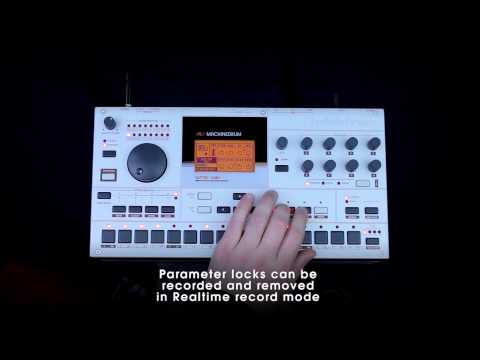
You already have the functionality for internal sounds. I don't think it would be too hard to add it to the midi output cells.
Sorry yes I remember. How does it work currently for internal synths? Do you mean the velocity => filter ?
@Alex fox Yes. Basically on every step the selected velocity morphs the filter. With the filter knob choosing how much the velocity affects it. Currently the midi cells don't have velocity parameters at all. My proposal let us have a knob that Let us pick the CC it modulates for the midi output. You can basically do electron style parameter locks this way. You could so some fantastic effect if say you sent the velocity to move delay settings, or even other parameters in a synth. The possibilities would be endless really. And you pretty much already have the functionality. I don't imagine it would be too much effort to add this to the midi output. A secondary request would be to have a setting to make the midi cell not actually send the note data and just the cc per step. But I can live without this secondary feature for now.
Hi Alex,
KRFT can be for me, but...make a grid with control of Pitch Bend, like GeoShred and KRFT = instabuy!
Perhaps it is a bit difficult?
Thanks...i hope...
I just bought KRFT for live performance and I must say it is a great and innovative app. What I miss is the ability to record audio directly into KRFT or I'd be happy if there's an easy way to do it that goes well with the workflow of KRFT. I love the KRFT workflow by the way, it's so easy. I didn't read any manual because it was so intuative.
Another feature that would be great is AU hosting, both instruments and efftects, or some some easy way to interact with other apps other than midi. I hope KRFT continues to develop because it's such a great app. Thanks
I’ve got it but I’ve yet to make it make a single sound or do anything other than eventually make a diamond shape on the screen from which a small circle can move out of and then disappear. Presumably it does more than that?
I'm interested but I haven't purchased it because I doubt it will add anything useful to my setup. The information on the KRFT web page is just as sketchy as the description on the AppStore, so I don't even know what exactly it's capable of.
Words like "Use KRFT to power DAWs with MIDI" may impress people who don't know a thing about music equipment, but I cannot get any sense out of it. My DAW already has full Midi send and receive support except Sysex messaging.
Is KRFT sending and/or receiving Midi status messages? Midi clock master? Slave to Midi clock? Control KRFT using Midi CC or Sysex? Send Midi Cc or Sysex? and so on.
A proper description of what KRFT can really do would help me a lot.
It's good stuff. But I wouldn't use it as a live set unless I'm only going on for a short while. Think of it as trying to do a Live Ableton Live set, but without the ability to drop and load smaller .als files on the fly. It can be done only if you are truly improvising. The screen real estate will only allow a certain number of premade configs.
Have had KRFT since it was released, I never want to work with it because after first impressions, I felt it was too much of a closed system.
I was hoping it would be THE app to trigger amazing results from anything IOS midi - and including the outside world ( hardware synths / DAW's)
The focus seems way too much on all the tricky things it does within this system.
Midi CC's to create paramater locks like Electron gear would be great.
I could be talking out of my butt here - as I really have not delved after my first impressions.
The way forward IMO is to put a HUGE focus on how it can play with other midi gear.
It should be a creative centerpiece talking to, manipulating, twisting, harmonizing, randomizing and triggering an abundance of other gear.
Until then I feel it is a little toy like (no offense)
Loading my patches to your website feels like facebook (yuk) ,
-a horrible approach to working
I still keep it on my iPad because I feel it has incredible (unrealized) potential as a creative playground to everything connected to it.
EDIT - ok, I see it has midi out now = great step forward!
I'm away from the electro-teat for the moment, but KRFT does indeed send midi notes and cc, but I do not believe that it can be controlled using midi cc or sysex. You can use multiple sound modules in KRFT, not just those that come with it. I typically use AB3 for this task.
KRFT is actually pretty easy to use once you decide to learn it and get past its ostensibly cryptic interface. It's sort of DAW-ish, but really more of a performance/song creation thing than a mastering polishing environment. But you can make pretty finished work in it.
Did I mention that it's pretty easy to use?
And you'll wonder why more developers don't go down this path.
No, it doesn't. You have exhausted its possibilities.
You should have another go at it. It's got what you want now, MIDI out. I was mapping controls other ios apps.
The way everything interacts quantize wise can be tricky, but once you figure which quantize control knob controls what, you're good.