Loopy Pro: Create music, your way.
What is Loopy Pro? — Loopy Pro is a powerful, flexible, and intuitive live looper, sampler, clip launcher and DAW for iPhone and iPad. At its core, it allows you to record and layer sounds in real-time to create complex musical arrangements. But it doesn’t stop there—Loopy Pro offers advanced tools to customize your workflow, build dynamic performance setups, and create a seamless connection between instruments, effects, and external gear.
Use it for live looping, sequencing, arranging, mixing, and much more. Whether you're a live performer, a producer, or just experimenting with sound, Loopy Pro helps you take control of your creative process.
Download on the App StoreLoopy Pro is your all-in-one musical toolkit. Try it for free today.
Comments
Definitely going in the right direction .
. 
Can I suggest you allow editing of colours for the interface? I find this kind of thing very important for a good user experience. Colour options are good and I think there should always be a dark background option. This is one of things I like about B-step pro, even though I'm not that mad keen on the style, being able to change the colours of everything goes a long way
I'd even say having user themes would be something which could take off too for Quantum, allowing access to the .png's etc. I'd definitely make one then too.
edit: yes the black one is best, i didn't see that before
that black one has a nice look to it.
Wow. The gui ideas are really nice, modern, uncluttered and 'clean'. Black looks pretty nice. I can see that it would appeal to the kids more like that. Good luck with the implementation, Tony.
There will be a choice of a few : black, white & some complementary colours in-between.
fonts get sans serif too - with easier to read text
Appreciating the amount of thought going into Quantum, it's reflecting that already as a matter of fact, thx and respect!
@RajahP with a sequence running, individual steps can be set to 'modulations' or 'ornaments' of that note (repeats, trills, etc.) in the step options menu (by tapping on the note's button).
Trigger on the nth loop (f.e. n=3) meaning the 'mute, skip or chord options' of that step will be triggered in the third repeat of the sequence, or: 1,n = on the first and third loop ... (I guess)
Then the logic in the step order, and ..., if you like to glance into the original manual: http://www.amssoftware.org/manual/midiSequencerManual.pdf
(http://www.amssoftware.org/manual/QuantumManual.pdf)
This looks so lovely. can't wait for it to release
Nice..
Thanks.. I will give it a look later..
That sure looks nice. From a quick look at it, it seems like everything is there. Yet, this version seems simpler and less intimidating. I really like it.
A year ago I changed my design workflow to go from Photoshop bitmaps to (mostly) vector and I'm using Affinity Photo and Affinity Designer now. Makes for an amazingly effective workflow (double so when you're already familiar with Adobe tools). What makes them especially great is how well they blur the distinction between vector and bitmap right until the moment you wish to export. Worth looking into if you haven't settled on your design tools yet.
Great, it'll be a big improvement, sans serif fonts are essential too. Looking forward to this
Yes I'll be looking to de-clutter the main screen a little.
@brambos And your apps go to show how good that design is - I especially like Ripplemaker. Also, the whole of Apple iTunes now seems to be vector graphics, so I should change my workflow for sure!
Just bought Designer so will start using it, but you're right - many features of photoshop in there!
please consider putting the step skip buttons on the main page beside the mute buttons
Are you referring to the current screens?
i am saying that step skip is just as important as mute, so consider putting that functionality up front, as it is on a 960 or numerology, cheers
This is my work in progress converting midiSequencer to VCV rack.
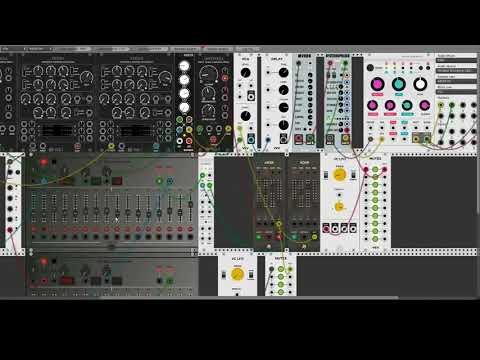
im dead.
VCV Rack might bring me back to the desktop. Trying to keep portability of touchscreens and hardware but I am always fascinated by modular.
Eagerly awaiting new iOS design and function updates. Love Quantum!
wow, this is unexpected. But I wonder, there are a lot of sequencers in VCV, don't they already cover the functionality of midiSequencer?
some good ones for sure - klee & metropolis clones, but I'm looking to create audio units too, so learning with sequencers first.
its a great system - and virtually free.
Quantum still being worked on though - I'm keen to get the next release out.
Beautiful stuff Tony!
thx - its a bit on the overdriven filter side (feedback from filter back to mixed input) & not the best use of clouds, but its a start!
Really need to start exploring audulus too.
The vcv rack seq1 sounds great.
I wanted to chime in about the interface and say how much I like Syrupcore’s design - very clean and focused.
I wanted to suggest a small modification to this and suggest merging the ‘led light’ and grey buttons (much like Elektron) to make vertical space for an extra pair of sequencer rows. I see this as a trade off between keeping to the physical hardware trope vs being able to see at a glance four lanes at a time - making it easier to understand the interrelated elements of at least four parts of the melodic or rhythmic structure of whatever you are working on.
+1
do you mean just lines of leds/labels - so a collapsed view without the ABCD & transpose etc? I think you need the ABCD for part selection. This would however allow me to extend to 8 sequences. Reworking the sequence lines is easy enough to do.
The version controls need to be simplified into one button(or a gesture) with a pop-out panel anyway.
@syrupcore 's wireframe here was done before I added selection panel.
can't wait to start on it, currently wading through 100s of enharmonic spellings for the custom user scales - almost done...