Loopy Pro: Create music, your way.
What is Loopy Pro? — Loopy Pro is a powerful, flexible, and intuitive live looper, sampler, clip launcher and DAW for iPhone and iPad. At its core, it allows you to record and layer sounds in real-time to create complex musical arrangements. But it doesn’t stop there—Loopy Pro offers advanced tools to customize your workflow, build dynamic performance setups, and create a seamless connection between instruments, effects, and external gear.
Use it for live looping, sequencing, arranging, mixing, and much more. Whether you're a live performer, a producer, or just experimenting with sound, Loopy Pro helps you take control of your creative process.
Download on the App StoreLoopy Pro is your all-in-one musical toolkit. Try it for free today.
Comments
FWIW: this thread rekindled the love of this app with me so thanks for starting it and ‘atting’ me on it. Here’s another little experiment using PolyPhase to generate the ambience of Korg ElectribeWave. I added drums via GrooveBox and noodled on things in real-time in AUM. I used Midi Link sync to keep everything linked since PolyPhase lacks Link.
Anyhoo thanks as always for listening 🙏🏼💕
You can make just about anything with this app. And do it very quickly. Love it.
Awesome track. But I didn't realize you went on a pause with KEW
What have you been using?
Thanks. I got sidetracked with Aparillo and the OP-Z 🤪
You are too kind. Glad you enjoyed it ™️💕
I just can’t stop myself. Shoveled some food down at lunch and had a go at 100% Electribe Wave on this track being generated by PolyPhase with manually entered drums by my t-Rex hands 🤪:
Your stuff is cool and all but I was really talking about the collective you and loving the app in general 😂
@db909 hahah
I speak for no one but myself but i do love this app 🤫 btw, here’s another little one i put together last night using the subject of this thread:
I honestly can’t figure out how to get started.
Can't get my head around the difference between the patterns and the song mode. Why can't I tap a button to clear the midi of whatever terrible techno is in Song A01 but keep the sounds and tweak from there?
Granted, I have put in almost no effort to learning the app. As is my way! But usually I stumble into something. I figured out Modstep! Digitakt!
Haven't grokked this at all.
So I have resolved to read the fing manual on the subway back to Brooklyn.
I honestly can’t figure out how to get started.
Can't get my head around the difference between the patterns and the song mode. Why can't I tap a button to clear the midi of whatever terrible techno is in Song A01 but keep the sounds and tweak from there?
Granted, I have put in almost no effort to learning the app. As is my way! But usually I stumble into something. I figured out Modstep! Digitakt!
Haven't grokked this at all.
So I have resolved to read the fing manual on the subway back to Brooklyn. Select an empty user preset slot
You can just select the terrible techno song which contains the sounds you want to tweak. Then hit the "Save" button select an empty user preset slot and press it. The terrible techno song will now be saved to the slot. Open the terrible techno go to the "Utility tab: Select the Bar 1 tab which will select all the instrument tracks and press clear. Repeat for rest of tracks.
Anybody here knows a way to reorder patterns in song mode? I can add patterns with the + button, delete patterns by pressing edit and use the minus button that shows up. But I can't find a way to change the order, i.e. insert a new pattern in the beginning in the song or put the pattern @ index 3 to index 5.
Do I really need to erase all patterns and start from scratch only because I made an intro pattern? Anyone?
Although the standalone version stands for its own, preset and song mode issues are nonexistent when using the engine in Gadget or as an AUv3 in a DAW.
How do you use the drummachine part in Gadget, or in a DAW?
The manual says that by "Tapping the EDIT button will show the delete button and the handles for resorting the patterns."
I can't find the handles for resorting the patterns.
Can't. Only the synth.
They're virtually invisible. Just drag up / down at the far right-hand side. Once you've grabbed a track you can just barely make the "hamburger" icon.
Yeh. You just have to remember to drag from the far-right side.
Ahh, cool, yes! Thanks alot! They are really hard to see.
Zombie thread! Highly contagious expired enthusiam brought back to life.
STOMP OUT ZOMBIES.
what are the A and B for in the mixer?

refunded. felt like decorating a Xmas tree...tbh the synthpart sounds good. But dRambo eats it tho, time catching up on some old iOS apps. Like, they feel old in sound and handling... Could be that I'm getting used to, spoiled by the new stuff this year (insert app here)
Nice review.
Great Korg sounds.
Targeted at the "low information" music maker.
In the hands of a high information user (@echoopera) however, magic can happen:
(cymbal, applause)
Choke group.
Stand by for a huge round of Zombie driven Korg bashing.
You open a Zombie thread and I'll just take it off into the weeds.
What Korg synth have you used the most? iWaveStation for me. So good... it's like a classic hardware
synth from the 90's. They should put it into a cloud subscription.
ahhh! that’s it
While this thread is breathing again: has anyone updated to iOS 14 and successfully used the auv3 of Korg Electribe Wave in a DAW?
Of all the auv3s I use, this seems to be the only one that will not save its state in AUM/Cubasis/NS2.
Whatever preset or parameters were set, when re-opening a project, it opens with just the default patch.
Help me confirm this behavior, please! I suppose the only solution is just to wait, I just want to make sure I'm not missing something.
@wim Thanks for the how-tos, I didn't know you're a KEW expert too 😉
For me too, Definitely. Just 2 days ago I walked through a number of old Sysex banks from the original WS and I was excited again about what can be done with it. It made a Roland D-50 look somewhat pale in comparison. The included single cycles and samples are endless ground to discover.
Using Korg Electribe Wave + tascam Portastudio03 as a drone....
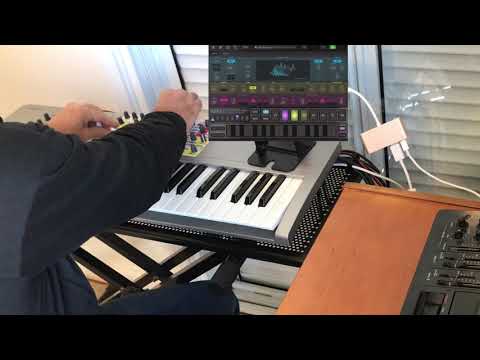
Opened this baby up for the first time in a while and listened through to a number of patterns I'd worked on previously. Was a, happy with the sounds and b, very pleased with the space...I have a tendency to fill in all the gaps (far too much), but here was the limitation playing out as perfectly desired....going back in.
nice work - and I note the only bit of the IK Multimedia keyboard you must own that you still use...is the plastic ipad holder