Loopy Pro: Create music, your way.
What is Loopy Pro? — Loopy Pro is a powerful, flexible, and intuitive live looper, sampler, clip launcher and DAW for iPhone and iPad. At its core, it allows you to record and layer sounds in real-time to create complex musical arrangements. But it doesn’t stop there—Loopy Pro offers advanced tools to customize your workflow, build dynamic performance setups, and create a seamless connection between instruments, effects, and external gear.
Use it for live looping, sequencing, arranging, mixing, and much more. Whether you're a live performer, a producer, or just experimenting with sound, Loopy Pro helps you take control of your creative process.
Download on the App StoreLoopy Pro is your all-in-one musical toolkit. Try it for free today.
Comments
Hi @Harro, a fix for this bug has been released, Piano Motifs v4.101. Please let me know if you encounter any other issues. Thanks!
Hi @lukesleepwalker, in the latest version v4.101 Delay Start Bars can go up to 999 🚀!
Just incredible support @azul3D_Apps
Thank you
Woot woot! Thank you. Is there a concern about app crashes if you bumped the number of bars in a progress from 128 to 164 or even 199?
Hi @lukesleepwalker. Not really a concern about app crashes. This one is related to the way motifs are created when the number of bars goes beyond 16 bars and the chord progression isn't programmed. In those cases, a sort of song structure like AABA, for example, is used. The different song structures can only support up to 16 sections of 8 bars each.
Maybe you can use Arrangements. In the Arrangement Screen you can concatenate as many motifs of up to 128 bars as you want. You can loop them, duplicate them, trim them, split them, change octaves for melody and accompaniment, shift by semitones, etc...lots of different functions. You can use the Append Motif mode, to continue adding motifs to an Arrangement, using the same settings, modifying the settings a little bit, or locking the melody, accompaniment or progression. Hope this helps.
Right, you know I’m an avid fan of the arrangement section. I sent you one of my creations that used the append feature quite a bit. I’m a fan!
But the request on the number of bars in a progression is centered on a different use case. For live performances, I will generate a new motif based on a progression for a whole song to keep things fresh. It works amazingly well because the new motif will include slight variations throughout—it’s like having a human accompanist. Sure, it’s a bit laborious to program 100+ bars of a progression manually but the payoff is worth it. I prep to play live by hitting the generation button (via AU parameter, thanks!) until I find something that suits my mood.
If I break this out into an arrangement or even multiple motifs, I can’t generate a coherent new motif for a whole tune. The best I can do is split a tune into parts and hope the different generated motifs come together into something coherent.
I realize I’m pushing the limits of things here!
@lukesleepwalker, sorry I misunderstood your use case. And yes, now I remember you using the Append Motif feature to great effect! I see that the limitation you are talking about is on the number of bars of the Programmed Chord Progressions, which you would want to program for variety through the motif. In this case maybe it might be easier for me to increase the limit since the app isn't the one generating the chord progression which is the scenario where the song structure is used. I will take a look.
For a temporary workaround, which isn't exactly what you want, maybe you can use the Repeat Progression feature at the bottom of the Chord Progression Screen. This will repeat the chord progression but each iteration will have a different motif.
Hi again Fernando! Yes, thanks for taking a look at increasing the bars in the programmed chord progression feature. It really results in wonderfully varied results for a complete song. I suppose if I was getting greedy, I would ask for a programmed chord progression arrangement feature similar to the multiple motif arranger. This would make programming less laborious by cutting down on programming each bar. Of course I’d want to retain the variation in the motif across the whole song. But I won’t be greedy! I’m happy to do the work in order to get such wonderful results.
The Repeat Chord Progression feature is very good and I do use it sometimes. However it doesn’t handle the progression changes that I need.
Again, thanks for looking at it!
Recently purchased Piano Motifs and as I start to explore and dig into the tutorials, figured I'd ask something here for all you experienced users as context prior to digging in further...Will be using as auv3 in Loopy Pro and wondering if there are any live/on-the-fly uses and if so, how you're doing so...from what I can tell it is intended for non-live use to create accompanying sections to previously set progressions, which will be very useful for me too, but just wanted to confirm/clarify...Thanks in advance
yes, you can use the append function to get a variant of the motif without completely highjacking the overall vibe. you can change midi channels on the fly to get a different feel, you can automate the loop end via cc.
i use it w/ takeamidi to sample small sections of the motif (midi loops) and map those in real time.
@azul3D_Apps demonstration tutorials are so great. Imagine if it supported microtonal MIDI-files with Scala.
A new version of Piano Motifs (v4.102) is now available. What’s new in this version:
• Added a new option for when to send a MIDI CC Message: At Bar. A CC Message will be sent on the first beat of a defined bar. When this option is selected a stepper will appear to define the bar. The default value for the stepper is 5. This means that a CC Message will be sent on the first beat of the 5th bar. (AUv3 MIDI Plug-In Only)
• Incremented the maximum number of bars that can be programmed in the Programmed Chord Progressions Screen to 256.
• Improved the accuracy of the Melody Note Frequency for frequencies less than or equal to 5%.
• Minor improvements and fixes.
If you like the new features and the music generated by Piano Motifs please consider leaving a review in the App Store. Every review helps others discover the app, ensures the app is fairly represented, and supports future development.
Enjoy!
Thanks Fernando for the update
You spoil us brother, you’ve done such amazing things with this app. It’s obviously a passion and much appreciated. Each update makes us better. Cheers to you @azul3D_Apps
☺️✌️
🙏☺️
Anyone able to get AUv3 Presets working in Piano Motifs?
I realize that AUv3 presets have some overlap in terms of who/how they are developed (b/ween the plugin dev and the host dev), so not sure where to start here, but I'm using Piano Motifs in Loopy Pro...when saving presets I do see them who up in the presets list, but my attempts to recall them are ignored.
I don't have AUM or would experiment there too.
Anyone have any insights or similar/different experiences?
Perhaps I should consider starting a separate thread...
Thanks
Hi @danm , there aren’t any AUv3 presets in Piano Motifs per se, but any Host Session can be saved if the Host has a saving mechanism. When you retrieve a Host Session all your Settings in Piano Motifs should be retrieved. Also, every time you save a motif it’s Settings are also saved. So when you press Load or Import you will get the motif and it’s Settings.
Thanks @azul3D_Apps!
If I have these presets saved while PM is hosted w/in Loopy Pro, would you expect the motif that is saved into the preset to be loaded when selecting the preset? That is what I’m expecting but not what’s happening. Thanks
Hi @danm , Piano Motifs doesn’t implement any presets, but it does implement state saving. I guess in Loopy Pro state saving is performed when you save a project or automatically if you close the app. When you open the project again, the motif and it’s settings will be retrieved. Now, if what you want is to have one Loopy Pro project and be able to save and retrieve Piano Motifs motifs+settings, may I suggest you use the Piano Motifs Save and Load functions. When you press Save, both the motif and its settings will be saved in the Piano Motifs Library. To retrieve, just press Load. Hope this helps.
@azul3D_Apps, thanks very much. That aligns with my experience.
It would be really helpful to be able to load a motif without manually using the UI, so I can trigger load with midi, for example.
Might you consider adding the ability to load a motif via midi? Thanks again
Hi @danm , if you mean generating a motif without manually using the UI, the functionality already exists through the Generate and Next AU parameters. These are one-shot trigger parameters that can be controlled by external events on a Host.
@lukesleepwalker had a video a while back on how he uses these in Loopy Pro:
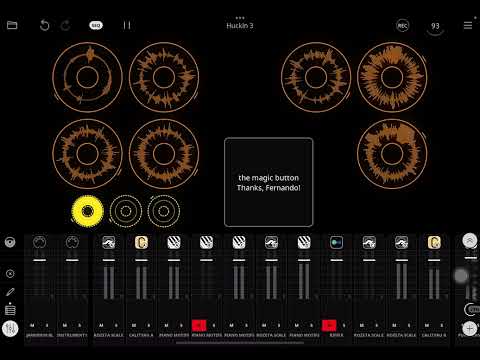
Now, if you mean loading a motif that has been saved in the Piano Motifs Library, I don't really know how you would perform a Load without having to interact with the Piano Motifs' UI to figure out which motif you want to load. I'm not a Loopy Pro user, so I probably don't understand the workflow in that Host and there's probably something I'm missing here. Let me know.
@azul3D_Apps, related to the Preset question, above, I'm wondering if you have AUM and if so, would you let me know if when you open Piano Motifs in AUM and try to add a preset: Is the 'Save in Plugin' option available?
If anyone else who has Piano Motifs and AUM can try this and let me know, I'd appreciate it!
Hi @danm, since Piano Motifs doesn't implement Presets, the Save in Plugin option is greyed out when you try to Save a Preset in AUM.
Thanks very much @azul3D_Apps! re: your question, above, about how to load motifs w/o having to interact with the UI, it's a common feature of other plugins I use, for example, one called ToneStack Pro by Yonac for guitar/amp effects.
There are saved items in the plugin (in this case, instead of Motifs, they are guitar effect patches) and also there are Banks/Folders within which you can save the various saved patches.
There is a simple convention for loading banks and presets via CC and PC messages, though I don't have it here in front of me, but it's something like this:
You send cc messages to select a Bank (ie: CC 0 to CC 32).
You send a Program Change message to load the desired preset w/in that Bank (ie: PC #0 for the first preset in that bank)
Presets are numbered from zero.
It would be great to have some way, even if it's simpler than the above to start, to load Motifs via Midi
Thanks
If you use the Save in AUM option, does that work to save the state for later recall?
Yes it does @espiegel123 , I use this all the time.
I very rarely save a PM motif within its own library as the AUM / PM state saving works just fine.
I’m glad you chipped in as I was going to ask if the LPro preset was the equivalent of an AUM session?
If so then the PM motif should be saved with the LPro reset which (I think) is what @danm was asking for ?
@espiegel123, @danm:
OK, I think I know what the issue is and why AUM (and probably Loopy Pro) won't save the state when a Preset Save in AUM (and maybe Loopy Pro) is performed. AUM uses fullState and not fullStateForDocument when saving a preset, Piano Motifs uses fullStateForDocument for state saving. Piano Motifs uses fullStateForDocument due to the fact that the state it saves is very big with many different types of data that can't be defined as parameters, like the motif itself. More investigation will be needed to determine if there is a workaround for this.
@danm, thanks for clarifying your workflow for me. I think I have found a way so that Hosts can default to save Presets from Piano Motifs State. Hopefully I can have this in the next release.
@damn, @espiegel123, Piano Motifs will still not save presets itself, but does Loopy Pro default to saving State if no preset saving is implemented, like you can do in AUM?
Yes, it does.