Loopy Pro: Create music, your way.
What is Loopy Pro? — Loopy Pro is a powerful, flexible, and intuitive live looper, sampler, clip launcher and DAW for iPhone and iPad. At its core, it allows you to record and layer sounds in real-time to create complex musical arrangements. But it doesn’t stop there—Loopy Pro offers advanced tools to customize your workflow, build dynamic performance setups, and create a seamless connection between instruments, effects, and external gear.
Use it for live looping, sequencing, arranging, mixing, and much more. Whether you're a live performer, a producer, or just experimenting with sound, Loopy Pro helps you take control of your creative process.
Download on the App StoreLoopy Pro is your all-in-one musical toolkit. Try it for free today.
Comments
Did it work. Just a guess. Only ever mapped sb drum patterns to be triggered by drambo notes. So there were actually no mapping.
Quick tip: You can use MIDI notes C-2 to C-1 to trigger 12 different patterns from NS2 and add a MIDI > Note filter module starting at C#-1 in Drambo to avoid triggering notes on the track.
Apart from using the flexisampler who is the evident solution here, has anyone found a workaround to record audio clips ?
My computer is down and I cannot use Bitwig the record MPE midi clips, so the only solution is to record audio in drambo :-)
Thanks rs
.
.
I think some people are using the 4Pockets Multitrack Recorder (hosted in standalone) to record. I outlined a method using SunVox as well, but it’s kind of complicated.
I think that native track recording is on the timeline though, so sooner or later it’ll be easier.
I love this but I have absolutely no idea what's going on! This reminds me of when I was sick for a week in ninth grade. I came back to advanced algebra and was completely baffled. Two weeks later, they moved me into "middle" algebra, and thus began the long slow descent into the liberal arts....
Can you tell me how you made this, @childofthecorndog? It's quite beautiful.
Wow, amazing trick, thanks so much!
Thanks for the kind words @drez
@ExAsperis99 yeah no problem There are four different buffer chains (each on a separate layer in Layers module). The XY’s move params/mixer levels on these. Combinations of the 4 buffers and settings (and the Granular AU) result in a kind of arpeggio like thing.. There’s some scene fader stuff going on between scene A and B. For making scenes you tap the button either side of scene fader then tweak knobs for an alt sound, then you can slide between the two (in case that’s part of what you were asking about
  Track 1 and 2 are same sequence, in the Main track you can connect a track’s midi input to the midi output of a previous track. Track one’s sequence is feeding track two. Hope that helps
Dosent sound great but volca drum and modular sit on the side. Drambo could be EG pulse ( which I just found ) for just randomness but would be better if the probabilty, locks and sequencer length were on screen like I described. Wouldnt ever be real music unless you spent a lot of time mastering everything and even then it would still be random and not a mastered track but maybe we just need a drum machine with quick recording and quick probabilty/p-locks/sequencer length. Sb drum is good also but dosent have input recording ( so best to design tracks )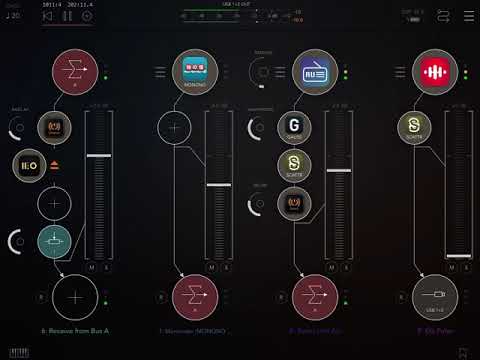
Id only consider another ipad ( for this type of randomness ) if theres a drum machine ideal.
Gonna get my deck on the side. Wtf is that bro ( at the club )
Gotta set up all my controllers. mutes for sure
Sorry drambo will be cool for this noodle stuff on the fly. Track lengths though needed.
Why isn’t Drambo in the “on my iPad” list with all the other apps?
Because it stores all files in it's "sandboxed" file area that isn't accessible to the files app. This makes things easier between AU and Standalone since AU's are restricted in where they can store files. You'll find that not all other apps have "on my iPad" folders, I think.
It doesn't expose any public storage. The apps you see in Files explicitly make part of their files visible. You can access it using WebDAV using a 3rd-party app like FE FileExplorer Pro, or Documents by Readdle. Launch the server from the hamburger menu in Drambo. Connect to it as
http://<iPadName>.local:8080/. This also works over your network, of course.Another tip: Be sure your PC/iPad's hostname doesn't include spaces, special characters, etc.
It can be changed here - Settings>General>About>Name.
Stick to one name, otherwise networked-attached configs may fail to connect if you change the hostname later.
WebDAV can also be configured via IP, but that may change depending on what network your iPad's on, network security settings, etc.
https://www.zubairalexander.com/blog/windows-computer-name-best-practices-and-recommendations/
When managing Drambo files over WebDAV locally on the same device, you can also just use
http://localhost:8080
or
http://127.0.0.1:8080
to connect.
This will work while connected to any WiFi network, no need to re-adjust IP addresses anymore. I'm using this for all file management from Readdle Documents. Much more user friendly than using the awful Files.app from Apple.
Ok. Thanks @wim
Thanks @uncledave @ocelot and @rs2000 - I have absolutely no idea what you’re talking about but I appreciate your help. I’m hoping that what you mention is an optional thing, otherwise I’ll probably be deleting drambo…
Not having access to the Drambo folder on your device may not be as big a deal as you think. You can import entire folder structures into Drambo with a single action. And, due to the way iOS handles file storage, doing so won’t actually take up any more space on your device.
Thanks @wim .
So far I’ve been downloading modules and projects from Patchstorage. Then in Drambo I have created 2 folders, one for modules, and one for projects. I open these folders and “Import file”. Is this the way to do it? Or is there another better/easier way?
Next week I’ll be working my way through the @bcrichards tutorial vids, and hopefully it will start to fall into place 😊
Have fun tonight y’all!
I did the same thing for my own stuff but also made a ‘3rd party’ with module and project folders inside them as well.
Good idea, thanks @shazbot
🤙🏽
@Kashi Usually, if you download projects or module presets and they're not zipped, you can open them directly in Drambo from the web browser.
Another, more organized way is to download the patchstorage stuff using the builtin browser in Readdle Documents and then "upload" them to your desired Drambo folder. I have hundreds of presets and projects ao I've started to add sub folders where they belong for different categories.
You only have to keep the basic structure intact:
Projects go under /Documents (and any sub folder created by you)
Module presets go under /Presets/{module name} (and any sub folder created by you)
So you got WebDAV running already?
No. Don't know what that is.
Don't know about Readdle Docs either.
Thanks for your reply @rs2000 - I'll investigate these things
...from an older thread: ( @Kashi )
In Drambo's main menu (let top burger icon), choose "WebDAV" to enable its WiFi file server.
In Readdle Documents, set up a new WebDAV server under "+ Add Connection"
using the address: http://127.0.0.1:8080 and call it "Drambo" or something like that.
No user or password required.
Upload, download, move, delete and create folders and files etc.
Documents also has a nice audio player built in.
Access from a Mac: In Mac Finder, connect to the Drambo URL as "Guest" via Go => Connect to Server...
Access from Windows: See https://forum.audiob.us/discussion/40126/drambo-webdav-under-windows
On my iPad with 6GB ram, after restart I have about 1GB free.
is it normal that ipados eat 5GB ram at the start?
And about CPU, CPU Dasher (app) shows use about 50%, but in drambo standalone metter shows using full available CPU and I have drops in audio. 128 buffer I know is very small, but how can we use all CPU for Drambo?
Yes. Not sure how you're measuring that, but iPadOS preloads components it thinks may be useful. I have the System Status app, and it always shows memory over 90% used, but the categories Inactive and Other imply memory that's not really committed. These items get pushed out when a real need comes along.