Loopy Pro: Create music, your way.
What is Loopy Pro? — Loopy Pro is a powerful, flexible, and intuitive live looper, sampler, clip launcher and DAW for iPhone and iPad. At its core, it allows you to record and layer sounds in real-time to create complex musical arrangements. But it doesn’t stop there—Loopy Pro offers advanced tools to customize your workflow, build dynamic performance setups, and create a seamless connection between instruments, effects, and external gear.
Use it for live looping, sequencing, arranging, mixing, and much more. Whether you're a live performer, a producer, or just experimenting with sound, Loopy Pro helps you take control of your creative process.
Download on the App StoreLoopy Pro is your all-in-one musical toolkit. Try it for free today.
Anyone here use Touché by ExpressiveE?

The SE version is $229 and seems to be an excellent mpe type controller. Anyone using either version?
Comments
I know @hypnopad uses one and mentions it in a few threads with some videos....
https://forum.audiob.us/discussion/40398/hypnopad-the-never-ending-continuum-layered-mozaics
@SimonSomeone, lol. I commented on it. I didn’t even know what it was then.
Classic
My reluctance to get the Touché is partially cause I don’t work on a table/desk surface. I’d have to find a way to place it directly on my keyboard. I wonder if @hypnopad is still using it?
Hey Mike. I am still using mine and consider it crucial to my music making. It’s one of my best hardware purchases. You not only get expressive playing with the Lié / Noisy/Imagine apps and sounds from ExpressiveE but it’s also a great midi controller in general. Highly recommended if you want to get the most out of your sounds. Too bad you might have to mess up your keyboard with Velcro.
Thanks @hypnopad. I’m getting reinvigorated about it. I’m thinking maybe a small, thick, towel might be a cushion for it on the keyboard.
@LinearLineman I would recommend the thin rubbery material that comes in rolls that people use in the bottoms of kitchen cabinets. You will pushing and pulling on that thing a lot and a towel might move around too much.
Or a silicone baking mat
Thanks for the advice @hypnopad @mojozart. That sounds better.
@LinearLineman Just thought I’d ask if you’ve done any research on how you would run this into Cubasis. I’ve used it with AUM with good results. Doug from the sound testroom has done a nice video on running it into an iPad and AUM. Hopefully Cubasis has a straight forward way to midi map and set amounts of modulation for external controllers.
@hypnopad, foolishly I assumed there would be no problem with Cubasis and midi learn. I’ll have to write @LFS unless he replies about it here.
I don’t get the appeal. The iPad glass is very expressive. Set up an X-Y pad or two in Rozeta.
@Wrlds2ndBstGeoshredr For me it’s about the physical feedback I get without even looking at it due to the z axis and spring return to 0. Also all the sensitive scraping and tapping goodness.
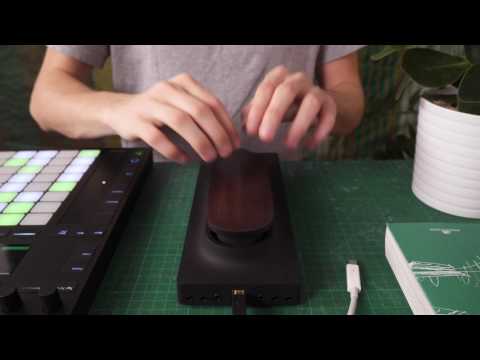
Here’s a good video showing that aspect.
More tactile I understand. As much as I love Drumjam, there is no comparison between a drum pad controller and a real drum.
I totally agree if you’re talking about midi drum controllers triggering drum samples. I’ve been using Korg Wavedrums since the 90’s and have to say they are among the most organic and expressive electronic drum synths ever made due to their use of physical modeling tech. Maybe not 100% on par with a real drum but the creative aspects of the physical modeling synthesis make up for that and more.
Thanks man. I came into this thread with no GAS at all for the Touche, and now you've given me GAS for a Wavedrum.
Oh yes, they definitely are. But they go far beyond conventional drum pad controllers except if you pair one with Drambo 😉
@rs2000 Piezo drum pad +Drambo/Impaktor = cheap Wavedrum alternative.
I see we're speaking the same language 😊🥂
@LinearLineman To get this thread back on track, I found a good video on the subject of midi learn in Cubasis 3.
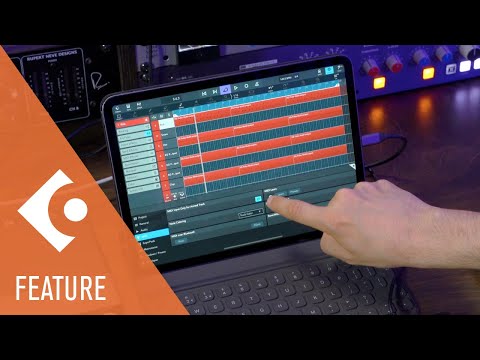
Didn’t see where you can set ranges ( which is important). Let me know what you think.
@hypnopad ... what exactly are”ranges”? Midi 0-127? Can these be set with a desktop and transferred to the Touché settings?
I found this video as well. Does “Apply to ports” do the trick? Will I need an additional controller to set these? It’s pretty confusing!
@LinearLineman Seems like you only get full range learning-0-127. Sometimes in an instrument or effect there is a sweet spot in a parameter you want - say 30-50. You can tell it when you turn a knob or press on the touché you will only get that range and avoid the stuff above and below it. You could also set it up to go from high to low- 80- 20 for example.
You can set this up in the Lié app on the desktop but I’m not sure you can transfer that to the touché itself- I’ll look into that. This is all there in AUM. I have no idea what apply to ports means. You would just need the touché and a powered hub for the midi mapping to work. And remember with the touché everything snaps back to 0 or what ever the low range is set at.
Thanks very much @hypnopad and @0tolerance4silence. My technometer is starting to reach the red zone, but I’ll persevere. Cause it looks like a lot of fun to use.
@hypnopad @0tolerance4silence, Doug has the answer... and it’s good! (at least for the SWAMs.
Nice @LinearLineman . For you I think finding apps that have presets for the Touché is the easier way to go. Otherwise it’s a lot of hunting and pecking /trial and error to figure out the parameters you manually want to assign. Looks like you’ll have a blast with the swam stuff.
I googled and now I’m in love. Can you put it into aum as auv3? If so i have to search for a good piezo drum pad
Sounds great. Seems so weird to be doing vibrato with the hand that's note playing the note. Vibrato and pitch bend feels so much more natural played on the screen.
@seventyfour Here is a live performance I did with three instances of Drambo in AUM each being triggered by its own Roland drum pad. I also changed scenes in Drambo with a midi controller.

Sorry to get off track again. Seems this thread has two subjects now.😜
Pretty cool. So Drambo has Impaktor built into it? Have you ever tried a piezo driving Drambo on a frame drum?
Kind of. You have to build up your own with modules. I’ve come to prefer Impaktor lately.
No but I imagine a frame drum would be an ideal exciter for any physical modeling software due to all the different timbres you can get out of it. In fact there is already a product like that now called Aframe by ATV. That one definitely inspired some GAS for me.😄
I’m going to start a new thread for this topic so we can concentrate on the touché here.
https://forum.audiob.us/discussion/47069/impaktful-resonations-physical-modeling-drum-synthesizers-ios-macos-and-hardware#latest