Loopy Pro: Create music, your way.
What is Loopy Pro? — Loopy Pro is a powerful, flexible, and intuitive live looper, sampler, clip launcher and DAW for iPhone and iPad. At its core, it allows you to record and layer sounds in real-time to create complex musical arrangements. But it doesn’t stop there—Loopy Pro offers advanced tools to customize your workflow, build dynamic performance setups, and create a seamless connection between instruments, effects, and external gear.
Use it for live looping, sequencing, arranging, mixing, and much more. Whether you're a live performer, a producer, or just experimenting with sound, Loopy Pro helps you take control of your creative process.
Download on the App StoreLoopy Pro is your all-in-one musical toolkit. Try it for free today.
Comments
Hey @McD Could (would) you (ask) to try to translate this generalisation of Per Norgards infiniti series: to Mozaic
I’ll try to code a solution… I can’t imagine how to prompt Meta AI to read a webpage and implement what it details in a mix of text and math.
Try this script (if you need assistance learning to load a script - just ask):
Sorry I thought you would spot the example in the pretty short text, my bad.
>
Ha! Pretty darn cool (if somewhat chaotic on the control side). Thanks for giving it a go. Awesome!
What would you like to see or hear it do differently? I like to run 2 instances and offset the PPQN (Pulses Per Quarter Note) to
contrasting settings and get polyrhythms. If you slide one of them out of service and back again you get them NOT aligning on the metronome which can be insane. Tweaking he Transposing Knob can be used to generate changes to the fixed note loops…
I suspect random notes changes would be just as useful. The Infinity Series seems somewhat arbitrary, IMHO but solving the best way to implement it in Mozaic was a nice little puzzle.
It was a follow up on an another discussion you had with someone having made a sequence based on the Norgard stuff. I didn't know what you were talking about and that led me to the page with the code. So, it's a circle... 😂
I tried with only one but had 'transpose' ran by a very slow LFO and that worked pretty nice.
I need to try this LTO trick. The Transpose knob is fun to create melodies so I’ll bet is works great.
I had to check and confirm that Mozaic exposes knobs as AU parameters to AUM and it does. That means I don’t have to write the CC event instructions… just set it up in an AUM project. Nice… then I noticed every possible control option in Mozaic is on the list. There’s a lot of them.
Remember tho that AUM has its own midi learn system, so you don't need to manually scroll through lists to find the thing you want to control, it should be absolutely painless!
Good idea.
@brambos . Thanks for new update improving preset section. please add rename option for bank if possible. and add serch option for presets if possible.
in new update mozaic crash when i press backup preset icon on right corner above.
Massive +1 on adding a search function. Even if subfolders make it less needed than it previously was.
I tried prompting Gemini to give me a simple “ Mozaic midi echo “. Script.
It looks good, gave suggestions to tweak it, reduce cpu and overall making it more efficient.
It even provided steps to copy into Mozaic. I haven’t tried to run it. Just looking at the code generation. If I get bored, I’ll run a few and see wassup.
Haha, I think you'll likely be in for a nasty surprise, as the code will almost certainly have problems, but let us know how it goes! 😂
lol, absolute fail. Love the confidence Gemini had that it “nailed it”
@Description:Randomizes incoming MIDI notes within a selected key and scale.
@Author: Gemini
// --- User Interface ---
@Knob1:Key
@Knob2:Scale
@Pad1:Randomize
// --- Constants ---
// Note names for the Key knob
DIM KeyNames[12]
KeyNames = {"C", "C#", "D", "D#", "E", "F", "F#", "G", "G#", "A", "A#", "B"}
// Scale definitions (intervals in semitones from the root)
DIM Scales[5][12]
// Major
Scales[0] = {0, 2, 4, 5, 7, 9, 11}
// Minor
Scales[1] = {0, 2, 3, 5, 7, 8, 10}
// Dorian
Scales[2] = {0, 2, 3, 5, 7, 9, 10}
// Mixolydian
Scales[3] = {0, 2, 4, 5, 7, 9, 10}
// Blues
Scales[4] = {0, 3, 5, 6, 7, 10}
DIM ScaleNames[5]
ScaleNames = {"Major", "Minor", "Dorian", "Mixo", "Blues"}
// --- Variables ---
DIM RootNote
DIM SelectedScale[12]
DIM RandomizeActive
// --- Initialization ---
@OnLoad
RandomizeActive = 0
SetKnobValue(1, 0)
SetKnobValue(2, 0)
UpdateUI()
@End
// --- UI Events ---
@OnKnob1
UpdateUI()
@End
@OnKnob2
UpdateUI()
@End
@OnPad1
RandomizeActive = Pad1Value
if RandomizeActive > 0 then
SetPadLED(1, 1)
else
SetPadLED(1, 0)
end
@End
// --- MIDI Events ---
@OnNoteOn
if RandomizeActive > 0 then
// Get the current root note and scale
RootNote = GetKnobValue(1) * 12
ScaleIndex = GetKnobValue(2) * 4
for i = 0 to 11
SelectedScale[i] = Scales[ScaleIndex][i]
end
else
// Pass through original note if not randomizing
SendNoteOn(Note, Velocity, Channel)
end
@End
@OnNoteOff
// Send All Notes Off to prevent hanging notes
AllNotesOff
@End
// --- Helper Functions ---
function UpdateUI()
// Update Key Knob Label
KeyIndex = GetKnobValue(1) * 11
SetKnobLabel(1, "Key: " .. KeyNames[KeyIndex])
// Update Scale Knob Label
ScaleIndex = GetKnobValue(2) * 4
SetKnobLabel(2, "Scale: " .. ScaleNames[ScaleIndex])
end
@brambos .
i found new bug in new version 1,4 about preset name state saving.
1, launch AUM and in AUM open mozaic.
2, select one preset from internal mozaic user presets.
3 . press save button, you can see preset name in save box properly.
4, close AUM , and launch it again with opening last state .
5, press mozaic save button .
In the preset Name box, the name of the preset we opened earlier is missing.
there is no this problem in 1,3 version.
Thanks for the heads up, but I'm fairly certain this was always the same behaviour. Once you enter a name in the file dialog box it will be remembered for that session, but it is not saved in the state of the plugin so the next time the plugin is loaded the dialog box will be in default state again
@brambos
I have been coding continuously in AUM for 2 years now in Mosaic.
This problem did not exist in the previous version at all.
And I could easily increase a number to the name of the previous version of my preset even if I closed and reopened aum.
This is a very important feature. Please return this feature to Mosaic if possible.
If I could make a video of the previous version, I would definitely send it to you, but unfortunately I updated Mosaic on both my iPhone and iPad.
@brambos presets beginning with upper case characters are listed before lower case. Any chance to have an option where that doesn't happen? It means it's harder to find things when scrolling through user presets, as some Patchstorage patches use upper case for the first letter, some don't
@brambos .
my ipad is air2 with 15,8 ios version.
I have always done coding via iPad. Could this be related to iOS version that this feature exists for me, I mean keeping the name of the preset in Save Box Dialog.
Let me look into it
🙏❤️
I spent two hours yesterday just trying to get it to sort the files in that way, and it stubbornly refuses to, so I decided it wasn't worth pursuing horrible iOS file system any further.
OK, thanks for trying Bram
As one of the many newer owners of mozaic since the price drop who “doesn’t know code”, was up late last night combing through the mozaic patches looking for something to fix note velocity from my midi keyboard that doesn’t have that built in (neither does AUM). Searching ‘velocity’ on PS gave me so many hits but never found what I needed. But then I remembered StreamByter. It had multiple instances of this function already in the presets.
So just a friendly lil reminder: if you can’t find a patch for a thing you’re trying to thing, try StreamByter!
Streambyter is often a really good choice, especially for very simple things such as this.
@brambos .
Can I ask you to widen the main window that shows the presets so that it shows more characters ( letters ) of a preset name?
And also, the last loaded preset is highlighted whenever we open the preset window.
I kinda like that second feature…
@brambos.
thanks for new update ( file name remember ) works Just like before the update. And I'm very happy about that.
thanks 🙏🙏🙏❤️.
and thanks for adding banks.
How nice it would be if we could change the name of the bank whenever we wanted.
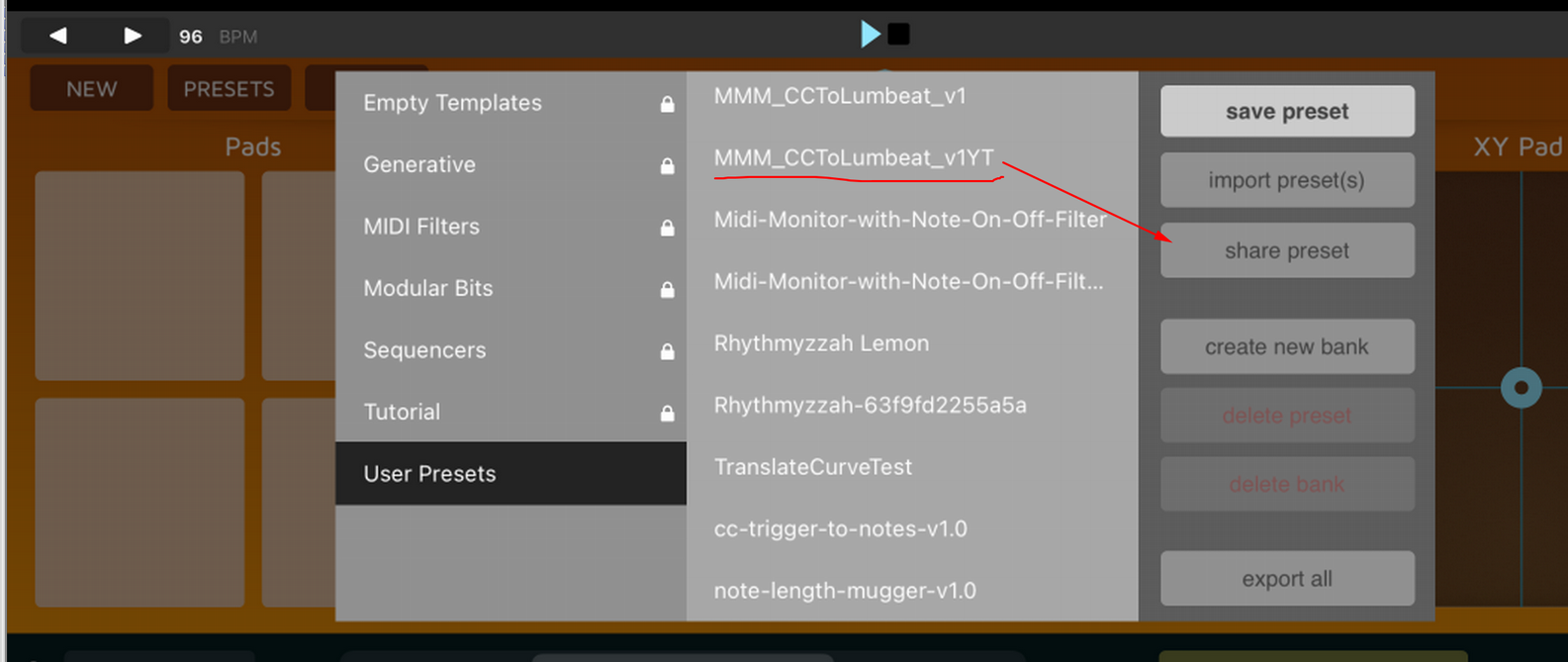
I'm totally lost. Could please tell me how to export (share) my own preset from Mozaic app to Files? The menu tree allows me only to choose preset (then the preset is automatically loaded and preset dialog is closed) or save it. I can't focus the preset nor tap to "share preset".