Loopy Pro: Create music, your way.
What is Loopy Pro? — Loopy Pro is a powerful, flexible, and intuitive live looper, sampler, clip launcher and DAW for iPhone and iPad. At its core, it allows you to record and layer sounds in real-time to create complex musical arrangements. But it doesn’t stop there—Loopy Pro offers advanced tools to customize your workflow, build dynamic performance setups, and create a seamless connection between instruments, effects, and external gear.
Use it for live looping, sequencing, arranging, mixing, and much more. Whether you're a live performer, a producer, or just experimenting with sound, Loopy Pro helps you take control of your creative process.
Download on the App StoreLoopy Pro is your all-in-one musical toolkit. Try it for free today.
Comments
It’ll be very interesting to explore this.
I’m currently using the 4Breaks patch, which I’ve been modifying over time. Big up for the Junglists, thanks!
@offbrands Thanks. That's my favourite feature of Drambo, that it's easy to create a playing surface, that may not be pretty to everybody's eyes (not mine either), but is easy to handle, with all the nonessential controls tucked away.
@Blipsford_Baubie Thanks for checking it out, hope you find something useful exploring:) If you end up modifying this patch or consolidate the two, I'd love to see it, if you don't mind.
The next upload follows shortly:)
@tyslothrop1 Awesome stuff!
I am a super beginner in Drambo, your patches are very inspiring!
@5alien Thanks. Not too long ago, I was a a bloody beginner, and there's still so much in Drambo to discover, I probably haven't used half of the modules in Drambo.
When it came to learning from looking at other people's patches, I wouldn't recommend things too complex. A couple of month ago, I tried to make sense of the M1sha patch on patch storage and it was just frustrating at that point.
If you want something easy to dissect, from my patches I'd recommend armagedgiator or midicarver. I think they're pretty straightforward and do some jumping between CV and Midi, which I find a really useful technique in Drambo.
Thanks so much for sharing your patches! Great stuff. I’m also looking to learn from these, but also simply to use them of course.
@distantstar Thanks, hope you have fun doing so:)
@tyslothrop1 duly noted! I still don't fully understand the concept of CV, but will search for that. Thanks for your recommendations.
Haven’t tried it yet but based on the video, this looks brilliant @tyslothrop1.
As others have pointed out, these serve as great educational tools for those of us with less expertise in Drambo. Thanks for sharing them.
@5alien I try to say a couple of things about CV in Drambo. This will probably be oversimplified and over generalized, but maybe still useful.
In Drambo every dial with a tiny triangle next to it can be modulated by cv. When you hook up something to a dial (tap it, then tap one of the little sine waves on one of the modules to the left, then turn put the little modulation dial, that appears), the value of the parameter changes with the voltage (you can't see it, the handle stays where it is, it's changing in the background). Try it with something obvious, like oscillator pitch or Filter cutoff.
Typical cv-sources are LFOs, envelopes and stepsequencers. An Audio stream can also be used, the only difference to typical modsources is, that audio changes much faster.
Gate is just cv, that changes from 0 to 1. Gate is for example the voltage that triggers an envelope or advances a step sequencer. In Drambo the symbol for gate is on the bottom of the modules that have it a little squarewave in a circle. Tap it to connect it to something on the left of it.
Hope that helps:)
@Robin2 Thanks, hope you have fun, when you get to check it out.
And thanks again to everybody, it's nice to get some feedback. If you make something with some of my stuff, I 'd love to hear it, too. Feel free to post it here!
The brilliant thing about drambo is it treats signals as a uniform standard going from -1.0 to +1.0 for things like oscillators and 0.0 to 1.0 for modulators. You can just connect things and never worry about levels because they are all normalized like that. If you want to interface with external gear there might be some scaling needed, but for working inside D you have it covered. And while debugging your projects, don’t neglect the scope, it’s really handy, both the old “in rack” scope and the much improved floating one you access by long pressing an input (but I’m sure you know already)
This is the Devil’s Tinnitus. It’s a tuned modal resonator feeding back on itself and some filtering and distortion in the feedback loop. Of course you can easily get it out of tune, but there are many settings, that allow slow melodic playing.
https://patchstorage.com/the-devils-tinnitus/
I’m still working on the stuff I mentioned earlier. It’s coming together nicely, but I’ve not run out of ideas, yet:)
If you enjoy my stuff and would like to support me, now you can, I’ve set up a kofi account, that you find behind the donation button at patchstorage.
Here’s a little midi rack inspired by the thread about probabilistic ratchets.
Get it here:
https://patchstorage.com/beat-impediment/
A little preview for a polyrhythmic sequencer I’ll be uploading soon. Kind of fun for snare Rolls among other things.
Dude, this is a beast that will talk if someone is willing to listen. I donated after playing around with it last night. Your creation connects to the supernatural.
@Blipsford_Baubie Thank you so much! For the money of course, but even more for that awesome compliment!
A quick jam I did with a couple of my racks and the lovely macro oscillator and OneShot.
Nice. It’s like listening to stuff off the Samuria Music label, just not as dark.
@Blipsford_Baubie Thanks for listening and the nice comparison, didn't know anything about the samurai label and listened to a playlist on YouTube, good stuff!
@tyslothrop1 very nice, and I should say you are totally into the drambo mindset, very inspiring patches you’ve been posting 👍
Cool stuff @tyslothrop1
So many possibilities with the Macro oscillator!
@pedro @Edward_Alexander Thanks guys:)
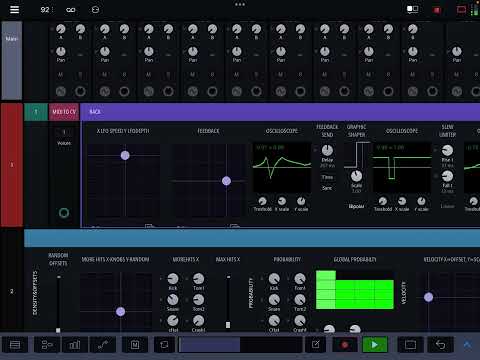
A Little preview of a percussion midi generator, I’m working on. I can play with it for a long time
@offbrands Thanks:)
That looks sick!! Love it
@5alien Thanks:)