Loopy Pro: Create music, your way.
What is Loopy Pro? — Loopy Pro is a powerful, flexible, and intuitive live looper, sampler, clip launcher and DAW for iPhone and iPad. At its core, it allows you to record and layer sounds in real-time to create complex musical arrangements. But it doesn’t stop there—Loopy Pro offers advanced tools to customize your workflow, build dynamic performance setups, and create a seamless connection between instruments, effects, and external gear.
Use it for live looping, sequencing, arranging, mixing, and much more. Whether you're a live performer, a producer, or just experimenting with sound, Loopy Pro helps you take control of your creative process.
Download on the App StoreLoopy Pro is your all-in-one musical toolkit. Try it for free today.
Comments
That was quick. Don't bother as it's full again.
When I drag a waveform onto the X or Y controls to modulate on iPad, there’s a small icon at bottom right of the waveform button to tap in the waveform to get to the LFO page to set x/y modulation… but on iPhone it's not there and there’s not a way to get to that LFO page/panel. A couple of times I was able to get to the LFO panel on iPhone by tapping the waveform again, but most of the time this doesn’t work. Has anyone figured out how to set modulation for the X/Y pads when using GRFX on iPhone?
@skiphunt That’s currently the only way to modulate X & Y— their modulation amount parameters are only accessible in the Modulations panel.
You're right about the button size when using GRFX on iPhone—it’s definitely too small. Don't know if we'll be able to fix this before the release, but if not, we will release an update with a bigger button.
What would happen on iPhone if instead of making the button larger for the modulation panel, you just made it a double tap or long press on the waveform itself to get to the modulation panel?
Actually, now that I know that the button is actually there in the bottom right corner… but just too tiny to see on the smaller iPhone screen, I can get to it somewhat reliably… just a bit bigger target 🎯 for the tap should be sufficient.
Also, on the B sends it has delay and reverb greyed out, does that mean they can be changed? Or, are those two specific B sends for delay/reverb unchangeable?
I’m not suggesting that they should be changeable, I’m only asking if the fact they’re “greyed” mean that they can be changed to a different effect if desired?
Loving the app by the way!
The delay and reverb in the send section can’t be changed. The only FX that can be customized are the two multi-FX slots on the left.
Happy to hear you're enjoying the app
It’s taken me awhile to understand this app… without instruction or demo videos…. But the more I experiment and explore this app… the more that’s revealed and the more I’m loving it!
I thought at first it might be similar to the new GSDSP Quantum Granulator app… which I’m finding also to be very cool 😎 - but, they’re actually very different apps… that I’m finding to be amazing working with them together! They compliment each other nicely for deep experimentation
FYI: latest beta build seems very stable on all 3 mobile devices I’ve used it on (iPad pro m2, iPad mini 5, iPhone 11pro)… all running latest OS 18.5
Thank you to everyone who participated in the GRFX beta testing and shared invaluable feedback!
We’re excited to announce that GRFX is now officially available on iOS.
👉 Download it here: GRFX – Granular Effects on the App Store
Bloody hell, it’s even quite cheap
Congrats @sinosoidal
I love it on the desktop and will love it on iOS even more 👊🏼🎚️💗💗
Thank you very much for your support!
Always sir. Imaginando is the BEST!!!!
Expect a few videos soon.
Congratulations on the release @sinosoidal. Someone has to ask so it may as well be me: is that an introductory offer or is it the regular price? If introductory offer, when will it end? Cheers.
@sinosoidal In the mixer panel, left of wet/dry dial… there’s return 1 & 2 dials… what do those do exactly?
Also, most of the time I don’t hear much effect from moving and/or modulating the center XY control. Is there a setting or preset that I could set that would make its effect more obvious to hear, in order to clarify its effect?
Love it, but I'm getting random crashes in AUM, for instance it doesn't seem to like being copied...
Also, the FX section sometimes disappears from view and I have to resize the window to get it back...
Wow, this is going to be my birthday (15th) gift to myself. Technology and science at it's best: 🔬🧠❤️
Thank you all at imaginando, you're all phenomenal.
I'm curious how many instances of GRfx people are able to get going on their iPads?
I'm on an iPad Pro M1 currently and I'm DSP Maxxing out in AUM with 2 instances of GRfx in my effects rack. I'm combining it with a couple other effects, so I'll need to investigate to see what it up
Haven’t checked DSP details, but I noticed my ipad got pretty warm after using it, so I’m guessing it might be a bit heavy on battery life too.
@sinosoidal here's a first example of using GRfx on iPad. I'm encountering some strange behavior in AUM, where the GRfx UI fails to load after a while. Not sure why, I'll see if I can repeat the action.
Let me know if you want the AUM Project file to pick apart as well.
Sounds really nice…
…
Can max out my M1 Pro 21.
When many other effects used too.
Quantum granulator
Surreal Machines Diffuse
Aparillo
Stellarvox
Eos2
Adverb
Quantum distortion
Quantum delay
Spacefields
Skulpt
Harmony Bloom.
Added dynabit and doctor vibe.
Mega crackles.
iPad was warm too!
Settled around 42 % before dynabit and dr vibe.
@sinosoidal
Having some fun with Imaginando GRfx and the kids:
Yep, I'm getting this too...
Going crazy over here with GRfx and the like:
@echoopera Hey, what is that white hardware device showing at 0:16? (I think you have another one in black just below it)
For those experiencing high DSP usage, could you please try disabling the following setting:
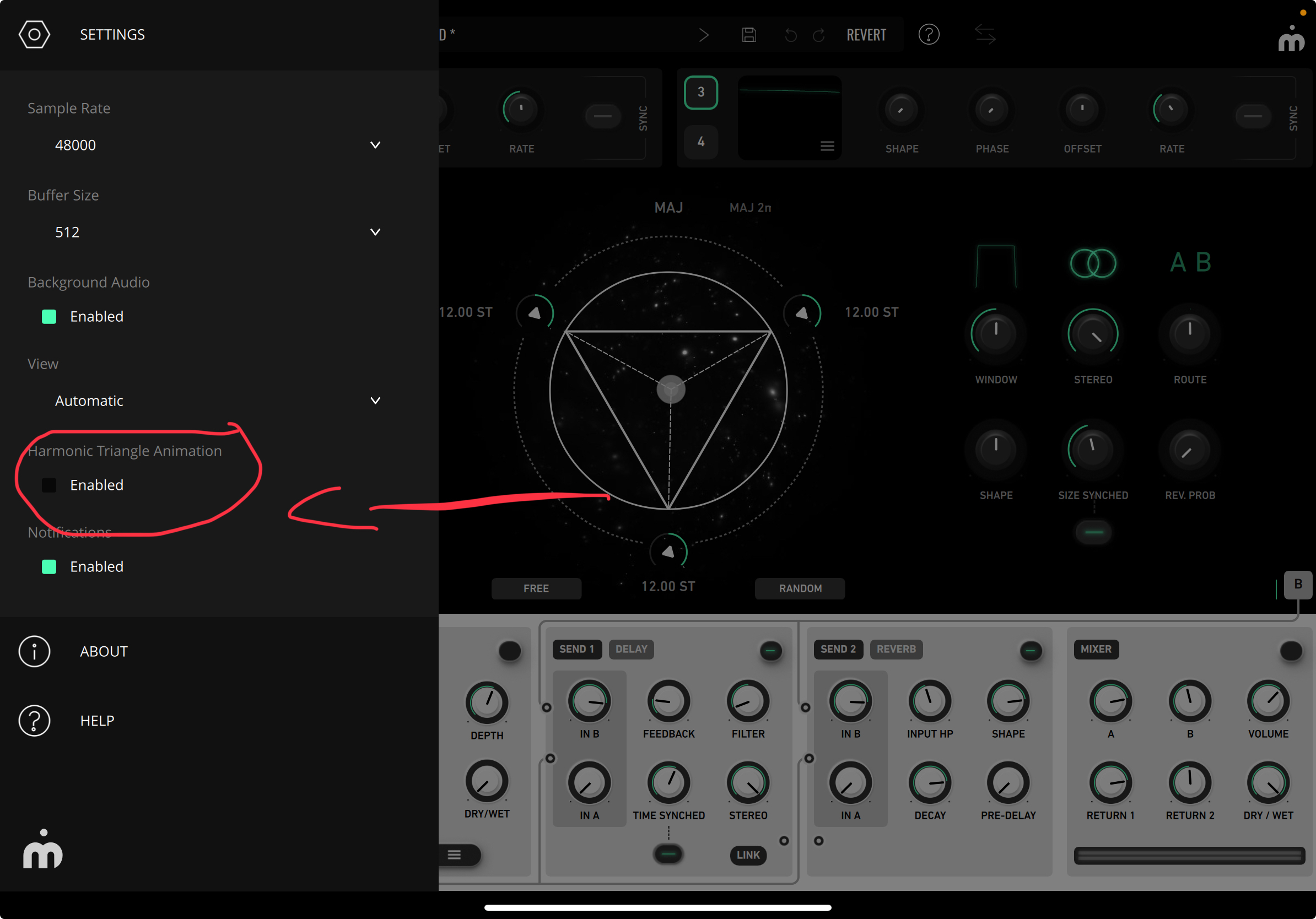
This will improve overall performance. @oldsynthguy Can you see if this helps with the heating problem? @echoopera can you see if you can instantiate more GRFX with this disabled?
You can force the layout of GRFX here:
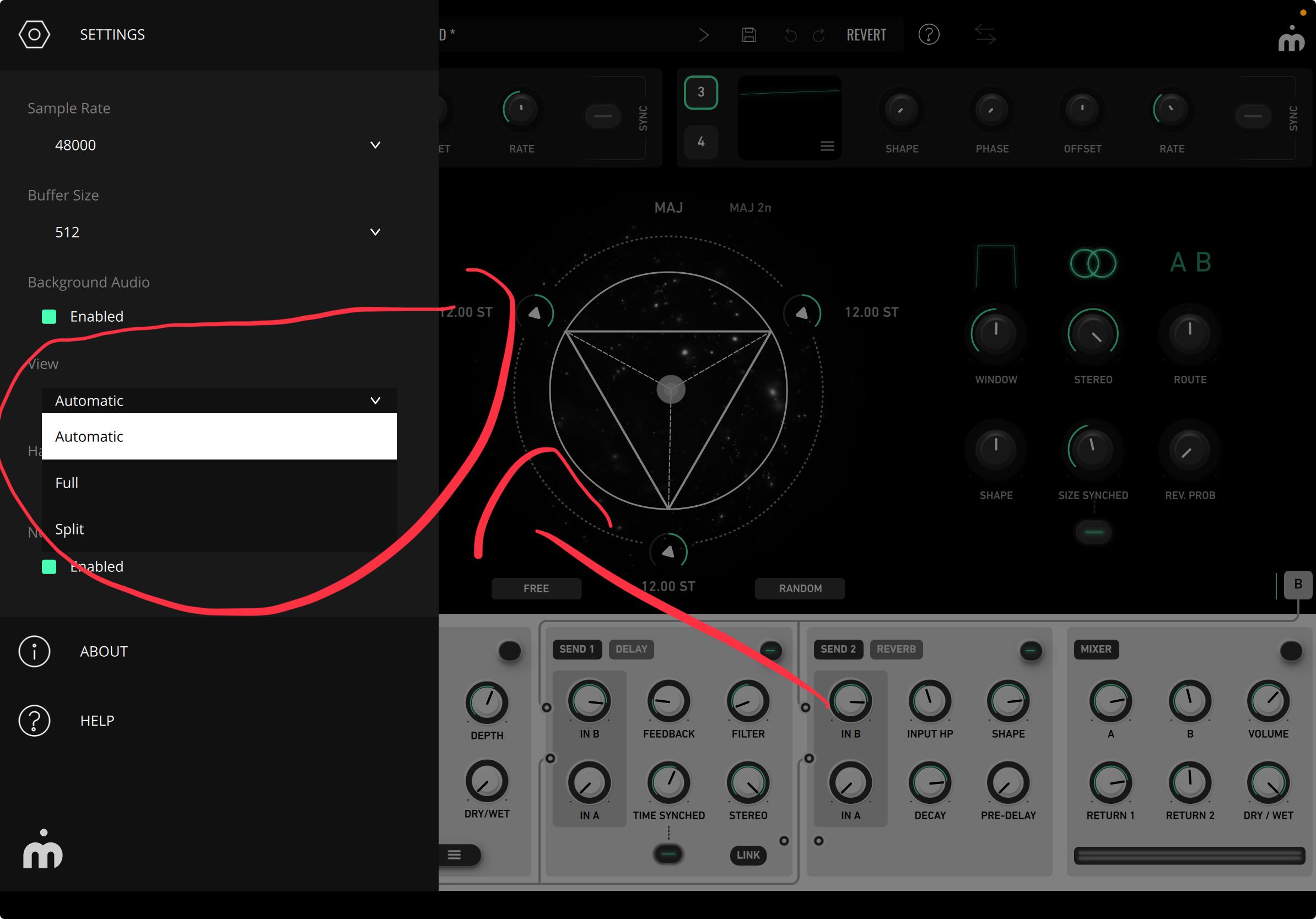
Currently GRFX display mode is automatic, and it will switch between tablet and phone mode depending on the size of the AUv3 window. You can set a fix layout if you want.
If you only see a panel you can change between the FX and the granular section here:

Have you found out a way of replicating this behaviour?
Do you know how many instances you're using when the UI fails to load?