Loopy Pro: Create music, your way.
What is Loopy Pro? — Loopy Pro is a powerful, flexible, and intuitive live looper, sampler, clip launcher and DAW for iPhone and iPad. At its core, it allows you to record and layer sounds in real-time to create complex musical arrangements. But it doesn’t stop there—Loopy Pro offers advanced tools to customize your workflow, build dynamic performance setups, and create a seamless connection between instruments, effects, and external gear.
Use it for live looping, sequencing, arranging, mixing, and much more. Whether you're a live performer, a producer, or just experimenting with sound, Loopy Pro helps you take control of your creative process.
Download on the App StoreLoopy Pro is your all-in-one musical toolkit. Try it for free today.
Circa Looper by Audio Damage (Released)

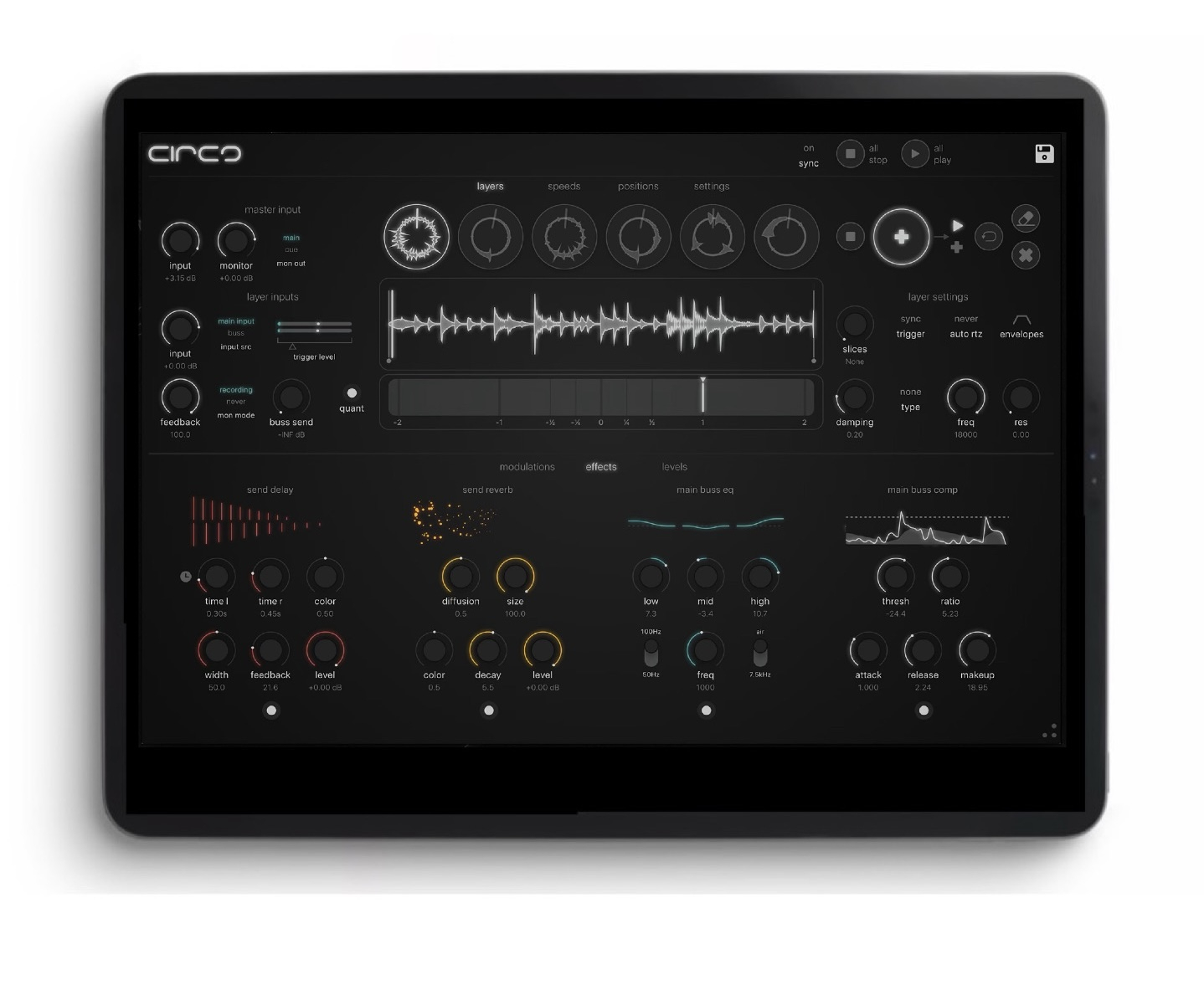
https://apps.apple.com/us/app/circa-looper/id6739890878
A creative looping powerhouse. Stack six stereo loops, modulate in real time, and sculpt evolving textures right on your iPad.
PLEASE READ: Circa is not a stand-alone app. It is an AUv3 plugin and requires an AUV3 host such as Garageband, Logic, AUM (recommended),
Cubase, etc.
Circa is a powerful multi-channel looping instrument designed for iPad, made for musicians, producers, and sound explorers.
With six independent stereo loop layers, deep modulation control, precision syncing, and built-in effects, Circa lets you capture spontaneous performances, sculpt evolving textures, and push loops far beyond repetition. Whether you're building complex rhythmic patterns or diving into ambient soundscapes, Circa's touch-friendly design gives you hands-on creative control, full MIDI mapping, and drag-and-drop audio export for seamless integration with your DAW.
Inspired by contemporary digital loopers and tools like the BOSS RC-505 and Monome Norns, Circa combines playfulness with precision — a creative playground for modern loop-based composition.
Each layer can sync to the host, a master loop, or free run, and can be triggered in sync, with an audio signal, or freely. Circa has seven stereo outputs (including a dedicated cue output for monitoring) and built-in reverb and delay. Add in a complete MIDI control system and Circa is a full looping workstation.
Features
-- Multi-Layered Looping
Circa has six layers that can operate independently or in sync with each other and/or the host. Circa can record from the stereo input, or self-record via an internal buss for interesting feedback possibilities.
--Designed To Be Touched And Played Circa's user interface is made for tactile manipulation, with touch strips for speed and position (including dedicated pages). The position strip can be further subdivided with slices. All this works together to turn a looping effect in to a playable instrument.
--Easy To Get Along With
Circa's layers each have an undo for destructive edits like recording, overdubbing, and erasing. In addition, product-wide tooltips make learning as easy as hovering. (Not available in iOS.)
--Controllability
Circa has a full complement of true MIDI controller destinations. Use virtually any MIDI device to control most of Circa's looping features.
--Self-Contained
Circa has a full internal mixer, filtering on each layer, and studio-quality send reverb, send delay, parametric EQ and compressor taken directly from Audio Damage's extensive effect library.
--Expandable And Performance-Ready
Circa has 7 outputs in all: six assignable stereo outputs and a cue output for monitoring. Send any layer to any of the six stereo outputs, while keeping the cue for soloing, recording, and editing, unheard by the audience.
--Ecosystem-Aware
Circa's user presets are cross-platform compatible, and work on any instance of Circa, whether on macOs, Windows, Linux, or iOS. In addition, sessions created in GargageBand or Logic on iOS will open the desktop version on macOS if you have purchased a license to that version.
Comments
One of the best release days ever, great plugins coming out left and right!
I agree. This day is one for the books!!
Loving this one too!!!
Are all the bugs ironed out, easy to avoid clicks on sustained input etc?
No bugs on my end, but I love artifacts so I might be deaf to it lol
Actually really been enjoying the beta. Very fun app to use for focusing looping ambient textures
so can this be used like a guitar looper pedal? like i record a loop, then set that loop to continue playing. then record another loop, and let it loop in sync with the first. and so on, untill all loops are playing at the same time?
How can I erase / réinitialise a cell ? I can erase the sample but the length is still predefined
Where’s the best video to learn how to use this thing.
I think the dev is working on one, but it’s very inutive. I had to look at the manual 2 or 3 times, but just for specifics. Otherwise, it was pretty easy to figure out without a demo video.
I don’t want to be a party pooper and sound harsh but how is this different from a Loopy Pro setup combined with some 3th party effects? I understand it runs as an AU and it’s a total package without some additional “programming” like in Loopy Pro (that could be a benefit to some).
Good question, I started figuring it out just tinkering a little, but maybe… @Gavinski will bless us 🙏
I had the same question. I also compared Loopy Pro with this and Circa… doing the same sort of thing back and forth. Circa is just different… you can get close with Loopy Pro for sure, but there’s just something about how they handled the interface in Circa that make it extra fun layering loops.
I wouldn’t say one is better than the other… just different
Oh I find it. Just long press on the stop button
I don't think so tbh, been a hella busy week, I'm frigging beat!
Is this an intro price? Kinda seems like it?
holly crap this thing is awesome. it a perfect looper pedal for guitar. midi mapping is excellent. and that’s not even scratching the surface of this app. i really hope they make an iphone version soon
This day!? It's been going on for, what? A month now, one release after the other.
Sure it's absolutely awesome but for us appaholics, times are hard. (joking of course, I have to add, boringly)
You notice it in the fact the that the tutorial people are totally left in the backwater, we need you guys 😄
I'm having a few bugs. Main one is duplicating an AUM track with an instance of Circa in it causes a Circa crash that requires iPad restart before it will load again. That's not good for workflow!
It looks likely to be amazing though.
new update on desktop
iOS version follows (when Apple accepts it...:)
Gesture Recorders is BiG i'd say...:)
CIRCA CHANGELOG
V1.1.0
++Gesture Recorders added to the Modulations page. These are a group of six loopers that, instead of audio, will loop the UI itself. Almost every control in Circa can be recorded and played back, either as a loop or a 1-shot. The transport works just like the audio transports (double click stop to RTZ, hold stop to clear). The loop toggle button allows you to switch between 1-shot playback and looping playback, and the scissors button trims any dead air at the front of the recording (useful when mousing or recording controls not on the top panel.) To prevent feedback loops, the gesture recorders can not record MIDI input; they only record actual UI manipulation. You can, however, play the gesture recorders with MIDI input, via two new controls in the momentary assign lists.
++Play position is now a continuous modulation target. This is, as you may imagine, somewhat experimental. GLHF
++Playback volume is is now ducked while scrubbing position. It was felt by several users that the scrubbing was too loud; we have addressed this.
++Slices were not displaying in the UI when editor was re-opened. This has been fixed.
++Several bugs related to waveform start and end point manipulation have been sent to live on a farm in the country.
++Various other bug fixes and optimizations.
Considering purchasing Circa as it’s currently on offer and I generally really like it. One thing is stopping me though. I’ve been trying the beta version again and the link to host control just doesn’t seem to reliably link to the host’s transport controls.
It links to the host bpm just fine, but just tends to not respond to the play/stop of the transport.
Anyone have any insights here? It’s quite possibly user error on my part but I’m not sure.
@Robin2
You should bro, it’s such a great app and. Great deal- folks that like Other Desert Cities will really dig the UI and controls, I believe.
have you tried ENSO? It is among my top 3 loopers and also on sale.
ENSO and Circa are absolutely fantastic. I would get Circa over ENSO, although ENSO is easier and faster. Circa is just loaded with really dope controls, like Other Desert Cities.
Enso is a lot simpler, and different as it has this loop back thingy that can get kinda crazy if you don’t keep an eye/ear on her.
Did you read the section of the manual about that? Pretty sure it doesn't say anything about play/pause behaviour of host. Host sync is just about making sure that beats and bars etc follow the host. Take a look at the manual (search for the word "sync") maybe to double check
Thanks @egobeats. Are you able to get Circa to respond to the host transport controls for playback?
Circa and Enso are both really fun to use but they have serious problems with clicks on loops of sustained sounds. Gauss and Loopy Pro are far more reliable for click-free loops.
Thanks @Gavinski. Since I have Gauss and Loopy Pro, that’s definitely food for thought. Cheers.
thx gav! i thought the clicks was my device. good looking out.
Apologies, I didn’t see this earlier message for you when I answered before.
Yes, I did of course check the manual before asking here. Just double checked now and yes, it does mention the transport. Doesn’t this imply to you that it should respond to the play/pause behavior of the host?
No, because when u read on it states clearly that they're just using that to make sure bars etc are synced