Loopy Pro: Create music, your way.
What is Loopy Pro? — Loopy Pro is a powerful, flexible, and intuitive live looper, sampler, clip launcher and DAW for iPhone and iPad. At its core, it allows you to record and layer sounds in real-time to create complex musical arrangements. But it doesn’t stop there—Loopy Pro offers advanced tools to customize your workflow, build dynamic performance setups, and create a seamless connection between instruments, effects, and external gear.
Use it for live looping, sequencing, arranging, mixing, and much more. Whether you're a live performer, a producer, or just experimenting with sound, Loopy Pro helps you take control of your creative process.
Download on the App StoreLoopy Pro is your all-in-one musical toolkit. Try it for free today.
Comments
Tip jar 🤙
https://youtube.com/shorts/gazHJdKKNbQ?si=ci2Kbg-lVUx7-U7t
Hazaa! Demos!
It's here
Now to learn how to use it sure @Gavinski will have a video for this.
I might indeed, though it's also possible that any detailed walkthrough on this will be on my Patreon. Been a long week too, I'm kinda beat!
Worth mentioning, it's totally possible to learn by slogging through the manual systematically (like I had to, lol)
Time to read !
That's the spirit! Tbh slogging through manuals solo is better than learning from vids anyway if you want to learn anything deeply. The effort put in is proportional to the rewards gained, have fun!
Actually on first glance the manual a bit confusing then I realised it’s interactive with a show hide function which tripped me up !
Hazaa! Gotta nice long weekend to figure out the ins and outs of this one. Let the modulated mangling commence!
(FAC makes such approachable, sleek UI!)
i absolutely regret not heeding @Gavinski pre-sale price warning.
lesson absolutely learned. kinda disappointed with the knobs. FAC has the coolest knob design in his UI's. Always overlooked as unimportant, it really spoke towards the A2D, and quality of his designs.
so pro tip for others... don't sleep on Gav's suggestions, like FAC's knobs- they come with great quality and personal value.
Cheers! Disappointed with the knobs in what way, btw?
So, if we're talking software manipulation only what would you (any of) suggest as a good starter synth or controller or both. Something with a good and clear approach for being manipulated. I was thinking Waldorfs latest (name is gone (hate old brain))* maybe but what midi controller have a nice set of things to control? I guess one still have to set up FPF first before the fun even can begin...
*edit: Blofeld (damn..)
Ulf, I'd suggest sending pitch bend messages to a few instances of AUGen X, like I did in this video. Or maybe send midi cc messages to modulate some filter bands in an app like Skulptur
https://youtube.com/shorts/joJ31lT8WRk
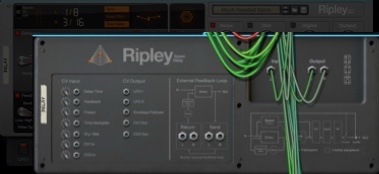
Thanks, yeah that could work as a test environment before going reaaaal deep. I wish I could use this in Reason which has loads of CV stuff and it's actually very easy to use there as it's all so visible, like e.g the superb delay Ripley, comes loaded with cv in and outs (sorry about the bad picture)
The only big criticism I'd have of this so far is that the UI is really a bit of a pain in the ass. In the attempt to make an elegant ui that works at small sizes, so much has been hidden away in pop-ups. Not very enjoyable to dial things in when you go deep with it. Some items in the popups are fiddly as hell to deal with. I also find it far too easy to accidentally tap things like the wrap/clip/fold icons, and sometimes accidentally turn Flos off. Beautiful UI, not a great UX at all imo
100%
Definitely!
@Gavinski
they didn't appear to be all fancy and unique from the videos i saw.
Ah, he's changed to a more minimalist style I guess. I prefer the minimalist look, it's all the scrolling through the pop-ups that bothers me!
I don’t mind the pop up menus. If it was all on one screen it wouldn’t have the badass almost vaporwave vibe, or at least take away from it. If you put them on a separate screen you’re still having to click some so 🤷🏻♂️. And the knob system is very similar to Fizzica, my first app from them, so they’re cool with me too. Diff strokes diff folks I guess 🤙
Good! See how you feel when you spend more time setting up your sessions and trying to tweak live. It took me a while to realize I didn't like the pop-ups and some other elements, but hopefully you won't feel the same!
Well alright!
Neither do I, or Gavin I guess since he (and I agreed) just wished for one in Walls. It's just that these are totally crammed with settings but it's not an easy solve. I would have like easier access to CC/channel settings which are at the bottom of said menu.
I got this to use with my Eurorack rig and ES-9 but for the life of me, I can't figure out how to send CV to my ES-9 over USB. the ES-9 shows up as an input but I see no way to set it up to output to specific channels on the ES-9.
ES-9 is the interface used in the first YouTube short demo FAC put out, so ITS DOABLE! I wouldn’t know how though, only been using it in AUM and don’t own any interfaces. The manual definitely could have been a bit more expository for sure, but I’m kinda enjoying my blind fumbling through the functionality. The amount of pride I felt getting the Env Follower to work 😆 If you can’t figure it out, an email to the dev would prolly set ya straight
Perhaps it’s in the Main CV menu? I don’t see a use for that stuff when using in AUM, so i assumed it was for hardware folks
Yes, I also found the midi settings being right at the bottom to be a maddening choice. In what host were you able to see the entire list like that without scrolling (if any). I've always needed to scroll in AUM, no matter how big I've sized the UI, which really bugs me
anyone know how to send audio from one track in aum and have it trigger the envelope follower on polyflo on another track,
in order to modulate things in polyflo? do you route it through another instance of polyflo?
I glued 4 screenshots together in Procreate (I don't have much of a life😅)
Haven't actually tried yet but I'm assuming you'd use the multi out feature. You'd open the main instance of polyflo on the track you want to modulate. You'd open a multi out instance on the track you want to use as sidechain source