Loopy Pro: Create music, your way.

What is Loopy Pro?Loopy Pro is a powerful, flexible, and intuitive live looper, sampler, clip launcher and DAW for iPhone and iPad. At its core, it allows you to record and layer sounds in real-time to create complex musical arrangements. But it doesn’t stop there—Loopy Pro offers advanced tools to customize your workflow, build dynamic performance setups, and create a seamless connection between instruments, effects, and external gear.

Use it for live looping, sequencing, arranging, mixing, and much more. Whether you're a live performer, a producer, or just experimenting with sound, Loopy Pro helps you take control of your creative process.

Download on the App Store

Loopy Pro is your all-in-one musical toolkit. Try it for free today.

midi guitar 2 alternative?

hey all, so mdi guitar 2 is very buggy for me on loopy pro, it does not save the settings when you exit, the sound recording through my guitar is very poor, i hardly use my guitar for this reason, not a fan of midi guitar 2, is there an alternative that i can try that might be more powerful with solid sound quality?

«1

Comments

  • @guitarhero07 said:
    hey all, so mdi guitar 2 is very buggy for me on loopy pro, it does not save the settings when you exit, the sound recording through my guitar is very poor, i hardly use my guitar for this reason, not a fan of midi guitar 2, is there an alternative that i can try that might be more powerful with solid sound quality?

    Are you using MIDI Guitar as an AUv3 or IAA?

    What settings aren’t being remembered?

    I am surprised about the sound quality issues. Do you mean MG’s built-in effects and amp sims or as a MIDI controller for synths?

  • @espiegel123 said:

    @guitarhero07 said:
    hey all, so mdi guitar 2 is very buggy for me on loopy pro, it does not save the settings when you exit, the sound recording through my guitar is very poor, i hardly use my guitar for this reason, not a fan of midi guitar 2, is there an alternative that i can try that might be more powerful with solid sound quality?

    Are you using MIDI Guitar as an AUv3 or IAA?

    What settings aren’t being remembered?

    I am surprised about the sound quality issues. Do you mean MG’s built-in effects and amp sims or as a MIDI controller for synths?

    I’m surprised as well, and wonder what audio interface is being used as well as type of guitar. You want a clean, strong signal going in. The built in sounds aren’t much to write home about - it’s all about being a controller, not sound source.

    This video is a good overview of setting up MIDI Guitar. It’s for MG3, but same philosophy.

  • wimwim
    edited December 2025

    Using a guitar to midi app to record the audio from your guitar isn't a good approach. The only reason to use midi guitar 2 is for it to create midi notes and to play synths based on pitch detection from your guitar. It adds latency and also pitch tracking isn't always perfect.

    I didn't even know it had built in amp sims. Really? Can the detection be disabled? nvm. I don't need to know.
    Well, I wouldn't expect much from the amp sims in an app that's main purpose is to convert audio to midi. That isn't the app's primary focus.

    If you're looking for good amp sims, there are plenty available now. If you give some idea of the type of tone you're looking for, you'll get plenty of suggestions. More than you want, probably.

  • edited December 2025

    my setup is loopy on a very good ipad, my audio card is audiofuse, see attached photo, i have tested 3 guitars, taylor GS mini, epiphone crestwood electric 150th, and a new cordoba classical electric, all guitars sound washed out, see attached video, sound seems muted or from far away, not present, i know i can add effects and all but seems like others have clean sound, not sure what my issue is, i know its hard to trouble shoot as you are not present to see my setup, but its quite a simple setup, could it be my audiofuse?
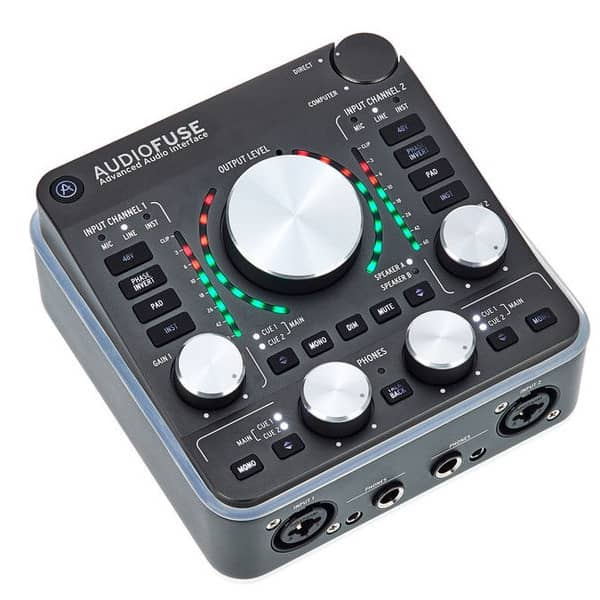
  • @guitarhero07 : use a proper amp sim rather than MG. MG is great as a midi controller so that you can play synths but there are much better choices for actual guitar processing .

  • Kind of like using a tractor to drive to the grocery store. Will it get you there? Sure. Is that what it excels at? No.

  • @guitarhero07 : Primo is a free amp sim and multi-effects unit whose quality is in a par with some of the better paid options.

  • @guitarhero07 said:
    my setup is loopy on a very good ipad, my audio card is audiofuse, see attached photo, i have tested 3 guitars, taylor GS mini, epiphone crestwood electric 150th, and a new cordoba classical electric, all guitars sound washed out, see attached video, sound seems muted or from far away, not present, i know i can add effects and all but seems like others have clean sound, not sure what my issue is, i know its hard to trouble shoot as you are not present to see my setup, but its quite a simple setup, could it be my audiofuse?

    Just asking. Are you using the proper input and mode on the Audiofuse? Are you getting a reasonable input level?

  • @espiegel123 said:
    @guitarhero07 : use a proper amp sim rather than MG. MG is great as a midi controller so that you can play synths but there are much better choices for actual guitar processing .

    proper amp sim? can you tell me more in detail? can i use it to record in loopy? i am not very technical in music gear, im looking to record clean guitar tones inside loopy, thanks

  • @espiegel123 said:
    @guitarhero07 : Primo is a free amp sim and multi-effects unit whose quality is in a par with some of the better paid options.

    looks like primo also offers auv3, so i would be able to use it in loopy and get clean sound recording?

  • @uncledave said:

    @guitarhero07 said:
    my setup is loopy on a very good ipad, my audio card is audiofuse, see attached photo, i have tested 3 guitars, taylor GS mini, epiphone crestwood electric 150th, and a new cordoba classical electric, all guitars sound washed out, see attached video, sound seems muted or from far away, not present, i know i can add effects and all but seems like others have clean sound, not sure what my issue is, i know its hard to trouble shoot as you are not present to see my setup, but its quite a simple setup, could it be my audiofuse?

    Just asking. Are you using the proper input and mode on the Audiofuse? Are you getting a reasonable input level?

    yes input levels are great, and proper wiring,

  • @wim said:
    Kind of like using a tractor to drive to the grocery store. Will it get you there? Sure. Is that what it excels at? No.

    lol

  • @guitarhero07 said:

    @espiegel123 said:
    @guitarhero07 : Primo is a free amp sim and multi-effects unit whose quality is in a par with some of the better paid options.

    looks like primo also offers auv3, so i would be able to use it in loopy and get clean sound recording?

    Correct - you’d route your guitar signal through that AUv3 and treat it as a real life amplifier. MIDI Guitar would be used to play something like Audiokit’s J6 (free) or any Rob Jackson synth like ANALOGyXS (very affordable).

    https://apps.apple.com/us/app/audiokit-synth-one-j6/id6741535277

    https://apps.apple.com/us/app/analogyxs/id6745030342

  • @guitarhero07 said:

    @espiegel123 said:
    @guitarhero07 : Primo is a free amp sim and multi-effects unit whose quality is in a par with some of the better paid options.

    looks like primo also offers auv3, so i would be able to use it in loopy and get clean sound recording?

    Yes

  • thanks for all the help guys

  • edited December 2025

    @FizzyLizzy27 said:

    @espiegel123 said:

    @guitarhero07 said:
    hey all, so mdi guitar 2 is very buggy for me on loopy pro, it does not save the settings when you exit, the sound recording through my guitar is very poor, i hardly use my guitar for this reason, not a fan of midi guitar 2, is there an alternative that i can try that might be more powerful with solid sound quality?

    Are you using MIDI Guitar as an AUv3 or IAA?

    What settings aren’t being remembered?

    I am surprised about the sound quality issues. Do you mean MG’s built-in effects and amp sims or as a MIDI controller for synths?

    I’m surprised as well, and wonder what audio interface is being used as well as type of guitar. You want a clean, strong signal going in. The built in sounds aren’t much to write home about - it’s all about being a controller, not sound source.

    This video is a good overview of setting up MIDI Guitar. It’s for MG3, but same philosophy.

    when will MG3 be released for IOS ?

  • @guitarhero07 said:

    @FizzyLizzy27 said:

    @espiegel123 said:

    @guitarhero07 said:
    hey all, so mdi guitar 2 is very buggy for me on loopy pro, it does not save the settings when you exit, the sound recording through my guitar is very poor, i hardly use my guitar for this reason, not a fan of midi guitar 2, is there an alternative that i can try that might be more powerful with solid sound quality?

    Are you using MIDI Guitar as an AUv3 or IAA?

    What settings aren’t being remembered?

    I am surprised about the sound quality issues. Do you mean MG’s built-in effects and amp sims or as a MIDI controller for synths?

    I’m surprised as well, and wonder what audio interface is being used as well as type of guitar. You want a clean, strong signal going in. The built in sounds aren’t much to write home about - it’s all about being a controller, not sound source.

    This video is a good overview of setting up MIDI Guitar. It’s for MG3, but same philosophy.

    when will MG3 be released for IOS ?

    The beta is out already and that’s what I run. Not sure when the official release will be out.

    https://testflight.apple.com/join/ek647PM6

  • I was just noodling around using MIDI guitar’s test synth and figured this might be a good place to reference it
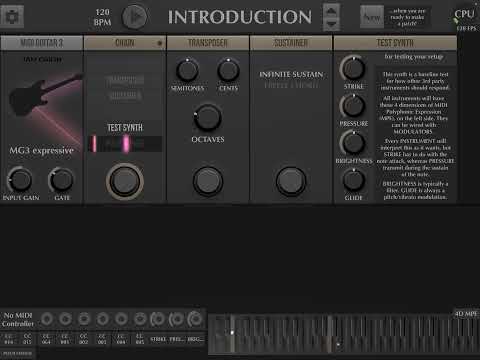
  • @FizzyLizzy27 said:
    I was just noodling around using MIDI guitar’s test synth and figured this might be a good place to reference it

    your guitar sounds so crisp, i just cant get my setup to sound like this, sigh

  • wimwim
    edited December 2025

    @guitarhero07 said:
    your guitar sounds so crisp, i just cant get my setup to sound like this, sigh

    That isn't the guitar you're hearing. It's a synth being triggered by the midi notes detected by MIDI Guitar.

    @guitarhero07 said:
    my setup is loopy on a very good ipad, my audio card is audiofuse, see attached photo, i have tested 3 guitars, taylor GS mini, epiphone crestwood electric 150th, and a new cordoba classical electric, all guitars sound washed out, see attached video, sound seems muted or from far away, not present, i know i can add effects and all but seems like others have clean sound, not sure what my issue is, i know its hard to trouble shoot as you are not present to see my setup, but its quite a simple setup, could it be my audiofuse?!

    Maybe detail the settings you're using on the Audiofuse and in Loopy Pro. Also, have you tired Primo yet, or are you ?

  • @wim said:

    @guitarhero07 said:
    your guitar sounds so crisp, i just cant get my setup to sound like this, sigh

    That isn't the guitar you're hearing. It's a synth being triggered by the midi notes detected by MIDI Guitar.

    @guitarhero07 said:
    my setup is loopy on a very good ipad, my audio card is audiofuse, see attached photo, i have tested 3 guitars, taylor GS mini, epiphone crestwood electric 150th, and a new cordoba classical electric, all guitars sound washed out, see attached video, sound seems muted or from far away, not present, i know i can add effects and all but seems like others have clean sound, not sure what my issue is, i know its hard to trouble shoot as you are not present to see my setup, but its quite a simple setup, could it be my audiofuse?!

    Maybe detail the settings you're using on the Audiofuse and in Loopy Pro. Also, have you tired Primo yet, or are you ?

    ah ok thanks for the clarification, audiofuse doesnt really have settings, i just plugged and play, i dont think it has any software, i did update firmware though. i have not tried premo since its not in app store yet, and beta wants me to install other apps which i rather not.

  • @guitarhero07 said:

    @wim said:

    @guitarhero07 said:
    your guitar sounds so crisp, i just cant get my setup to sound like this, sigh

    That isn't the guitar you're hearing. It's a synth being triggered by the midi notes detected by MIDI Guitar.

    @guitarhero07 said:
    my setup is loopy on a very good ipad, my audio card is audiofuse, see attached photo, i have tested 3 guitars, taylor GS mini, epiphone crestwood electric 150th, and a new cordoba classical electric, all guitars sound washed out, see attached video, sound seems muted or from far away, not present, i know i can add effects and all but seems like others have clean sound, not sure what my issue is, i know its hard to trouble shoot as you are not present to see my setup, but its quite a simple setup, could it be my audiofuse?!

    Maybe detail the settings you're using on the Audiofuse and in Loopy Pro. Also, have you tired Primo yet, or are you ?

    ah ok thanks for the clarification, audiofuse doesnt really have settings, i just plugged and play, i dont think it has any software, i did update firmware though. i have not tried premo since its not in app store yet, and beta wants me to install other apps which i rather not.

    I mean details such as where you're plugging your guitar in, how you're monitoring, which buttons are pressed on the AudioFuse, and what the levels look like. A screen shot of the mixer in Loopy would help too.

    It's unlikely that there's anything wrong with the AudioFuse. It's likely something else, but guessing without details is going to be difficult.

    Again ... did you try Primo yet, are are you still trying to use MIDI Guitar 2 for amp/preamp?

  • @guitarhero07 said:

    @wim said:

    @guitarhero07 said:
    your guitar sounds so crisp, i just cant get my setup to sound like this, sigh

    That isn't the guitar you're hearing. It's a synth being triggered by the midi notes detected by MIDI Guitar.

    @guitarhero07 said:
    my setup is loopy on a very good ipad, my audio card is audiofuse, see attached photo, i have tested 3 guitars, taylor GS mini, epiphone crestwood electric 150th, and a new cordoba classical electric, all guitars sound washed out, see attached video, sound seems muted or from far away, not present, i know i can add effects and all but seems like others have clean sound, not sure what my issue is, i know its hard to trouble shoot as you are not present to see my setup, but its quite a simple setup, could it be my audiofuse?!

    Maybe detail the settings you're using on the Audiofuse and in Loopy Pro. Also, have you tired Primo yet, or are you ?

    ah ok thanks for the clarification, audiofuse doesnt really have settings, i just plugged and play, i dont think it has any software, i did update firmware though. i have not tried premo since its not in app store yet, and beta wants me to install other apps which i rather not.

    Primo is a free app and in the App Store.

  • @guitarhero07 said:

    @wim said:

    @guitarhero07 said:
    your guitar sounds so crisp, i just cant get my setup to sound like this, sigh

    That isn't the guitar you're hearing. It's a synth being triggered by the midi notes detected by MIDI Guitar.

    @guitarhero07 said:
    my setup is loopy on a very good ipad, my audio card is audiofuse, see attached photo, i have tested 3 guitars, taylor GS mini, epiphone crestwood electric 150th, and a new cordoba classical electric, all guitars sound washed out, see attached video, sound seems muted or from far away, not present, i know i can add effects and all but seems like others have clean sound, not sure what my issue is, i know its hard to trouble shoot as you are not present to see my setup, but its quite a simple setup, could it be my audiofuse?!

    Maybe detail the settings you're using on the Audiofuse and in Loopy Pro. Also, have you tired Primo yet, or are you ?

    ah ok thanks for the clarification, audiofuse doesnt really have settings, i just plugged and play, i dont think it has any software, i did update firmware though. i have not tried premo since its not in app store yet, and beta wants me to install other apps which i rather not.

    Have you tried using MIDI Guitar standalone? Also, I think it does need an IAP to use as an AUv3. I can’t remember if you mentioned that yet.

  • oops i mixed primo with midi guitar 3, yes i did try primo, same thing really the sound is just not crisp, i did purchase my audiofuse used and it has some volume issue where the volume jumps up really quickly when i move the dial up, so it could be a lemon, but then again i dont know much about audio gear, im just an artist trying to make music, here in the picture im holding the cable that goes to my guitar
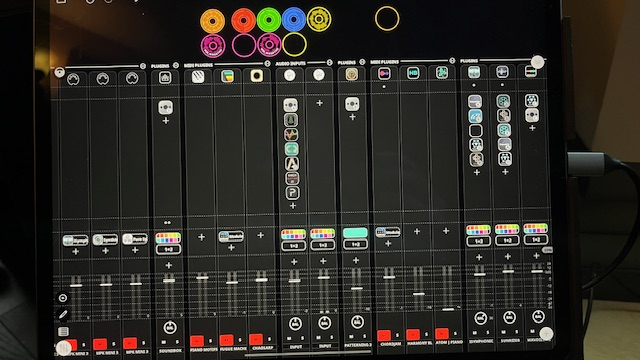
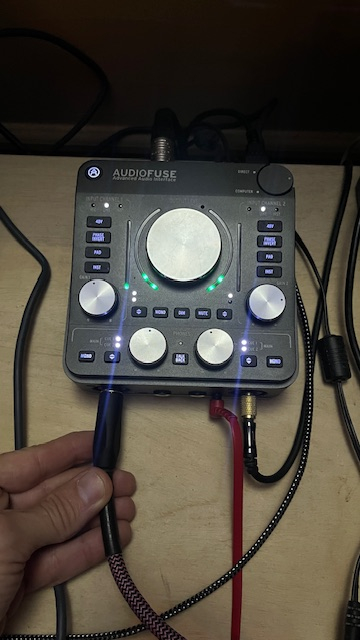
  • edited December 2025

    @guitarhero07 said:
    oops i mixed primo with midi guitar 3, yes i did try primo, same thing really the sound is just not crisp, i did purchase my audiofuse used and it has some volume issue where the volume jumps up really quickly when i move the dial up, so it could be a lemon, but then again i dont know much about audio gear, im just an artist trying to make music, here in the picture im holding the cable that goes to my guitar

    To troubleshoot your guitar tone, create a new project from Loopy Pro’s default project. Add Primo as a pre-fader effect on the input channel and no other plugins. Set the input to come from your guitar.

    With loopy pro’s mixer open and primo open so we can see levels in both, make a screen recording and post a link to it so we can see your levels.

    Here is a video where Primo is the only effect in use:

    https://www.youtube.com/watch?si=-47fjRgx_06t_7Am

    You can download my loopy pro template that has the same settings from:

    https://wiki.loopypro.com/Templates:Edward's_Workbench#RC30-Style_Workflow

  • @guitarhero07 said:
    oops i mixed primo with midi guitar 3, yes i did try primo, same thing really the sound is just not crisp, i did purchase my audiofuse used and it has some volume issue where the volume jumps up really quickly when i move the dial up, so it could be a lemon, but then again i dont know much about audio gear, im just an artist trying to make music, here in the picture im holding the cable that goes to my guitar

    It looks like midi guitar isn’t first in the chain. You don’t want anything between your signal coming in and going into MG. It looks like you have reverb before which especially isn’t good. Absolutely no spatial effects before the chain.

    Again, have you tried standalone yet? That’s going to be troubleshooting 101.

  • Let's get MIDI Guitar 2 out of that signal chain altogether. You just don't need it if all you're doing is trying to hear your guitar. Even if you do decide you like the amp sim feature of MG2, you don't want to use it at the same time as Primo. Pick one or the other.

    Guitar input > Primo. Simple. See what it sounds like. Then start thinking about adding in eq, reverbs (after the amp), etc.

    This'll never get sorted out with so many crossed wires.

  • Also, how are you listening to this? Headphones, I assume? Where are those plugged in?

  • well the chain you see is all turned off, so i assume it is not being actuated, or is it? and i have tried everything from a fresh loopy template, i even ran it without using MG2 or any other app, just straight through, the sound just feels like it is not being recorded clean, sounds as though itis coming from far away, last night i went back to using my Zoom H6 recorded and this seems to be so much cleaner, so ill just use this method for now recording my guitar into loopy, keep it simple, this zoom H6 records very clean, my room is sound proofed as well, thx for all the input, one day ill figure this out

Sign In or Register to comment.