Loopy Pro: Create music, your way.
What is Loopy Pro? — Loopy Pro is a powerful, flexible, and intuitive live looper, sampler, clip launcher and DAW for iPhone and iPad. At its core, it allows you to record and layer sounds in real-time to create complex musical arrangements. But it doesn’t stop there—Loopy Pro offers advanced tools to customize your workflow, build dynamic performance setups, and create a seamless connection between instruments, effects, and external gear.
Use it for live looping, sequencing, arranging, mixing, and much more. Whether you're a live performer, a producer, or just experimenting with sound, Loopy Pro helps you take control of your creative process.
Download on the App StoreLoopy Pro is your all-in-one musical toolkit. Try it for free today.
Mela 7.1 – 7.3: Preset Reuse, Collection 5, Unison, Frequency Shifter, Limiter, New Modulation Tools

TL;DR: Mela 7.3 Update: Reuse Presets as Modules, Note Pulse & Note Event Improvements. See my latest post. 40% off Collections until March 14.
Update: I’m experimenting with releasing Mela updates weekly rather than the usual 3–4 week cycle. This keeps each update more focused and speeds up the feedback loop. I’ll post replies in this thread for new versions to avoid creating too many separate threads.
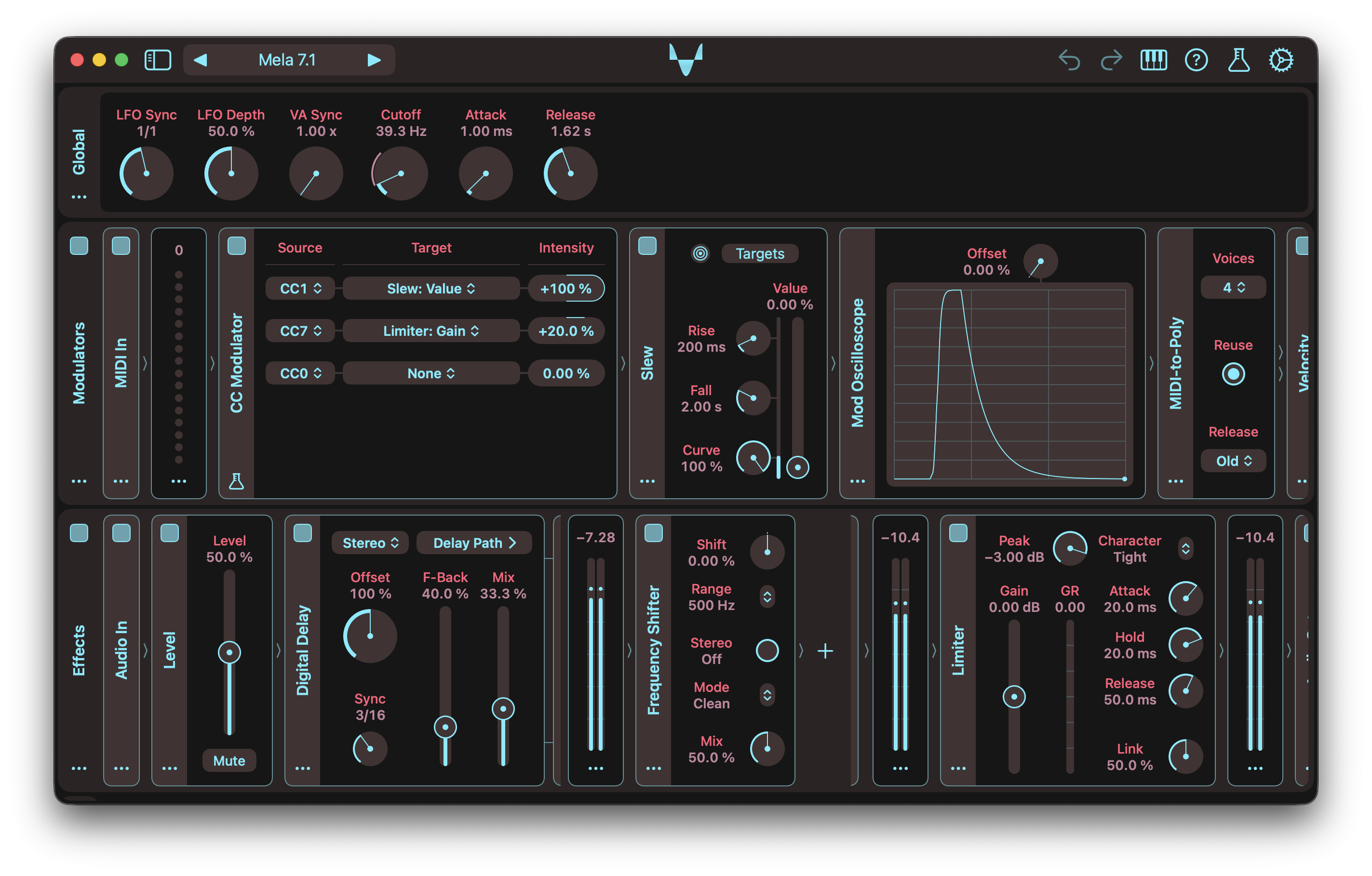
Mela 7.1 introduces Collection 5, a new set of creative and essential modules. It begins with one of the most requested audio processors, Frequency Shifter, a highly configurable module for producing metallic and inharmonic textures. Also included is a transparent brickwall Limiter, designed to be an essential part of your production toolkit.
Collection 5 also brings powerful new modulation tools: CC Modulator, Slew, and Mod Oscilloscope. Unlike other modulators in Mela, CC Modulator allows each target parameter to use a different MIDI CC source. This provides an alternative way to automate parameters from the host, especially in hosts that do not support AUv3 dynamic parameter trees. The host can send MIDI CC automation curves, which are translated into parameter modulation.
Slew smooths Mod signals using independent Rise and Fall controls, with support for linear, exponential, or blended curves. Mod Oscilloscope lets you visualise Mod signals in real time by modulating its Offset parameter.
Beyond Collection 5, version 7.1 adds the new MIDI Meter module to Collection 0 for visualising MIDI messages. The existing Meter module has been refined with a more compact design. The Arpeggiator now includes an indicator that shows the active note position within the chord, along with a new Manual mode for creating custom patterns by modulating the Position parameter.
Collection 5 will continue to expand with every 7.x update and is available as a one-time purchase.
There's a lot more in this update. For the full details, check out the Changelog.
Even more 7.1 videos:
How to Create Unison by Stacking Oscillators in Mela
Mela 7.1 Preview: Customising Arpeggiator Patterns with Modulation
Mela 7.1 Preview: Slew and Mod Oscilloscope Modules
Mela 7.1 Preview: Frequency Shifter Module
Frequency Shifter
- Frequency Shifter offsets all frequency components in the Audio signal by a fixed amount, producing metallic or inharmonic textures unlike pitch shifting.
- Provides useful tweaks with parameters: Shift, Range, Mode, Stereo, Mix.
- Shift: Sets the shift amount within the selected Range. Linear ranges map directly, while Cubic uses a non-linear curve for finer control near 0.
- Range: Selects the maximum shift amount. Linear ranges map -100% to 100% directly. Cubic is non-linear and spans ±5 kHz.
- Mode: Selects how energy behaves around 0 Hz. Clean is single-sideband. Reflect preserves down-shifted components below 0 Hz. Duplicate adds mirrored components when shifting up. Both combines reflect and duplicate.
- Stereo: When enabled, left and right channels shift in opposite directions.
Limiter
- Limiter is a brickwall limiter that provides transparent peak control using a lookahead gain envelope.
- Includes standard controls such as input gain, attack, release, and channel linking, along with a gain reduction meter.
- Offers character modes for either faster response or smoother, lower-distortion limiting.
Slew
- Slew is a modulator that smoothly ramps the Mod signal toward a target value.
- The target is set by the Value parameter and can itself be modulated to smooth another Mod signal.
- Ramping can be linear, exponential, or a blend of both, controlled by the Curve parameter.
- The Rise and Fall parameters determine how quickly the Mod signal responds when the Value parameter changes.
- The indicator lets you visualise the current value of the Mod signal.
CC Modulator
- CC Modulator uses incoming MIDI CC messages to modulate parameters.
- Unlike other modulators, each target can be configured to use a different MIDI CC source.
- This provides an alternative way to automate parameters from the host.
- The host can send MIDI CC automation curves, which are translated into parameter modulation.
- CC Modulator is a Mela Lab module.
Mod Oscilloscope
- Mod Oscilloscope visualises the modulated value of its Offset parameter.
- Modulating Offset at 100% intensity displays the modulator's Mod signal directly.
- For best results, set Offset to 0% for unipolar Mod signals and to 50% for bipolar signals.
- The module can also be used to visualise how another parameter is being modulated.
- To do so, apply the same modulation settings to Offset as the target parameter.
MIDI Meter
- Added the MIDI Meter module for visualising incoming MIDI values.
- Displays a 16-circle vertical meter and a numeric value readout.
- MIDI Meter is part of Collection 0 and listed under the Visualiser category.
Arpeggiator
- Added an indicator that visualises the active note position within the chord.
- Added Manual mode, where the new Position parameter selects the next chord position across the active Oct Range.
- The Position parameter is a great target for automation or modulation, enabling custom arpeggio patterns.
Other Changes
- Meter: The module now has a more minimalistic appearance with no sidebar, as there is little benefit to keeping it collapsed or showing its name.
- Meter: Updated the DSP implementation for a more natural response.
- Band Pass: Now supports Poly mode and no longer collapses Poly signal to Mono.
- Module Actions Menu: The menu now displays the module name as the title. If the type is not clear from the name, the type name is appended in brackets.
- Modulators: Refined the appearance of the modulators' drag target icon.
- Module Categories: Replaced the Utility module category with Visualiser.
- Pitch Ramp: The module has graduated from Mela Lab and can now be found under the Pitch Processor category.
- Presets: Updated the default preset to use MIDI Meter.
- Automation: Fixed a 7.0 regression that prevented parameter automation from working in some hosts.
- Note Stack: The module now ensures that generated note-off events precede note-on events within the same sample call.
Grab Mela from the App Store.
As always, let me know if you have follow-up questions 🙏
Comments
Instabought.
🧡
Same. And @Nikolozi I admire your dedication to not only keeping Mela updated but also writing docs and producing videos that explain how everything fits together. I rarely comment on your posts precisely because you seem to have answered all the questions I may have asked.
Very glad to hear that the docs and videos help.
+1
All Nikolozi Synth Apps and IAPs are on Sale
Mela
Mela Original
NFM
Dumb question time…do the modules have to be bought in order? I have 1 and 2… do I have to buy 3 next or can I get 4?
Not at all. You can purchase them in any order you like. And only buy the modules you are interested in.
Awesome…thank you !
Thanks for pointing that out. I forgot to mention that I also put NFM and Mela Classic on 50% sale to celebrate the release of Collection 5.
How does mela compare to drambo.
Is it more intuitive or less.
I do know I like the looks much more 🙂
I'll let the others with more experience with Drambo share their opinions. But I will point out a few things that you might find useful.
Both Drambo and Mela have one main thing in common, which is that they both hate wires But take a slightly different approach to how their corresponding modular systems work. Drambo is also a DAW and can host AUv3s, whereas Mela focuses on just the modular aspect and lets you have feedback with a 1-sample delay. And of course, you could use Mela inside Drambo
My goal with Mela is to make it as intuitive and approachable as possible. While I draw inspiration from various modular systems, Mela has its own unique approach, which, obviously, I think is more intuitive. Simply put, Mela is my take on modular music-making.
You can get started by downloading Mela and checking out the tutorials page. You don't need to purchase any IAPs to get the feel of the app. And if something is not clear or confusing or you want to know how to do a specific thing, just ask me here or via email. Often, I create a tutorial video based on what someone found confusing or asked how to do.
Congrats on the fifth collection! 🎉🤩 The constant development and updates in Mela keep me using this toolbox more and more.
For me, CC Modulator is one of the most useful modules released in Mela. It's so simple, but it will bring so much power to my AUM environment.
Keep up the good work! 🏆
Awesome, that's what I like to hear 🧡
Good to hear. I agree, CC Modulator is super useful in a lot of scenarios.
Thank you, sir!
An explanation from the maker himself,
I get it, gonna try the free version.
Any time on when the sale is over?
March 3. There will be more sales, usually when there's a new version. But introductory sales, like this one, usually have steeper discounts.
Is it best to buy the expansion packs in order?
Or can you also for example only get nmr 1 & 4 ?
Any order is fine, just pick the modules you most desire. I always recommend to get C1 first, because that gives you the most power. And then pick others in whatever order you prefer.
Oke. I asked because 4 is called a cornerstone. So that sounds like a great addition to 1.
I fiddled a bit in the free version and right away got some very nice sounding pads.
I see, I'll remove that word from the description : ).
C4 did introduce module nesting capabilities, i.e. adding modules with sublanes and the Stack module for parallel submodule processing. The Group module, which was initially part of C4, became part of C0 because it became a fundamental building block in Mela. But I guess C4 is still quite useful, because it has the powerful Stack module.
Nice, yes! Even with just C0, one could build a lot of interesting synths and effects. The VA Oscillator has many types of morphable waveforms and supports sync and ring synthesis. Then you have a great-sounding VA Filter and a very powerful and flexible LFO. Also, Apreggiator, Stereo Delay etc.
Is there a pdf version of the manual ?
Or is it possible to convert the webmanual to a pdf?
You can easily convert the web version into pdf using Safari, on iOS and macOS:
Thanks. Did not know that.
I bought expansion pack 1 & 2 by the way.
🧡
Worked for a bit with it and find it really intuitive.
I know nothing about modular synths.
But with a few tweaks had some beautiful pads.
Also like the user interface design.
Only thing which I have troubles with is when scrolling right or left accidentally adjusting parameters.
Still recommended highly
Great to hear, that's my goal, for it to be as intuitive as possible. Because modular systems can be super confusing.
Sweet!
🧡
My recommendation, when scrolling, is to always use module sidebars. Because module interfaces are quite dense, touching anywhere will usually adjust the parameter. Undo/Redo also makes life easier to fix any accidents.
My original thinking was that even during scrolling, if the user wants to adjust a parameter, they should not have to wait for scrolling to slow down. They should always be able to adjust parameters.
Some users have suggested a fat scrollbar at the bottom of each lane, dedicated to scrolling. But it will end up taking a lot of space. Another trick is that as soon as the scroll bar appears, you can grab the bar. It won't cause accidental touches on module controls because there's automatically a much fatter touch target area for it.
I will revisit this to see if there's space for improvement. Do you find you have accidental touches when initiating a scroll or during scroll adjustments?
Another approach is, and that's how iOS's default behaviour is, if a control is in a scroll view, if the user swipes quickly, the touch is not delivered to the control, and instead, scrolling initiates. This means you can never have fast parameter adjustments, and instead, you might have accidental scrolls.
Anyway, I'll experiment. It's been a while since I revisited this aspect of the app, so it's probably a good idea.
Thank you!
Darn, missed the intro sale on the new collection… I was really looking forward to checking it out this weekend. Oh well.
Regarding scrolling, I personally would never want to adjust a parameter while the modules were moving and would definitely prefer a mode that locks parameters while scrolling.
There will be another update soon ; )
What I meant was that, after the user scrolls to the desired module, even though they are no longer scrolling / touching, a scroll declaration is still being executed. At that point, the user is usually ready to interact with controls, but if touch is disabled during scroll, they have to wait for deceleration to complete. Unless I disable scroll inertia, which I'm not a fan of, as that usually feels very unnatural.
Honestly so kicking myself… Have bought everything you have released to date!
Deceleration seems to happen quickly having just tested it. That wouldn’t be a problem for me.