Loopy Pro: Create music, your way.
What is Loopy Pro? — Loopy Pro is a powerful, flexible, and intuitive live looper, sampler, clip launcher and DAW for iPhone and iPad. At its core, it allows you to record and layer sounds in real-time to create complex musical arrangements. But it doesn’t stop there—Loopy Pro offers advanced tools to customize your workflow, build dynamic performance setups, and create a seamless connection between instruments, effects, and external gear.
Use it for live looping, sequencing, arranging, mixing, and much more. Whether you're a live performer, a producer, or just experimenting with sound, Loopy Pro helps you take control of your creative process.
Download on the App StoreLoopy Pro is your all-in-one musical toolkit. Try it for free today.
Comments
I definitely need to add a settings menu with some customisation options. Tapping samples to replay them works out well for me, but it would be good if there was a toggle that turns tapping a sample that’s playing into a pause instead of replay.
Keeping the transport at the bottom felt like the intuitive move for those with Sample Crate muscle memory who are already used to having it at the bottom. Adding a tap to pause option would definitely solve “finger flight” haha.
I can definitely take a look at adding some sort of waveform view.
That volume slider at the bottom is less useful than I thought it would be, maybe that should be a playhead instead that can be dragged. I think that’d be a better use for that space 😊
I think I know what’s happening with the midi. Sometimes midi stores data that suggests an instrument, we’ve all heard those horrid midi guitar, piano and drum sounds, so I need to go over the code with a fine-tooth comb and see if I’ve messed up somewhere with how it handles that sort of data.
Sample length should automatically appear beneath each sample next to the file size.
Thank you for the feedback! Genuinely helpful.
Thnx for being open to suggestions Lewis!
This is what I love about apps; being able to put out updates. There’s so many apps I’ve given up on because they haven’t been updated, but a big part of creating something that you can continue to be proud of and happy with is listening to the feedback and ensuring they get better and better! 😊
I’m curious. Does the app work for drum midi files?
Cheers @lewisleval
Thanks for midnight plaza!
Think im gonna grab Cache soon too.
Yes, please.
I would like this to finally replace Audioshare at one point.
Have you thought about adding simple audio editing and other AS features?
AudioDamage said via discord that Circa is on the operating table at the moment. Someone asked about drag and drop a couple days ago and it seems like the question was ignored while reports made before/after were replied to promptly. So I would not get my hopes up lol
Yes, would be great if this could fully replace AUM's File Player tbh, with all its features including control of playback speed, though I also understand that maybe wasn't the original intention and we're potentially giving Lewis a lot of extra work here 😅🙏
Maybe it’s just inexperience but I find the drag and drop system a hassle and rather just open or import a file.
Yeah, drag and drop can be a bit of a hassle tbh, you need to get a knack for it. Ultimately, anything dealing with files on iOS is just still a slightly subpar experience, even after all these years...
Let’s me add folders and works fine in standalone - in AUM says same folders contain no playable files?
Thanks for the insight via discord @justaglove. Yeah, as I said, the way the note in the manual regarding iOS drag and drop is worded gives me the impression that it’s intended as a ‘stop asking us about this!’ message so I’m not surprised the question was ignored. And, who knows, maybe there are particular intricacies with Circa which mean it truly isn’t possible in that case?
Maybe, just maybe, if it’s on the operating table, they will add import via the Files app as I suggested to them? That would do just fine by me. As you recommend, I won’t get me hopes up though! Cheers.
I'd hazard a semi educated guess that it's nothing specific to Circa. I still maintain it must be either that they don't know how to do it, or they don't want to put the time in to do it.
Yeah, I tend to agree with you personally but, for whatever reason, correct or not, they seem to have decided that they’re not willing to look again at the drag and drop situation. My fingers are crossed for Files app based import.
Has anyone checked if the DnD functionality works for Quanta2 yet? Cause that would be clutch, but now I’m guessing it don’t
@lewisleval can cache sync the same collections across multiple devices?
Is the developer keeping tabs here? I want to send off my suggestions... Favorites would be clutch. I have thousands of samples I'd love to sort through!
And +100 on having a play/pause button in the right place and a waveform preview.
I’m not sure how closely but he is in the forum and has commented in this thread.
@lewisleval is the developer
Just checked and it doesn’t seem to accept drag and drop using slide over view in either standalone or AU mode. As you say, not surprising considering.
Does Cache support selecting, dragging and dropping multiple files at once? For apps like Outgrowth where you can drop in multiple files at once when creating presets.
I don't see any way to multi select, but that would be useful for sure @lewisleval
An update for Cache is available now! Loading collections and folders is now far quicker than in previous versions, I’ve given the app a better method for handling data which makes everything far quicker, smoother and more reliable.
The volume slider at the bottom is now a draggable playhead which also shows a waveform of your sample.
Tapping a sample that’s playing now pauses it rather than restarts it (thanks Gavinski!)
And there’s further bug fixes and improvements, including one that was stopping Cache playback in Logic for iPad.
Bought it and love it
Good call. Or a drum sampler.
Good to know.
@lewisleval I really like the idea here and the way this app works and I'm sure I'll get use out of it. but I bought it primarily to use with a Google Drive and I cannot get it to work - I'm following the instructions in the app for dealing with cloud drives. I cannot share a Google Drive folder - it will only work with individual files. Are you able to explore that sharing folders from cloud drives?
Audioshare workaround Update Coming! Was hoping to hear that.
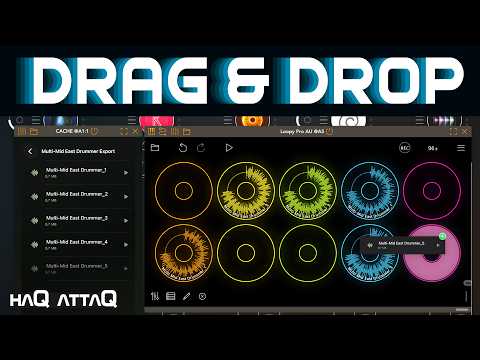
Picked it up nice addition mainly for the drag and drop.
>
That update was released about 5 days ago.
This is so much faster! Kudos. Love the waveform view.
It would be great if we could edit the top-level collection names for those cases (like when choosing an app’s folder, which is Documents regardless of the app) where the actual folder name isn’t ideal. If there were a way (I don’t know if it is possible) to choose to reveal the original in Files app when long-pressing that would be handy.