Loopy Pro: Create music, your way.
What is Loopy Pro? — Loopy Pro is a powerful, flexible, and intuitive live looper, sampler, clip launcher and DAW for iPhone and iPad. At its core, it allows you to record and layer sounds in real-time to create complex musical arrangements. But it doesn’t stop there—Loopy Pro offers advanced tools to customize your workflow, build dynamic performance setups, and create a seamless connection between instruments, effects, and external gear.
Use it for live looping, sequencing, arranging, mixing, and much more. Whether you're a live performer, a producer, or just experimenting with sound, Loopy Pro helps you take control of your creative process.
Download on the App StoreLoopy Pro is your all-in-one musical toolkit. Try it for free today.
Mochizuki by iceWorks, Inc. (Released)

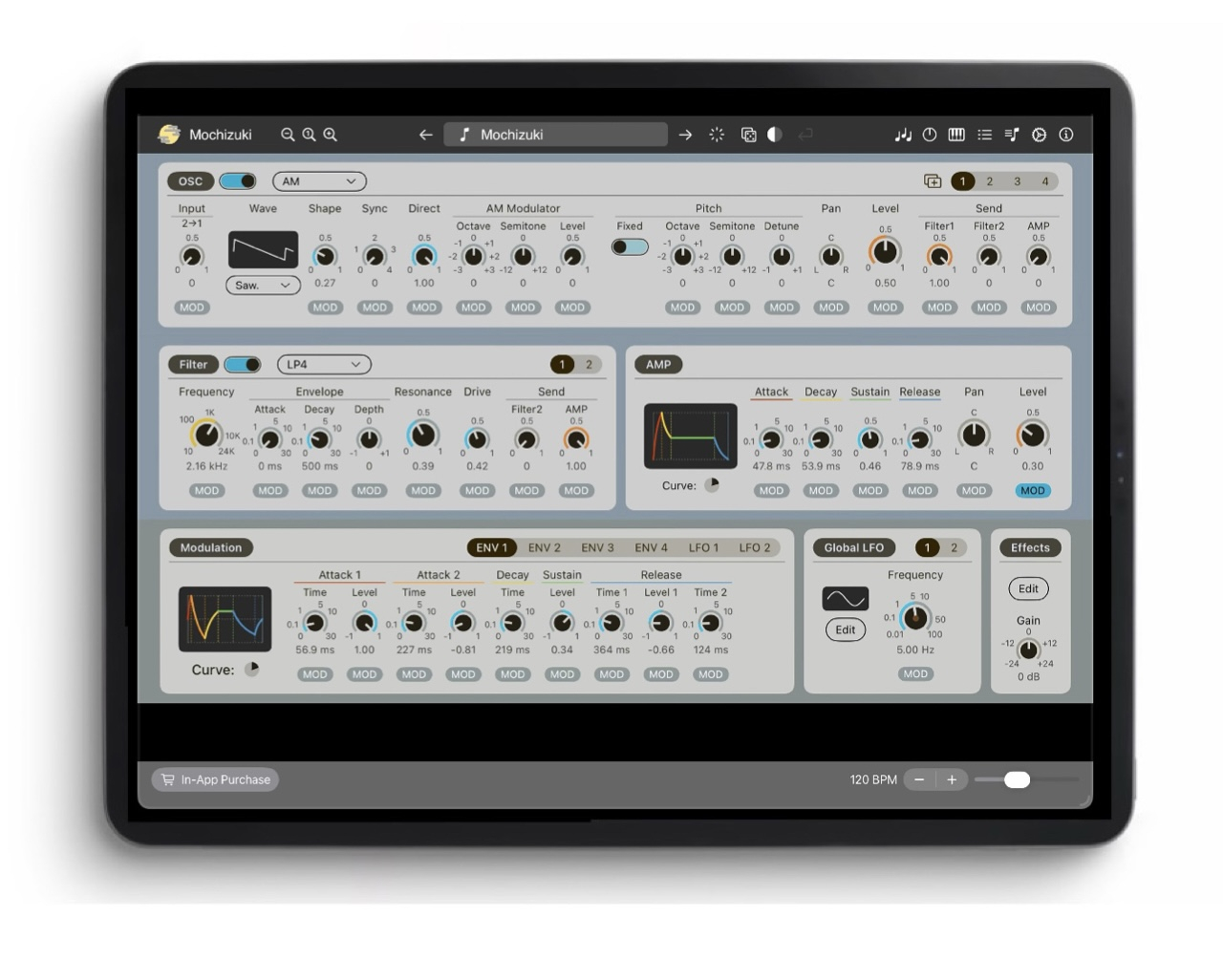
https://apps.apple.com/us/app/mochizuki-auv3-synth/id6776942580
Mochizuki is a subtractive synthesizer with four oscillators for Mac and iPad!!
Comments
@Fear2Stop New Iceworks synth!
Dude, I haven't heard from them in a long time. This is probably the closest thing to an AUv3 version of Cassini. It doesn't have as many modulators, though. I also miss the saturation modes and the lo-bit waves.
Hell yeah! 7 day free trial , royalties should hit soon anyway , and I can write it off as a business expense.
There you go, my friend. 😎
UI is messed up for me in standalone and AUv3.
Edit, dev replied:
Please try going to Settings → Display & Brightness → Text Size and reducing the text size a little. The interface should then display correctly in both the standalone app and the AUv3 plug-in…I will look into making the layout more tolerant of larger system text sizes in a future update.
Really disappointed. After Nubu, which was a blast, this synth feels uninspired. I don’t see anything that justifies the €22 price tag in such a saturated market. The Mela-style IAP model with paid versions is also something I don’t want to support. Plenty of better alternatives out there.
Bah, got very excited at the prospect of a new iceWorks synth because I also love Nambu (assume that’s what you mean @Charlesalbert ?😆) …..but initial responses here seem sceptical. Will trial it.
There's no demo on the official site, which is weird, and it looks like a very simple AM/FM combo synth.
And... it looks like you can only unlock features for version 1, so there will probably be v2, v3, etc. 😉
It’s a hard UI to read and the dials are uncomfortable small. Also it doesn’t seem to display everything correctly when switching tabs. Feels more like a work in progress? Sound fine but not something we don’t already have.
The ui text actually depends on your device settings. You should go to Settings → Display & Brightness → Text Size and increase your text size a bit. If the ui looks too cramped, the text size needs to be reduced.
I like it so far. Good review from Synth Anatomy too:
https://synthanatomy.com/2026/07/icegear-mochizuki-a-four-oscillator-multi-engine-synthesizer-for-ios-and-macos.html
Despite what the AppStore says, this IS actually a good mpe implementation, at least for my purposes. It may not technically follow every single aspect of the spec, it's a custom implementation, but it'll be more than enough for most users. I was able to set it up with Salome as a controller no problem, doing per note pitch bend, per note filter and volume mod etc. I have a 25 minute spoken walkthrough on the paid tier of my Patreon btw showing how to set all that up:
https://www.patreon.com/Gavinski/posts/walkthrough-auv3-163591583
The terms seem to indicate that there will be more features coming that require IAPs. So maybe it’s best not to buy it now.
Yeah, but I don’t wanna mess with that as it changes everything on my device, it should be right from the get go.
It’s not unusable, but (for example) Lagrange is way better to the eyes.
Yes, I told the dev the same, if you read my earlier post above, it sounds like he'll change this in an update. Wasn't a very good idea imo to do it the way he did it
It's hard to say, because this dev is clearly very very careful/paranoid (take your pick) when it comes to publishing various terms and conditions which might protect him from criticism or from being sued etc. I've never seen anything quite like it tbh.
A 31-point disclaimer? Why?
UI is actually perfect in my device in standalone; haven’t tried auv3 yet as I’m in process of moving to a new place so time is a bit stretched right now.
First impressions? Well…this is the first iceworks synth I wasn’t able to make any usable presets within 2 minutes of me picking it up . Quite the opposite actually; I normally rock using FM, but I’m
realizing AM synthesis is a bit unfamiliar to me .
Leo says in his video that you have to have OneDrive enabled on your iPad to use this. If that is so then this is a big NO from me...
https://forum.loopypro.com/discussion/69012/sfm-tutorials-mochizuki-from-icegear#latest
Example of an MPE patch I made from scratch, using the great inbuilt mpe keyboard. “Not mpe” my ass lol. Anyone who has doubts that this will work well with their MPE controller can try the 7-day free trial, as far as I’m concerned this is a very nice MPE synth. Weird that the Appstore description is so hard in denial of being an MPE synth, since this deserves the name MPE better than many apps in the Appstore that deign to use that label. See the description / pinned comment of the YouTube video for more commentary:
https://youtube.com/shorts/w20IQa98Sko
So, in terms of why this is worth buying if you have the other iceWorks synth, this is the main reason imo. It’s the first iceWorks synth capable of per-note expression. As someone who has comparatively little interest in synths that don’t, this is a major plus point.
Haven’t tried the inbuilt presets, I just saved things in AUM. That would be so weird tho if what Leo says is right, hmm. You wrote “OneDrive” btw, but the manual says it uses iCloud. I use iCloud, so this doesn’t bother me tbh.
Edit: and I just now made a user folder and saved a user preset, totally painless.
I switched off iCloud, so it’s either save in host or nothing. Some strange decisions where made here..
That may be a deal breaker for me…. My iCloud storage is full
Email the dev, should be trivial to add support for on-device presets
Ok, Leo said OneDrive...I can deal with iCloud...
Have anyone gotten the arpeggiator to work? I can open the window, but the arp on/off toggle is utterly unresponsive and the same goes for the dropdown menu to choose the arp style. (I’m on 18.7.7)
Otherwise I kinda like this synth (big fan of the Icegear apps in general - have all their previous apps) but am a little worried if this is an ios version thing. The graphics seem somewhat sluggish in general too - responses from menus coming a little delayed, which is not something I am used to from their other synths.
Love everything Ice Works have released…..gonna wait to buy this one though
I haven’t had either of those probs, I’m on iOS 26.5. Email the dev? There should be a contact form or listed email on the site.
My policy with this dev is buy what he makes, ever since since Argon and Xenon.
UI is messed up, text is a mess and nothing in the menu to change it.
See above for solution