Loopy Pro: Create music, your way.

What is Loopy Pro?Loopy Pro is a powerful, flexible, and intuitive live looper, sampler, clip launcher and DAW for iPhone and iPad. At its core, it allows you to record and layer sounds in real-time to create complex musical arrangements. But it doesn’t stop there—Loopy Pro offers advanced tools to customize your workflow, build dynamic performance setups, and create a seamless connection between instruments, effects, and external gear.

Use it for live looping, sequencing, arranging, mixing, and much more. Whether you're a live performer, a producer, or just experimenting with sound, Loopy Pro helps you take control of your creative process.

Download on the App Store

Loopy Pro is your all-in-one musical toolkit. Try it for free today.

Steinberg Mobile Summer Update: New HALion Sonic Play, Instrument Updates & Cubasis 3.8.5 Available

13»

Comments

  • @McD said:
    I’m a piano App completist and the chance to add both Steinberg Piano apps in a bundle at 50% off got me to put down the $20 for “Etude” (their concert piano app) and “Verve” (a Felted Piano app).

    I need another Piano like I need another “Reverb” but the heart can make the brain go “all in”.

    The UI is also the light white text on black but for performers it’s AUv3 and iPhone/iPad… I’ll check on Mac just to see. UPDATE: The only app from Steinberg I can find to install is “Studio Pass for VST Connect” (which sends audio/video from IOS to a Mac loaded with Cubase Pro or Nuendo). So… not “completely universal” apps here but universal in the IOS alone world.

    I’d load it into AUM sessions per set up and avoid finding the Preset from the side menu. Especially, on an iPhone. But an iPhone loaded with these pianos and a MIDI keyboard can make gigging a lot easier than hauling in the real Yamaha Piano or Workstation.

    Comparable to many of the great Piano apps sonically… I wish someone like @linearlineman could comment on the realism for the true piano touch and response.

    Many of the presets just eliminate the need to load up additional FX as you would expect from a keyboard workstation leader like Yamaha (Steinberg is a division of Yamaha). So, like the Roland Zenology GX stuff that’s coming or the Korg apps in this vein (Module Pro) we are getting IOS instances of some really pristine sound engines and rompler sound sets.

    I do wish the Verve Felt piano had even more Felt to make them be able to sound like a Kalimba or other pitched percussion instruments. It actually strikes me as a great intimately recorded upright that has one of the “practice mode” felt screens you can drop down between hammers and strings.

    NOTE: If you have Cubasis 3 installed then Verve and Etude will show up as a loaded instrument without the AUv3 overhead. So, live performers could load Cubasis projects with pre-config’ed Setups.

    NOTE2: Like most rompler Pianos these are large apps:
    Verve 1.5GB
    Etude 750 MB

    I was shocked to see the new HALion Sonic Play download was only 230MB but it appears it shares sound samples with HALion Sonic Selection and used 2.1GB in all.
    Or does it share with Iconica Sketch?

    Is storage is a concern for you then $50 “PianoTech 9” instances are the way to go.
    I went “all in” using some credit card bonus $’s that kept the massive spend off my credit card bill. Going “all in” on PianoTech 9 also lets you tweak a massive number of instrument parameters important to serious pianists. There are tweaks that can make PianoTeq imitate other instruments or let you treat it like a very different synth type. I really would like to see Modartt (the maker of PianoTeq) go even further into this area of offering a physical modeling synth that drops some of the pianisms of PianoTeq. Maybe a hot start up will invade this “solution space”. I’d really appreciate the chance to tweak some models to make new “physical” instruments that no one has ever built.

    Hi @McD

    WOW - that's quite a review.

    Thanks for the detailed feedback and for giving Verve, Etude, and HALion Sonic Play a try!

    We're glad to hear you're enjoying the instruments and appreciate your observations about the sounds, workflow, and AUv3 integration. And yes, one of the main goals behind HALion Sonic Play was to make Steinberg instruments available across compatible AUv3 hosts, following our Verve, Etude and Iconica Sketch AUv3 apps and giving users more flexibility beyond a single app.

    Enjoy exploring the sounds, and thanks again for sharing your impressions with the community!

    Thanks again,
    Lars

  • @Robin2 said:
    @LFS, is there a list of included instruments anywhere? Searched but couldn’t find one.

    Hi @Robin2

    Unfortunately we do not have a full list of the +2000 instruments available.

    Best,
    Lars

  • @NoiseHorse said:
    I think this is the first app I ever downloaded without hearing a SoundTestRoom video first.

    Hi @NoiseHorse,

    I very much hope so, too, that Doug will release a video about HSP soon... 😊

    Best,
    Lars

  • @LFS said:

    @rapidfire said:
    the Punch-in clip records to the right size then it instantly jumps back a 3/32 note length as soon as it reaches Punch-out?
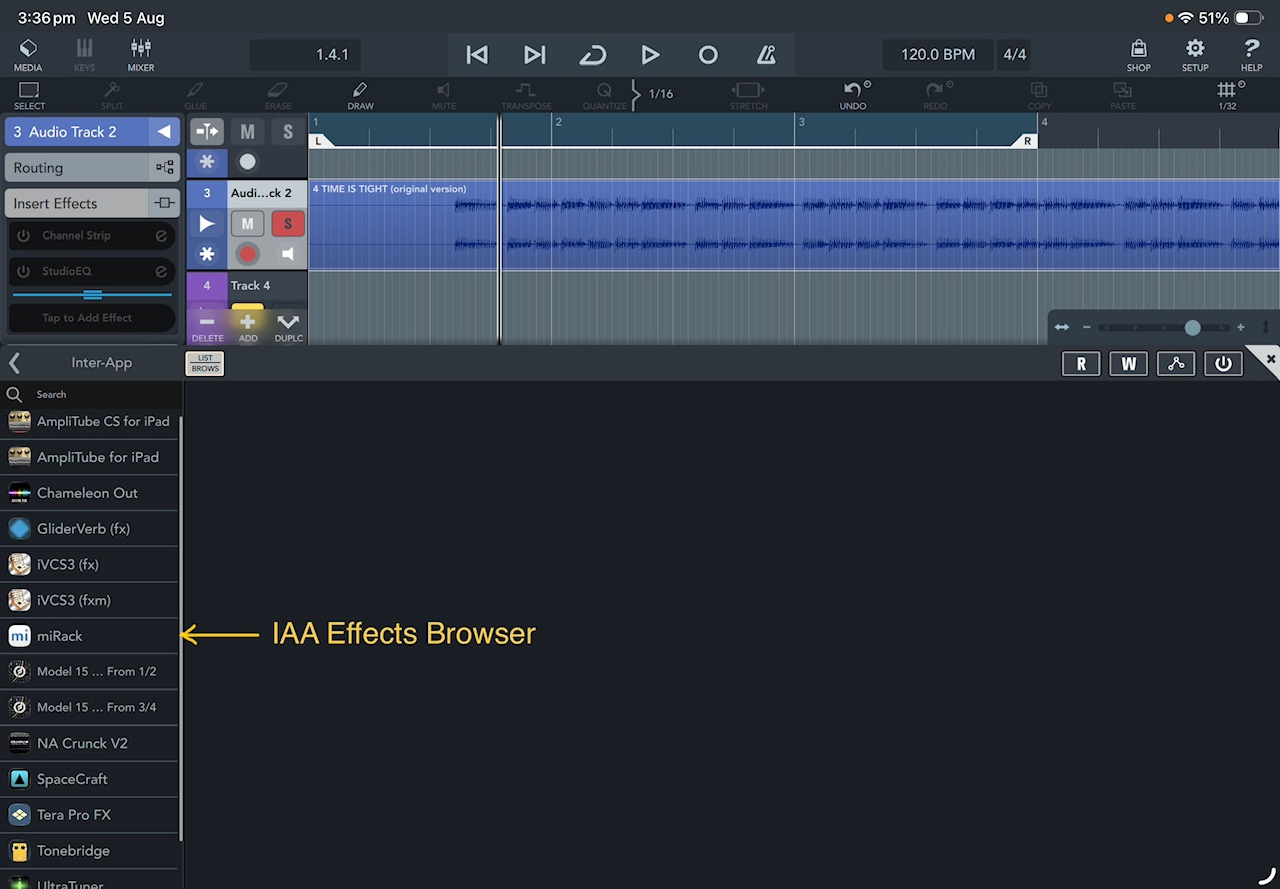
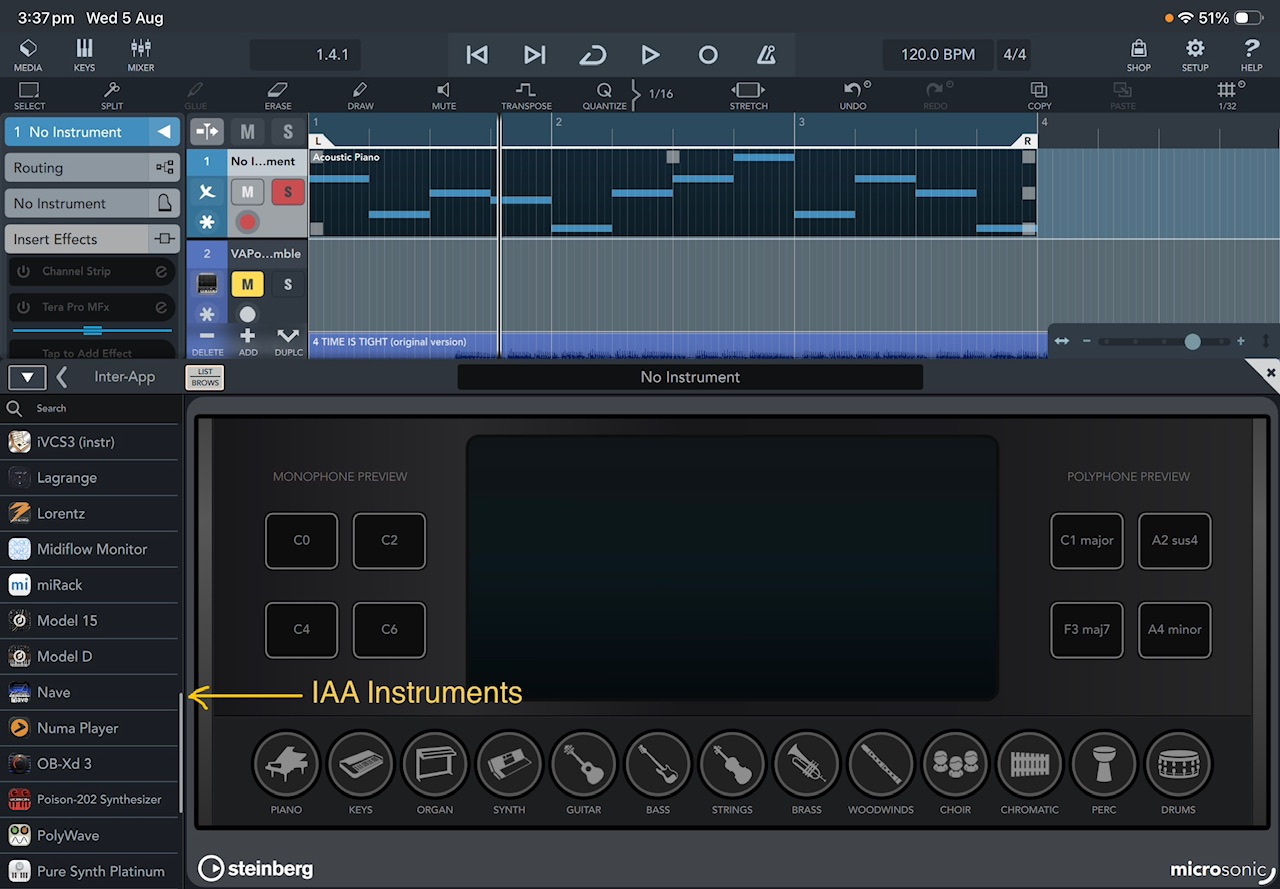
    IAA seems broken on audio tracks. The menu is empty. This is both on phone and iPad on latest iOS. I have restarted both units and still get this

    Hi @rapidfire,

    You've reported both issues in our Cubasis forum, correct?

    Am I correct in understanding that you've also experienced the IAA issue in AUM? If so, please make sure to report it to Jonatan as well, to see if he has any insights into the cause.

    I'll make sure to forward both issues to our engineering team.

    On a side note, I'd strongly recommend moving over to AUv3. IAA is no longer supported for quite some time, while AUv3 offers significantly more features, flexibility, and integration options.

    Best regards,
    Lars

    Hi @LFS,
    I am confused how the subject of the broken IAA is somehow imposed on my message concerning Punch-in recordings? I certainly didn’t write that complaint because all my IAA apps (except SampleTank) still work as good now as they did 5 or more years ago.

    I haven’t reported the Punch-in recording issue on the Cubasis forum mainly because I hardly ever use it, I much prefer to play a new part on a separate track and then cut and drag the new section required, I find this method sounds more natural, I find when using Punch-in in Cubase on desktop always sounds different dynamically to the original, that’s just my ‘eager to get it right’ and I end up playing either too hard or too soft, I merely indicated to @ecou that the issue still exists even in v3.8.5
    Mike

  • LFSLFS
    edited August 5

    @maxxpower18 said:
    With instruments that have the key switch, like the strings, do you have to hold down the key the whole time? I'm talking about like switching from staccato to sustained.

    Hi @maxxpower18,

    In Iconica Sketch, key switches are triggered by simply tapping the corresponding key.

    In HSP, this works the same way for some presets (e.g. FlexPhrased Pizzicatos). However, for other presets (such as guitars), you need to press and hold the key switch key for the articulation to remain active.

    You may also want to check out our tutorials for both apps, where Dom demonstrates how key switches work in each instrument. Please note that the Iconica Sketch tutorial covers the original release version and not yesterday's 1.2 update.


    Hope that helps!

    Best,
    Lars

  • @LFS said:

    @jwmmakerofmusic said:
    I was just thinking about how I wish I had Halion sounds in other apps. Sold.

    Hi @jwmmakerofmusic

    Glad to hear that we already had HSP in place for you right when you needed it... 😉

    Best,
    Lars


    Hi @jwmmakerofmusic

    Thank you very much for your kind feedback!
    We're glad to read that you seem to enjoy HSP so far... :)

    Best of luck for your client work!

    Thanks again,
    Lars

    Thanks mate. :) You're welcome for the feedback. Honestly Halion Sonic Play is a godsend.

  • All my IAA apps are still available in the Audio and MIDI browser on both iPad Air 4 and 13” iPad M2.
    Mike.

    Hi Mike

    Thanks for checking. Still the same here after a clean install 🙄

  • edited August 5

    @NTKK said:

    All my IAA apps are still available in the Audio and MIDI browser on both iPad Air 4 and 13” iPad M2.
    Mike.

    Hi Mike

    Thanks for checking. Still the same here after a clean install 🙄

    Same issue all the iaa for audio are missing. Restarted the device but list still empty. ios 26.5.2 , iphone 15 max. Same thing on ipad running ipad 10.7.8 with Cubasis 3.8.5

  • @rapidfire said:

    @LFS said:

    @rapidfire said:
    the Punch-in clip records to the right size then it instantly jumps back a 3/32 note length as soon as it reaches Punch-out?
    IAA seems broken on audio tracks. The menu is empty. This is both on phone and iPad on latest iOS. I have restarted both units and still get this

    Hi @rapidfire,

    You've reported both issues in our Cubasis forum, correct?

    Am I correct in understanding that you've also experienced the IAA issue in AUM? If so, please make sure to report it to Jonatan as well, to see if he has any insights into the cause.

    I'll make sure to forward both issues to our engineering team.

    On a side note, I'd strongly recommend moving over to AUv3. IAA is no longer supported for quite some time, while AUv3 offers significantly more features, flexibility, and integration options.

    Best regards,
    Lars

    Hi @LFS,
    I am confused how the subject of the broken IAA is somehow imposed on my message concerning Punch-in recordings? I certainly didn’t write that complaint because all my IAA apps (except SampleTank) still work as good now as they did 5 or more years ago.

    I haven’t reported the Punch-in recording issue on the Cubasis forum mainly because I hardly ever use it, I much prefer to play a new part on a separate track and then cut and drag the new section required, I find this method sounds more natural, I find when using Punch-in in Cubase on desktop always sounds different dynamically to the original, that’s just my ‘eager to get it right’ and I end up playing either too hard or too soft, I merely indicated to @ecou that the issue still exists even in v3.8.5
    Mike

    I did report it on the Steinberg forum and @LFS did reply to me. 😀

  • @ecou said:

    @rapidfire said:

    @LFS said:

    @rapidfire said:
    the Punch-in clip records to the right size then it instantly jumps back a 3/32 note length as soon as it reaches Punch-out?
    IAA seems broken on audio tracks. The menu is empty. This is both on phone and iPad on latest iOS. I have restarted both units and still get this

    Hi @rapidfire,

    You've reported both issues in our Cubasis forum, correct?

    Am I correct in understanding that you've also experienced the IAA issue in AUM? If so, please make sure to report it to Jonatan as well, to see if he has any insights into the cause.

    I'll make sure to forward both issues to our engineering team.

    On a side note, I'd strongly recommend moving over to AUv3. IAA is no longer supported for quite some time, while AUv3 offers significantly more features, flexibility, and integration options.

    Best regards,
    Lars

    Hi @LFS,
    I am confused how the subject of the broken IAA is somehow imposed on my message concerning Punch-in recordings? I certainly didn’t write that complaint because all my IAA apps (except SampleTank) still work as good now as they did 5 or more years ago.

    I haven’t reported the Punch-in recording issue on the Cubasis forum mainly because I hardly ever use it, I much prefer to play a new part on a separate track and then cut and drag the new section required, I find this method sounds more natural, I find when using Punch-in in Cubase on desktop always sounds different dynamically to the original, that’s just my ‘eager to get it right’ and I end up playing either too hard or too soft, I merely indicated to @ecou that the issue still exists even in v3.8.5
    Mike

    I did report it on the Steinberg forum and @LFS did reply to me. 😀

    I think Lars was questioning if I had reported the issue in the past……. I didn’t 🫣
    Mike

  • edited August 5

    .

  • @rapidfire said:

    @ecou said:

    @rapidfire said:

    @LFS said:

    @rapidfire said:
    the Punch-in clip records to the right size then it instantly jumps back a 3/32 note length as soon as it reaches Punch-out?
    IAA seems broken on audio tracks. The menu is empty. This is both on phone and iPad on latest iOS. I have restarted both units and still get this

    Hi @rapidfire,

    You've reported both issues in our Cubasis forum, correct?

    Am I correct in understanding that you've also experienced the IAA issue in AUM? If so, please make sure to report it to Jonatan as well, to see if he has any insights into the cause.

    I'll make sure to forward both issues to our engineering team.

    On a side note, I'd strongly recommend moving over to AUv3. IAA is no longer supported for quite some time, while AUv3 offers significantly more features, flexibility, and integration options.

    Best regards,
    Lars

    Hi @LFS,
    I am confused how the subject of the broken IAA is somehow imposed on my message concerning Punch-in recordings? I certainly didn’t write that complaint because all my IAA apps (except SampleTank) still work as good now as they did 5 or more years ago.

    I haven’t reported the Punch-in recording issue on the Cubasis forum mainly because I hardly ever use it, I much prefer to play a new part on a separate track and then cut and drag the new section required, I find this method sounds more natural, I find when using Punch-in in Cubase on desktop always sounds different dynamically to the original, that’s just my ‘eager to get it right’ and I end up playing either too hard or too soft, I merely indicated to @ecou that the issue still exists even in v3.8.5
    Mike

    I did report it on the Steinberg forum and @LFS did reply to me. 😀

    I think Lars was questioning if I had reported the issue in the past……. I didn’t 🫣
    Mike

    Just +1 my thread. Easy peasy.

  • @hacked_to_pieces said:

    @NTKK said:

    All my IAA apps are still available in the Audio and MIDI browser on both iPad Air 4 and 13” iPad M2.
    Mike.

    Hi Mike

    Thanks for checking. Still the same here after a clean install 🙄

    Same issue all the iaa for audio are missing. Restarted the device but list still empty. ios 26.5.2 , iphone 15 max. Same thing on ipad running ipad 10.7.8 with Cubasis 3.8.5

    Hi @hacked_to_pieces, @NTKK,
    Everything is fully updated

  • @LFS this is what I see on iPhone and iPad with Cubasis 3.8.5

  • @hacked_to_pieces said:
    @LFS this is what I see on iPhone and iPad with Cubasis 3.8.5

    A device restart (Power Off) might help with this.

  • @uncledave said:

    @hacked_to_pieces said:
    @LFS this is what I see on iPhone and iPad with Cubasis 3.8.5

    A device restart (Power Off) might help with this.

    @uncledave thanks for the suggestion I did try that already to no avail.

  • @hacked_to_pieces

    I have the same thing here.

  • LFSLFS
    edited August 5

    Hi @rapidfire, @hacked_to_pieces,

    Thanks for the info which I'll share with our engineering team for evaluation.

    Please allow some time for the issue to be reviewed by our engineering team.
    I'll get back to you once I have more information.

    We recommend using Audio Unit (AUv3) plug-ins instead of Inter-App Audio (IAA) whenever possible. IAA was deprecated by Apple quite some time ago and has largely been superseded by the more capable and reliable AUv3 format.

    Best regards,
    Lars

  • @LFS said:
    Hi @rapidfire, @hacked_to_pieces,

    Thank you for the report.

    I'll share the issue with our engineering team for evaluation. Please allow some time while it is being reviewed.

    In the meantime, could you let me know if the feature works as expected in other hosts/apps?

    Best regards,
    Lars

    Thanks for keeping the IAA flame lit.

  • @hacked_to_pieces said:
    @LFS this is what I see on iPhone and iPad with Cubasis 3.8.5

    Hi @hacked_to_pieces,
    My apologies, I was looking in the wrong place, I also have no IAA in the Audio Routing like on your screenshot.
    Mike

  • @NoiseHorse said:

    @LFS said:
    Hi @rapidfire, @hacked_to_pieces,

    Thank you for the report.

    I'll share the issue with our engineering team for evaluation. Please allow some time while it is being reviewed.

    In the meantime, could you let me know if the feature works as expected in other hosts/apps?

    Best regards,
    Lars

    Thanks for keeping the IAA flame lit.

    You've been too fast to quote, was still updating my feedback.
    Again we strongly suggest using AUv3 - see above.

  • @rapidfire said:

    @hacked_to_pieces said:
    @LFS this is what I see on iPhone and iPad with Cubasis 3.8.5

    Hi @hacked_to_pieces,
    My apologies, I was looking in the wrong place, I also have no IAA in the Audio Routing like on your screenshot.
    Mike

    No problem I know you were trying to help so thank you.

  • Cheers for the official announcement @LFS

  • @Poppadocrock said:
    Cheers for the official announcement @LFS

    +1🍻
    Mike

  • I can't get over how amazing this app is. I'm having a lot of fun playing keys this morning. Thank you, Steinberg, for bringing this app to iOS.

  • edited 1:00AM

    @echoopera said:
    Really loving HALion Sonic Play workstation synth @LFS great work on it and Cubasis as always. 👊🏼💗🎚️

    What is that in the top half of the screen?

    Oops. NM. I see, playbeat.

  • @garden said:

    @echoopera said:
    Really loving HALion Sonic Play workstation synth @LFS great work on it and Cubasis as always. 👊🏼💗🎚️

    What is that in the top half of the screen?

    Oops. NM. I see, playbeat.

    I wish we had a step Seqeuncer in Cubasis. 🤓

  • @echoopera said:

    @garden said:

    @echoopera said:
    Really loving HALion Sonic Play workstation synth @LFS great work on it and Cubasis as always. 👊🏼💗🎚️

    What is that in the top half of the screen?

    Oops. NM. I see, playbeat.

    I wish we had a step Seqeuncer in Cubasis. 🤓

    +1 🙂

Sign In or Register to comment.