Loopy Pro: Create music, your way.
What is Loopy Pro? — Loopy Pro is a powerful, flexible, and intuitive live looper, sampler, clip launcher and DAW for iPhone and iPad. At its core, it allows you to record and layer sounds in real-time to create complex musical arrangements. But it doesn’t stop there—Loopy Pro offers advanced tools to customize your workflow, build dynamic performance setups, and create a seamless connection between instruments, effects, and external gear.
Use it for live looping, sequencing, arranging, mixing, and much more. Whether you're a live performer, a producer, or just experimenting with sound, Loopy Pro helps you take control of your creative process.
Download on the App StoreLoopy Pro is your all-in-one musical toolkit. Try it for free today.
DEDALUS by Amazing Noises another Video

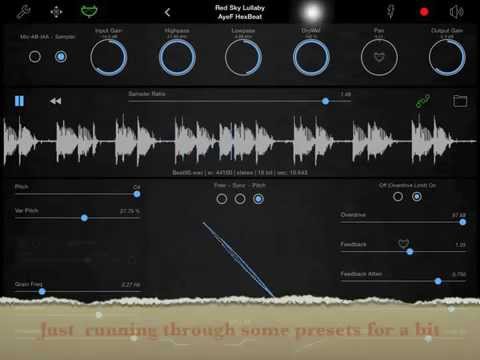
This a demo I did doing my best to show what Dedalus is including using in Audiobus fx slot
the app includes a bunch of samlpes presets i did
Comments
Got some nice stuff going running DM1 through it
Gnarley!
Reminds me of some of the Reaktor stuff and the morphing is cool.
After a frustrating futz earlier I'm determined to get DM1 running through something new and has there ever been an easier more vapid justification that that Sold! Which I wasn't an hour ago and haven't really had any more information (before your vid), but then I started to think about the 'coffee equation' and remembered that it's Friday night and for a thousand of them (payday after all) I would be nowhere else about now than in a loud bar where the drinks were expensive because the girls were pretty.
Erm, I digress.
@RedSkyLullaby Good work on the video by the way, showed me what I was waiting for someone to tell me; your way is better What do you use to screen capture with?
Thanks, used X Mirage on mac to do screen capture, recording ipad via bluetooth/airplay. it is a little ropey on ipad2 at times.
Dedalus is more satisfying to the soul than inflated drinks and eye candy. Ear candy is what you need
Siiiiick demo red sky, questions, what's the largest size sample you can load up, does it allow you to audition samples before you load them in the sample slot, does it have sample trimming, does the automation only work on the loaded sample or does it also work on the live input, and lastly is it possible to delete the sample library if you need to make space?
Thanks so much for the video
You can audition samples in the file manager before loading and you can trim samples by pinch zooming on the sample which works really well, if you hold your finger on the sample it resets to the original sample length.. although I wish this was different as sometimes when I'm doing a delicate trim adjustment it resets.
Nice demo, thanks @RedSkyLullabye, Apesoft/Amazing Noises are simply on a tear the last few months. Love the LFO automation
Apedelay coming soon is also excellent and much more than a delay
Not sure re largest file size but i just loaded a track over 3 mins and it worked.
Yes to audition samples and can delete, lfo automations work on live input and also you can record output to a file and export or even load that back in to remangle it.
Another great app, I can hear this one getting a lot of use
thanks Redsky …
can ape delay do what this can do and more or is it just different?
How many delays is too many?
I just instabuy apesoft apps now, sparkle is one of the most mind blowing apps I have. I just love the stuff they make, creative and pushes you into new sonic territory. I've been copying stuff from Reason7 into sparkle and it's magic what comes out. I can't wait until I actually have an internet connection (other than my crappy phone plan), so I can post some stuff
Apedelay is different, less mangling
Wow, just played with this for the first time and this is incredible, really..
Slow clap to apesoft for this one, just wow.
@RedSkyLullaby nice demo thanks.
does anyone know if the LFOs can be synced to BPM beat divisions?
The LFO speed is in Hertz 0.0160hz to 16hz
1hz = 1 LFO cycle per second so you could sync with a bit of math.
Eg. 60bpm would sync up well with 1hz (1 LFO cycle per beat) 2hz (2 cycles per beat), 4hz (4 per beat) etc
120 bpm 2hz would be 1 lfo cycle per beat.
I think it does receive midi clock but not sure what it syncs, might be worth an email to developer as i'm not sure re sync of LFOs to bpm, would be a cool option for an update to have choice of bpm setting on lfo rather than hz.
Just purchased based solely on @RedSkyLullaby 's vid. Thanks.
@RedSkyLullaby cheers for the details.
Just a quick question, it's not showing up as an effect in audiobus on my ios8 but is on my ios7 iPad?
Anyone else having this problem?
I was hesitating on this due to their volume spikes and the fact I already have the Reverb, but this and Doug's videos tempted me into buying it. Glad I did, it's an excellent effect, I'll use this one a lot. Though maybe not with headphones.
@buska it works fine for me in the effect slot on iOS 8.1.3 in Audiobus 2.1.9.
Damn it, it works on my iPad3 on ios7 but just isn't in the fx list on ios8
@Buska You might want to try deleting the app from your iOS 8 iPad and reinstall it again. I've had some situations where getting apps to work in Audiobus required restarting the iPad, opening the app first, or deleting and reinstalling the app.
It would be nice if the LFOs could sync to beat divisions / incoming MIDI clock.
I think MIDI clock is used only for delay times in Sync mode right now.
Great App though even in the crowded delay/FSU market.
I agree with this, although I haven't had any nasty suprises with Amazing Noises stuff.
I have had horrible maximum output feedback from ApeFilter when used in Audiobus.
(It could of been pretty serious if I had been wearing headphones)
It still happens pretty regularly actually when initiating the App within Audiobus and I had considered returning it due to this issue. It also seems to kill Audiobus when it happens.
Although these Apps allow pretty extreme amounts of gain and modulation options (which is great!), I'm hoping they can address the sudden audio spikes when initiating or switching presets in future updates since I don't think this is really an adequate level of protection for users hearing right now.
Hope the right folks are paying attention. This seems to be becoming An Issue.
@bonso - yep, they make a limiter anyway, so they should be including this as a built-in feature for a their apps, rather than leaving it to customers to discover the issue the hard way.
I'm still pondering what to do about my experience, it's a very serious issue.