Loopy Pro: Create music, your way.
What is Loopy Pro? — Loopy Pro is a powerful, flexible, and intuitive live looper, sampler, clip launcher and DAW for iPhone and iPad. At its core, it allows you to record and layer sounds in real-time to create complex musical arrangements. But it doesn’t stop there—Loopy Pro offers advanced tools to customize your workflow, build dynamic performance setups, and create a seamless connection between instruments, effects, and external gear.
Use it for live looping, sequencing, arranging, mixing, and much more. Whether you're a live performer, a producer, or just experimenting with sound, Loopy Pro helps you take control of your creative process.
Download on the App StoreLoopy Pro is your all-in-one musical toolkit. Try it for free today.
Comments
Yes I know that's track volume but that's not velocity. Thanks anyway!
@SAND Please consider the priority of loop markers. SAND supports MPE and usually MPE clips are longer harmony phrases and being able to loop part of the clip is very helpful.
https://roadmap.getsand.app/feature-requests/p/loop-markers-in-clip-editor
Will do! I'm about to implement loop markers with audio clips anyway, I'll see if I can make an intermediate release for MIDI clips
Thanks so much. Will be patient and submit ideas to roadmap
The way SAND layout AUv3 apps is the simplest yet the best.
Regardless your iPad orientation, all hosted AUv3 on the same track will max out horizontially and you just scroll up and down for different plugins.
Usually I use landscape mode but the portrait mode has some magic showing the full controller first and the upper part of the main plugin. It is so handy!
This is just a crop of the lower part of the portrait mode. I have the velocity control and custom layout from Velocity Keyboard and also full access to control panel of Geoshred(or most other instruments)
How crazy to have multiple Beat Scholar load up!
Polyrhythm x Polyrhythm
Seriously, even u don’t need a clip based sequencer nor MPE capturing, the joy of hosting Auv3 just for jamming is way above AUM
I may be wrong, but I seem to remember Sand can capture MPE.
It does
Ah, I misread your last paragraph, so I guess you meant, even if you don't need those killer features, it's great.
Does it record audio from external source?
loop markers are now in beta: https://testflight.apple.com/join/vNHnzdwH
I wish we could define our own scales.
New update just released:
LOOP MARKERS
Set start and end points to loop a portion of a clip.
CROP CLIP
Select and trim a section of a MIDI clip.
LINKED CLIPS
In Song Mode, changes applied to a clip will propagate to all its linked clips.
STEP INPUT RECORDING
Record one step at a time via MIDI or on-screen keyboard.
KEY COMMANDS
Added support for external keyboard shortcuts to speed up editing. Long press the Command key to see the full list on screen.
VOICEOVER SUPPORT
Navigate and edit using iOS accessibility
I've been interested in Sand for a while, and now that it supports linked clips I'm considering making a purchase
i really love the step input. but does anyone know. is there a way to slide that red step input playhead back to the start of the clip, so i can record in more steps?
I'm getting more and more tempted. Anyone with a judgement call on the learning curve? A 1 to 10 ranking on pliability / fun / quirky features this does best?
@SAND stellar release!!
I love the design of this app. It’s one of the few music apps I use on my phone because it’s great in portrait mode. A very capable host.
@coloringpad I haven’t used it much outside of recording GeoShred, but it’s been great for that. Easy to wrap your head around and use in terms of the core functions. MIDI Tape Recorder and Sand are my go to apps for MPE recording.
thank you! 🙏
Step Input Recording! Yesssssss
you can tap anywhere on the grid to position the red step selection. You can also disable auto-advance by toggling the button with the right-arrow in a circle.
Hope it helps
it does help. thanks. really nice update
My only request is to be able to set my own scale, since the included choices are very basic.
Aside from that, it’s great 👍
+1: Ideally a one-octave mini keyboard to enable/disable notes live. Some sequencers have this and it's a lot more fun and musical than scrolling through a list of names.
Had it forever, finally getting into it. This is a pretty great app.
that would be cool
Hello all, I’m having ghost notes playing in Oneshot and other Auv3 instruments, if I sequence them with a MIDI sequencer (eg Octachron).
I launch the transport, everything is fine.
If I stop it, the AU inst still plays a random note endlessly.
It happened with drums, synths, and so on.
Is it a known bug?
@SAND
This is my problem with sand
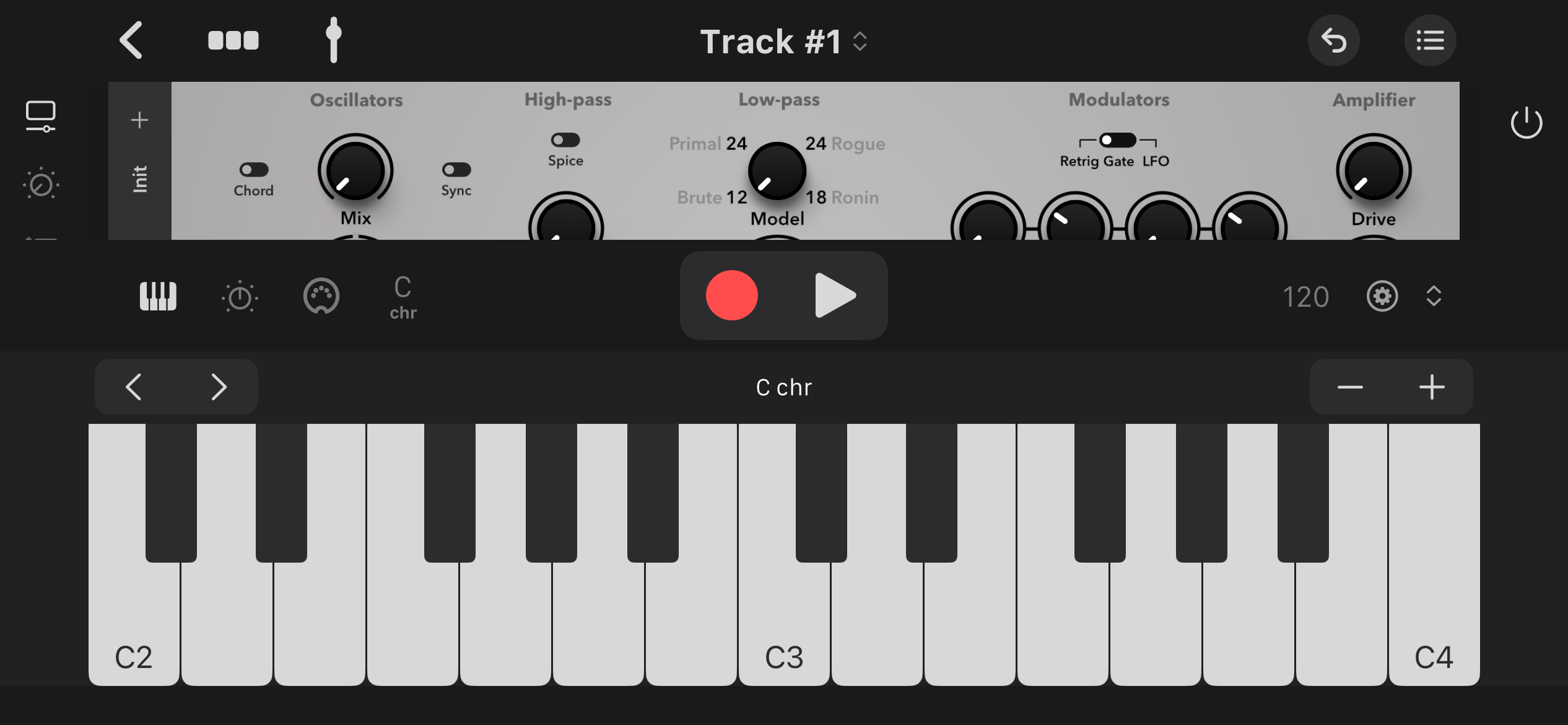
The build in keyboard covers the synth
Otherwise I ‘d buy it.
But this way it’s useless
Hi, thanks for reporting, it's not a known bug
I'm trying to replicate the bug, with Octachron and OneShot in one track, a drum sequence is set up in Octachron, clips in SAND are empty. After starting and stopping transport in SAND, I don't hear any other note playing.
Do you have any further detail? Am I missing something?
in the latest version it's possible to reduce the on-screen keyboard height by dragging down the toolbar (the black bar with the keyboard, transport buttons etc.. )
I hope it helps