Loopy Pro: Create music, your way.
What is Loopy Pro? — Loopy Pro is a powerful, flexible, and intuitive live looper, sampler, clip launcher and DAW for iPhone and iPad. At its core, it allows you to record and layer sounds in real-time to create complex musical arrangements. But it doesn’t stop there—Loopy Pro offers advanced tools to customize your workflow, build dynamic performance setups, and create a seamless connection between instruments, effects, and external gear.
Use it for live looping, sequencing, arranging, mixing, and much more. Whether you're a live performer, a producer, or just experimenting with sound, Loopy Pro helps you take control of your creative process.
Download on the App StoreLoopy Pro is your all-in-one musical toolkit. Try it for free today.
Control Voltage out AUv3 for eurorack modular synth — What's Possible?

Mods: I checked the forum for posts on this topic before posting this. There are some threads on connecting the iPad to Eurorack, but they are not limited to CV output (also including midi). There are also some thread on the individual apps mentioned in this post, whereas I wanted to create an overview. However, if you feel this should be merged please do so.
After many years with Ableton, I’ve finally made the switch to Loopy Pro on iPad as the central hub for my synth setup and I’m not looking back. The iPad feels much more intuitive and immediate for making music, and Loopy Pro has proven to be a fantastic piece of software. It does everything I wanted from Ableton, and more.
That said, there’s one thing I really miss from the Ableton ecosystem: control voltage (CV) output for my Eurorack setup. In Ableton, I used CV Tools, which gave me:
LFO
Clock generator
Envelope generator
CV instrument
Trigger out
Modulateable output
I mainly used the LFO, clock, and envelope generator, as I control synth voices and sequencing via a MIDI-to-CV module. For getting the CV into my rack, I used the optical out of a MOTU Ultralite MK5 into a BoredBrain OPTX which works really well. I also use some of the MOTU’s DC-coupled outputs as trigger outs.
I knew going in that CV output would be a challenge on iPad. It’s not a deal-breaker — I’m sticking with this setup — but I’d love to see more viable solutions here. For any developers reading this: there’s definitely a gap in the market. I’ve explored a few options, but so far none have been quite right. Here’s a quick overview:
CoVariant
Likely the most promising. It includes AUv3s for CV instrument, trigger out, clock, MIDI processor, and individual outs. This could solve most of my needs — but unfortunately, it’s not currently available where I live (Germany). Last update was in July 2023.
MiRack
Essentially a port of VCV Rack to iPad. In theory, it can output CV, but it’s also unavailable in Germany (and possibly other European countries). I also think it would be a bit overkill for my needs — I don’t want a full modular environment on each track, just simple LFOs.
sql Canvas
Outputs 8 CV signals, but only available as a standalone app (no AUv3). It also has limited routing options.
Flux Pro
So far the most success I’ve had. It outputs its modulation graphs as CV and runs inside Loopy Pro. But there are some downsides: It only runs when audio is detected (maybe I’m missing something here?) and the CV levels are very hot, possibly +/-10V, with no easy way to attenuate inside the plugin (you’d have to draw smaller curves). You can of course attenuate in the rack, but that’s another step I’d rather skip.
Drambo
Apparently capable of CV output, but I haven’t tried it yet. If someone can confirm this works well for CV, that would be hugely helpful. It seems like overkill for this purpose (similar to MiRack), especially if running multiple instances.
Not an option but... LFOH by K-Devices
I love this LFO (used it in Ableton too), but it has no CV out. It can modulate incoming audio level, so theoretically, if fed a 5V or 10V signal, it could work as an LFO, but again I would need something which could feed it such a signal (perhaps Drambo...?).
That’s everything I’ve found so far. Have I missed anything? I would love to hear what other folks are using to get CV out from iPad, especially in a Loopy Pro-based setup.
And as mentioned, if any developers feel like addressing this I would be very grateful! 
Comments
In principle many apps can create a DC capable audio signal that can be processed by a DC coupled audio interface. The other route are MIDI/CV converters. In my setup I sometimes use a Korg SQ-1 sequencer that way.
@catherder , which apps are you referring to? I would need it to be able to make CV signals which are useful for modulating synths: mainly LFO's which can be synchronised to the host's tempo.
As mentioned in my post above, my interface setup is DC coupled: I use a MOTU Ultralite MK5, which as DC-Coupled outputs, and a BoredBrain OPTX connected to its optical IO, which provides another 8 DC-coupled outputs. I use a Midi-CV interface for controlling voices, but would rather output LFO's directly, instead of using a midi-cv converter.
@ASBM The stars align Please contact me via my support mail.
Thanks, that's very encouraging! I haven't tried out Drambo yet because it is a (little) bit more pricy than other apps and I was not sure it would be able to do what I need it to do, but now that you've confirmed it I will try it out. I'll just wait and see what @FredAntonCorvest has to contribute to this.
DM'd!
My setup is centered around Audulus and AUM, and I love it.
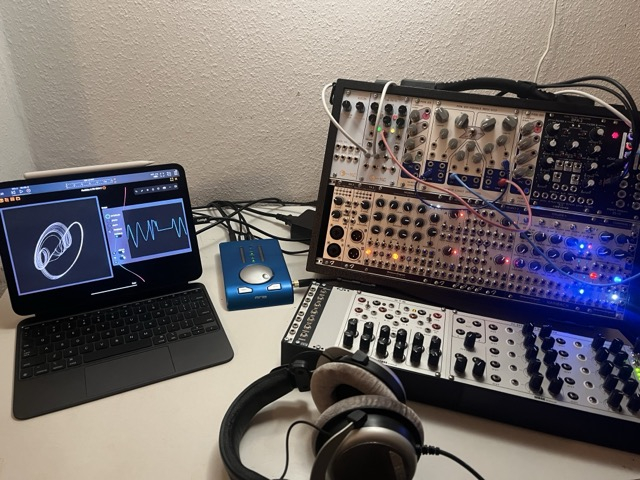
Hardware: Expert Sleepers ES-10 -> RME Babyface -> CalDigit Element -> iPad Pro M4.
A recent-ish Audulus update added proper AUv3 multi-bus support. I've got an AUM template for plumbing 8x ADAT I/O.
Audulus is great for CV processing. The built-in library includes modules for stuff like attenuating, offsetting, quantizing, triggering envelopes, etc.
Or the low-level 'expr' node (http://docs.audulus.com/nodes/#expr) is an absolute swiss-army knife.
e.g. to full-wave rectify an audio signal to CV, you'd just drop this expr:
'a < 0? a * -1: a'
For MIDI, the library modules are admittedly a bit limited (no output). You'd need to use nodes, which require Pro. And no built-in MPE support.
Visualisation is fun. I'll often just patch up a grid of scopes:
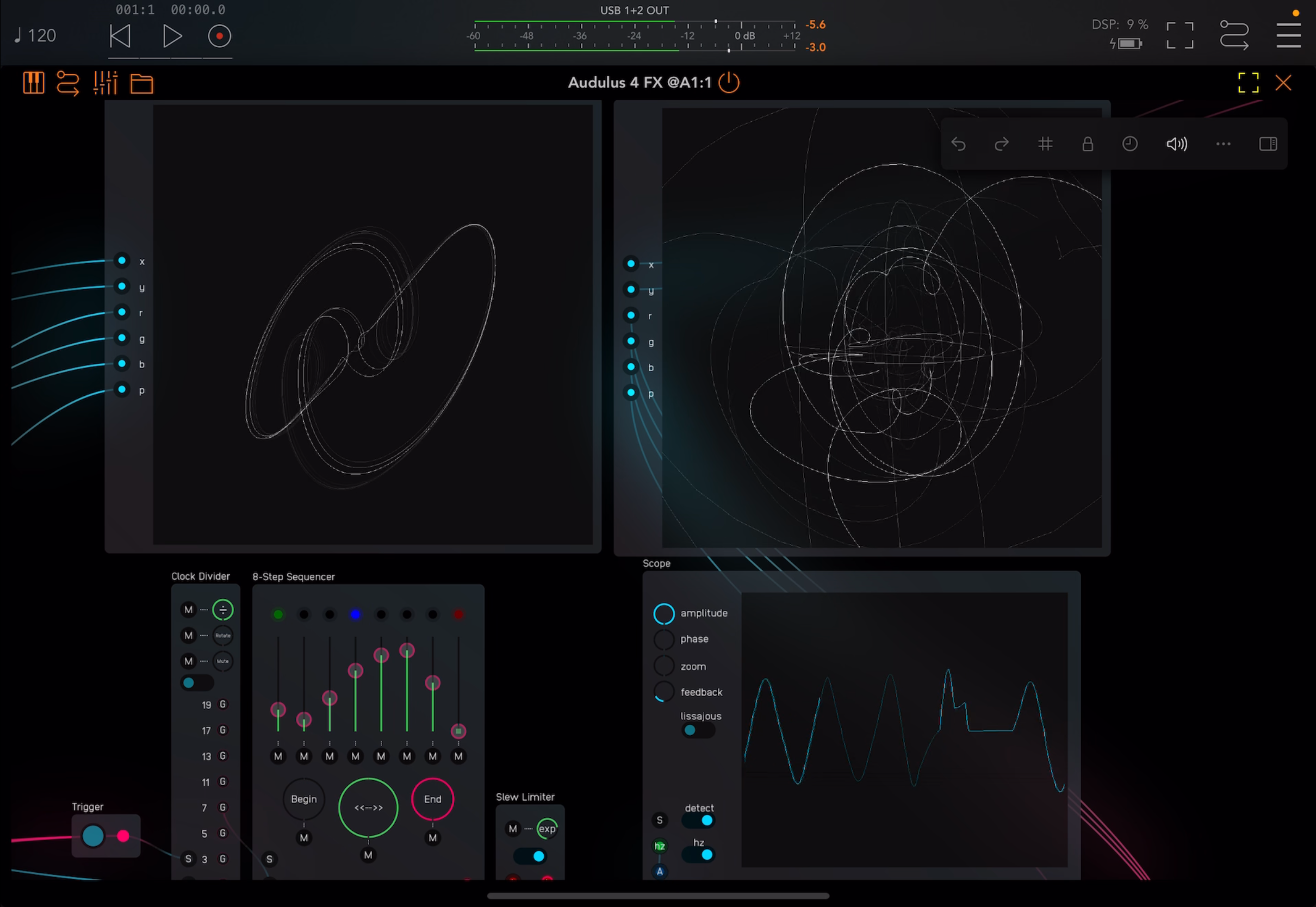
Above: Audulus library modules for sequencing, sending CV to Eurorack. The scopes are plotting signals from specific hardware. Top X/Y plots: NLC Hypster and a Collide 4. Bottom right: Middle Path VCO.
I have DC helper modules, for zero-calibration and voltage reference/measurement. As a multimeter, it's real helpful for debugging and understanding Eurorack gear:
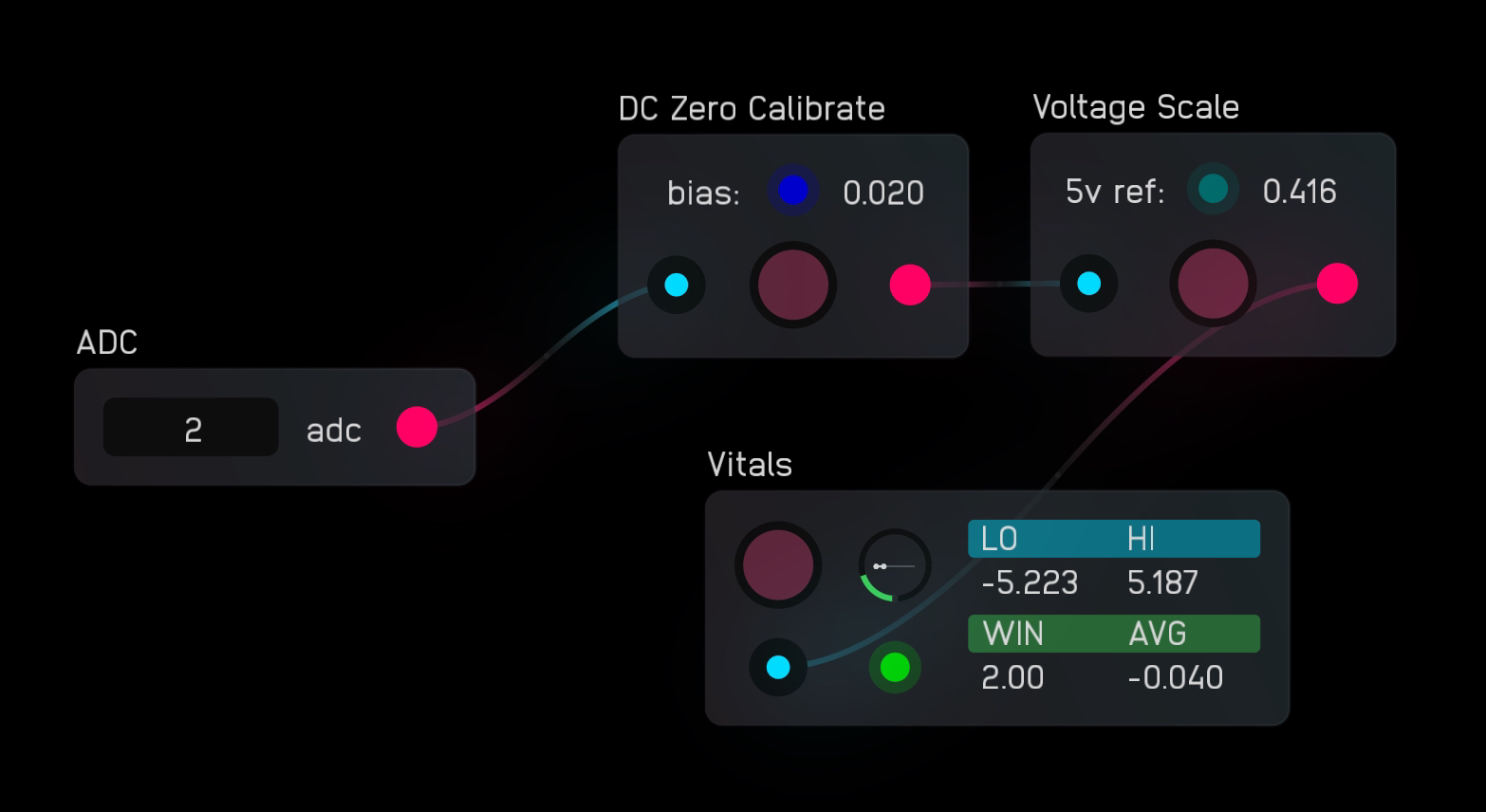
One gotcha to mention is that the audio input/output library modules (incidentally) filter DC. They're wrappers for the adc/dac nodes- but Pro subscription is required to work directly with nodes, or edit modules. If you'd like, just ask here or in the Audulus discord- myself or another user with Pro could share (modified) modules for DC.
FWIW, a number of Eurorack module designers use Audulus for mockups before physical prototyping and then use Audulus to generate CV to test the actual hardware units.
I've tried sqsl Canvas, MiRack, and Drambo.
Canvas is the most straightforward and provides the best user interface by far, but it's much more limited in the capabilities it provides. It has a couple different modes: sliders x8 ch., attack-decay envelope x8 ch., LFO x8 ch., and clock dividers x8 ch.. Unfortunately (afaik) you can't mix and match these different modes -- you're stuck using either 8 envelops or 8 clock divider rates -- you can't mix and match.
I like using Drambo and MiRack together. In particular, I use the Expert Sleepers ES-8 audio interface, and MiRack includes a virtual ES-8 calibrator module that lets you fine-tune the calibration of the hardware outputs so that a virtual representation of 0V actually outputs 0V into the rack (as opposed to ie. -0.04V or some other imprecise value). MiRack also includes a variety of virtual oscilloscopes that i like to use to analyze incoming signals -- although that might be less relevant for you, since afaik the MOTU interface doesn't provide DC-coupled inputs.
Even though MiRack is forked from the same codebase as VCV, the iOS/iPadOS app includes only a small fraction of the whole VCV module library. It has been a very long time since the developers added any recent modules. And there's no way to import modules on your own -- you have to wait for the officials devs to do it for you. (This is a limitation of App Store apps in general.)
When I want to make something more complex, I use drambo. Drambo is definitely not a "professional" or "full feature" virtual environment like Max/MSP or PureData, and it's got a lot of quirks and leaves lot to be desired. But it's still the most advanced and customizable voltage workstation I've used on iPad.
I haven't tried CoVariant, and it's been missing from the app store basically all
year.
The other limitation is miRack is stuck in the VCV v1 pre-release code base because the VCV developers changed the licensing, which excludes miRack from using later versions. Modules are increasingly dependent on the VCV v2 code base, so can't be directly ported, if at all. miRack is also unavailable in Europe at least for now.
Thanks for all the helpful replies!
@splishsplosh , I did not know about Audulus at all, it looks fantastic. I will be trying this one out, as well as Drambo.
Hi all, as you may have heard or read about in this thread, Fred now released Polyflo, the plugin he was hinting at here. I helped a bit with the Beta testing and it's fantastic - it solves all my CV in Loopy Pro wishes. I use it with a BoredBrain OPTX and it works perfectly. Highly recommended!
Can confirm. Scooped this one on release. Don’t own a eurorack, but FAC Polyflo is like a CV playground. If this were a standardized test and the question was “Waymaker is to midisequencing as _____ is to CV output” the answer would by Polyflo and I’d get a wicked smaht grade on the exam
I'm just starting to dip my toes into using Audulus with my ES-8 and eurorack setup, but I'm finding it daunting to learn how to use all the modules. Could you share those utility modules you've created for working with DC voltage? Maybe upload them to patchstorage.
i would use drambo, but there is also this
https://apps.apple.com/de/app/rope-midi-to-cv-converter/id6760467677