Loopy Pro: Create music, your way.
What is Loopy Pro? — Loopy Pro is a powerful, flexible, and intuitive live looper, sampler, clip launcher and DAW for iPhone and iPad. At its core, it allows you to record and layer sounds in real-time to create complex musical arrangements. But it doesn’t stop there—Loopy Pro offers advanced tools to customize your workflow, build dynamic performance setups, and create a seamless connection between instruments, effects, and external gear.
Use it for live looping, sequencing, arranging, mixing, and much more. Whether you're a live performer, a producer, or just experimenting with sound, Loopy Pro helps you take control of your creative process.
Download on the App StoreLoopy Pro is your all-in-one musical toolkit. Try it for free today.
Punchline Drum Machine - punch-in performance FX + AuV3 + Sequenced Gate (Out Now!)

Edit: It's out now! https://apps.apple.com/us/app/punchline-drum-machine/id6748292824
Find out more at https://charles.pizza/punchline, or check out the full manual at https://charles.pizza/manual.
--
First time poster, let me know if this is in the wrong spot!
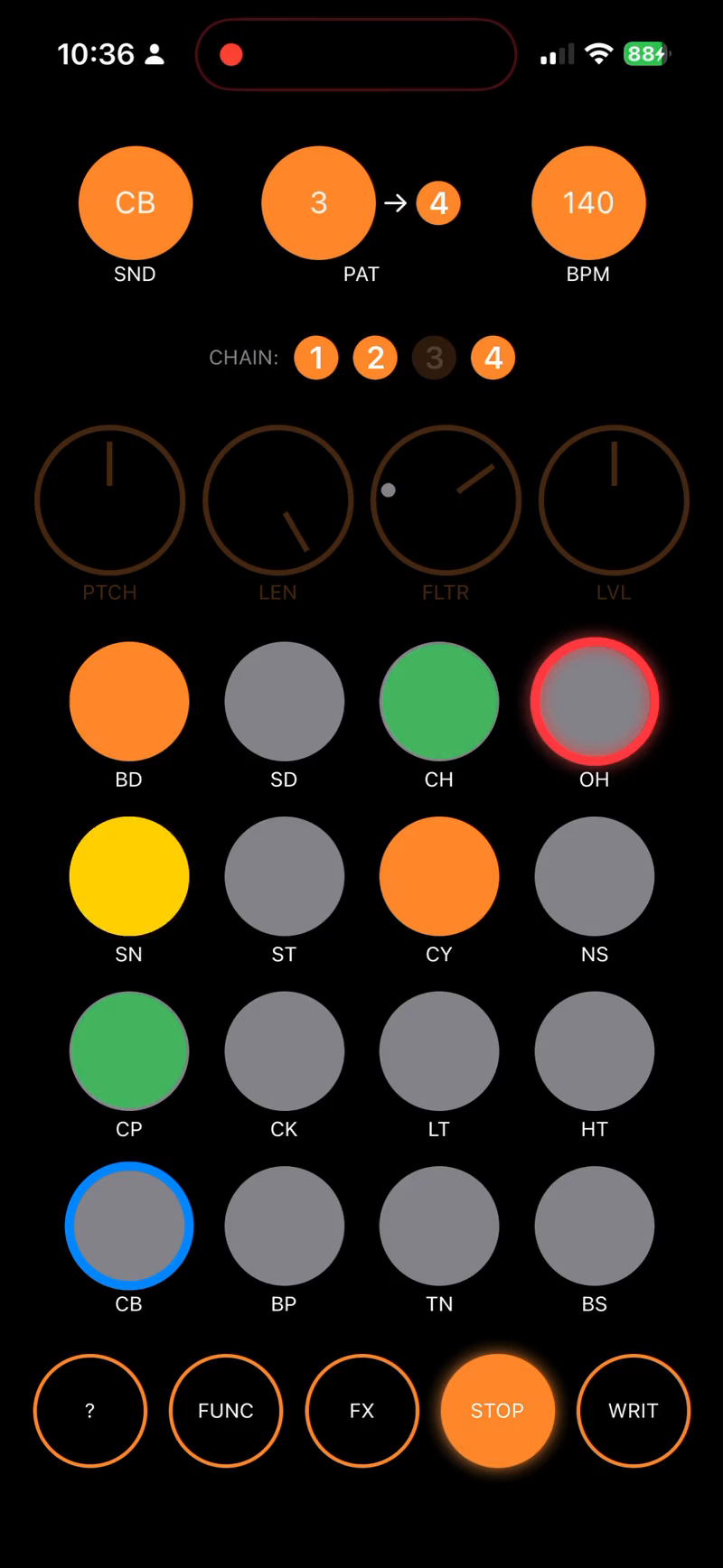
I’ve been working on my first iOS music app, inspired by pocket operators, but with some extra twists:
- 16 step sequencer x 16 chainable patterns
- 16 automatable punch-in fx
- 4 automatable per-sound parameters (pitch, length, level, filter) plus pad mutes
- Load your own custom samples or save sample sets as kits
It also works as an AUv3 plugin for loading into AUM, etc.
As a bonus, it works as a live effects plugin, too: use the same punch-in effects and automation but instead of sequencing drums, it becomes a sequenced gate effect.
You can see more at https://charles.pizza/punchline
It’s not out on the App Store yet, but there’s a few dozen TestFlight spots open, so grab it and let me know what you think! I'm grateful for any feedback you might have.
Comments
https://charles.pizza/punchline/
Looks very well put together and AUv3 and custom WAV import.
[Moved to General App Discussion for better visibility.]
Neat app, I’ve been trying out the Testflight. I do seem to have a text rendering issue. iPhone 16, iOS 18.6.
This should be fixed in the latest build; was a light mode issue. Let me know if you still see it with 19!
Pretty neat little thingy! 😁
Okay,so I started it in S.A and messed about for some time then wanted to save what I'd done. I get you can save kits but I'm referring to the seq and automation part. Are those saved with a '.punchlinkekit' maybe? I haven't got to test it in AuV3 yet so state-saving remains to be tested.🙃
This is fun! Are you going to include more samples than the 16 that currently come with the app? It would be cool to have a few different kits already set up that we could switch between.
Hm…am I missing something basic? I have tried the test flight, but get no sound when clicking the pads, nor can I change the selected sounds. This is both in AUM and as stand alone. (IOS 17.7 if this matters.)
Worked for me @catbox both in S.A and in AUM. I wanted to try to save a preset and saved locally in AUM. Reloaded the app and it loads the preset I saved but, now I got no sound, just like you.
edit: I tested to delete the pattern and that gave me sound again. Weird things.. 😃
@Pxlhg @catbox very weird! I'll see if I can reproduce. This my first time doing any audio at all, so it's possible it's not reconnecting the audio graph correctly in some states. Forgive my ignorance, but...what is S.A.?
It should save the pattern information with the document in AUM.
@Michael_R_Grant I need to put together some more open source kits and can include them as a bundle (or download from the site).
Ah, sorry - meant “stand alone”. And yes, have also tried to reinstall the testdrive, but can’t get any sound out of it at all, nor be allowed to choose another sound. The other buttons seem to work fine - can change to write and click play. But no sound no matter what I do. (And for the record: the sound and other apps work as usual.)
@Pxlhg it's possible you were between pattern versions as I made some changes, but to answer your other question: there's no saving/exporting patterns in the standalone app; it's got 16 patterns for you to play with and chain, and that's it! In AUM obviously patterns are saved with the document, so you're only limited to 16 per sesion
I guess I was thinking more about the whole: like, you do your kit, you do your patterns and possible automations and that would be a unique preset. I get that's not possible now but should be with state saving in e.g AUM, right?
Anyway, I hope it might come something like it (preset or session save, whatever) in a future version.
Thank you.
Hey, I was really surprised by how much i am enjoying this app. Having followed closely the launch of the pocket operators and smiling with each new Cuckoo video of him jamming to those little machines and often feeling uninspired by the serious music making software, I have been having so much fun with your app that I had to finally register on this forum after lurking around for months.
Every time I open it, I have more ideas on what it could do in addition… but am aware that the PO-vibe can quickly get lost in too many functions. Maybe there are two I would dare to share here.
The first would be a FX STEP SEQUENCER. In FX LATCH MODE, you can use the SND button to select an FX and then use the step sequencer for the FX, to have more control on the punch-in. FUNC+CLR could be used to clear an FX Automation in the FX LATCH MODE of the selected FX too…
I really liked your implementation of the tempo adjustment in the stand alone version, pulling down to show three more knobs, maybe in the FX LATCH MODE this could open two or three more fx settings when pulling down one of the FX PADS? Or maybe when you click the FUNC button in the LATCH MODE, the SND button opens an effect browser with some tweaks…
Ah, and the last one was to lock the parameters of the four knobs per step when the PAD os long pressed (on addition to the retrigger mode). Maybe these would make it less like a live instrument and more a sequencer, so feel free to dismiss it
Anyway, just wanted to say thank you for developing the app, have really been enjoying it! Also love the horizontal format, I was already imagining the next two apps in the series and having all three open next to each other on an IPad 😂
Cheers
Thanks all! There was an iOS 17 (!) issue, and some state restoration of levels in Host documents. Audio Unit debugging is a lot more complicated than the standalone app!
@Pxlhg Session state in AUM should save patterns, kits, automations, etc.
I've pushed a new build (20) with a number of updates:
@philms thanks for the kind words! I'm trying to balance "simple" with "powerful", it's always a balance. One thing I do plan to do is add global effects configurations, to adjust distortion amount, delay time, etc. Lots to do once I get v1 ready
I can confirm it work for me now as it should. :-) And that the app is fun!
And fixed the isolation issue - build 21 is up!
I’ve added a number of improvements including drambo support. If anyone has issues in any auv3 hosts, let me know!
I just pushed a new build with
plus some other fixes and improvements
Feel free to check it out!
@charlesv
+1 for more kits.
What Cem did with Community Presets in Nikali is kinda cool, or even just a section on a site like patchstorage where kits could be shared in the app format.
(Or is stuff like that on sites like patchstorage done by the community? Kinda like this forum? Pianobook is another site with a lotta DecentSampler stuff).
Also an easier way to make your own kits, current way is cumbersome. Lovely app, excited to try out the per-step editing!
@Squishy I’ll plan to include a few default kits if I can source some samples I’m allowed to distribute!
I could make a little webapp for kit generation, unless you have an idea for in-app? They’re just a zip file of wavs + json so easy enough to spin up.
Oh cool! Ya, that’s easy enough (sorry if that was in the manual and I just overlooked it!)
Really exciting news!! The implementation of the pattern lock is super effective and easy to use. I immediately tried to use it on some pitched samples and got some really interesting results, similar experience to some modular sequencers where I end up using much more my ears than a specific scale to build melodies.
It seems that when the sample is long enough, the parameter lock of step 2 will still affect the end of the first steps sample. Maybe this could be fixed with choking the previous sample?
Since your implementations have been great Im not sure about giving suggestions, but long-pressing the SND button could give some options about choking, cent/semitone for pitch and maybe a third one…
I see you use ST (Semitones) for the pitch… it might be too specific, but usually when using decimal values for pitch we use “cent” and “semitone” when it is stepped like when holding the FUNC button. I mentioned it above, maybe this could be defined per SND since not all samples need to be quantized to semitones.
Thanks for the amazing work! I will keep on testing the new features.
Samples for a single sound should choke currently. If you're not seeing that, let me know!
Maybe too technical but under the hood each step only has 8 substeps of resolution for automation values, and I'm doing some smoothing between them to avoid stairstepping. I think this makes sense for live recorded knob movements, but perhaps I can make manually entered / edited steps jump to their values instead of smoothing to them. Thanks for the feedback!
Edit: pushed a build with the above!
@Squishy I don't have any more kits up yet, but here's a kit generator, maybe this helps! http://charles.pizza/punchline/kits.html
Nice @charlesv works perfectly.
Here’s a kit I put together from Battalion (no samples, all synth drums). Kinda glitchy, gritty.
Above n beyond, I like this guy
Cheers man!
Hi, you were right! It is working great now. The web-app is a really easy to use, importing the ones were a breeze. I will try to build some Monday.
Is there a way to clear automations? For FX I think I got it but happens kind of by accident have checked the manual but couldnt find it.
Thanks
@philms if you have WRIT enabled and you press FX the automation will erase when the sequence restarts, I believe.
Thanks for the hint! It works fine for me now just double pressing FX when WRIT is enabled. What about the automation of the four knobs, is there a way to clearing it? My go to has been double clicking on the knob to bring them back and holding WRIT until the sequence has repeated once, but maybe there is a better way?