Loopy Pro: Create music, your way.

What is Loopy Pro?Loopy Pro is a powerful, flexible, and intuitive live looper, sampler, clip launcher and DAW for iPhone and iPad. At its core, it allows you to record and layer sounds in real-time to create complex musical arrangements. But it doesn’t stop there—Loopy Pro offers advanced tools to customize your workflow, build dynamic performance setups, and create a seamless connection between instruments, effects, and external gear.

Use it for live looping, sequencing, arranging, mixing, and much more. Whether you're a live performer, a producer, or just experimenting with sound, Loopy Pro helps you take control of your creative process.

Download on the App Store

Loopy Pro is your all-in-one musical toolkit. Try it for free today.

Piano Motifs by Fernando Morales

1757678808183

Comments

  • @azul3D_Apps said:

    @gusgranite said:

    @azul3D_Apps said:

    @gusgranite said:
    Minor workflow comment. Every time you change a parameter you have to pause and wait for the Generate icon to show again. It’s a minor workflow issue. Does there need to be that little pause each time? For example, when you select a key, then a scale, etc.

    Hi @gusgranite, thanks for your feedback. Since you're mentioning the Generate icon, I believe you're talking about the AUv3 Plug-In. I took a look in AUM and as soon as you change, let's say, the Key, the Generate button appears with no delay. What host is this happening in? If you have some time and it's not much trouble, maybe you can DM me a video of what you're seeing. Thanks!

    Honestly, something has changed and I’m not seeing it now. Haha. It used to always pause on a pop up message that was something like the ‘No motif, you need to press Generate’ and you couldn’t use the app until that message went away. I just tried to recreate it and I can’t now.

    @gusgranite, now that you mention the pop up message, I know what is going on. What you were seeing was a Warning Message. This happens when you lock the Programmed Chord Progression Setting and you press the Randomize Button or you change the Scale. When you press the Randomize button it will say that only the key will be randomized. When you change the Scale it will give you the option to clear the chord progression.

    I really appreciate the reply but that wasn’t it. It’s been a thing for a long time. I would pause the transport, change a setting, and a Generate related message would pop up and the app would pause until the message loaded and then cleared. Sorry to have taken your time with this though as I can’t recreate it now.

  • @gusgranite said:

    @azul3D_Apps said:

    @gusgranite said:

    @azul3D_Apps said:

    @gusgranite said:
    Minor workflow comment. Every time you change a parameter you have to pause and wait for the Generate icon to show again. It’s a minor workflow issue. Does there need to be that little pause each time? For example, when you select a key, then a scale, etc.

    Hi @gusgranite, thanks for your feedback. Since you're mentioning the Generate icon, I believe you're talking about the AUv3 Plug-In. I took a look in AUM and as soon as you change, let's say, the Key, the Generate button appears with no delay. What host is this happening in? If you have some time and it's not much trouble, maybe you can DM me a video of what you're seeing. Thanks!

    Honestly, something has changed and I’m not seeing it now. Haha. It used to always pause on a pop up message that was something like the ‘No motif, you need to press Generate’ and you couldn’t use the app until that message went away. I just tried to recreate it and I can’t now.

    @gusgranite, now that you mention the pop up message, I know what is going on. What you were seeing was a Warning Message. This happens when you lock the Programmed Chord Progression Setting and you press the Randomize Button or you change the Scale. When you press the Randomize button it will say that only the key will be randomized. When you change the Scale it will give you the option to clear the chord progression.

    I really appreciate the reply but that wasn’t it. It’s been a thing for a long time. I would pause the transport, change a setting, and a Generate related message would pop up and the app would pause until the message loaded and then cleared. Sorry to have taken your time with this though as I can’t recreate it now.

    @azul3D_Apps just for the sake of closing the loop here’s what I’m talking about. It’s so minor I feel silly going on about it but each time you select a setting it pauses with the popup like I was saying

  • The user and all related content has been deleted.
  • @gusgranite said:

    @gusgranite said:

    @azul3D_Apps said:

    @gusgranite said:

    @azul3D_Apps said:

    @gusgranite said:
    Minor workflow comment. Every time you change a parameter you have to pause and wait for the Generate icon to show again. It’s a minor workflow issue. Does there need to be that little pause each time? For example, when you select a key, then a scale, etc.

    Hi @gusgranite, thanks for your feedback. Since you're mentioning the Generate icon, I believe you're talking about the AUv3 Plug-In. I took a look in AUM and as soon as you change, let's say, the Key, the Generate button appears with no delay. What host is this happening in? If you have some time and it's not much trouble, maybe you can DM me a video of what you're seeing. Thanks!

    Honestly, something has changed and I’m not seeing it now. Haha. It used to always pause on a pop up message that was something like the ‘No motif, you need to press Generate’ and you couldn’t use the app until that message went away. I just tried to recreate it and I can’t now.

    @gusgranite, now that you mention the pop up message, I know what is going on. What you were seeing was a Warning Message. This happens when you lock the Programmed Chord Progression Setting and you press the Randomize Button or you change the Scale. When you press the Randomize button it will say that only the key will be randomized. When you change the Scale it will give you the option to clear the chord progression.

    I really appreciate the reply but that wasn’t it. It’s been a thing for a long time. I would pause the transport, change a setting, and a Generate related message would pop up and the app would pause until the message loaded and then cleared. Sorry to have taken your time with this though as I can’t recreate it now.

    @azul3D_Apps just for the sake of closing the loop here’s what I’m talking about. It’s so minor I feel silly going on about it but each time you select a setting it pauses with the popup like I was saying

    @gusgranite, thanks for taking the time to reproduce the issue and illustrate it with a video. I can now see what is happening. The warning should only appear when the transport in AUM is first activated. If AUM is playing and you change the key/scale there shouldn't be any warning. I'll see how I can fix this in the next revision.

  • @offbrands said:

    @gusgranite said:

    @gusgranite said:

    @azul3D_Apps said:

    @gusgranite said:

    @azul3D_Apps said:

    @gusgranite said:
    Minor workflow comment. Every time you change a parameter you have to pause and wait for the Generate icon to show again. It’s a minor workflow issue. Does there need to be that little pause each time? For example, when you select a key, then a scale, etc.

    Hi @gusgranite, thanks for your feedback. Since you're mentioning the Generate icon, I believe you're talking about the AUv3 Plug-In. I took a look in AUM and as soon as you change, let's say, the Key, the Generate button appears with no delay. What host is this happening in? If you have some time and it's not much trouble, maybe you can DM me a video of what you're seeing. Thanks!

    Honestly, something has changed and I’m not seeing it now. Haha. It used to always pause on a pop up message that was something like the ‘No motif, you need to press Generate’ and you couldn’t use the app until that message went away. I just tried to recreate it and I can’t now.

    @gusgranite, now that you mention the pop up message, I know what is going on. What you were seeing was a Warning Message. This happens when you lock the Programmed Chord Progression Setting and you press the Randomize Button or you change the Scale. When you press the Randomize button it will say that only the key will be randomized. When you change the Scale it will give you the option to clear the chord progression.

    I really appreciate the reply but that wasn’t it. It’s been a thing for a long time. I would pause the transport, change a setting, and a Generate related message would pop up and the app would pause until the message loaded and then cleared. Sorry to have taken your time with this though as I can’t recreate it now.

    @azul3D_Apps just for the sake of closing the loop here’s what I’m talking about. It’s so minor I feel silly going on about it but each time you select a setting it pauses with the popup like I was saying

    Does this same popup happen if you add piano motifs, then pause the main transport of AUM, then generate?

    Hi @offbrands, no, if AUM is paused you shouldn't see the warning popup.

  • edited August 2025

    @azul3D_Apps said:

    @gusgranite said:

    @gusgranite said:

    @azul3D_Apps said:

    @gusgranite said:

    @azul3D_Apps said:

    @gusgranite said:
    Minor workflow comment. Every time you change a parameter you have to pause and wait for the Generate icon to show again. It’s a minor workflow issue. Does there need to be that little pause each time? For example, when you select a key, then a scale, etc.

    Hi @gusgranite, thanks for your feedback. Since you're mentioning the Generate icon, I believe you're talking about the AUv3 Plug-In. I took a look in AUM and as soon as you change, let's say, the Key, the Generate button appears with no delay. What host is this happening in? If you have some time and it's not much trouble, maybe you can DM me a video of what you're seeing. Thanks!

    Honestly, something has changed and I’m not seeing it now. Haha. It used to always pause on a pop up message that was something like the ‘No motif, you need to press Generate’ and you couldn’t use the app until that message went away. I just tried to recreate it and I can’t now.

    @gusgranite, now that you mention the pop up message, I know what is going on. What you were seeing was a Warning Message. This happens when you lock the Programmed Chord Progression Setting and you press the Randomize Button or you change the Scale. When you press the Randomize button it will say that only the key will be randomized. When you change the Scale it will give you the option to clear the chord progression.

    I really appreciate the reply but that wasn’t it. It’s been a thing for a long time. I would pause the transport, change a setting, and a Generate related message would pop up and the app would pause until the message loaded and then cleared. Sorry to have taken your time with this though as I can’t recreate it now.

    @azul3D_Apps just for the sake of closing the loop here’s what I’m talking about. It’s so minor I feel silly going on about it but each time you select a setting it pauses with the popup like I was saying

    @gusgranite, thanks for taking the time to reproduce the issue and illustrate it with a video. I can now see what is happening. The warning should only appear when the transport in AUM is first activated. If AUM is playing and you change the key/scale there shouldn't be any warning. I'll see how I can fix this in the next revision.

    Thank you. Please put it on the low priority list in that case. My workflow is that I always reset the transport as I like to hear new motifs from the start of the bar. This means I have probably noticed it more.

  • The user and all related content has been deleted.
  • A new version of Piano Motifs (v4.99) is now available. What's new in this version:

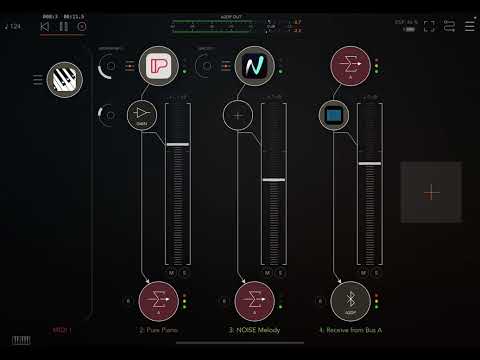
    • Added new "Every N Accomp" Accompaniment Style. When you choose this accompaniment a popup screen will be displayed where you can select the Accompaniment type you want to use every N bars (Arpeggio, Chord or Bass), the value of N (2, 4 or 8), and the Accompaniment type for the rest of the bars (Arpeggio, Chord or Bass).
    • Removed unnecessary Warning popup when there isn't a generated motif and you change the key, scale or time signature (AUv3 Plug-In Only).
    • Fixed issue where the Melody 16th Notes Setting could change even if it was locked.
    • Fixed issue where the Accomp Open Voicing Setting could change even if it was locked.
    • Minor bug fixes and improvements.

    An example of a motif using the new "Every N Accomp" can be found here:
    If you like all the new features and the music generated by Piano Motifs please consider leaving a review in the App Store. Every review helps others discover the app, ensures the app is fairly represented, and supports future development.

    Enjoy!

  • I did finally not forget to write a review yesterday. It's the least I could do. Thanks again for such a great app, and for constantly improving it!

  • You are awesome @azul3D_Apps 🏋️🙏

  • @oscillotus said:
    I did finally not forget to write a review yesterday. It's the least I could do. Thanks again for such a great app, and for constantly improving it!

    @oscillotus, thanks so much for leaving a review! It helps a lot!

  • @gusgranite said:
    You are awesome @azul3D_Apps 🏋️🙏

    😊✌️

  • edited September 2025

    A new version of Piano Motifs (v4.100) is now available. What's new in this version:

    Added the ability to send a configurable MIDI CC message at the end of a motif or after all motif loops have completed. To configure, tap MIDI to open the MIDI screen, where you can choose the CC Number, Value(s) and Channel for the message. Then select the "CC Send At" from two options:
    – Motif End: Sends a CC message every time a motif ends, even if the motif is looping. For this option, you can define two CC values, which will toggle with each loop completion if the motif is being looped.
    – Loops End: Sends a CC message only once, after all loops of the motif have completed.

    This feature is only available for the AUv3 MIDI Plug-In.

    You can use this to synchronize the end of a motif or looped motif, with other apps.

    Special thanks to @GeoTony for the feature request and feedback!

    I can't believe Piano Motifs has reached its 100th version 🎉🥳 since the AUv3 MIDI plug-in release (well, maybe not exactly, since a few versions were skipped due to app submission problems, but still, a milestone!). Thanks everyone for your support!

    If you feel that these 100 versions have added value, please consider leaving a review in the App Store. Every review helps others discover the app, ensures the app is fairly represented, and supports future development.

    Enjoy!

  • Many thanks for this Fernando and congratulations on the 100th version, I hope you realise how much we value your hard work and imagination 🙏
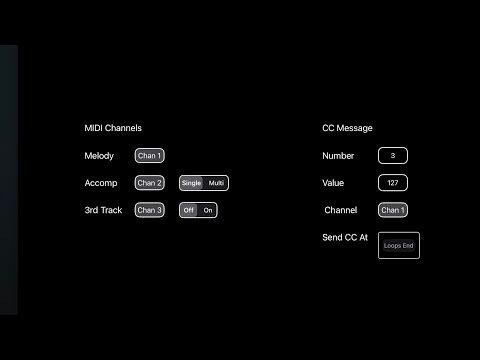
    I’ve knocked together this quick video of one of my intended uses I.e. stopping other apps from making sounds when the motif ends.

  • @azul3D_Apps said:
    A new version of Piano Motifs (v4.100) is now available. What's new in this version:

    Added the ability to send a configurable MIDI CC message at the end of a motif or after all motif loops have completed. To configure, tap MIDI to open the MIDI screen, where you can choose the CC Number, Value(s) and Channel for the message. Then select the "CC Send At" from two options:
    – Motif End: Sends a CC message every time a motif ends, even if the motif is looping. For this option, you can define two CC values, which will toggle with each loop completion if the motif is being looped.
    – Loops End: Sends a CC message only once, after all loops of the motif have completed.

    This feature is only available for the AUv3 MIDI Plug-In.

    You can use this to synchronize the end of a motif or looped motif, with other apps.

    Special thanks to @GeoTony for the feature request and feedback!

    I can't believe Piano Motifs has reached its 100th version 🎉🥳 since the AUv3 MIDI plug-in release (well, maybe not exactly, since a few versions were skipped due to app submission problems, but still, a milestone!). Thanks everyone for your support!

    If you feel that these 100 versions have added value, please consider leaving a review in the App Store. Every review helps others discover the app, ensures the app is fairly represented, and supports future development.

    Enjoy!

    What an interesting and creative idea for the configurable MIDI CC message--my brain is working overtime thinking about how I'm going to use this.

  • Very interesting update! As @lukesleepwalker said, this opens ups a whole bunch of automation possibilities!! Thanks @GeoTony and @azul3D_Apps

  • @azul3D_Apps awesome stuff man.

  • @GeoTony said:
    Many thanks for this Fernando and congratulations on the 100th version, I hope you realise how much we value your hard work and imagination 🙏
    I’ve knocked together this quick video of one of my intended uses I.e. stopping other apps from making sounds when the motif ends.

    Thanks for the idea Tony 🌟! Great demo of how the new feature can be used!

  • @lukesleepwalker said:

    @azul3D_Apps said:
    A new version of Piano Motifs (v4.100) is now available. What's new in this version:

    Added the ability to send a configurable MIDI CC message at the end of a motif or after all motif loops have completed. To configure, tap MIDI to open the MIDI screen, where you can choose the CC Number, Value(s) and Channel for the message. Then select the "CC Send At" from two options:
    – Motif End: Sends a CC message every time a motif ends, even if the motif is looping. For this option, you can define two CC values, which will toggle with each loop completion if the motif is being looped.
    – Loops End: Sends a CC message only once, after all loops of the motif have completed.

    This feature is only available for the AUv3 MIDI Plug-In.

    You can use this to synchronize the end of a motif or looped motif, with other apps.

    Special thanks to @GeoTony for the feature request and feedback!

    I can't believe Piano Motifs has reached its 100th version 🎉🥳 since the AUv3 MIDI plug-in release (well, maybe not exactly, since a few versions were skipped due to app submission problems, but still, a milestone!). Thanks everyone for your support!

    If you feel that these 100 versions have added value, please consider leaving a review in the App Store. Every review helps others discover the app, ensures the app is fairly represented, and supports future development.

    Enjoy!

    What an interesting and creative idea for the configurable MIDI CC message--my brain is working overtime thinking about how I'm going to use this.

    Yes, please share any creative ways 🌟 you come up with! In my case, I will probably use it to stop drum machines, which I had to do manually before. Not very creative, but practical.

  • @oscillotus said:
    Very interesting update! As @lukesleepwalker said, this opens ups a whole bunch of automation possibilities!! Thanks @GeoTony and @azul3D_Apps

    🙏 🦾 😊

  • @egobeats said:
    @azul3D_Apps awesome stuff man.

    🙏✌️

  • @azul3D_Apps congrats on the 100th iteration of this brilliant app! What a testament to your continuous improvement model of development. 👏🥳🎉

  • @gusgranite said:
    @azul3D_Apps congrats on the 100th iteration of this brilliant app! What a testament to your continuous improvement model of development. 👏🥳🎉

    Thanks @gusgranite 🙏!

  • @azul3D_Apps said:

    @lukesleepwalker said:

    @azul3D_Apps said:
    A new version of Piano Motifs (v4.100) is now available. What's new in this version:

    Added the ability to send a configurable MIDI CC message at the end of a motif or after all motif loops have completed. To configure, tap MIDI to open the MIDI screen, where you can choose the CC Number, Value(s) and Channel for the message. Then select the "CC Send At" from two options:
    – Motif End: Sends a CC message every time a motif ends, even if the motif is looping. For this option, you can define two CC values, which will toggle with each loop completion if the motif is being looped.
    – Loops End: Sends a CC message only once, after all loops of the motif have completed.

    This feature is only available for the AUv3 MIDI Plug-In.

    You can use this to synchronize the end of a motif or looped motif, with other apps.

    Special thanks to @GeoTony for the feature request and feedback!

    I can't believe Piano Motifs has reached its 100th version 🎉🥳 since the AUv3 MIDI plug-in release (well, maybe not exactly, since a few versions were skipped due to app submission problems, but still, a milestone!). Thanks everyone for your support!

    If you feel that these 100 versions have added value, please consider leaving a review in the App Store. Every review helps others discover the app, ensures the app is fairly represented, and supports future development.

    Enjoy!

    What an interesting and creative idea for the configurable MIDI CC message--my brain is working overtime thinking about how I'm going to use this.

    Yes, please share any creative ways 🌟 you come up with! In my case, I will probably use it to stop drum machines, which I had to do manually before. Not very creative, but practical.

    Yep, for sure, I just thought of another use case. I was working on a tune recently and bumped up against the limit of 128 bars in the chord progression (don't ask! :D ). With this CC option, I could chain two PMs together so that when I reach the end of one progression, it switches off the first instance and switches on the second instance. The only challenge I see here is that I won't be able to keep the two instances aligned in terms of the parameters/settings but maybe that'll work out to be a feature rather than a bug. B)

  • Out of all the midi generators I've used both on iOS and desktop, Piano Motifs has been by far the best.

    The coolest part is by following Fernando's tutorials, he teaches you how to dial in the sounds you want, so it's not just random chaos all the time.

    The longer you play with it, the more music theory you incidentally retain, elevating everyone's melodic game.

    Really great midi data and my absolute favorite.

  • @lukesleepwalker said:

    @azul3D_Apps said:

    @lukesleepwalker said:

    @azul3D_Apps said:
    A new version of Piano Motifs (v4.100) is now available. What's new in this version:

    Added the ability to send a configurable MIDI CC message at the end of a motif or after all motif loops have completed. To configure, tap MIDI to open the MIDI screen, where you can choose the CC Number, Value(s) and Channel for the message. Then select the "CC Send At" from two options:
    – Motif End: Sends a CC message every time a motif ends, even if the motif is looping. For this option, you can define two CC values, which will toggle with each loop completion if the motif is being looped.
    – Loops End: Sends a CC message only once, after all loops of the motif have completed.

    This feature is only available for the AUv3 MIDI Plug-In.

    You can use this to synchronize the end of a motif or looped motif, with other apps.

    Special thanks to @GeoTony for the feature request and feedback!

    I can't believe Piano Motifs has reached its 100th version 🎉🥳 since the AUv3 MIDI plug-in release (well, maybe not exactly, since a few versions were skipped due to app submission problems, but still, a milestone!). Thanks everyone for your support!

    If you feel that these 100 versions have added value, please consider leaving a review in the App Store. Every review helps others discover the app, ensures the app is fairly represented, and supports future development.

    Enjoy!

    What an interesting and creative idea for the configurable MIDI CC message--my brain is working overtime thinking about how I'm going to use this.

    Yes, please share any creative ways 🌟 you come up with! In my case, I will probably use it to stop drum machines, which I had to do manually before. Not very creative, but practical.

    Yep, for sure, I just thought of another use case. I was working on a tune recently and bumped up against the limit of 128 bars in the chord progression (don't ask! :D ). With this CC option, I could chain two PMs together so that when I reach the end of one progression, it switches off the first instance and switches on the second instance. The only challenge I see here is that I won't be able to keep the two instances aligned in terms of the parameters/settings but maybe that'll work out to be a feature rather than a bug. B)

    Cool use case! To have the same parameters/settings on 2 instances you can always perform a copy/paste of an instance in the Host. In AUM you long press on the Piano Motifs instance and choose "Select". Then you add an empty MIDI node and long press on it and then choose "Copy Here".

    I was also going to suggest that you could use the Delay Start (Bars) feature under SYNC (long press on SYNC), but it is currently constrained to go up to 99 bars. I will increase that number in the next revision.

  • edited September 2025

    @egobeats said:
    Out of all the midi generators I've used both on iOS and desktop, Piano Motifs has been by far the best.

    The coolest part is by following Fernando's tutorials, he teaches you how to dial in the sounds you want, so it's not just random chaos all the time.

    The longer you play with it, the more music theory you incidentally retain, elevating everyone's melodic game.

    Really great midi data and my absolute favorite.

    @egobeats , so glad to hear the tutorials have been useful for you!

    If anybody is interested here is a link to a tutorial playlist:

  • @azul3D_Apps said:

    @lukesleepwalker said:

    @azul3D_Apps said:

    @lukesleepwalker said:

    @azul3D_Apps said:
    A new version of Piano Motifs (v4.100) is now available. What's new in this version:

    Added the ability to send a configurable MIDI CC message at the end of a motif or after all motif loops have completed. To configure, tap MIDI to open the MIDI screen, where you can choose the CC Number, Value(s) and Channel for the message. Then select the "CC Send At" from two options:
    – Motif End: Sends a CC message every time a motif ends, even if the motif is looping. For this option, you can define two CC values, which will toggle with each loop completion if the motif is being looped.
    – Loops End: Sends a CC message only once, after all loops of the motif have completed.

    This feature is only available for the AUv3 MIDI Plug-In.

    You can use this to synchronize the end of a motif or looped motif, with other apps.

    Special thanks to @GeoTony for the feature request and feedback!

    I can't believe Piano Motifs has reached its 100th version 🎉🥳 since the AUv3 MIDI plug-in release (well, maybe not exactly, since a few versions were skipped due to app submission problems, but still, a milestone!). Thanks everyone for your support!

    If you feel that these 100 versions have added value, please consider leaving a review in the App Store. Every review helps others discover the app, ensures the app is fairly represented, and supports future development.

    Enjoy!

    What an interesting and creative idea for the configurable MIDI CC message--my brain is working overtime thinking about how I'm going to use this.

    Yes, please share any creative ways 🌟 you come up with! In my case, I will probably use it to stop drum machines, which I had to do manually before. Not very creative, but practical.

    Yep, for sure, I just thought of another use case. I was working on a tune recently and bumped up against the limit of 128 bars in the chord progression (don't ask! :D ). With this CC option, I could chain two PMs together so that when I reach the end of one progression, it switches off the first instance and switches on the second instance. The only challenge I see here is that I won't be able to keep the two instances aligned in terms of the parameters/settings but maybe that'll work out to be a feature rather than a bug. B)

    Cool use case! To have the same parameters/settings on 2 instances you can always perform a copy/paste of an instance in the Host. In AUM you long press on the Piano Motifs instance and choose "Select". Then you add an empty MIDI node and long press on it and then choose "Copy Here".

    I was also going to suggest that you could use the Delay Start (Bars) feature under SYNC (long press on SYNC), but it is currently constrained to go up to 99 bars. I will increase that number in the next revision.

    I didn’t even know about the delay start feature! Thank you!

  • Hi @azul3D_Apps , I found a small bug in the latest version of Piano Motifs: in MIDI-settings: when I change the midi-channel for Melody Harmony the midi-channel for the CC Message is changed (and the midi-channel for Melody Harmony always stays on channel 1)! In short: It is not possible to change the midi-channel for Melody Harmony...

  • Hi @Harro, thanks for reporting this issue. @amarok found this yesterday and I was able to implement a fix which will be available soon in the next release.

Sign In or Register to comment.