Loopy Pro: Create music, your way.
What is Loopy Pro? — Loopy Pro is a powerful, flexible, and intuitive live looper, sampler, clip launcher and DAW for iPhone and iPad. At its core, it allows you to record and layer sounds in real-time to create complex musical arrangements. But it doesn’t stop there—Loopy Pro offers advanced tools to customize your workflow, build dynamic performance setups, and create a seamless connection between instruments, effects, and external gear.
Use it for live looping, sequencing, arranging, mixing, and much more. Whether you're a live performer, a producer, or just experimenting with sound, Loopy Pro helps you take control of your creative process.
Download on the App StoreLoopy Pro is your all-in-one musical toolkit. Try it for free today.
Dream Setup, or Feature Request?

I I I aiaiai. I’ve been lost on this boat for a while.
I don’t know what feature to request, I am unable to phrase it.
There is some hump I have not been able to get over in my setup. I will reply with Videos and talking, I need to get this one sorted out.
Please download my project from Patcstorage https://patchstorage.com/languid-order/
And watch my video. I’ll be here till its solved or a feature request is properly hashed out.
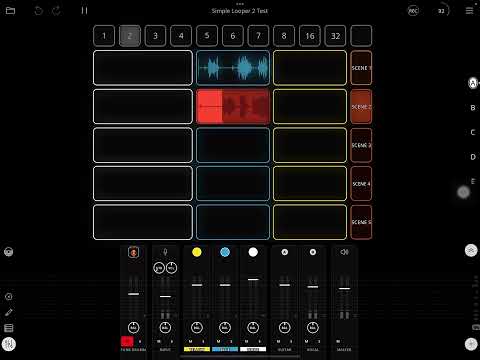
PROBLEM 1: When I press Scene 2 to record the next clip, scene 1 stops recording
PROBLEM 2: If I am recording on Scene 2 and want to que switching back to scene 1 when I am finished, the beat length currently recording is increased!
I simply want to be able to dictate recording length on clips before I record and to seamlessly switch between scenes when the longest clip is played through.
Yea and obviously I want to be able to que the next scene while recording on the previous
Comments
@wim
IGNORE THIS REPLY
@_smund : it will be to your benefit to solve one problem at a time.
It will help you to understand play/stop quantization settings and record count-in/count-out and how they interact.
Your problem 2: it seems to be that you are triggering scene 1 to play in order to stop recording. So, recording will continue till scene 1 starts to play. In this case, scene 1 starting its playback is what determines the clip’s length.
What are your play/stop settings?
If instead of triggering scene 1 to end recording what happens if you tap the clip is recording? Does it stop recording when you expect?
Before talking about how to address that, let’s make sure you understand why you are seeing the behavior you are seeing.
IGNORE THIS REPLY
Re problem 1: show a still screenshot of your scene 2 button.
What do you want to happen when you press the scene 2 button if scene 1 is recording?
@_smund : i should have downloaded your project before commenting. I apologize.
It looks like there is a bug with the play action with play group or multiple clips as the target when a clip is recording (if the target clips are empty). They are triggering immediately without respecting the recording count out.
The solution is to change your scene buttons slightly.
Put the record action before the play action. Make the play action play rather than play/stop or the action will stop the recording. If you need play/stop then a dial will be needed to prevent the collision.
The bug seems to be triggered when a play action that targets empty clips that won’t record is triggered while recording is happening.
This is the behavior if you make the suggested change
Hello @espiegel123 man, Thanx for coming back.
I still have PROBLEM 2:
-If I am recording on Scene 2 and want to que switching back to scene 1 when I am finished, the beat length currently recording is increased!
Thanks formdownloading my project. The settings are the same besides the changes you set, as you see in this video showing problem 2.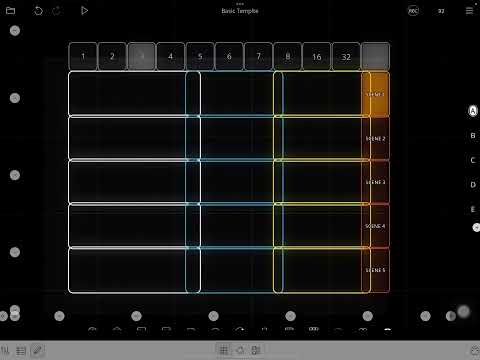
You see me Record 4 bars on scene 1. While I do that you see me press the ‘3’ Widget to change the master clock to 3–> Then I press scene 2.
I start to record 3 Bars on scene 2, but when I que scene 1 (while recording) it extends the recording time to 4 bars.
I want it to record 3 and go back to scene 1
(:
I won’t have a chance to double-check, but I think that this is because the record count out and play quantization are in conflict-and you are ending recording by playing another clip.
[EDIT]Try this and tell me your result. If you end recording by letting the count out complete without triggering the other group, does it end as desired?
If you change the master clock like that, there will need to be some adjustments to how the project is set up and may require follow actions to change quantization settings and/or reset the clock phase.
@espiegel123 Yea it ends as desired if I let it record through, 3 bars instead of 4. Is that a bug then? I need to cue to go back to track one to have a smooth transision.
I wonder if there is some specialized knowledge I need to finish this setup, like a follow action to reset the clock.. That seems wild to me. I can’t do it alone but I will post the result if I get some help.
It isn't a bug. I can point you in the right direction when I get some time.
In the meantime, it is worth your while to spend a bit of time understanding the play/stop quantization settings, record count-in/out and the master clock.
In your project, you have a record count-out going on and you trigger a loop to play whose quantization is in conflict with your record count-out. The clip s a 4 bar clip with loop play quantization. The master cycle is three as is your record count-out. Because of thr loop play quantization, the loop can't start playing till one bar after the clock reaches the top. In a conflict like that, the play quantization takes over and recording ends when the clip starts playing.
Spend some time reading the manual and experimenting until what I wrote above makes sense. Understanding it will help you understand the solution. The Verse/Chorus Looper has follow actions to adress this sort of problem,
There are a few solutions. One involves using master rather than loop play quantization and resetting the clock phase as needed. But there are drawbacks to that. Another solution is changing play quantization when a clip is being recorded then switching back.
More later.
Alright! I’m stoked to try changing Play Quantization in relation to the widgets I set up. This could be a great freedom.
I just tried changing Playback/Stop settings and Count in/Out settings between Loop, or Master and observed the behavior.
I cognize the solution of binding an action like something “Reset clock when new clip is recording” or “when a clip finishes recording” to ‘scene change’ or ‘widgets’ if those are actions. Whats the drawback of the reset clock route? (:
Changing Play Quantization sounds like a handy solution,
Would I bind that action to the length of my Widget? So when I change Master length to 3 it also changes the Play quantization of the clip waiting to be Qued to play back, after I finish recording? I donno how I would bind it..
I wonder if its a problem if I don’t want to send the action to a spesiffic clip, as I might move around the board, up or down when building the song and not to a spesiffic clip.
-I want to set the length of the next clip I am recording and seamlessly move to another scene.
@espiegel123
Please come back,, and I will start down the path you think is better suited for the project. Maybe you can give me some basic instructions on where to put what action. I’ll link the Proj here again with he original changes we made to start from
https://patchstorage.com/dream-setup-or-feature-request/
Thanks!!
I’m stomped with this setup, I don't know how to move on. It is the only setup I’ve worked on for a while and I would so like to finish it! If there are anybody here that can help it’s greatly appreciated!
I’m also not sure yet if what I want can be done so I have to make it clear if there is a feature request cooking so I can write it up.
The next step is the post above. I’ll make a video of where I am at if you want to help. Thank you very much!
I have told you that it is possible and that I’ll explain more when I have time if you can’t figure it out. It may be a day.
You asked above about resetting the clock.
How about making a copy of the project and try it and see what happens.
I will try to post a solution for you later today but I can’t guarantee it.
@_smund : here is information about how to solve the issues shown in the video. I don't know if these will address your long term desires as the way your project is set up, there is a lot of potential need for much more complexity -- as it looks like your groups may end up with loops of unrelated lengths -- which will make queuing things with master or loop quantization somewhat tricky.
As you have the project set up, you are going to frequently run into situations where the master cycle is not related or meaningfully aligned with the playing clips. For example, your white clips are always going to be 16 bars long regardless of the lengths of the other clips in the group. Tricky situations like that can be handled and require a pretty deep understanding of how things work. You will really want to understand all the quantization and count-in/out settings and how those relate to the master cycle.
In order to really know how to solve your problem some more information is needed.
We have seen what you want if you:
What do you want if scene 1 is playing (not recording) when you trigger an empty scene 2?
@espiegel123
So great! Thank you, coming back like this is just what I need, TY (:
Your discription is sussinct. Let me say forget about clip 1 in the far left, they will be controlled from screen as Emergency Buttons if I play something cool and want to grab something from the past. I figured I can trim them down to work with what on track 2, 3. They are all set to 16 bars cuz it is far enough back as an emergency.
The other two clips/colors are my setup:
———————————————————————————-
The Idea is to bind clip 2/3; blue and yellow to my foot controller.
ANSWER
—>When scene 1 is playing through I want it to play the whole scene, and to be able to que trigger recording on scene 2 that starts immediately when scene 1 is finished.
-I want to be able to set the length of the upcoming recording before it starts, this might include doing it while a clip is allready recording.
Something to consider:
When I used retro recording as my template I was able to adress Clip Length directly on the clips from the widgets because Retro Rec have available costom length. IMPORTANT: This way I was able to just set master clock length to one bar, and use the widgets to decide clip length. I was able to organize clip rec length freely from the widgets before I recorded.
While cool I find retrorecord hectic for live and want a more traditional template, but I want to be able to decide the length of clips before I record
I want to be able to play odd times against each other on a scene; Six bars on clip 2 vs Four bars on clip 3.. and play through the longest clip before it switch.
@_smund you mentioned that you previously had buttons to set the retrospective recording length. You can do the exact same thing for non-retrospective recording. Recording count-out has a custom option.
It is going to be somewhat complicated to implement something that does precisely what you want given your groups possibly mixing lengths. It would be much simpler to implement having a one bar recording count-in and you queuing recording any time in the bar before recording.
Im not sure I understand, can I adjust recording length of a clip before I switch to its scene, or not?
Its that last bit there “Queuing recording any time IN the bar before recording”
I hope you dont mean while I am in the same bar or scene recording in that?
Lets say:
I need to count in recording the Clip in scene 2 while I record the clip on Scene 1.
Hope that is what you mean,
Your other point about different length of clips on same scene;
is it not already like it plays through the longest clip before switching scenes? Do you see a deeper prob with this?
I will test now (:
I will try to set 1 bar count in globally.
I will try to map the widgets on top to adjust count out length (1-16) for all clips
If it works I will make you a cake!
Or I would want to.
I don’t know if you like Cake, and I live across the ocean but you prob deserve it
In this quick and easy to see video I have implemented the changes you mentioned.
I still get the behavior of if I want to aue going back to Scene 1 while recording on scene 2 it cuts the recording short.
What are the next steps? @espiegel123
@_smund : in order to help you understand better how things fit together so that you will be able to refine this as time goes on, let’s see if I can help you figure out for yourself what needs to be adjusted.
Your play quantization is set to Master.
When play quantization is set to master, when does playback of the triggered clip happen?
Thanx mate. Really.
Ok, so I get that its play quantization that makes it so that switching back to scene 1 while recording scene 2, effectively “PLAYING” scene 1 gets pushed ahed or slowed down according to its setting.
But the confusing part for me is that I am recording 4 bars on scene 2…. While I am doing that I want to que scene 1.
Recording according to the set cout out duration is unable to tale priority as it crashes with the play setting?
I tried now to set the same play quantization as rec count out on the widgets, but I realized that wont work either cuz its a different length then then,, well, i dont know if its counting from when i press the switch scene button + the new length I set.
How do I re set these things to work? I find it is a simple request really, maybe that recoud count out could be able to take priority while quing the next scene.
I actually need help on setting this up
Master is now on 1 bar. . I know whats wrong but I don’t know what to change
@espiegel123
I still get wrong behavior if i set play and rec quant to the same length when queuing. It cuts rec short by some bars.
Please, I will link a video again, and the project. I have asked for help for a week, I think its unfair I’m supposed to know how to reset quantazation length or whatever I need to do to get basic functionality of playing one clip immediatly when I am finished recording another…
But Im redy for that, so if you have the time, lets go?
@espiegel123
https://patchstorage.com/need-help-with-count-in-out-reset/
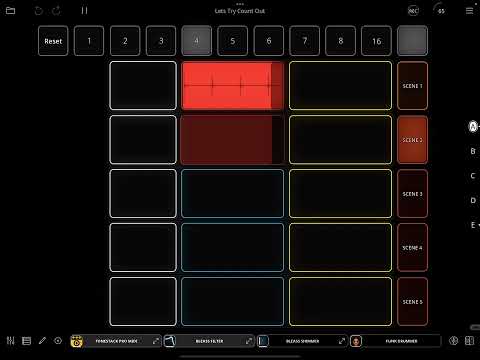
In the video you see the last two times, it records one beat short when i switch scenes. The play quant is set to 4, same as the count out, so.. IDK how to think about that particular incidence.
@_smund let’s slow down so that all the pieces of the situation are understood before you start changing things.
Since you are putting together a complex design, it will be helpful to you to understand the behavior.
What is the answer to the question: “when play quantization is master, and you trigger a clip to play, when will it start playing.”
We aren’t ready for the solution yet. But this needs to be understood before we move on to solving the puzzle.
———
My earlier comment was perhaps not clear. I mean to suggest to not use auto-count-out. You will vastly simplify things by using a 1-bar recording count-in/out (or master with master set to 1bar) and manually triggering recording and scene switching rather than using auto-count out.
The latter is do-able but the solution is complicated.
@espiegel123
“When play quant its set to follow master, new clips play when a new cycle starts”
This will be my answer
I know the master clock becomes a jumbled mess when I mix times together, but I thought I could still be okay as long as finishing a set recording length could be prioritized over play quant..
Lets instead:
-I dissable auto count out
-set rec count out to 1 for all clips
How do I decide clip length ahead of time then?
As you remember I was trying to use rec count out for it.
How will my setup look If want to decide clip length ahead of time and use scenes? Do I need to change it? I’ll take comprehensive suggestions at this point if I may
You don't have to decide clip length ahead of time if auto count-out is disabled. The loop will continue to record until you hit the switch to stop it sometime in the last bar that you want to record.
The upside is you don't have to decide length in advance and it simplifies a lot of things. The downside is you have to be on the ball and hit that switch when you need to. If one bar is too short to decide that, then you can set a longer quantization, but that can end up being more confusing in some cases.
Since you are trying to implement something complicated, I want to make sure you understand the elements so that you will be able to implement and adjust your project.
I understand that you are impatient to get the project working the way you want it. To get there, you will need to understand a few things that seem unclear.
When you trigger playback while something is recording, the play quantization will take precedence if they conflict. Similarly, if you trigger recording, the recording count-in will take precedence over the play/stop settings of already playing clips...
in most cases that results in the behavior people want.
In some cases, you need to make adjustments based on the context. For instance, follow actions are sometimes needed to adjust quantization and count-in/out...
BUT Before adding complexity, I think it will be helpful for you to understand the behavior you are seeing so that you will understand the adjustments that need to be made.
When play quantization is set to master, it means "start playing when the top of the clock is reached."
When play quantization is custom-> 4 bars. That means 'start playing the next time the clock is at a multiple of four bars'
Watch the most recent video you posted. Count bars from the time the transport starts running.
Do you understand why the clip starts playing back when it does?
@wim thats really jice. Thanks for pointing that out!
I’ll try that
@espiegel123 hi espiegel! (:
Dident I answer your question?
Thats literaly the same as saying
>
I’m not daft mate. There are just alot of menu options.
I’ll dissable auto count out first and, set rec count out to one bar and see if i cant solve the issue that way first.
Thanks guys
@wim
@espiegel123
I switched to what wim suggested over, I removed the widgets and I’m counting on 1 bar rec count in.
Ironing this one out, it’s far better to set up when you know it’s doable, and hopefully it’s better to help
-I have recording Count in set to one bar
-I have recording Count out set to Never
This is so I can do as wim described, decide clip lengths on the fly
Play/Stop quant’s are set to «Loop», so they let the previous play through
2 things
Video:
I have an issue that while I am playing back (Scene 4), if I queue recording on another clip (Scene 3) it starts after 1 bar.
I know this is because I have Recording count in set to 1 bar, and it is taking priority here.
What do I need to set up in order to queue recording on scene 3 after it has played through entire clip on scene 4 instead?
Just type out the setup and I will understand it.
—————————————————————-
Thing 2:
I am wondering how can I stop recording on a clip when I am using no Rec count out..
-Sometimes I just want to finish a clip on a scene and keep looping that without having to switch out of it.
In this situ I want to stop recording with a 1 Bar count out, same as how rec count in is set, without having to record or skip to another clip in to stop recording..
Thats how it is set now.
Do I need to use an action like «Change clip rec count out to 1» for the clip I am swithing out of, when pressing a new clip? and «re-change it again back to ‘Never’» after?
If thats the most logical way, how do I set it up to work like that globally for all clips?
-I have Master clock set to 1 bar for simplicity, but nothing is listening to it so far.
-I am so far using Play Quant’s set to loop
As you know, (and Thank you for listening!)
I want to be able to dictate clip rec lengths on the fly, so far I am able to do that exept for my two issues. So complex or not lay it out for me. Assume the most efficient way is what I’m after.
To my mind it is a simple setup
https://patchstorage.com/scene-switcher-with-queue-rec/
I am putting up the template and hope that all is well.
PS:This one is more organized.