Loopy Pro: Create music, your way.

What is Loopy Pro?Loopy Pro is a powerful, flexible, and intuitive live looper, sampler, clip launcher and DAW for iPhone and iPad. At its core, it allows you to record and layer sounds in real-time to create complex musical arrangements. But it doesn’t stop there—Loopy Pro offers advanced tools to customize your workflow, build dynamic performance setups, and create a seamless connection between instruments, effects, and external gear.

Use it for live looping, sequencing, arranging, mixing, and much more. Whether you're a live performer, a producer, or just experimenting with sound, Loopy Pro helps you take control of your creative process.

Download on the App Store

Loopy Pro is your all-in-one musical toolkit. Try it for free today.

A hardware version of GeoShred?
I ran into this Kickstarter project. I don’t know if it’s inspired by GeoShred but it looks very similar. I want one!

https://youtube.com/shorts/tH56-bdSWFo?si=cLMzgocJKKGgB1pP

«1

Comments

  • Or perhaps they were inspired by the Linnstrument?

  • Maybe but the colors and grid size look more like GeoShred.

  • I wonder about the long-term durability of this kind of mechanical key system. Looks like I'm seeing a lot of plastic components in the mockup. Has potential, but I often consider potential points of failure in complex systems.

  • Yeah, those button-keys does not look like a good idea for long lasting runtime. The whole box is ugly as fuck imo. What price is it at?

  • @Pxlhg said:
    Yeah, those button-keys does not look like a good idea for long lasting runtime. The whole box is ugly as fuck imo. What price is it at?

    I did not see a suggested price they were trying to hit. If they make them all themselves using 3D printers and machine shop tools, they could end up more costly than they might expect. And hiring out an overseas manufacturer could be extremely challenging for low volume production.

  • edited April 2025

    @Pxlhg said:
    Yeah, those button-keys does not look like a good idea for long lasting runtime. The whole box is ugly as fuck imo. What price is it at?

    $ 995.00

    https://www.kickstarter.com/projects/dogpaw/dog-paw

  • It looks like there’s no way of performing slides though, which is an important selling point of both the Linnstrument and GeoShred

  • Thanks @Prog1967 That Kickstarter page is a mess 😃 They ask for 15 000 (got double that so far), and one unit cost around 1000. Delivery 18 months from now (international version).

    Somethings off, I don't know what. ... Maybe me 😜

  • @Grandbear said:
    It looks like there’s no way of performing slides though, which is an important selling point of both the Linnstrument and GeoShred

    Bingo

  • @Grandbear said:
    It looks like there’s no way of performing slides though, which is an important selling point of both the Linnstrument and GeoShred

    The touchscreen is perfect for GeoShred.
    For better haptic feedback, I could imagine a transparent screen overlay though, giving the surface a slight button-like matrix, matching GeoShred's layout.

  • @rs2000 said:

    @Grandbear said:
    It looks like there’s no way of performing slides though, which is an important selling point of both the Linnstrument and GeoShred

    The touchscreen is perfect for GeoShred.
    For better haptic feedback, I could imagine a transparent screen overlay though, giving the surface a slight button-like matrix, matching GeoShred's layout.

    I like that idea, I do tend to switch layouts around though, I like a lot of vertical space for each "button" with some instruments

  • edited April 2025

    Yea, no pitch bend, no comparison to GeoShred /GeoSynthesizer/ Cantor/ Linnstrument.

    SADLY though, GeoShred no longer has velocity sensitivity as good as it responded back in the day with early GeoSynthesizer prior to updates that killed it.. The velocity sensitivity on the unit depicted above looks good, but you can find that elsewhere and no pitch bend for that price = no sale.

  • I feel that this doesn’t fully capture the concept of pitch fluidity—the ability to slide seamlessly between keys with pitch rounding so the performance remains in tune within the current temperament. This combination of Pitch Fluidity + Pitch Rounding is one of GeoShred’s most distinctive features.

    Here’s a short video that demonstrates it in action:
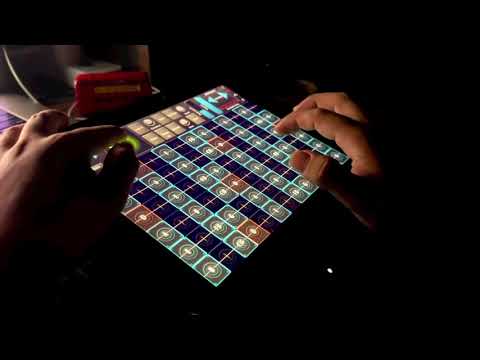
    It’s worth noting that this same challenge also comes up with many MPCs when they’re used as instruments.

  • @NeuM said:
    Or perhaps they were inspired by the Linnstrument?

    This was my first thought. I would much rather have a Linnstrument.

  • @Prog1967 said:

    @Pxlhg said:
    Yeah, those button-keys does not look like a good idea for long lasting runtime. The whole box is ugly as fuck imo. What price is it at?

    $ 995.00

    https://www.kickstarter.com/projects/dogpaw/dog-paw

    Why do they claim LS lacks tactile feedback? That seems false.

  • @Wrlds2ndBstGeoshredr said:

    @Prog1967 said:

    @Pxlhg said:
    Yeah, those button-keys does not look like a good idea for long lasting runtime. The whole box is ugly as fuck imo. What price is it at?

    $ 995.00

    https://www.kickstarter.com/projects/dogpaw/dog-paw

    Why do they claim LS lacks tactile feedback? That seems false.

    I guess they’re referring to the “bounciness” or “give” of their keys, but I don’t agree with that being the definition of “tactile feedback”. With the LS the feedback is simply how hard you’re pressing down your fingers.

  • edited September 2025

    Can this do proper pitch glides from one note to another? Or just a bit of vibrato? I only saw vibrato in the demos. Horribly played demos too BTW on that Kickstarter.

  • The only hardware I've used that comes close to the Geoshred experience is the Push 3 SA, it has 64 mpe pads that are easy to slide with. The feel and response is very similar to Geoshred, with pressure as well as x-y. Really nice pads.

  • edited December 2025

    @abf said:
    The only hardware I've used that comes close to the Geoshred experience is the Push 3 SA, it has 64 mpe pads that are easy to slide with. The feel and response is very similar to Geoshred, with pressure as well as x-y. Really nice pads.

    Does the Push 3 SA support sliding or is it just wiggle. I met with the developer of the Push 3 at NAMM last year and he indicated to me that you can't do pitch fluid slides. Also it has the same limitation as Ableton, only supports MIDI Mode 3, no MIDI Mode 4 so you can't have each row be on the same channel to support legato for plucked string and bowed string physical models.

  • @moForte said:

    @abf said:
    The only hardware I've used that comes close to the Geoshred experience is the Push 3 SA, it has 64 mpe pads that are easy to slide with. The feel and response is very similar to Geoshred, with pressure as well as x-y. Really nice pads.

    Does the Push 3 SA support sliding or is it just wiggle. I met with the developer of the Push 3 at NAMM last year and he indicated to me that you can't do pitch fluid slides. Also it has the same limitation as Ableton, only supports MIDI Mode 3, no MIDI Mode 4 so you can't have each row be on the same channel to support legato for plucked string and bowed string physical models.

    Don’t know the technical details, but using some of the built-in MPE instruments on my P3 controller feels very similar to Geoshred on an iPad.

    A quick AI search provided this:

    Yes, the Ableton Push 3 controller supports "sliding" via its MPE (MIDI Polyphonic Expression) capable pads. This feature allows for expressive per-note control by detecting horizontal and vertical finger movements on individual pads.

    How it Works

    The MPE pads on the Push 3 capture several dimensions of control data for each individual note:

    Slide This refers to the vertical (Y-axis) movement on a pad, which can be mapped to control parameters such as timbre (e.g., filter cutoff, wave position). You can adjust the vertical range for slide expression in the settings to avoid accidentally triggering other functions.

    Glide (Pitch Bend) This refers to the horizontal (X-axis) movement on a pad, which is typically used for per-note pitch bending and glissandos.

    Pressure (Aftertouch) This is the continuous pressure applied after the initial strike, allowing for sustained expressive effects like vibrato.

    This contrasts with the Push 2, which only supported monophonic aftertouch and did not have per-pad vertical or horizontal slide capabilities.

  • @oldsynthguy said:

    @moForte said:

    @abf said:
    The only hardware I've used that comes close to the Geoshred experience is the Push 3 SA, it has 64 mpe pads that are easy to slide with. The feel and response is very similar to Geoshred, with pressure as well as x-y. Really nice pads.

    Does the Push 3 SA support sliding or is it just wiggle. I met with the developer of the Push 3 at NAMM last year and he indicated to me that you can't do pitch fluid slides. Also it has the same limitation as Ableton, only supports MIDI Mode 3, no MIDI Mode 4 so you can't have each row be on the same channel to support legato for plucked string and bowed string physical models.

    Don’t know the technical details, but using some of the built-in MPE instruments on my P3 controller feels very similar to Geoshred on an iPad.

    A quick AI search provided this:

    Yes, the Ableton Push 3 controller supports "sliding" via its MPE (MIDI Polyphonic Expression) capable pads. This feature allows for expressive per-note control by detecting horizontal and vertical finger movements on individual pads.

    How it Works

    The MPE pads on the Push 3 capture several dimensions of control data for each individual note:

    Slide This refers to the vertical (Y-axis) movement on a pad, which can be mapped to control parameters such as timbre (e.g., filter cutoff, wave position). You can adjust the vertical range for slide expression in the settings to avoid accidentally triggering other functions.

    Glide (Pitch Bend) This refers to the horizontal (X-axis) movement on a pad, which is typically used for per-note pitch bending and glissandos.

    Pressure (Aftertouch) This is the continuous pressure applied after the initial strike, allowing for sustained expressive effects like vibrato.

    This contrasts with the Push 2, which only supported monophonic aftertouch and did not have per-pad vertical or horizontal slide capabilities.

    Would be very wary of using AI for this kind of thing, answers about music gear and plugins are often wildly inaccurate. Maybe another Push 3 user who's familiar with mpe could comment, @Krupa for example

  • edited December 2025

    @Gavinski said:

    @oldsynthguy said:

    @moForte said:

    @abf said:
    The only hardware I've used that comes close to the Geoshred experience is the Push 3 SA, it has 64 mpe pads that are easy to slide with. The feel and response is very similar to Geoshred, with pressure as well as x-y. Really nice pads.

    Does the Push 3 SA support sliding or is it just wiggle. I met with the developer of the Push 3 at NAMM last year and he indicated to me that you can't do pitch fluid slides. Also it has the same limitation as Ableton, only supports MIDI Mode 3, no MIDI Mode 4 so you can't have each row be on the same channel to support legato for plucked string and bowed string physical models.

    Don’t know the technical details, but using some of the built-in MPE instruments on my P3 controller feels very similar to Geoshred on an iPad.

    A quick AI search provided this:

    Yes, the Ableton Push 3 controller supports "sliding" via its MPE (MIDI Polyphonic Expression) capable pads. This feature allows for expressive per-note control by detecting horizontal and vertical finger movements on individual pads.

    How it Works

    The MPE pads on the Push 3 capture several dimensions of control data for each individual note:

    Slide This refers to the vertical (Y-axis) movement on a pad, which can be mapped to control parameters such as timbre (e.g., filter cutoff, wave position). You can adjust the vertical range for slide expression in the settings to avoid accidentally triggering other functions.

    Glide (Pitch Bend) This refers to the horizontal (X-axis) movement on a pad, which is typically used for per-note pitch bending and glissandos.

    Pressure (Aftertouch) This is the continuous pressure applied after the initial strike, allowing for sustained expressive effects like vibrato.

    This contrasts with the Push 2, which only supported monophonic aftertouch and did not have per-pad vertical or horizontal slide capabilities.

    Would be very wary of using AI for this kind of thing, answers about music gear and plugins are often wildly inaccurate. Maybe another Push 3 user who's familiar with mpe could comment, @Krupa for example

    It’s linking to content in the manual:

    “ Note Pitch Bend — Per-note pitch bend is automatically enabled for Live devices that support it. For devices that do not, sliding your finger horizontally on a pad will retrigger notes (i.e., glissando) by default. You can customize this behavior using the corresponding encoder. When set to On, per-note pitch bend is always enabled. When set to Off, it is always disabled.

    In Tune Location – Determines how pitch bend is initiated when the pad is touched. When set to Finger, the location where you first place your finger on the pad has zero pitch bend, and sliding horizontally causes the pitch to bend. When set to Pad, the center of the pad always has zero pitch bend, and placing your finger elsewhere immediately bends the pitch based on the distance from center.

    In Tune Width – Determines how quickly pitch bend changes happen when moving a finger horizontally on the pad. The available width range is from 0 mm to 20 mm. When set to a small width, such as 3 mm, pitch bend changes occur faster as you move your finger across the pad. A larger width, such as 15 mm, causes the pitch to bend more gradually.”

    https://www.ableton.com/en/push/manual/#:~:text=Note Pitch Bend —%20Per%2Dnote,10%20mm%20to%2016%20mm.

    So basically you can set it to pitch-up fully to the next note/pad on the right (or pitch-down to the pad on the left), which is set to pick up the same pitched-down note on that side of the second pad, giving the impression of a sliding scale.

    It works for MPE enabled Live instruments and plugins, so it isn’t impossible and shouldn’t be dismissed out of hand.

  • Yeah you definitely can pitch bend across the grid from pad to pad, though it is possible to mess it up and accidentally trigger a new note instead of a smooth slide, and the range is limited depending where you start (left side hard to pitch down much right side the opposite…) though that is the same everywhere I guess… the slide/y functions I think only work on the pad you’re on as I’ve never got them to smoothly transition up or down to the next row, but I may stand to be corrected there… pressure sensitivity is lovely, feels just right to me, though I’ve never tried a linn…

  • @Krupa said:
    I’ve never got them to smoothly transition up or down to the next row, but I may stand to be corrected there…

    That’s right, pitch bend works horizontally, vertical is for volume, filter etc.

    Ironically the same as using Geoshred!

  • I’m not a GeoShredder but I wonder if the Embodme Erae 2 would be suitable:
    https://embodme.com/

  • @oldsynthguy said:

    @Krupa said:
    I’ve never got them to smoothly transition up or down to the next row, but I may stand to be corrected there…

    That’s right, pitch bend works horizontally, vertical is for volume, filter etc.

    Ironically the same as using Geoshred!

    Yeah the slide/y action on individual pads is excellent, more spacious than on iPads and tactile to boot…

  • @oldsynthguy said:

    @Krupa said:
    I’ve never got them to smoothly transition up or down to the next row, but I may stand to be corrected there…

    That’s right, pitch bend works horizontally, vertical is for volume, filter etc.

    Ironically the same as using Geoshred!

    That's because they are both MPE and following the same 3D controller convention. Props to Roger Linn for coming up with this semantic for the MIDI 1 protocol.

  • @catherder said:
    I’m not a GeoShredder but I wonder if the Embodme Erae 2 would be suitable:
    https://embodme.com/

    I have both the Erae touch 1 and 2. There is no real tactile feedback. Like GeoShred it's a visual instrument.

  • edited December 2025

    @Gavinski said:

    @oldsynthguy said:

    @moForte said:

    @abf said:
    The only hardware I've used that comes close to the Geoshred experience is the Push 3 SA, it has 64 mpe pads that are easy to slide with. The feel and response is very similar to Geoshred, with pressure as well as x-y. Really nice pads.

    Does the Push 3 SA support sliding or is it just wiggle. I met with the developer of the Push 3 at NAMM last year and he indicated to me that you can't do pitch fluid slides. Also it has the same limitation as Ableton, only supports MIDI Mode 3, no MIDI Mode 4 so you can't have each row be on the same channel to support legato for plucked string and bowed string physical models.

    Don’t know the technical details, but using some of the built-in MPE instruments on my P3 controller feels very similar to Geoshred on an iPad.

    A quick AI search provided this:

    Yes, the Ableton Push 3 controller supports "sliding" via its MPE (MIDI Polyphonic Expression) capable pads. This feature allows for expressive per-note control by detecting horizontal and vertical finger movements on individual pads.

    How it Works

    The MPE pads on the Push 3 capture several dimensions of control data for each individual note:

    Slide This refers to the vertical (Y-axis) movement on a pad, which can be mapped to control parameters such as timbre (e.g., filter cutoff, wave position). You can adjust the vertical range for slide expression in the settings to avoid accidentally triggering other functions.

    Glide (Pitch Bend) This refers to the horizontal (X-axis) movement on a pad, which is typically used for per-note pitch bending and glissandos.

    Pressure (Aftertouch) This is the continuous pressure applied after the initial strike, allowing for sustained expressive effects like vibrato.

    This contrasts with the Push 2, which only supported monophonic aftertouch and did not have per-pad vertical or horizontal slide capabilities.

    Would be very wary of using AI for this kind of thing, answers about music gear and plugins are often wildly inaccurate. Maybe another Push 3 user who's familiar with mpe could comment, @Krupa for example

    You know when I met with the HW developer of the P3 at NAMM he told us that the X control was only wiggle (vibrato) and not glissando. Glissando being large pitchbends up to 2 octaves after the noteOn. That is why the MPE standard for pitch bend range is +/-48. Note that a number of MPE controllers support wiggle (x) instead of glissando. The KMI controllers, the Dog Paw, the Equis, the Roli Lumi ... others.

    That being said, we did a brain storming session showing him GS and he showing us P3 and it's possible that he invented a way to do glissando. Just to be clear I think that is really hard because each key is a discrete button. Roger does it in the LinnStrument by having a patented XYZ mechanism of overlapping strips that supports gliding (Glissando) large distances from the silicon overlay screen.

  • @Wrlds2ndBstGeoshredr said:

    @Prog1967 said:

    @Pxlhg said:
    Yeah, those button-keys does not look like a good idea for long lasting runtime. The whole box is ugly as fuck imo. What price is it at?

    $ 995.00

    https://www.kickstarter.com/projects/dogpaw/dog-paw

    Why do they claim LS lacks tactile feedback? That seems false.

    'cause that way only Dog Paw ticks every box, making it the OBVIOUS CHOICE.

Sign In or Register to comment.