Loopy Pro: Create music, your way.
What is Loopy Pro? — Loopy Pro is a powerful, flexible, and intuitive live looper, sampler, clip launcher and DAW for iPhone and iPad. At its core, it allows you to record and layer sounds in real-time to create complex musical arrangements. But it doesn’t stop there—Loopy Pro offers advanced tools to customize your workflow, build dynamic performance setups, and create a seamless connection between instruments, effects, and external gear.
Use it for live looping, sequencing, arranging, mixing, and much more. Whether you're a live performer, a producer, or just experimenting with sound, Loopy Pro helps you take control of your creative process.
Download on the App StoreLoopy Pro is your all-in-one musical toolkit. Try it for free today.
Comments
I felt the same way, but (re)purchased those FabFilter plugins anyways. Truly the cream of the crop. Of course there was about a year or two when I stuck with iPhone-only music production, and the ToneBoosters apps came in handy since they are usable on both iPhone and iPad.
Nice! I tried Zenbeats, and I could never get it to click with my brain. Cubasis on the other hand clicks well with my brain. Has a lot of IAPs chock full of sounds, from NeoFM and FMClassics, to Iconica Sketch and Halion sounds, etc.
You really ought to, my friend. They are cheaper in price but not in quality, and they work just as well as the Fabfilter ones. Including Flowtones, which is the TB equivalent to Twin 3.
Machine is bonkers. Complete self contained production machine.
Roland Zenbeats is Roland’s multi- platform DAW in Roland Cloud, available for both Windows, Mac, Android and iOS.
It is a full-fledged DAW with AUv3, MIDI tracks, audio tracks, both loop- and timeline view and has both an internal rompler synth based on Roland’s Zencore engine (ZC1) and and drum machine/sampler (ZR1) with TR-8S style workflow.
Unfortunately due to Roland’s somewhat confusing pricing models on Windows and Mac, and the many misunderstandings when it comes to Roland Cloud and Galaxias (only available for Windows and Mac), Zenbeats on iOS is a very underrated, and for many, unknown app😔.
On iOS it is not a subscription, it is either a free app to try out with basic functions or a paid version (”platform unlock”) with full functionality and hundreds of Roland sounds, loops and FX. More sounds and loops are available through the internal store. But, given it’s AUv3, the whole iOS universe is available so purchases apart from the platform unlock is hardly needed unless you specifically want Roland sounds.
It is actively developed by Roland and I can highly recommend it, it is IMO a top tier iOS DAW but due to the reasons above, not often mentioned by developers as an AUv3 host. I use it for all my projects🥳.
People here on the LPF have also graciously helped out to get Zenbeats where it is today on iOS, and all feedback (literally😎!) have reached the developer, who is also active here on a regular basis.
https://apps.apple.com/se/app/roland-zenbeats/id1473380367
/DMfan🇸🇪
It’s noting like THIS though with these quadrant enabled MPE pads..Revolutionary really.. > @jwmmakerofmusic said:
@jwmmakerofmusic : Yeah I went down the Auria Pro Fab filter rabbit hole too back when they had the Christmas sale in 2019 or 2020 thereabouts. But have you checked out the Fab Filter bundle prices on the App Store ? They have sales too. Not too bad actually .
You should really give Zenbeats another try. Way back I had explained you how the nav bar works. It’s a bit weird but Once you know it is easy going.
Totally agree! For some reason having the extra screen size now on my M1 Pro 12.9” has made a huge difference and impact in my enjoyment of Roland Zenbeats!
I was totally impressed with the sound quality of Zencore ZC1 sound engine!
For a second I was wondering if I had another synth on but oh wow was I pleasantly surprised!
Loved how the midi track shows immediately everything you recorded ready to edit! Reminds me of how NS2 gave me that same feeling of rock solid editing abilities.
Oh yeah, I love that you can start all your projects in timeline view instead of looping view! That is so awesome as it gives me that option.
Oh yeah! This brings me to something I wanted to ask the developers @MatthewAtZenbeats;
Would it be possibly in a future update to be able to set or rename sections in timeline view? Please forgive me if this is already possible but I couldn’t find it anywhere.
@Telstar5 I do have all the FabFilter AUv3 plugins already outside of Auria. I bought them twice in essence. 😂 But, worth it still. Paying twice on iOS was still cheaper than the unholy cost on desktop, lol.
Also, yeah, MPC Live III will serve me well someday. Just not this year. OH, and I could also use Koala Sampler if I have the MPC/SP-404 itch. 😂
@ecou I think I forgot you explained it to me. My memory can be rock-solid at times, and at other times my head is full of rocks. 🤣 Well, since Zenbeats is also on Android, I may give it another look.
Not to me. I just accept the limitations and work within them. There's always some way to get the job done.
People who are looking for the full desktop DAW experience in an iPad DAW are always going to be frustrated, and it's unlikely to get a lot better. Even if it was economical to do (it isn't with prices on the platform), the form factor is just too limited. Logic Pro tries, and to me it's a most unattractive experience. If I want that kind of DAW experience, I'm headed for the Desktop where there's some room to stretch out.
It helps me to think of the iPad for creating, and the desktop for finishing things up. I can't create on a desktop to save my life, and I get frustrated pretty quick trying to finish up big projects on the iPad. So it's a good balance.
That said, like you, I finished 14 tracks in 16 weeks, all on the iPad as a part of Weekly Beats 2018 before I decided to stop. When you have only a week to finish something, you learn to discard workflows that would be ideal in other situations. I quickly learned that many things I thought were essential simply aren't.
@wim : I really tried w Logic on iPad . It’s just an unpleasant experience. I’m about to get the new MPC Live 3 and usb audio my iPad for scaler and for Halicon on Cubasis , BeatHawk , GB and KORG Module to help flesh out the sounds . Just use my iPad as a midule(s).
Sounds like I might need to adopt this “make a song a week” mentality to get over my hang ups on certain features.
Shame you decided to stop, my friend. I hope you do make music again sometime in the near future.
I use aum or loopy and do the complicated stuff on desktop. Touch is never as quick as keyboard and mouse, so I focus on using the ipad for what it excels in. I just ordered two ethernet dongles for my ipad so I can sync them with the mac around Ableton. We’ll see how it goes.
I know this is a bit off topic, sorry. Its just… I don’t believe the ipad interface paradigm can support a full fledged daw. So maybe the op’s idea is unworkable. And if so, there are other ways.
As I think on it more, I just need to figure out a good way to bring multi-out effect plugins into Cubasis/Logic Pro. IAA from AUM is probably the way to go.
A few thoughts/notes:
One use case for my multi-out AUv3 plugins is using FAC Medusa to split a guitar, bass, or synth signal into channels for the low, mid, and high ranges and adding a lot of effects to each one. I can get some really lush sounds running a different amp sims and effects on each frequency.
I think I should be focusing on an audio or MIDI workflow - I spend a lot of time fiddling with the piano roll. Learning to freeze tracks to audio and touching up MIDI if necessary down the line could clear up grind in the weeds on MIDI routing.
Whichever DAW I choose, a template might go a long way. Any suggestions on templates, whether DAW specific or general purpose?
All the suggestions for looking to Desktop are valid, and what I’ve been kind of gearing for. I really think AUM on iPad routed to Logic on Mac is the best of both worlds. I get all my great iPad sounds, MIDI sequencers , and touch controllers integrated into a desktop workflow.
What helped me was creating templates in AUM. For example, I found with Cubasis I was always going to AUM for the multi out of OneShot. So I made a session in AUM that’s just OneShot, 8 multiout channels, and the midi sequencer, all hooked up and ready to be routed out. Just a lil QOL thing that made the workflow smoother. Need drums? Open up AUM, open the OctDrums session, pick a kit, BAM good to go 🤙
Would you be able to share that template? I’ve worked on setting one up myself but I’d be interested to see what you have. In fact, I did set up what I thought were proper templates in AUM routing IAA to Cubasis but when I saved, exited, and reopened them AUM had erased all the IAA ports to Cubasis. That’s right about when I wrote up this post now that I think about it. I thought I was so smart and then was ready to chuck the iPad out the window. In hindsight it’s not the worst if I have to do that each time I open the sessions, but it took a bit of finagling after already being frustrated over a few multi-out instrument bugs in Logic Pro. FWIW those bugs seem to have fixed themselves - I’m guessing iPadOS 26 was still settling in after installing. It just seems to be the trend that I’m always troubleshooting or restarting apps more than I’m able to make music. That’s also a good reason to get solid templates - once I know it’s locked in and working I can put actual time into the music making part.
With an M2 Macbook Air currently at Best Buy for $680 (and routinely discounted to at least $799) it makes no sense to use an iPad and "apps" if you really want a music production machine.
https://www.bestbuy.com/product/apple-macbook-air-13-inch-laptop-apple-m2-chip-built-for-apple-intelligence-16gb-memory-256gb-ssd-silver/JJGCQ8WRX2
For me the iPad is more about performance. I don’t get mad at my guitar for missing features either. I can play amazing stuff with my iPad and I can record that stuff if I want to. For years I was an Ableton user on PC and I have very little to show for it. With the iPad, I’m forced to live in the moment and stay active and engaged with what I’m doing. It’s perfect.
I'm curious what AUM brings to the party with OneShot? Cubasis supports multi-out from OneShot.
It's coming up on 2026, and AUM still doesn't know what MIDI clock is.
I went back and forth and then bought an iPad Air M3. Touch makes a difference.
But, yeah, if it was my main music-making computing thingy, I'd go with something more traditional. But there's plenty of people that won't even touch iOS because it's too much like a computer, and they like to perform "DAWless" (never mind that you don't need to use a DAW on iOS).
For me, the iPad is standalone, or can be used as outboard synths and fx (I have a dedicated interface for iOS connected to my main computer interface).
You mean sections from top to bottom in timeline view, not the individual channels because that you can do?
/DMfan🇸🇪
I probably don’t know how to ask lol!
But what i want is to be able to label a certain area of the timeline like intro, chorus, verse one, etc and be able to jump to it easily to work on that section alone. Perhaps that’s already possible in looping mode; again forgive me if i’m not using the correct terminology.
@FizzyLizzy27
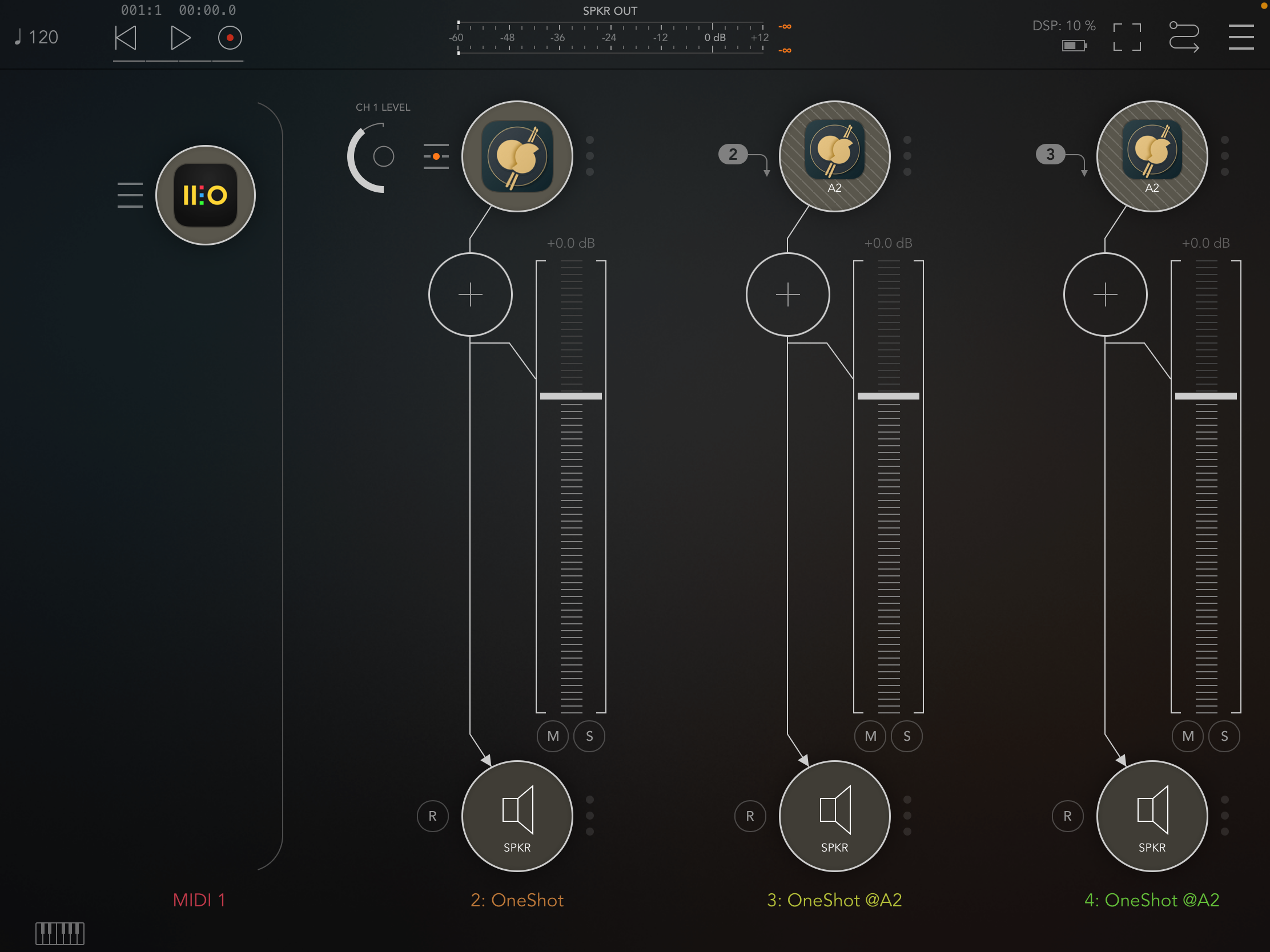
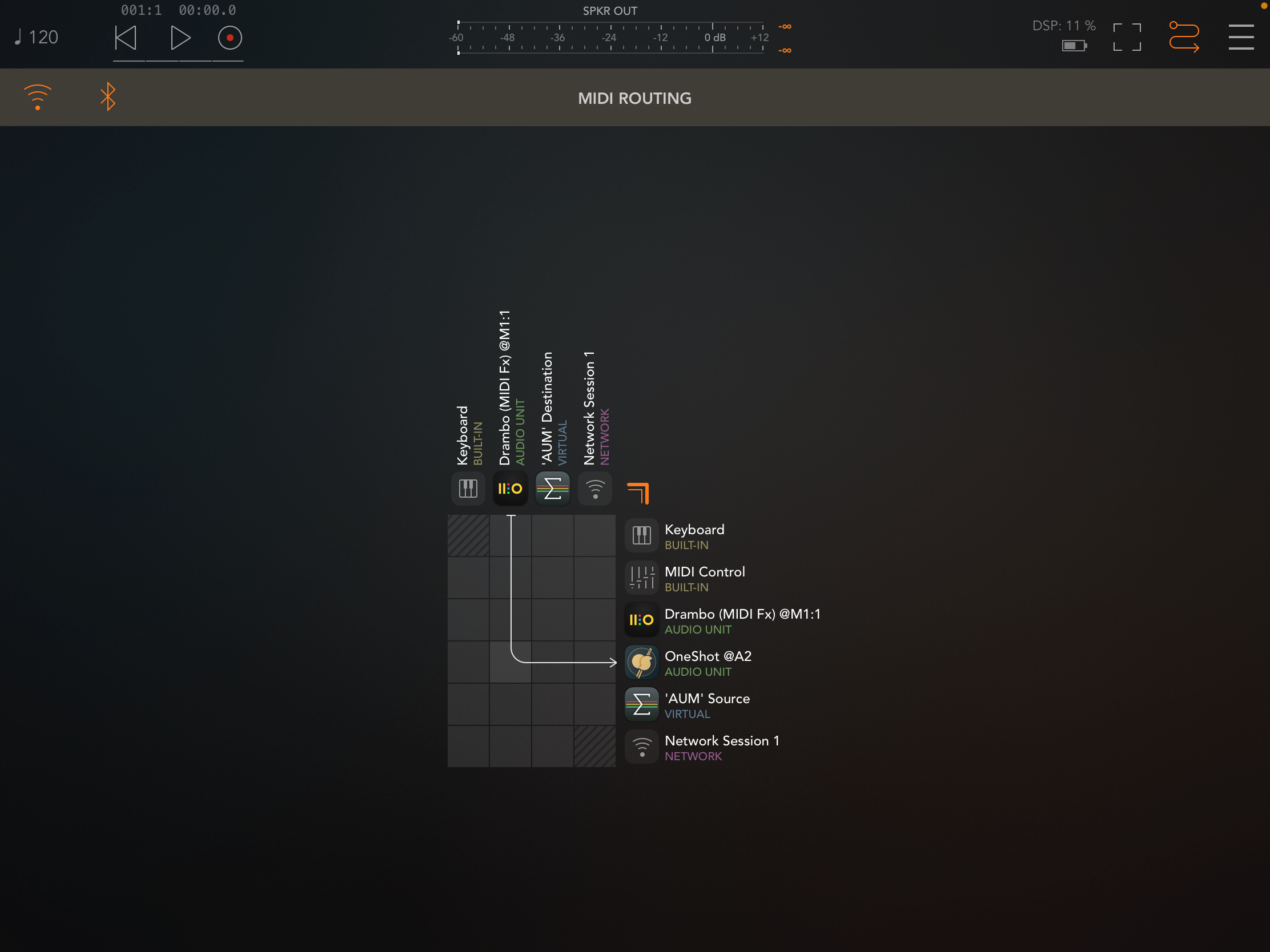
Here’s my template (it’s really nothing fancy haha). I used to have the outputs saved as IAA but I found I was constantly switching it back to “Speakers” to hear it before sending it to Cubasis so I switched it back. Hopes it helps!
@wim
Correct, cubasis “3” has multiout but I still use Cubasis 2. I’m stuck in the past, mannnn 😉 but this might help FixzyLizzy for sure if they’re using 3. Really no need for AUM I spose
I was one who also stayed on Cubasis 2 for over a year after the C3. But I am glad I made the change. So many nice improvements and very few down side.
Hey, no worries, was just trying to understand. This is an interesting and useful function IMO and I’ll have it added to our wishlist for Zenbeats.
No promises, the decisions are all made by the developer what functions or changes to be added but they will see the wish for sure😎.
/DMfan🇸🇪
Mind listing some other improvements you found helpful? I’m trying to talk my wallet into upgrading to 3
Busy morning, so didn't have a chance to reread the thread, but between 2->3
-Improved waveforms in the timeline and more precise audio slicing and such.
-Ability to stretch audio in the timeline with a dedicated handle.
-Tempo automation and time sig changes.
-More soundpack IAPs, including Halion. Speaking of IAPs, your old CB2 IAPs will transfer to CB3. I forgot how to do that, but someone hopefully can fill you in.
-Iconica Sketch works natively in CB3.
-Cubasis 3 works on iPad and on iPhone.
I'm sure there are loads more improvements besides what I mentioned as well as stability improvements. Hopefully this helps.
The best work I ever did was when I was in an "album" a month mode. Also, I was way more prolific before I started researching the (cough) 'proper' way to do things heh. Need to get back to that naive 'git er done' mode. But yah having multiple songs to jump between without allegiance or loyalty to any one in particular was liberating.
Cubasis is sweet now. The only thing keeping me from using it is the lack of instancing of patterns. Making a change and having to delete/recopy stuff... damn, too painful.
So awesome! Thank you
I’ve been a Roland fan since the early days when our church band got the Roland D20.
Love everything Roland, totally pro level and Zenbeats has that same feel!