Loopy Pro: Create music, your way.

What is Loopy Pro?Loopy Pro is a powerful, flexible, and intuitive live looper, sampler, clip launcher and DAW for iPhone and iPad. At its core, it allows you to record and layer sounds in real-time to create complex musical arrangements. But it doesn’t stop there—Loopy Pro offers advanced tools to customize your workflow, build dynamic performance setups, and create a seamless connection between instruments, effects, and external gear.

Use it for live looping, sequencing, arranging, mixing, and much more. Whether you're a live performer, a producer, or just experimenting with sound, Loopy Pro helps you take control of your creative process.

Download on the App Store

Loopy Pro is your all-in-one musical toolkit. Try it for free today.

Frustrating state of iOS DAWs closing out 2025

124

Comments

  • edited October 2025

    @jwmmakerofmusic said:

    @Squishy said:

    @ecou said:

    @Squishy said:
    @FizzyLizzy27
    Here’s my template (it’s really nothing fancy haha). I used to have the outputs saved as IAA but I found I was constantly switching it back to “Speakers” to hear it before sending it to Cubasis so I switched it back. Hopes it helps!

    @wim
    Correct, cubasis “3” has multiout but I still use Cubasis 2. I’m stuck in the past, mannnn 😉 but this might help FixzyLizzy for sure if they’re using 3. Really no need for AUM I spose

    I was one who also stayed on Cubasis 2 for over a year after the C3. But I am glad I made the change. So many nice improvements and very few down side.

    Mind listing some other improvements you found helpful? I’m trying to talk my wallet into upgrading to 3

    Busy morning, so didn't have a chance to reread the thread, but between 2->3

    -Improved waveforms in the timeline and more precise audio slicing and such.
    -Ability to stretch audio in the timeline with a dedicated handle.
    -Tempo automation and time sig changes.
    -More soundpack IAPs, including Halion. Speaking of IAPs, your old CB2 IAPs will transfer to CB3. I forgot how to do that, but someone hopefully can fill you in.
    -Iconica Sketch works natively in CB3.
    -Cubasis 3 works on iPad and on iPhone.

    I'm sure there are loads more improvements besides what I mentioned as well as stability improvements. Hopefully this helps.

    Thank you for helping my poor memory. I can’t really remember what C2 was like but I know I was happy to move over.

  • edited October 2025

    @AudioGus said:

    @jwmmakerofmusic said:

    @Squishy said:

    @ecou said:

    @Squishy said:
    @FizzyLizzy27
    Here’s my template (it’s really nothing fancy haha). I used to have the outputs saved as IAA but I found I was constantly switching it back to “Speakers” to hear it before sending it to Cubasis so I switched it back. Hopes it helps!

    @wim
    Correct, cubasis “3” has multiout but I still use Cubasis 2. I’m stuck in the past, mannnn 😉 but this might help FixzyLizzy for sure if they’re using 3. Really no need for AUM I spose

    I was one who also stayed on Cubasis 2 for over a year after the C3. But I am glad I made the change. So many nice improvements and very few down side.

    Mind listing some other improvements you found helpful? I’m trying to talk my wallet into upgrading to 3

    Busy morning, so didn't have a chance to reread the thread, but between 2->3

    -Improved waveforms in the timeline and more precise audio slicing and such.
    -Ability to stretch audio in the timeline with a dedicated handle.
    -Tempo automation and time sig changes.
    -More soundpack IAPs, including Halion. Speaking of IAPs, your old CB2 IAPs will transfer to CB3. I forgot how to do that, but someone hopefully can fill you in.
    -Iconica Sketch works natively in CB3.
    -Cubasis 3 works on iPad and on iPhone.

    I'm sure there are loads more improvements besides what I mentioned as well as stability improvements. Hopefully this helps.

    Cubasis is sweet now. The only thing keeping me from using it is the lack of instancing of patterns. Making a change and having to delete/recopy stuff... damn, too painful.

    It dies have instanciancing. If we are talking about the same thing.

  • Can someone explain the Zenbeats IAPs?

    I see there are Unlocks and Memberships - what’s the difference between the two? There’s also three options for each of those.

  • edited October 2025

    As far as I’m concerned Logic for iPad is pretty great.

    Whilst it’s missing the odd feature compared to the Mac version I can easily get songs done with it and most of the missing stuff isn’t too hard to work around.

    I’m a Mac head and have always been Mac first, but Logic on the iPad is fantastic and easily the most accomplished DAW on the platform. Nothing else comes close.

    The stuff I need a desktop for has nothing to do with logic, the iPad is missing the sample libraries I like to use for orchestral music. For my solo electronica stuff I could easily do it all in Logic with stock plugs with no dramas.

    There’s nothing I’ve ever needed to do with effects plugins I’ve not been able to achieve with logic. The bussing system is pretty great. Especially as you can easily automate everything in multiple ways, track automation, region automation and pattern based (p-lock style) automation too.

    I often record the output of a bus and then use it in alchemy sampler for cool textures and atmospheric instruments. All with a simple drag and drop — and touch based playing of the instrument on the iPad makes it extra fun. Many a track I make has a bedrock of atmospherics made this way.

    Anyway. Logic is frikkin great. It’s a powerhouse. It’s frankly astonishing what you can do with just an iPad, Logic Pro and a pair of headphones.

  • @FizzyLizzy27 said:
    Can someone explain the Zenbeats IAPs?

    I see there are Unlocks and Memberships - what’s the difference between the two? There’s also three options for each of those.

    If You only use iOS devices (iPhone and iPad) the iOS Unlock V3 will be more than enough.

  • @Samu said:

    @FizzyLizzy27 said:
    Can someone explain the Zenbeats IAPs?

    I see there are Unlocks and Memberships - what’s the difference between the two? There’s also three options for each of those.

    If You only use iOS devices (iPhone and iPad) the iOS Unlock V3 will be more than enough.

    What’s the difference between a membership and the Unlock? Are they two separate things?

  • I think trying to make your iOS device your DAW is a mistake.

    Personally it was years of aggravation using touch screens for this stuff. I am sad I wasted so much time with it.

    I don't mean to offend anyone by saying this, just that life isn't forever and the device may be stopping you from making the music you want to make. If you're happy then ignore this message.

  • @wim said:
    People who are looking for the full desktop DAW experience in an iPad DAW are always going to be frustrated, and it's unlikely to get a lot better.

    I think that sums up many years of posts from many forum members. Don’t put a square peg into a round hole (unless you are a traditional woodworker and then you know that's exactly what you should do). Use iPhone/iPad for what they can do and if you need more then incorporate your iPad workflow into a desktop. Seems to me the best of both worlds is attainable, but each of us will have a slightly different configuration. We may still hope to have all desktop feature in an iPad app, but that is an elusive unicorn. Identify your needs and find solutions, but why not also use desktop/laptop solutions for those who can afford to have both?

  • @FizzyLizzy27 said:

    What’s the difference between a membership and the Unlock? Are they two separate things?

    Memberships are monthly/annual pay (ie. Roland Cloud Subscription which Includes fully unlocked ZenBeats for all platforms).

    The platform unlocks are more or less a perpetual license you can keep forever and maybe at later point upgrade to V4 when ever it drops. You can unlock for one platform or all platforms, the MAX version includes all sounds and all platforms should you ever need them (at times Roland drops free packs and the other's can be bought when needed).

    So if you're only interested in using it on iPhone or iPad the iOS Unlock V3's got you covered.
    If you need it on a Desktop or Android devices etc. the 'All Platforms' got you covered.
    If you need 'Everything Zenbeats' for all platforms the Max is for you...

    ...pretty basic really.

  • Thanks Samu, man yours such a blessing with all you help and all!

    Yeah, the V3 has been enough for me as I only do iPad and iPhone! Yep the fill DAW works perfectly on the iPhone!

    Love it!

    @Samu said:

    @FizzyLizzy27 said:

    What’s the difference between a membership and the Unlock? Are they two separate things?

    Memberships are monthly/annual pay (ie. Roland Cloud Subscription which Includes fully unlocked ZenBeats for all platforms).

    The platform unlocks are more or less a perpetual license you can keep forever and maybe at later point upgrade to V4 when ever it drops. You can unlock for one platform or all platforms, the MAX version includes all sounds and all platforms should you ever need them (at times Roland drops free packs and the other's can be bought when needed).

    So if you're only interested in using it on iPhone or iPad the iOS Unlock V3's got you covered.
    If you need it on a Desktop or Android devices etc. the 'All Platforms' got you covered.
    If you need 'Everything Zenbeats' for all platforms the Max is for you...

    ...pretty basic really.

  • I started working through some of the Logic Pro tutorials last night - I’m thinking learning the “right way” to do things will lead to less frustration. Seeing what it’s capable of and what the intended workflow looks like seems pretty obvious but isn’t something I’ve really put the time into.

  • @ecou said:

    @AudioGus said:

    @jwmmakerofmusic said:

    @Squishy said:

    @ecou said:

    @Squishy said:
    @FizzyLizzy27
    Here’s my template (it’s really nothing fancy haha). I used to have the outputs saved as IAA but I found I was constantly switching it back to “Speakers” to hear it before sending it to Cubasis so I switched it back. Hopes it helps!

    @wim
    Correct, cubasis “3” has multiout but I still use Cubasis 2. I’m stuck in the past, mannnn 😉 but this might help FixzyLizzy for sure if they’re using 3. Really no need for AUM I spose

    I was one who also stayed on Cubasis 2 for over a year after the C3. But I am glad I made the change. So many nice improvements and very few down side.

    Mind listing some other improvements you found helpful? I’m trying to talk my wallet into upgrading to 3

    Busy morning, so didn't have a chance to reread the thread, but between 2->3

    -Improved waveforms in the timeline and more precise audio slicing and such.
    -Ability to stretch audio in the timeline with a dedicated handle.
    -Tempo automation and time sig changes.
    -More soundpack IAPs, including Halion. Speaking of IAPs, your old CB2 IAPs will transfer to CB3. I forgot how to do that, but someone hopefully can fill you in.
    -Iconica Sketch works natively in CB3.
    -Cubasis 3 works on iPad and on iPhone.

    I'm sure there are loads more improvements besides what I mentioned as well as stability improvements. Hopefully this helps.

    Cubasis is sweet now. The only thing keeping me from using it is the lack of instancing of patterns. Making a change and having to delete/recopy stuff... damn, too painful.

    It dies have instanciancing. If we are talking about the same thing.

    Can we copy a pattern (I think they call them events) move it somewhere on the timeline, make a change to one and they are both instantly updated?

  • edited October 2025

    @AudioGus said:

    @ecou said:

    @AudioGus said:

    @jwmmakerofmusic said:

    @Squishy said:

    @ecou said:

    @Squishy said:
    @FizzyLizzy27
    Here’s my template (it’s really nothing fancy haha). I used to have the outputs saved as IAA but I found I was constantly switching it back to “Speakers” to hear it before sending it to Cubasis so I switched it back. Hopes it helps!

    @wim
    Correct, cubasis “3” has multiout but I still use Cubasis 2. I’m stuck in the past, mannnn 😉 but this might help FixzyLizzy for sure if they’re using 3. Really no need for AUM I spose

    I was one who also stayed on Cubasis 2 for over a year after the C3. But I am glad I made the change. So many nice improvements and very few down side.

    Mind listing some other improvements you found helpful? I’m trying to talk my wallet into upgrading to 3

    Busy morning, so didn't have a chance to reread the thread, but between 2->3

    -Improved waveforms in the timeline and more precise audio slicing and such.
    -Ability to stretch audio in the timeline with a dedicated handle.
    -Tempo automation and time sig changes.
    -More soundpack IAPs, including Halion. Speaking of IAPs, your old CB2 IAPs will transfer to CB3. I forgot how to do that, but someone hopefully can fill you in.
    -Iconica Sketch works natively in CB3.
    -Cubasis 3 works on iPad and on iPhone.

    I'm sure there are loads more improvements besides what I mentioned as well as stability improvements. Hopefully this helps.

    Cubasis is sweet now. The only thing keeping me from using it is the lack of instancing of patterns. Making a change and having to delete/recopy stuff... damn, too painful.

    It dies have instanciancing. If we are talking about the same thing.

    Can we copy a pattern (I think they call them events) move it somewhere on the timeline, make a change to one and they are both instantly updated?

    At the end of a pattern in the middle you can drag the pattern and it will make as many copy as long as you drag. No those copies will not change with the original. Its good to introduce small variation in my music. Not just repeating.

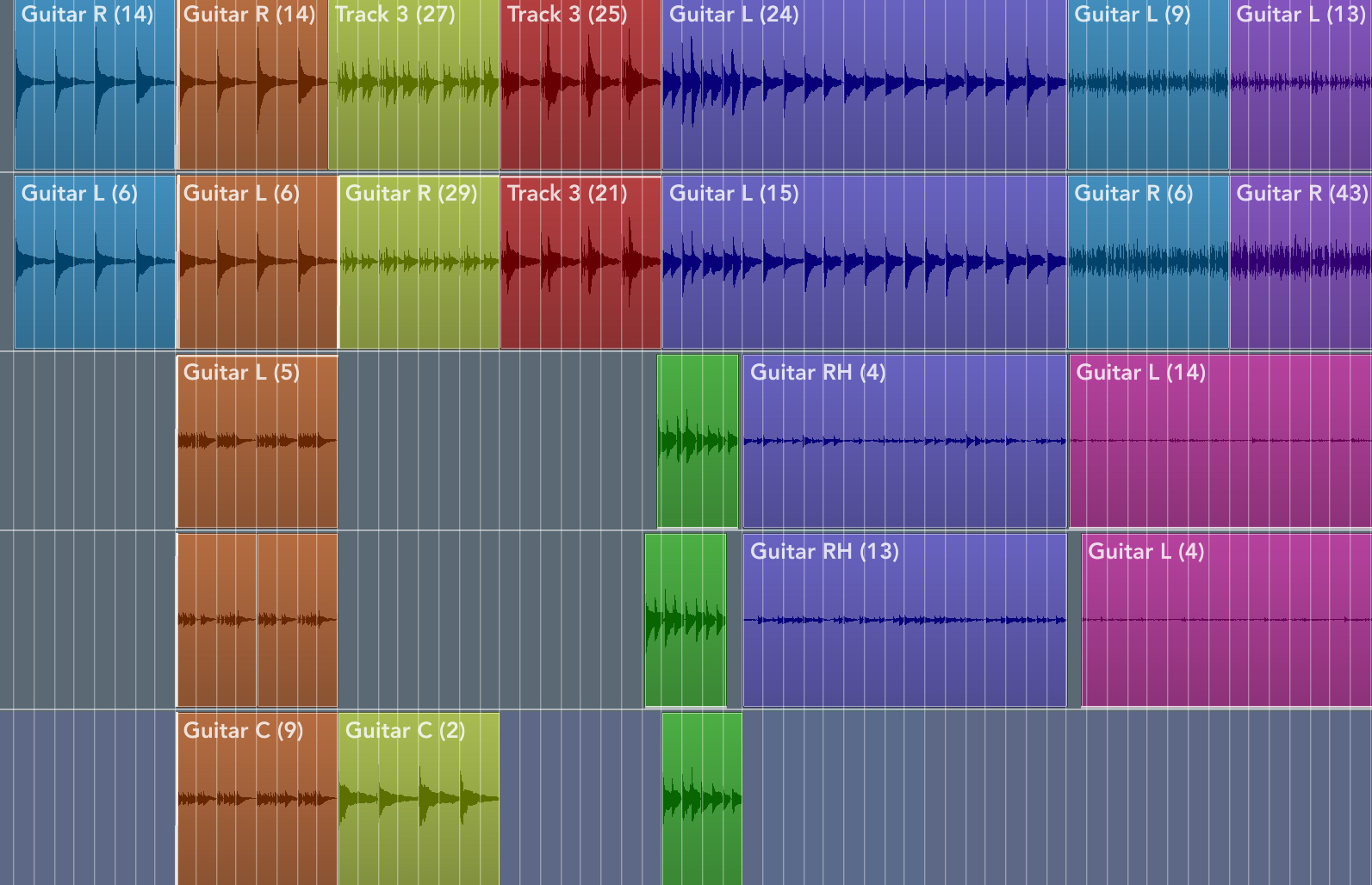
    A tip : I Color my patterns vertically to identify sections. It makes it easier to just replace sections if needed.
  • @klownshed said:
    As far as I’m concerned Logic for iPad is pretty great.

    Whilst it’s missing the odd feature compared to the Mac version I can easily get songs done with it and most of the missing stuff isn’t too hard to work around.

    I’m a Mac head and have always been Mac first, but Logic on the iPad is fantastic and easily the most accomplished DAW on the platform. Nothing else comes close.

    The stuff I need a desktop for has nothing to do with logic, the iPad is missing the sample libraries I like to use for orchestral music. For my solo electronica stuff I could easily do it all in Logic with stock plugs with no dramas.

    There’s nothing I’ve ever needed to do with effects plugins I’ve not been able to achieve with logic. The bussing system is pretty great. Especially as you can easily automate everything in multiple ways, track automation, region automation and pattern based (p-lock style) automation too.

    I often record the output of a bus and then use it in alchemy sampler for cool textures and atmospheric instruments. All with a simple drag and drop — and touch based playing of the instrument on the iPad makes it extra fun. Many a track I make has a bedrock of atmospherics made this way.

    Anyway. Logic is frikkin great. It’s a powerhouse. It’s frankly astonishing what you can do with just an iPad, Logic Pro and a pair of headphones.

    Yes, the feature set is nothing short of astounding. Now if they only worked.

    I bought an m4 pro with 2 TB when it first came out with the intent of using logic to its fullest potential. My work is purely midi based and I am very comfortable with getting around the app. But the app is one of the buggiest I own. I spend a significant percentage of my time recovering lost work from crashes and other failures. I can still do more than I can with the other daws but the pros only barely outweigh the cons. I started compiling a list of bugs the other day. Here’s few of them if anyone is interested…

    Notes option in inspector for an opened midi region suddenly disappears, leaving only region and track. Must quit and reopen logic

    Sample rate will sometimes change on its own wreaking havoc on bounced regions. Must quit and reopen logic. Sometimes it will corrupt the file.

    On several occasions I have opened and found random notes in ALL midi tracks transposed by an octave

    Large projects crash several times per session. Autosave sometimes corrupts the file and it won’t open, causing frequent lost work. Sometimes need to reboot the iPad

    In large projects, Modifier and modulator plugins almost always lose reference to assigned synth parameters. Shows message “loading from settings” but never loads. Can only assign to another controller.

    Frequently receive message on loading a project saying …
    “Missing Audio Files
    This Logic Pro for Mac project is missing audio files. Consolidate this project in Logic Pro for Mac (by choosing File > Project Management > Consolidate), then try to open it again in Logic Pro for iPad.
    OK
    Learn More”
    All my projects are created on iPad and have never been on a Mac. I don’t own a mac. So I

    There’s more. Most of them are intermittent and I can’t document steps to reproduce any of them so I think bug reports would be a waste of time.

  • @boomer said:

    @klownshed said:
    As far as I’m concerned Logic for iPad is pretty great.

    Whilst it’s missing the odd feature compared to the Mac version I can easily get songs done with it and most of the missing stuff isn’t too hard to work around.

    I’m a Mac head and have always been Mac first, but Logic on the iPad is fantastic and easily the most accomplished DAW on the platform. Nothing else comes close.

    The stuff I need a desktop for has nothing to do with logic, the iPad is missing the sample libraries I like to use for orchestral music. For my solo electronica stuff I could easily do it all in Logic with stock plugs with no dramas.

    There’s nothing I’ve ever needed to do with effects plugins I’ve not been able to achieve with logic. The bussing system is pretty great. Especially as you can easily automate everything in multiple ways, track automation, region automation and pattern based (p-lock style) automation too.

    I often record the output of a bus and then use it in alchemy sampler for cool textures and atmospheric instruments. All with a simple drag and drop — and touch based playing of the instrument on the iPad makes it extra fun. Many a track I make has a bedrock of atmospherics made this way.

    Anyway. Logic is frikkin great. It’s a powerhouse. It’s frankly astonishing what you can do with just an iPad, Logic Pro and a pair of headphones.

    Yes, the feature set is nothing short of astounding. Now if they only worked.

    I bought an m4 pro with 2 TB when it first came out with the intent of using logic to its fullest potential. My work is purely midi based and I am very comfortable with getting around the app. But the app is one of the buggiest I own. I spend a significant percentage of my time recovering lost work from crashes and other failures. I can still do more than I can with the other daws but the pros only barely outweigh the cons. I started compiling a list of bugs the other day. Here’s few of them if anyone is interested…

    Notes option in inspector for an opened midi region suddenly disappears, leaving only region and track. Must quit and reopen logic

    Sample rate will sometimes change on its own wreaking havoc on bounced regions. Must quit and reopen logic. Sometimes it will corrupt the file.

    On several occasions I have opened and found random notes in ALL midi tracks transposed by an octave

    Large projects crash several times per session. Autosave sometimes corrupts the file and it won’t open, causing frequent lost work. Sometimes need to reboot the iPad

    In large projects, Modifier and modulator plugins almost always lose reference to assigned synth parameters. Shows message “loading from settings” but never loads. Can only assign to another controller.

    Frequently receive message on loading a project saying …
    “Missing Audio Files
    This Logic Pro for Mac project is missing audio files. Consolidate this project in Logic Pro for Mac (by choosing File > Project Management > Consolidate), then try to open it again in Logic Pro for iPad.
    OK
    Learn More”
    All my projects are created on iPad and have never been on a Mac. I don’t own a mac. So I

    There’s more. Most of them are intermittent and I can’t document steps to reproduce any of them so I think bug reports would be a waste of time.

    Logic seem pretty terrible. 😳

    I imagine you tried Cubasis ?

  • @ecou said:

    @AudioGus said:

    @ecou said:

    @AudioGus said:

    @jwmmakerofmusic said:

    @Squishy said:

    @ecou said:

    @Squishy said:
    @FizzyLizzy27
    Here’s my template (it’s really nothing fancy haha). I used to have the outputs saved as IAA but I found I was constantly switching it back to “Speakers” to hear it before sending it to Cubasis so I switched it back. Hopes it helps!

    @wim
    Correct, cubasis “3” has multiout but I still use Cubasis 2. I’m stuck in the past, mannnn 😉 but this might help FixzyLizzy for sure if they’re using 3. Really no need for AUM I spose

    I was one who also stayed on Cubasis 2 for over a year after the C3. But I am glad I made the change. So many nice improvements and very few down side.

    Mind listing some other improvements you found helpful? I’m trying to talk my wallet into upgrading to 3

    Busy morning, so didn't have a chance to reread the thread, but between 2->3

    -Improved waveforms in the timeline and more precise audio slicing and such.
    -Ability to stretch audio in the timeline with a dedicated handle.
    -Tempo automation and time sig changes.
    -More soundpack IAPs, including Halion. Speaking of IAPs, your old CB2 IAPs will transfer to CB3. I forgot how to do that, but someone hopefully can fill you in.
    -Iconica Sketch works natively in CB3.
    -Cubasis 3 works on iPad and on iPhone.

    I'm sure there are loads more improvements besides what I mentioned as well as stability improvements. Hopefully this helps.

    Cubasis is sweet now. The only thing keeping me from using it is the lack of instancing of patterns. Making a change and having to delete/recopy stuff... damn, too painful.

    It dies have instanciancing. If we are talking about the same thing.

    Can we copy a pattern (I think they call them events) move it somewhere on the timeline, make a change to one and they are both instantly updated?

    At the end of a pattern in the middle you can drag the pattern and it will make as many copy as long as you drag. No those copies will not change with the original. Its good to introduce small variation in my music. Not just repeating.

    A tip : I Color my patterns vertically to identify sections. It makes it easier to just replace sections if needed.

    Yes, a part can be looped immediately after… I’m now wondering if part mutes could be used to add gaps, and a track per variation.

    This, however, isn’t ghost copies (with tiny ghost icon) in the OG Cubase sense where parts can be copied anywhere with the ghost copy option.

  • @boomer said:

    @klownshed said:
    As far as I’m concerned Logic for iPad is pretty great.

    Whilst it’s missing the odd feature compared to the Mac version I can easily get songs done with it and most of the missing stuff isn’t too hard to work around.

    I’m a Mac head and have always been Mac first, but Logic on the iPad is fantastic and easily the most accomplished DAW on the platform. Nothing else comes close.

    The stuff I need a desktop for has nothing to do with logic, the iPad is missing the sample libraries I like to use for orchestral music. For my solo electronica stuff I could easily do it all in Logic with stock plugs with no dramas.

    There’s nothing I’ve ever needed to do with effects plugins I’ve not been able to achieve with logic. The bussing system is pretty great. Especially as you can easily automate everything in multiple ways, track automation, region automation and pattern based (p-lock style) automation too.

    I often record the output of a bus and then use it in alchemy sampler for cool textures and atmospheric instruments. All with a simple drag and drop — and touch based playing of the instrument on the iPad makes it extra fun. Many a track I make has a bedrock of atmospherics made this way.

    Anyway. Logic is frikkin great. It’s a powerhouse. It’s frankly astonishing what you can do with just an iPad, Logic Pro and a pair of headphones.

    Yes, the feature set is nothing short of astounding. Now if they only worked.

    I bought an m4 pro with 2 TB when it first came out with the intent of using logic to its fullest potential. My work is purely midi based and I am very comfortable with getting around the app. But the app is one of the buggiest I own. I spend a significant percentage of my time recovering lost work from crashes and other failures. I can still do more than I can with the other daws but the pros only barely outweigh the cons. I started compiling a list of bugs the other day. Here’s few of them if anyone is interested…

    Notes option in inspector for an opened midi region suddenly disappears, leaving only region and track. Must quit and reopen logic

    Sample rate will sometimes change on its own wreaking havoc on bounced regions. Must quit and reopen logic. Sometimes it will corrupt the file.

    On several occasions I have opened and found random notes in ALL midi tracks transposed by an octave

    Large projects crash several times per session. Autosave sometimes corrupts the file and it won’t open, causing frequent lost work. Sometimes need to reboot the iPad

    In large projects, Modifier and modulator plugins almost always lose reference to assigned synth parameters. Shows message “loading from settings” but never loads. Can only assign to another controller.

    Frequently receive message on loading a project saying …
    “Missing Audio Files
    This Logic Pro for Mac project is missing audio files. Consolidate this project in Logic Pro for Mac (by choosing File > Project Management > Consolidate), then try to open it again in Logic Pro for iPad.
    OK
    Learn More”
    All my projects are created on iPad and have never been on a Mac. I don’t own a mac. So I

    There’s more. Most of them are intermittent and I can’t document steps to reproduce any of them so I think bug reports would be a waste of time.

    On the Mac if Logic ever misbehaves it can be down to a corrupted prefs file. I had that for a while with v11.0 on the Mac but Logic is stable for me now.

    You can easily delete the prefs file on the Mac but you obviously can’t on iPad. The only option is to delete and reinstall Logic itself. If you continuously get corrupted files I’d try and reinstall Logic. It might work. It might not.

    And if you open a corrupted file or have a misbehaving auv3 installed which causes or exacerbates the corruption then the whole cycle starts over.

  • @ecou said:

    Logic seem pretty terrible. 😳

    It’s not. But I guess that it is for some and that’s not cool. Same can be said for most apps. Most people don’t have issues but when you do get issues on the iPad they can be infuriating if not impossible to troubleshoot.

    I imagine you tried Cubasis ?

    I’d personally rather not use an iPad for music than use Cubasis. ;-)

  • @boomer said:

    @klownshed said:
    As far as I’m concerned Logic for iPad is pretty great.

    Whilst it’s missing the odd feature compared to the Mac version I can easily get songs done with it and most of the missing stuff isn’t too hard to work around.

    I’m a Mac head and have always been Mac first, but Logic on the iPad is fantastic and easily the most accomplished DAW on the platform. Nothing else comes close.

    The stuff I need a desktop for has nothing to do with logic, the iPad is missing the sample libraries I like to use for orchestral music. For my solo electronica stuff I could easily do it all in Logic with stock plugs with no dramas.

    There’s nothing I’ve ever needed to do with effects plugins I’ve not been able to achieve with logic. The bussing system is pretty great. Especially as you can easily automate everything in multiple ways, track automation, region automation and pattern based (p-lock style) automation too.

    I often record the output of a bus and then use it in alchemy sampler for cool textures and atmospheric instruments. All with a simple drag and drop — and touch based playing of the instrument on the iPad makes it extra fun. Many a track I make has a bedrock of atmospherics made this way.

    Anyway. Logic is frikkin great. It’s a powerhouse. It’s frankly astonishing what you can do with just an iPad, Logic Pro and a pair of headphones.

    Yes, the feature set is nothing short of astounding. Now if they only worked.

    I bought an m4 pro with 2 TB when it first came out with the intent of using logic to its fullest potential. My work is purely midi based and I am very comfortable with getting around the app. But the app is one of the buggiest I own. I spend a significant percentage of my time recovering lost work from crashes and other failures. I can still do more than I can with the other daws but the pros only barely outweigh the cons. I started compiling a list of bugs the other day. Here’s few of them if anyone is interested…

    Notes option in inspector for an opened midi region suddenly disappears, leaving only region and track. Must quit and reopen logic

    Sample rate will sometimes change on its own wreaking havoc on bounced regions. Must quit and reopen logic. Sometimes it will corrupt the file.

    On several occasions I have opened and found random notes in ALL midi tracks transposed by an octave

    Large projects crash several times per session. Autosave sometimes corrupts the file and it won’t open, causing frequent lost work. Sometimes need to reboot the iPad

    In large projects, Modifier and modulator plugins almost always lose reference to assigned synth parameters. Shows message “loading from settings” but never loads. Can only assign to another controller.

    Frequently receive message on loading a project saying …
    “Missing Audio Files
    This Logic Pro for Mac project is missing audio files. Consolidate this project in Logic Pro for Mac (by choosing File > Project Management > Consolidate), then try to open it again in Logic Pro for iPad.
    OK
    Learn More”
    All my projects are created on iPad and have never been on a Mac. I don’t own a mac. So I

    There’s more. Most of them are intermittent and I can’t document steps to reproduce any of them so I think bug reports would be a waste of time.

    I’ve found the iOS version to be less buggy than desktop, surprisingly, though I’ve been mainly working in ‘looper’ mode. Not disputing your bugs, though, my iPad usage has been relatively basic.

    I’ve had a few freezes on the iPad due to memory/CPU usage, most likely due to using long audio files as loops, but it’s been pretty stable otherwise.

    Getting some strange issues on desktop though, where it keeps forcing certain clips to mute. I’ve had to recreate a couple of projects as even after clearing all automation, they still kept switching off.

  • @boomer said:

    Sample rate will sometimes change on its own wreaking havoc on bounced regions. Must quit and reopen logic. Sometimes it will corrupt the file.

    Ahhh thank god it's not just me!
    I've been bouncing a lot of stuff to audio lately because of corrupted midi nonsense in Logic. I stupidly thought that audio would be 100% safe so deleated the midi tracks of any any bounced to audio that I was happy with...
    Loading a song revealed several out-of-time drum loops. Nothing I could do to get them back :(

  • @ecou said:

    @AudioGus said:

    @ecou said:

    @AudioGus said:

    @jwmmakerofmusic said:

    @Squishy said:

    @ecou said:

    @Squishy said:
    @FizzyLizzy27
    Here’s my template (it’s really nothing fancy haha). I used to have the outputs saved as IAA but I found I was constantly switching it back to “Speakers” to hear it before sending it to Cubasis so I switched it back. Hopes it helps!

    @wim
    Correct, cubasis “3” has multiout but I still use Cubasis 2. I’m stuck in the past, mannnn 😉 but this might help FixzyLizzy for sure if they’re using 3. Really no need for AUM I spose

    I was one who also stayed on Cubasis 2 for over a year after the C3. But I am glad I made the change. So many nice improvements and very few down side.

    Mind listing some other improvements you found helpful? I’m trying to talk my wallet into upgrading to 3

    Busy morning, so didn't have a chance to reread the thread, but between 2->3

    -Improved waveforms in the timeline and more precise audio slicing and such.
    -Ability to stretch audio in the timeline with a dedicated handle.
    -Tempo automation and time sig changes.
    -More soundpack IAPs, including Halion. Speaking of IAPs, your old CB2 IAPs will transfer to CB3. I forgot how to do that, but someone hopefully can fill you in.
    -Iconica Sketch works natively in CB3.
    -Cubasis 3 works on iPad and on iPhone.

    I'm sure there are loads more improvements besides what I mentioned as well as stability improvements. Hopefully this helps.

    Cubasis is sweet now. The only thing keeping me from using it is the lack of instancing of patterns. Making a change and having to delete/recopy stuff... damn, too painful.

    It dies have instanciancing. If we are talking about the same thing.

    Can we copy a pattern (I think they call them events) move it somewhere on the timeline, make a change to one and they are both instantly updated?

    At the end of a pattern in the middle you can drag the pattern and it will make as many copy as long as you drag. No those copies will not change with the original. Its good to introduce small variation in my music. Not just repeating.

    A tip : I Color my patterns vertically to identify sections. It makes it easier to just replace sections if needed.

    @ecou said:

    @AudioGus said:

    @ecou said:

    @AudioGus said:

    @jwmmakerofmusic said:

    @Squishy said:

    @ecou said:

    @Squishy said:
    @FizzyLizzy27
    Here’s my template (it’s really nothing fancy haha). I used to have the outputs saved as IAA but I found I was constantly switching it back to “Speakers” to hear it before sending it to Cubasis so I switched it back. Hopes it helps!

    @wim
    Correct, cubasis “3” has multiout but I still use Cubasis 2. I’m stuck in the past, mannnn 😉 but this might help FixzyLizzy for sure if they’re using 3. Really no need for AUM I spose

    I was one who also stayed on Cubasis 2 for over a year after the C3. But I am glad I made the change. So many nice improvements and very few down side.

    Mind listing some other improvements you found helpful? I’m trying to talk my wallet into upgrading to 3

    Busy morning, so didn't have a chance to reread the thread, but between 2->3

    -Improved waveforms in the timeline and more precise audio slicing and such.
    -Ability to stretch audio in the timeline with a dedicated handle.
    -Tempo automation and time sig changes.
    -More soundpack IAPs, including Halion. Speaking of IAPs, your old CB2 IAPs will transfer to CB3. I forgot how to do that, but someone hopefully can fill you in.
    -Iconica Sketch works natively in CB3.
    -Cubasis 3 works on iPad and on iPhone.

    I'm sure there are loads more improvements besides what I mentioned as well as stability improvements. Hopefully this helps.

    Cubasis is sweet now. The only thing keeping me from using it is the lack of instancing of patterns. Making a change and having to delete/recopy stuff... damn, too painful.

    It dies have instanciancing. If we are talking about the same thing.

    Can we copy a pattern (I think they call them events) move it somewhere on the timeline, make a change to one and they are both instantly updated?

    At the end of a pattern in the middle you can drag the pattern and it will make as many copy as long as you drag. No those copies will not change with the original. Its good to introduce small variation in my music. Not just repeating.

    A tip : I Color my patterns vertically to identify sections. It makes it easier to just replace sections if needed.

    Ahh I see. I was talking about copying and moving instanced midi events, not looping audio.

  • Does Zenbeats do AUv3 MIDI/FX multi-out? Or is multi-out for instruments only?

  • @klownshed said:

    You can easily delete the prefs file on the Mac but you obviously can’t on iPad. The only option is to delete and reinstall Logic itself. If you continuously get corrupted files I’d try and reinstall Logic. It might work. It might not.

    And if you open a corrupted file or have a misbehaving auv3 installed which causes or exacerbates the corruption then the whole cycle starts over.

    I have entered this cycle multiple times as well as other suggestions found online. And BTW, updating to 26 did nothing for the logic issues.

    Like I said “ the pros only barely outweigh the cons.”. At some point they may not. Apple keeps adding more wonderful features instead of fixing the existing ones. I just picked up FL studio at the suggestion of @jwmmakerofmusic. I’ll see if I can make that work. Not sure if loopy has the substantial midi capabilities I need. And I can’t use the built in synths in CB3. NS2 was almost perfect for me. Sadness.

  • Regarding iOS DAWs, this image comes to mind… 🤭

  • @boomer said:

    @klownshed said:

    You can easily delete the prefs file on the Mac but you obviously can’t on iPad. The only option is to delete and reinstall Logic itself. If you continuously get corrupted files I’d try and reinstall Logic. It might work. It might not.

    And if you open a corrupted file or have a misbehaving auv3 installed which causes or exacerbates the corruption then the whole cycle starts over.

    I have entered this cycle multiple times as well as other suggestions found online. And BTW, updating to 26 did nothing for the logic issues.

    Like I said “ the pros only barely outweigh the cons.”. At some point they may not. Apple keeps adding more wonderful features instead of fixing the existing ones. I just picked up FL studio at the suggestion of @jwmmakerofmusic. I’ll see if I can make that work. Not sure if loopy has the substantial midi capabilities I need. And I can’t use the built in synths in CB3. NS2 was almost perfect for me. Sadness.

    If you have any questions about FLSM, don't hesitate to reach out. ❤️

  • @FizzyLizzy27 said:
    Does Zenbeats do AUv3 MIDI/FX multi-out? Or is multi-out for instruments only?

    No multi-out for MIDI/FX it seems.

    /DMfan🇸🇪

  • Does anyone have thoughts on doing MIDI/audio routing in AUM vs ApeMatrix to run into a DAW?

  • edited October 2025

    @AudioGus said:

    @ecou said:

    @AudioGus said:

    @ecou said:

    @AudioGus said:

    @jwmmakerofmusic said:

    @Squishy said:

    @ecou said:

    @Squishy said:
    @FizzyLizzy27
    Here’s my template (it’s really nothing fancy haha). I used to have the outputs saved as IAA but I found I was constantly switching it back to “Speakers” to hear it before sending it to Cubasis so I switched it back. Hopes it helps!

    @wim
    Correct, cubasis “3” has multiout but I still use Cubasis 2. I’m stuck in the past, mannnn 😉 but this might help FixzyLizzy for sure if they’re using 3. Really no need for AUM I spose

    I was one who also stayed on Cubasis 2 for over a year after the C3. But I am glad I made the change. So many nice improvements and very few down side.

    Mind listing some other improvements you found helpful? I’m trying to talk my wallet into upgrading to 3

    Busy morning, so didn't have a chance to reread the thread, but between 2->3

    -Improved waveforms in the timeline and more precise audio slicing and such.
    -Ability to stretch audio in the timeline with a dedicated handle.
    -Tempo automation and time sig changes.
    -More soundpack IAPs, including Halion. Speaking of IAPs, your old CB2 IAPs will transfer to CB3. I forgot how to do that, but someone hopefully can fill you in.
    -Iconica Sketch works natively in CB3.
    -Cubasis 3 works on iPad and on iPhone.

    I'm sure there are loads more improvements besides what I mentioned as well as stability improvements. Hopefully this helps.

    Cubasis is sweet now. The only thing keeping me from using it is the lack of instancing of patterns. Making a change and having to delete/recopy stuff... damn, too painful.

    It dies have instanciancing. If we are talking about the same thing.

    Can we copy a pattern (I think they call them events) move it somewhere on the timeline, make a change to one and they are both instantly updated?

    At the end of a pattern in the middle you can drag the pattern and it will make as many copy as long as you drag. No those copies will not change with the original. Its good to introduce small variation in my music. Not just repeating.

    A tip : I Color my patterns vertically to identify sections. It makes it easier to just replace sections if needed.

    @ecou said:

    @AudioGus said:

    @ecou said:

    @AudioGus said:

    @jwmmakerofmusic said:

    @Squishy said:

    @ecou said:

    @Squishy said:
    @FizzyLizzy27
    Here’s my template (it’s really nothing fancy haha). I used to have the outputs saved as IAA but I found I was constantly switching it back to “Speakers” to hear it before sending it to Cubasis so I switched it back. Hopes it helps!

    @wim
    Correct, cubasis “3” has multiout but I still use Cubasis 2. I’m stuck in the past, mannnn 😉 but this might help FixzyLizzy for sure if they’re using 3. Really no need for AUM I spose

    I was one who also stayed on Cubasis 2 for over a year after the C3. But I am glad I made the change. So many nice improvements and very few down side.

    Mind listing some other improvements you found helpful? I’m trying to talk my wallet into upgrading to 3

    Busy morning, so didn't have a chance to reread the thread, but between 2->3

    -Improved waveforms in the timeline and more precise audio slicing and such.
    -Ability to stretch audio in the timeline with a dedicated handle.
    -Tempo automation and time sig changes.
    -More soundpack IAPs, including Halion. Speaking of IAPs, your old CB2 IAPs will transfer to CB3. I forgot how to do that, but someone hopefully can fill you in.
    -Iconica Sketch works natively in CB3.
    -Cubasis 3 works on iPad and on iPhone.

    I'm sure there are loads more improvements besides what I mentioned as well as stability improvements. Hopefully this helps.

    Cubasis is sweet now. The only thing keeping me from using it is the lack of instancing of patterns. Making a change and having to delete/recopy stuff... damn, too painful.

    It dies have instanciancing. If we are talking about the same thing.

    Can we copy a pattern (I think they call them events) move it somewhere on the timeline, make a change to one and they are both instantly updated?

    At the end of a pattern in the middle you can drag the pattern and it will make as many copy as long as you drag. No those copies will not change with the original. Its good to introduce small variation in my music. Not just repeating.

    A tip : I Color my patterns vertically to identify sections. It makes it easier to just replace sections if needed.

    Ahh I see. I was talking about copying and moving instanced midi events, not looping audio.

    So was I, if you read the first part of my message. “ At the end of a pattern in the middle you can drag the pattern and it will make as many copy as long as you drag. ”

  • This is just my experience but - since 2018 I’ve been trying to make finished music on the iPad. 1st, with an entry level iPad, and now an m2 air, 11 inch.
    With a frustrating lack of results.
    I would describe myself an experienced recordist with tons of tape/analog, cakewalk, protools, logic & ableton hours put in.

    On the iPad I’ve extensively given it a go with, n-track studio, audio evolution, koala, iMPC Pro 2, beat maker 3, Cubasis 2&3, and Logic Pro for iPad. Right now, Cubasis 3 has the least amount of show stopping frustrations, for me.

    I’ve realized that, for me, asking an iPad to be control surface, sound module, & DAW all at the same time, is a recipe for frustration and lack of product.

    Maybe it’s a combo of my own baggage/quirks/workflow preferences & because I like to make music that has my own guitar, bass, & vocal audio that’s not loop-based, alongside the infinite pool of midi/synth sounds we have access to. Or who knows why.

    In any event, I recently bought a used MPC One+ to try out as a type of 21st century cassette 4 track, along side my iPad, and I’m here to tell you: I’m having more fun and producing more real music than I have in years.
    More than on just iPad & more than using ableton. Using the iPad as just a control surface or just as sound module & turning DAW duties over to the MPC has been a fun, exciting, productive relief.
    I really recommend trying out an MPC running 3.5/.6 software if you’re curious about them.

    Your mileage may vary, of course. But that’s been a great decision for me & I wish I had made it sooner.

  • @drconfusion said:
    This is just my experience but - since 2018 I’ve been trying to make finished music on the iPad. 1st, with an entry level iPad, and now an m2 air, 11 inch.
    With a frustrating lack of results.
    I would describe myself an experienced recordist with tons of tape/analog, cakewalk, protools, logic & ableton hours put in.

    On the iPad I’ve extensively given it a go with, n-track studio, audio evolution, koala, iMPC Pro 2, beat maker 3, Cubasis 2&3, and Logic Pro for iPad. Right now, Cubasis 3 has the least amount of show stopping frustrations, for me.

    I’ve realized that, for me, asking an iPad to be control surface, sound module, & DAW all at the same time, is a recipe for frustration and lack of product.

    Maybe it’s a combo of my own baggage/quirks/workflow preferences & because I like to make music that has my own guitar, bass, & vocal audio that’s not loop-based, alongside the infinite pool of midi/synth sounds we have access to. Or who knows why.

    In any event, I recently bought a used MPC One+ to try out as a type of 21st century cassette 4 track, along side my iPad, and I’m here to tell you: I’m having more fun and producing more real music than I have in years.
    More than on just iPad & more than using ableton. Using the iPad as just a control surface or just as sound module & turning DAW duties over to the MPC has been a fun, exciting, productive relief.
    I really recommend trying out an MPC running 3.5/.6 software if you’re curious about them.

    Your mileage may vary, of course. But that’s been a great decision for me & I wish I had made it sooner.

    I am happy you found something that works for you. I am also curious where your frustration stem from while using only the iPad.

    Btw my music is also not loop based with guitar and some vocoder vocal.

Sign In or Register to comment.