Loopy Pro: Create music, your way.
What is Loopy Pro? — Loopy Pro is a powerful, flexible, and intuitive live looper, sampler, clip launcher and DAW for iPhone and iPad. At its core, it allows you to record and layer sounds in real-time to create complex musical arrangements. But it doesn’t stop there—Loopy Pro offers advanced tools to customize your workflow, build dynamic performance setups, and create a seamless connection between instruments, effects, and external gear.
Use it for live looping, sequencing, arranging, mixing, and much more. Whether you're a live performer, a producer, or just experimenting with sound, Loopy Pro helps you take control of your creative process.
Download on the App StoreLoopy Pro is your all-in-one musical toolkit. Try it for free today.
Comments
@espiegel123 Do I use select/longpress the clip I want to record in and press the button?
-A long (Clip 1) is playing
While it in the middle of playing I select (longpress clip 2)
Clip 1 is still playing, I press the button.
Come back with result?
i don't understand
I suggest either adding a gesture to clips to select them (for example add global swipe right gesture "select this clip") or to add "select next empty clip" as the first action of the button used to stop then record
[Edited]
Alright @espiegel123 , I am with you. That works.
The button works
How do I make it into global follow action?
-STOP ‘Playing clips’ when record is triggered? Do I need to add a Quatization setting to the action, similar to what you told me to do on the button action, Play/Stop Quant :Loop to it?
- I was asking «Do I need that?» as it is identical to the project setting.
Is it to not crash with other follow actions?
If you test, select clip is swipe right
I want to globalize it
@espiegel123 one more post above.
I tried to add a follow action that changes record count in for all clips to «Loop» when on Play clip
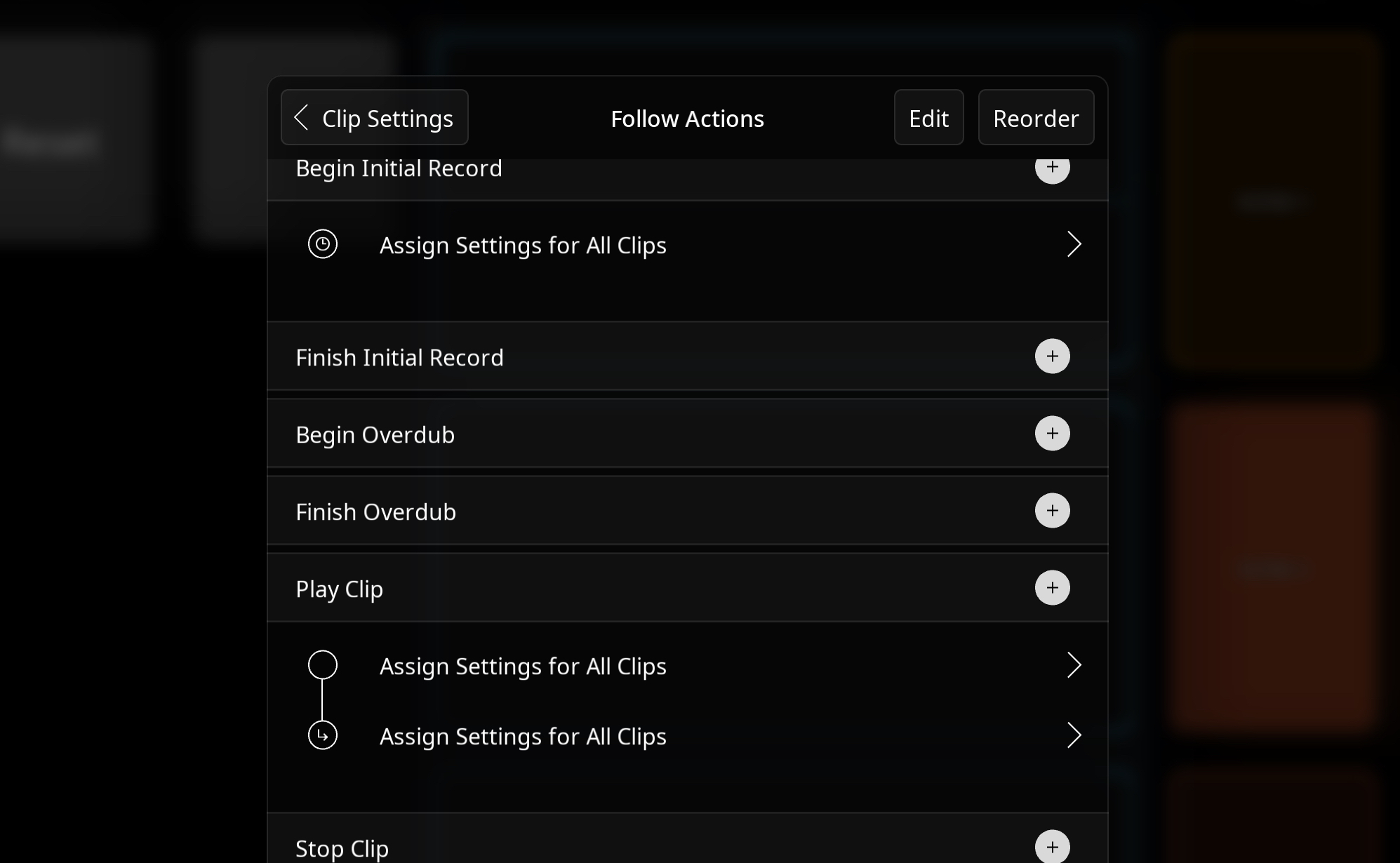
This so that it would play through the last playing clip before it records but dident work
Setting record count-in to loop doesn’t address this. What does record count-in for an empty loop?
The help text explains it and I’ve updated the manual. I was l aso explained it earlier in this thread.
Because of the way that you want your project to work: groups whose clips can be arbitrarily different lengths, stop followed by record is the way to go.
There are a few possible ways to go for the next step. But I’ve run out of time for now.
How do yu plan on triggering your clip recording? My suggestion is that you consider triggering by selecting the desired clip and triggering the button. Keeping the button around will simplify the process of updating the actions if needed.
@espiegel123
There wouldn’t be extra presses to select the clips using the method I mentioned.
Describe specifically what the two buttons do. How are you setting up the two buttons to choose between the more than two clips that will be in your project ?
@espiegel123 I will be standing and playing. I will not be touching the screen
My foot controller has two buttons available, only «single press». Button two is used for recording on clip 2, while changing scenes mostly auto records on clip 1 (if it is empty).
I scroll up and down scenes using my footswitch.
Button 1 and button 2 on my footswitch will be used for tapping clips in a scene for overdubs, or recording the first take, but changing scenes may equally be responsible for the first take on clip 1 anyway.
I was planning on pressing button 1-2 to = tap clip 1-2 in loopy
@_smund : I want to know the precise action setup that you would use for your midi bindings.
You do not have to touch the screen for the button to be used. For example if your midi binding would normally Record Clip 2. You would have your binding
@espiegel123
Okay so
-Pressing Foot controller 1-2 =Select clip 1-2.
Can ‘Selecting’ clip 1-2 do both record in an empty clip, and prime overdub? I don’t cognize why ‘selecting’ would be different than ‘tapping’ cuz it is also just 1 thing, similar to the 1 button I have available? it can be different like that?
You want me to make:
1.Press foot switch 1-2 = ‘Select’ clip 1-2
2.Select clip 1-2 = Press the button with the Stop Playing clips+Record action?
@_smund : what does select clip 1-2 mean?
Do you mean
Press switch 1 = select clip 1
Press switch 2 = select clip 2
?
Yes
@espiegel123 yes.
Please come back
Let’s say the button that stops playing clips then records is called “SerialRecordSelected”
Create a midi binding for switch 1 whose actions are:
-Select Clip 1
- trigger widget “SerialRecordSelected”
Create a binding for switch 2 with actions:
@espiegel123 will do
When I have 5 rows, 10 clips, do Imake 10 buttons? That would’nt be a problem but is that the smart way?
Switching scenes switches midi profiles
So far we have only discussed needing one button. What I described above only uses 1 button.
When you have 5 rows, what is your plan for choosing the target via your pedal?
Hola.
@espiegel123 I cant find the midi binding for “Select clip” when I open midi learn from the menu and press clip 1 to bind it to my midi controller. There is no “select clip 1” option” there, is there?
Do I make an intermediary button with: Select clip 1, + Press Stop Rec Button, and bind that to my midi controller instead?
I guess for each clip that would make 10 buttons
There are a few ways to create the bindings you need. You can create them completely manually in control settings which is what I would do or you could midi learn pressing the button then edit the binding in control settings to add the select action.
Hi Ed, it was a good idea to spread out the actions for getting the sequence of things, I’m now able to queue the actions I know!
I set up Queue Recording for the next scene post playthrough, but
I got stuck on Queue recording while respecting the playing clip on the same scene.
I think you can help:
@espiegel123
I want to make a widget with an action to queue recording on an clip while a longer clip is playing through on the same scene VIDEO.
The button we made STOPS playthrough while queuing recording.
I want to bind it to somethimg similar to tap clip 2
@_smund : my time to help with this project will be a bit limited for a while.
You might want to study the scene-based looper I posted here:
https://forum.loopypro.com/discussion/comment/1427187/#Comment_1427187
It isn’t set up for scenes to have have arbitrarily different lengths within a scene. You could modify the count-out settings with some care to get clips of arbitrary lengths..but you will want the scenes’ longest clip to be the first in order for transitions to happen when it completes its cycle.
@espiegel123
Maybe you can help me with something quick before you sign off.
I don't know what actions to use (widget)
How do I queue recording on clip 2 for when clip 1 has finished its loop?
Clip 1 still playing after it’s loop
Thank you
Post a copy of your project. I don’t know how much time I will have.
Did you set your groups to have all clips play together? If so, starting recording should start the other loop in the group playing.
@espiegel123 Lets make the world a better place.
I will start a new thread and make single questions. It makes sense to start over as I am putting my project back together and I can describe the outline from the start.
Thanx!
I think it would be helpful to proceed from the project that we started. It is a few steps away from where you should be able to proceed without needing more guidance.
@_smund here is how your project will behave with two clips per group set to be all play together and mutually exclusive with each other
https://youtube.com/shorts/6kToye3Zm0w?si=gj3tFEuaHBLA2lQq
This does what you have asked for.