Loopy Pro: Create music, your way.
What is Loopy Pro? — Loopy Pro is a powerful, flexible, and intuitive live looper, sampler, clip launcher and DAW for iPhone and iPad. At its core, it allows you to record and layer sounds in real-time to create complex musical arrangements. But it doesn’t stop there—Loopy Pro offers advanced tools to customize your workflow, build dynamic performance setups, and create a seamless connection between instruments, effects, and external gear.
Use it for live looping, sequencing, arranging, mixing, and much more. Whether you're a live performer, a producer, or just experimenting with sound, Loopy Pro helps you take control of your creative process.
Download on the App StoreLoopy Pro is your all-in-one musical toolkit. Try it for free today.
WoodPecker by Woodman’s Immaculate Maple Syrup Studio (Released)

https://apps.apple.com/us/app/woodpeckr/id6744409726
Introductory price : 30% Off for 2 weeks!!
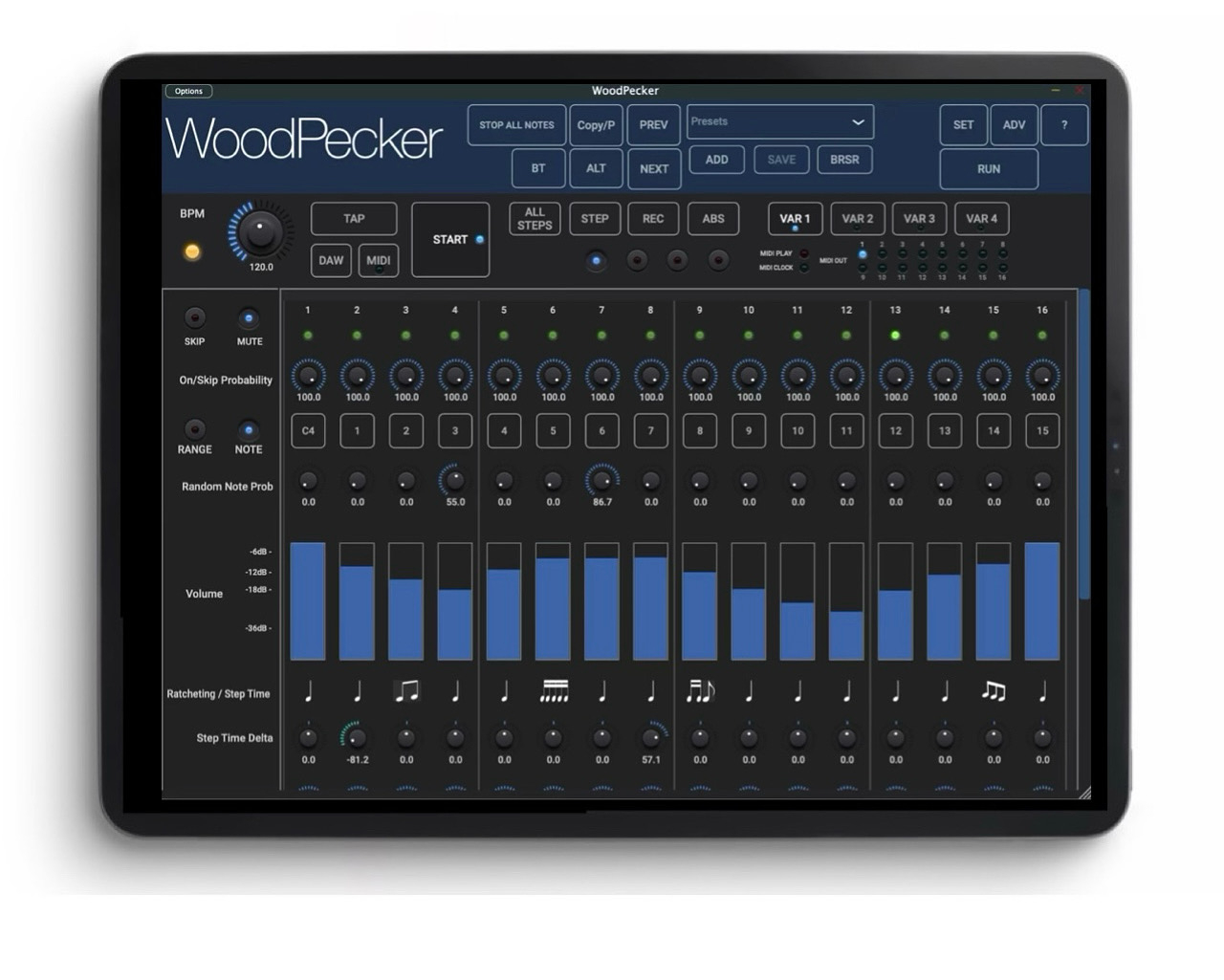
WoodPecker is a midi V2 and V1 sequencer with 4 independent layers (sequencers).
Each sequencer has up to 64 steps and 4 variations (resulting in max 256 steps).
The app can be used stand-alone (device midi input and output) or as a plugin in a DAW.
Plugin type : AUv3 and stand-alone app.
Each sequencer can set its own midi channel and hence 4 different instruments can be addressed simultaneously.
Each sequencer can set its own number of steps and step duration.
Each sequencer has 4 Variations (which can have different values for all step params).
Variations can be selected manually or from any step.
Sequencers can be started manually, by DAW transport, by Midi RT Play, by keyboard note input and when inserted as audio effect by audio input triggering.
BPM can be set manually, by tapping, by the DAW or by the Midi RT clock. WoodPecker can also send the Midi Clock and Midi RT play start/stop messages.
Midi V2 mode sends UMP messages given higher precision.
Resync mode restarts at step 1 after a number of bars (compensate for the random or odd timings).
Midi can be sent to the DAW and/or directly to the OS (allowing a plugin to address external instruments).
Stand-alone app support Midi over BlueTooth.
Each Step has :
"On" or "Skip" probability.
Velocity value.
Random note probability.
Random note range which can be limited to a scale.
Ratcheting (repetition of same note in the step). 9 ratcheting patterns (triplet, 4-sixteenths, 2-eights, etc).
Ratcheting probability.
Delta step time setting (different duration...)
Can send 4 Midi (CC, PC, Pressure, Pitch, V2 RPN, ...) or meta commands (start/stop other sequencer, set variation).
Presets can be stored in iCloud Drive (makes them available on all your devices).
Comments
Cool, will definitely give it a try.
(iPad only)
Strange naming, maybe due to searches? (Searching for regular woodpecker would give loads of results I guess)
Anyway, so far I'm not happy at all, as per usual you need a degree in engineering to get started. I will take some time with the manual but I really love apps I just can jump in without starting a reading session. I'll be back after...
Can’t find any videos, demos, or walkthroughs. Find that odd for an app/plug-in release. Thanks for being the Guinea pig 🙏
here is a small vid to get you started, more will come as I usually first do a release and then make vids ...
oh and the name being slightly weird is simply because WoodPecker was already taken :-)
Woodman
Ayyyy thank ya kindly!
Woohoo! New Woodman MIDI sequencer! 🤩 But why not universal?
Congratulations on the release! 🎉
@Luxthor : I guess by universal you mean for iPhone as well ? the code obviously runs on iPhone however honestly if you look at the UI it will have to be tailored for the iPhone to be really useful ...
If there would be a lot of demand, I can think of it ...
Woodman
My initial thought was more like WoodTroller, both for iPadOS and macOS. No worries, I just needed to ask. 🤗
@Luxthor : ah ok, it is available on MacOS (with the even weirder name WoodPeckrr ) but as prices are a bit higher there , I did not make it universal ...
Woodman
Could we get a link to the manual? For me, at least, your apps require it.
@seawind161 : https://wimsstudio.com/docs/WoodPeckerHelp.pdf
Thanks!
Cool sequencer! It’s mostly a familiar interface, so I didn’t rtfm (much) or watch videos quite yet. I was able to get a nice 4 part going pretty easily.
That said, I couldn’t get midi note on to fire sequences from a default state after enabling that and/or note on in settings. Maybe rtfm more would help here, but I didn’t see any obvious setup info in that section.
I tried audio which did work, but the parts can start out of sync using the same threshold settings. Both of these were in pursuit of one-shot functionality since I use that a lot on these type of sequencers.
One thing I’d definitely suggest is a different velocity scaling. Most of the slider range is going to be inaudible on most synths.
Cheers on the release! I personally love using these kind of sequencers attached to a control surface, so looking forward to where it goes.
https://www.wimsstudio.com/docs/WoodPeckerHelp.pdf
And just a couple of UX things:
Sliding to select a note is much cooler than tapping twice for a list when hunting for sequences.
I’ve tried to two-finger scroll that window about a dozen times
@MonsieurCheval : tnx for the very fast feedback ! rescaling of the velocity is on the list for the next version, any suggestions there ?
starting the sequencers from a note on : Set the Start mode dropdown to "Note On" in the Seq Settings (Set button), and arm by clicking the master Start ...
I 'll check the audio input behaviour, it may need a common start ...
Woodman
Personally, I think a linear slider would be sufficient.
For the midi…
-load woodpecker to a midi track in AUM
-attach the AUM keyboard
-start the AUM transport
-click set
-set start to note on
-close the set window
-click master start….its flashing
-push a note on the AUM keyboard….still flashing, not running
I can switch it back to manual and it starts running.
iPadOS 18.6.2, AUM 1.4.7, iPad Pro 11 m4
@MonsieurCheval : you found the first bug (well it is v 1.0 :-),
indeed midi input from the DAW is not handled, external midi will work (switch off Receive Midi from DAW in Advanced).
will be fixed in the next update.
Woodman
@woodman
I haven't found the time to go deep yet but found 2 things I would like to have: double-tap to reset, that's just standard and I always think I'm doing something wrong when it doesn't work.
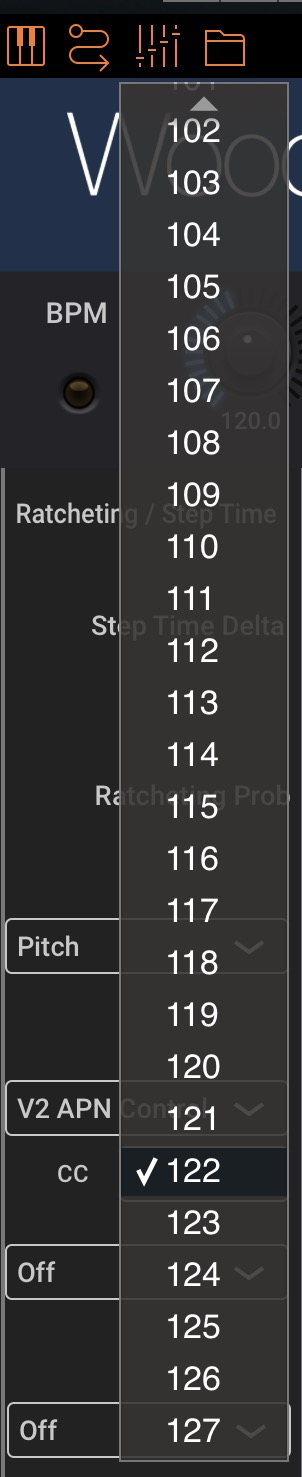
Scrolling list to choose CC!! That's just cruel Mr Woodman, make it a spinning wheel and the option to type in whatever CC.
I've had some issues changing the VAR: it either takes a while or stop working all together i.e no sound (on the VAR chosen).
Just a few blinkers, there'll be more over the coming days 😃
@Pxlhg : tnx a lot for the feedback ! with CC you mean the CC controller which is now a dropdown ?
ok I'll check the VAR, if you have a reproducible flow (or preset), that would be helpful ...
Woodman
Is it a midi DAW, a midi Auv3. ? Does it host plugin ?
@ecou : it is both a stand-alone app or an AUv3 plugin sending midi to 4 different channels allowing to control 4 diff instruments/apps/plugins.
Thank you! Very interesting
@woodman can it load midi files ? Browse and preview?
I kinda like this one...
Mind if I ask “why”? I love woodmans apps, but already own lotsa midi sequencer stuff. What separates this one from the pack?
Yeah, your menu's always have had an issue, I know we discussed it long ago but something with Juce made it hard to better. I don't know but take a look at this image and know that the little arrow to scroll is 1. small 2 miss it and the menu closes.
Well not now, I'm not available for testing but the scenario was 4 synths connected via dedicated channel (1-4) and playing around with one of them, changing VAR worked sometimes and sometimes not, while playing I should add. That's all I got for now.
Would I be right in thinking this is like an auv3 Quantum?
I can't say...nothing really, it just clicked with me in a way other step sequencers haven't...