Loopy Pro: Create music, your way.
What is Loopy Pro? — Loopy Pro is a powerful, flexible, and intuitive live looper, sampler, clip launcher and DAW for iPhone and iPad. At its core, it allows you to record and layer sounds in real-time to create complex musical arrangements. But it doesn’t stop there—Loopy Pro offers advanced tools to customize your workflow, build dynamic performance setups, and create a seamless connection between instruments, effects, and external gear.
Use it for live looping, sequencing, arranging, mixing, and much more. Whether you're a live performer, a producer, or just experimenting with sound, Loopy Pro helps you take control of your creative process.
Download on the App StoreLoopy Pro is your all-in-one musical toolkit. Try it for free today.
Musyc2 - New app by Fingerlab - Open for Beta-test

Hi,
I'm Aurelien from Fingerlab.
We are happy to start the Musyc2 beta-test, the app can be installed here:
https://testflight.apple.com/join/WMFZpjVG
Don't hesitate to send me your feedback!!
We hope you'll like it, thanks!
Here is the app description:
Musyc2 is a fun and innovative music app using physics to create organic and unique generative song.
No need for piano keyboard or music scores, just draw shapes and create stunning visual music!
Musyc2 is the sequel of our famous app Musyc. Built with a modern audio-engine, Musyc2 has all Musyc features plus many new features: Midi Output, AudioUnit, MacOS support, new sound kits, new FX modules and many more!
Test, experiment, and create a new kind of music with 55 sound kits and all the physic objects and features.
Musyc2 is universal for iPad, iPhone and Mac with no in-app in it, once you bought it, you got it all!
Features:
-Graphic design by Jonas Eriksson
-Intuitive User-Interface
-Physic-based Engine
-55 Sound Kits
-Audio Mixer with Level, Pitch, Length & Pan
-4 FX Modules with 10 Sonic Effects (Overdrive, Delay, Reverb, …)
-Built-in Physic Sequencer
-Shape Motion Recorder
-Advanced Physic Objects (Planet, Black hole, Modulator, …)
-10 Harmonic Scales
-User Sound Kit Creation Module
-Real-time Audio Recording
-User guide
-Tutorial
-12 Demo Songs
-Song Import & Export
-Audio Background support
-Midi Out support
-AudioUnit full support
-AudioUnit Midi processor support
-Mac Fullscreen support
Comments
First!
And. Oh. Hell. Yes!
The original was so much fun! Now an auv3? Whaaaaat..
Been waiting for nigh on 10 years for fingerlab to bring this app back…
In an unrelated wish (being different devs) would this “resurgence” of the old guard mean nodebeat is getting a modernization
Ha! Fun, still playing around with the old version from time to time.
I did think that multi-out would be a given with AuV3 but it wasn't. Coming!?
Nice! Happy to see individual MIDI ports.
Ah, did not check on that. Works too, instead of multi-out I mean.
Dope! The original was a lot of fun! Def going to check this one out
First impressions and yes I did own the original feels like breakout/ donkey kong/ the arcade game in a musical sense! Especially as a midi fx love it !
Indeed. Multi-out audio would be a cool addition. Maybe we can suggest that through the beta feedback.
It’s interesting that he also provides a AU Midi processor (MIDI only) version, in addition to the Audio Unit itself.
Wow, this is just thrilling. I wish I was about 7 years old and just encountering this on my iPad, but secretly I probably would enjoy just as much today. This is super creative and so perfectly suited to the touch screen. Very responsive and easy to navigate. Well done, Fingerlab!
Great fun to use as an AU driving different plugins with the different shapes. Congratulations @relpot.
My only observation so far is that the black hole object should be black, not white. Until I saw it referred to as a black hole in the tutorial, I had absolutely no idea that’s what it represented - I thought it was a circular saw.
Thanks for the feedbacks.
About the AudioUnit multi-out, I tried to add it but so far I did not succeed, I'm not sure the audio framework (AudioKit) I used for Musyc2 can do it. But as you said, you can use Musyc2 AudioUnit midi out (or Musyc 2 Midi Processor AudioUnit) to trigger other synths.
About the black hole, yes indeed, it's more a white hole ;p I will think about it.
Awesome cant wait to try it out. Thanks
@relpot, will MIDI-out also be added to Musyc Pro? My concern is that the App Store page for Musyc Pro is still up and still lists MIDI-out as an upcoming feature for that product: it would be expected some people will purchase Musyc Pro (as I myself have done) based on possibly incorrect information.
No, unfortunately, Musyc Pro code is too old and I cannot modify this app anymore, so I will not be able to add Midi-Out to Musyc. This is why I made Musyc2 with new code and new audio engine.
Once Musyc2 will be released, I will remove Musyc Pro from the AppStore.
Hi Aurelien, @relpot. Congratulations on the release. I’ve just been playing around with the beta again to make a decision on whether to buy or not.
Is there no way to have a chromatic scale? I can’t find one?
Hey Robin,
No there is currently no chromatic scale indeed. It's a bit difficult to add it due to the app architecture, but I will think about it for future update.
Thanks for the clarification @relpot. That’s a real shame. I could imagine setting up templates which would allow it to be used as a MIDI AU for sequencing and modulation duties but the lack of ‘do what you want’ chromatic mode is a major limitation in how it could be used. Hopefully, as you say, you can consider it for a future update. Cheers.
I’m using the desktop version, standalone. Got Ableton set to receive from Musyc 2, on midi channels 1-4. Midi is activated in Musyc, but nothing coming through. What am I doing wrong? @relpot
By mistake did I post this in Gavinski's walkthrough thread for M2, makes more sense here:
A pretty substantial update to the beta came through today and thanks to the Haq video a while back, a few nice changes and a lot of Haq presets and also some new sounds. Cool!
I don’t suppose the update added a chromatic scale option did it? Can’t see it in the release notes so I assume not. @relpot?
Hello,
Just a word to tell you that a new Musyc2 update is available for testing on TestFlight.
You can get it here: https://testflight.apple.com/join/WMFZpjVG
Please send me your feedback about this update.
This update will be available on the AppStore on the 12th of March.
I'm currently working on a next update with other new features, it will be available in April.
Thanks
Yes indeed, the last update v3.0-2 did'nt have chromatic scale, but I have added it and a new update v3.0-3 is now available on TestFlight with the chromatic scale.
Yes indeed, another user had the same issue, but it finally worked for him.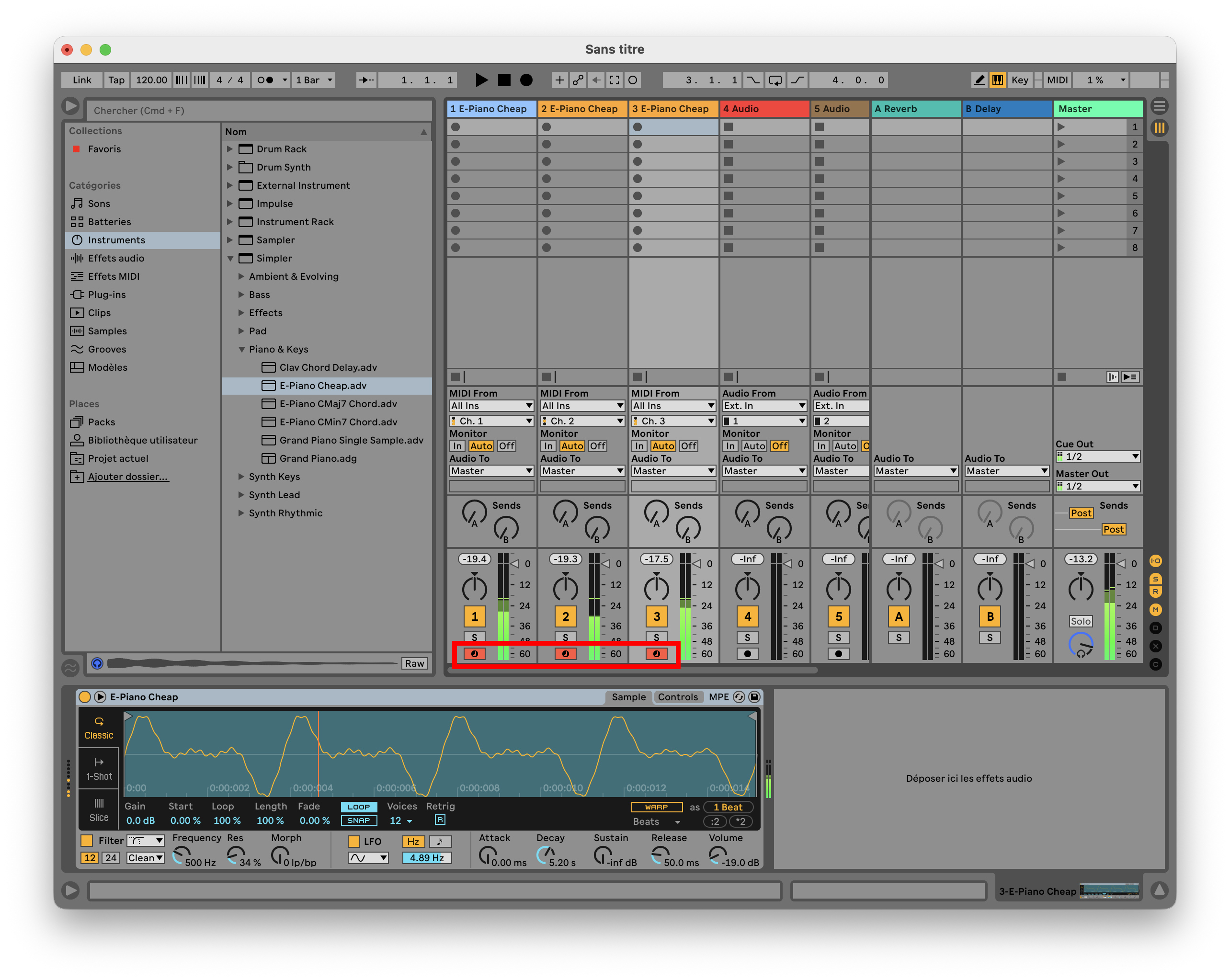
When I test it, it works fine for me. I can trigger different instruments on four different channels, I just have to set different channels for each instrument and to set the correct channel in Live for each midi track.
I have attached screenshots showing the setup for Musyc2 and Live. Note that in Live, I need to have the bottom small icon set to red for each track to have it working (I have highlighted it in red in the Live screenshot).
Hope it helps, tell me if it works for you..
Hi @relpot , no , still not working. I have it set up exactly like you. Have armed the record button on each Ableton channel, like you suggested. The built-in sounds are still coming out of Musyc, but no midi coming in to Ableton….
Damn, I don't understand what is going wrong as it works fine on my Mac. I'm not at my office today so I can't do new test or make you a video, but I will do that tomorrow and send you a video tomorrow showing you my setup and how I make it working.
No worries @relpot - I appreciate you looking into it.
It is weird though huh? It’s not like it’s a complicated thing to configure. When I use Fugue Machine Rubato in the same way, it’s seamless, no issues at all.
I’m on an M4 Macbook Air, running Sequoia 15.7.4, for what it's worth.
Anyone else got a mac and ableton who could see what happens when they try to do this?
Yes @relpot , do send a video when you can
Wow, the new project files by @jakoB_haQ are amazing! The dude sat down and got serious with this app. He must be single lol
He’s not single last I heard … I love how he treated Musyc2 like and drawing app and a music machine.