Loopy Pro: Create music, your way.

What is Loopy Pro?Loopy Pro is a powerful, flexible, and intuitive live looper, sampler, clip launcher and DAW for iPhone and iPad. At its core, it allows you to record and layer sounds in real-time to create complex musical arrangements. But it doesn’t stop there—Loopy Pro offers advanced tools to customize your workflow, build dynamic performance setups, and create a seamless connection between instruments, effects, and external gear.

Use it for live looping, sequencing, arranging, mixing, and much more. Whether you're a live performer, a producer, or just experimenting with sound, Loopy Pro helps you take control of your creative process.

Download on the App Store

Loopy Pro is your all-in-one musical toolkit. Try it for free today.

Battlestation: the 1-minute groovebox

1356712

Comments

  • @wim said:
    hey @brambos - I think it'd be great if the mutation chance knob could switch context to the selected drum rather than apply globally. There would be no change to the UI other than that the knob would move when you change context, but the utility would be fantastic. I don't have much use for the current global mutation other than to toss up a (too) random fill.

    I love the way you can use per hit mutation chance in XOX, and also how it can add random hits to even a sequence with no steps enabled.

    Totally agree. What if there 🤔 there was an option for both? :#

    I hope it's not too much to code? :#

    I really love this app! EDM is not my thing but got it because it is super fun and I can make some cool background beats for Ambient stuff. Loved Haq's video where he moved all the effects for ambient!

    Hope Wim's suggestion gets in there. It would make it so much better <3

  • If I load a preset (try analog delights) and then solo one of the drum tracks,specifically snare our percussion, I can hear echo. Note,not on all presets but on some. But if I hold down the Init button and start entering percussion I can't seem to find a way to get echo. Is this a bug or an I missing something?

  • @billkuhl said:
    If I load a preset (try analog delights) and then solo one of the drum tracks,specifically snare our percussion, I can hear echo. Note,not on all presets but on some. But if I hold down the Init button and start entering percussion I can't seem to find a way to get echo. Is this a bug or an I missing something?

    That’s the kind of thing I was getting when using midi (mentioned above) weird behaviour.

  • edited December 2025

    @billkuhl said:
    But if I hold down the Init button and start entering percussion I can't seem to find a way to get echo. Is this a bug or an I missing something?

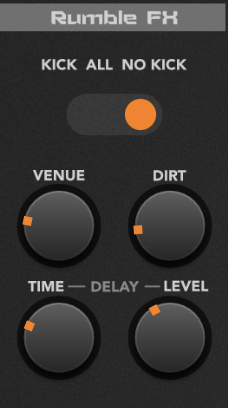
    I can get echo from the snate by enabling the delay in the Rumble FX for All or No Kick:
  • Ah, that's it, the rumble fx! Thank you!!!

    @Grandbear said:

    @billkuhl said:
    But if I hold down the Init button and start entering percussion I can't seem to find a way to get echo. Is this a bug or an I missing something?

    I can get echo from the snate by enabling the delay in the Rumble FX for All or No Kick:

  • edited December 2025

    Such a fun app.

    It would be cool if there was some indication on the memory bank buttons when controls have been changed. I keep forgetting which bank I’m in. 🙂 So far I haven’t overwritten the wrong bank but it seems pretty likely.

  • I know the phone version isn't recommended, however it's kind of fun anyway.

    There's a problem with the scroll buttons on the plugin interface. In some window sizes it scrolls too far so that you can't get to the middle synths. I noticed this particularly in portrait mode on the iPhone in Loopy Pro. Except for this, portrait actually works better than landscape due to having bigger controls.

  • The user and all related content has been deleted.
  • wimwim
    edited December 2025

    @brambos said:

    @jwmmakerofmusic said:

    @brambos said:

    @jwmmakerofmusic said:
    By the way, @brambos . :) How've you been doing? Hope life is treating you well.

    Thanks J! Had a bit of a rocky time, because it's not the best time to be a freelance automotive designer when the entire automotive industry is in a state of absolute chaos, but I'm happy to say that I've landed nicely and it's all good now. Thanks so much for asking <3

    I'm glad things have stabilised. And, I had no idea you are a freelance automotive designer! That's really amazing. :) Any automobiles out there that you worked on? Or is that under an NDA (non-disclosure agreement)?

    @wim said:

    @brambos said:

    @wim said:
    Oh man, I love that it runs on my embarrassingly old Intel MacBook. Thanks for making that effort @brambos !

    Happy to hear it works! I don't have an abundance of Mac devices to test on, so it's great to get confirmation! Have fun! <3

    There’s a graphical glitch where the next and previous buttons show as question marks. Other than that it works great in standalone. I haven’t tried it as a plugin yet, if that’s even possible.

    Interesting! Can you tell me what OS version you're using?

    MacOS 12.7.6 on 2015 Intel MacBook Pro.

    Using it as a plugin should work, because the standalone is, in fact, running as a plugin :wink:

    Yep. Works fine in GarageBand, miRack, and Ableton Live. It loads in FL Studio but the drum sequencer jumps all over the place and the audio is totally garbled. I assume that's an FL Studio shortcoming though. It's not real robust with AU plugins on the Mac.

  • In Drambo I see 9 Audio outputs, but everything comes out of the first one. How do I switch to individual outputs?

  • @tyslothrop1 said:
    In Drambo I see 9 Audio outputs, but everything comes out of the first one. How do I switch to individual outputs?

    The first output is the master out. Route outputs 2-9 for individual outputs.

  • @wim said:

    @tyslothrop1 said:
    In Drambo I see 9 Audio outputs, but everything comes out of the first one. How do I switch to individual outputs?

    The first output is the master out. Route outputs 2-9 for individual outputs.

    Ah, they're on all the time, I was looking for a switch. Thanks:)

  • I see the midi in and out, but how do you send out separate audio for each instrument when loaded in AUM?

  • edited December 2025

    @skiphunt said:
    I see the midi in and out, but how do you send out separate audio for each instrument when loaded in AUM?

    Just add the second channel as multiout then duplicate the channels. Mute the first channel as that is master out.

  • Good morning, now reading all of your comments (a man needs to sleep, unfortunately).

    Even if I don't always respond to each of them separately, I read and consider (and appreciate) them all! :)

    One small thing about the Memory states:

    • There isn't really an "active state". Only what you see in the UI is the active state
    • Think of the Memory Slots more like files: you read their contents into the UI, or overwrite them with the contents of the UI
    • So whatever you do in the UI isn't automatically saved to the last pressed memory slot etc. You need to do that manually
    • The only things that aren't saved in the memory slots are the tempo and the play-state of the playback button

      B)

  • @gusgranite said:

    @skiphunt said:
    I see the midi in and out, but how do you send out separate audio for each instrument when loaded in AUM?

    Just add the second channel as multiout then duplicate the channels. Mute the first channel as that is master out.

    Thanks Gus, you beat me to it :)

    In AUM it takes a fair few taps to set up, but duplicating channels is a neat trick to make it a bit faster once you've set up the first one.

  • 😎😍👏🏻👏🏻

  • All I wanted was Noir for the desktop too, what we got with Battlestation is maybe way too much, 😳 but if this is the only way to get Bram magic on the desktop, I’m in. 🤗

  • What a fun groove box.

    Feature request. Lock tempo option when changing presets.

  • @Luxthor said:
    All I wanted was Noir for the desktop too, what we got with Battlestation is maybe way too much, 😳 but if this is the only way to get Bram magic on the desktop, I’m in. 🤗

    Likewise. I would love full fat Noir on Mac. And also likewise, if this is the only way to get Noir on Mac, albeit Noir Lite, then I’m probably in too :-)

  • edited December 2025

    @cyberheater said:
    Feature request. Lock tempo option when changing presets.

    May I humbly suggest a manual workaround for this use case...

    1. Create a new empty bank and name it with a tempo, e.g. "130bpm jam 01"
    2. Save copies of your favourite presets into this new bank set at the same 130bpm tempo - you could even prefix the filenames with this tempo, e.g. "130_Mainframe"
    3. Switching between presets in this bank will not change the tempo
  • @cyberheater said:
    What a fun groove box.

    Feature request. Lock tempo option when changing presets.

    If you use it as a plugin in a host, the host tempo is respected no matter the preset.

  • @ecamburn said:
    Such a fun app.

    It would be cool if there was some indication on the memory bank buttons when controls have been changed. I keep forgetting which bank I’m in. 🙂 So far I haven’t overwritten the wrong bank but it seems pretty likely.

    I have similar feelings about memory bank, for me lighting up the M button that was either last loaded or saved would be sufficient.

  • @wim said:

    @cyberheater said:
    What a fun groove box.

    Feature request. Lock tempo option when changing presets.

    If you use it as a plugin in a host, the host tempo is respected no matter the preset.

    A perfect work around

    @tk32 said:

    @cyberheater said:
    Feature request. Lock tempo option when changing presets.

    May I humbly suggest a manual workaround for this use case...

    1. Create a new empty bank and name it with a tempo, e.g. "130bpm jam 01"
    2. Save copies of your favourite presets into this new bank set at the same 130bpm tempo - you could even prefix the filenames with this tempo, e.g. "130_Mainframe"
    3. Switching between presets in this bank will not change the tempo

    Thanks. A great idea.

  • Thanks @brambos . This is very immediate. The Turing style sequencers are fantastic. Love it.
    One request, I’d like to be able to swap out one synth for another. Using 2 or 3 noirs, or phase2s, instead of being fixed at 1 of each synth.
    Could be as simple as tapping the name above the controls and selecting the synth engine from a drop down.
    Thanks again Bram.

  • @kryten42 said:

    @ecamburn said:
    Such a fun app.

    It would be cool if there was some indication on the memory bank buttons when controls have been changed. I keep forgetting which bank I’m in. 🙂 So far I haven’t overwritten the wrong bank but it seems pretty likely.

    I have similar feelings about memory bank, for me lighting up the M button that was either last loaded or saved would be sufficient.

    Yes, this is the most recurring feedback so far, so I'll definitely will be coming up with something for this in the next update :)

  • I really like that this is available on iPhone, for those moments when I'm likely to doom-scroll I now have a very low-friction music alternative.

    If I get something going that I like, save it. otherwise, just roll the Turing dice and see what funky riff I can absent-mindedly filter sweep for 5 minutes when waiting for the train.

  • it was instant buy, especially for the price – and that's a lot of fun.
    @brambos special thanks for allowing Battlestation run on Mac but can we have Mozaic on Mac as well please?

  • Reguarding multi out (in AUM),
    the global fx and the rumble fx are only output on the main channel.
    The source sounds aren’t removed from the main channel when they are sent on an individual out.
    So the source is then doubled, the main channel and the individual out.
    There doesn’t seem to be any way to use the global fx and rumble fx in a multiout setup.
    Is this right?
    Thanks

  • @gsm909 said:
    Reguarding multi out (in AUM),
    the global fx and the rumble fx are only output on the main channel.
    The source sounds aren’t removed from the main channel when they are sent on an individual out.
    So the source is then doubled, the main channel and the individual out.
    There doesn’t seem to be any way to use the global fx and rumble fx in a multiout setup.
    Is this right?

    Yes, that's correct. It was technically complicated (at least in a CPU optimized way), so I decided this was the way to go, because the main reason for using the multi-outs was that you're likely going to use your own FX anyway :)

Sign In or Register to comment.