Loopy Pro: Create music, your way.
What is Loopy Pro? — Loopy Pro is a powerful, flexible, and intuitive live looper, sampler, clip launcher and DAW for iPhone and iPad. At its core, it allows you to record and layer sounds in real-time to create complex musical arrangements. But it doesn’t stop there—Loopy Pro offers advanced tools to customize your workflow, build dynamic performance setups, and create a seamless connection between instruments, effects, and external gear.
Use it for live looping, sequencing, arranging, mixing, and much more. Whether you're a live performer, a producer, or just experimenting with sound, Loopy Pro helps you take control of your creative process.
Download on the App StoreLoopy Pro is your all-in-one musical toolkit. Try it for free today.
Comments
It would be nice if a midi note could be used to transpose the sequences like in your Rosetta midi apps. Maybe it would need one of the spare midi channels as the first ones are used for midi input to the sound sources.
What's the quantization of the memory buttons? It feels like it might be 16th. I'm likely to play Battelstation while rendering audio, using those buttons like scene launch buttons.
Deleted comment
Thank you Sir 😊 🙏 @gusgranite !!!
Although the multi-out in AUM always initially throws me off, what was tripping me up is that I didn’t realize that even each drum part is also an audio out.
@brambos Excuse my ignorance, but can you do this same multi-out feature when using Battlestation on macOS in Logic?
I hesitated getting this because I already have the groove box BAM that I also love ❤️ though, I’m not really a groovy tunes sort of user for the most part and rarely use it… however, this is significantly different… very well designed, so that someone like myself can easily get something going with still loads of possibilities to experiment endlessly. Brilliant!
I’m also always amazed with how Brambos can fit so much functionality and visually appealing GUI into only 7.9MBs… and still also be completely universal, including macOS. Wow! 🤩
Very happy thank you note for kind file delivery to boys at the back of the room who are willing but slow etc.
Well, I was having a good deal of fun with this anyway... but now I just mapped some hardware knobs... and the whole thing has just taken off
Thanks @brambos, absolutely brilliant.
Had fun jamming along with Battlestation last night.. was sitting at my drum kit ready to play along to some of my favourite tunes when I thought “why not use @brambos new app?” Generated notes on Trouble, Noir + then Phase 2 in literally seconds.. cranked the tempo down, added a random percussion track.. Eh voilà.. fresh jam ready track.. play along for a bit, generate some new notes, tweak a few knobs.. total blast!
Congrats on the release and for making this fun new jam partner..
I find on my 12.9 5th Gen Pro, at many AUv3 window sizes, the right side is chopped off but there is no way to scroll, the little arrow thing is missing, Bram
@brambos
Interesting. We have tested the shit out of all the resizing variations (and haven’t seen it trip in a while).
Thanks for posting examples. Let’s see if I can reproduce that.
@Gavinski I have the same iPad and no issues here. The left/right arrows are fine. Maybe you just need a restart?
And I see the multi-out channels are set up just like Hammerhead; 1 is Main, and 2 thru 9 are the multi-out channels 1-8. Quite familiar with this setup!
I can't get it to follow the scale notes I put in. I added it to a older project in Emin but I can't for the world get B1 to not add extra notes I definitely don't want. Am I missing something?
Is the “scale” switch enabled on the pattern generators? Is there a transpose button enabled?
Yes (oc!) and no. I tried to stop the mutations just to see if those were the culprit but I don't think so. I'll start anew, see if it was just a temp glitch...
It gives me the wrong notes for Emin so I have to change myself..
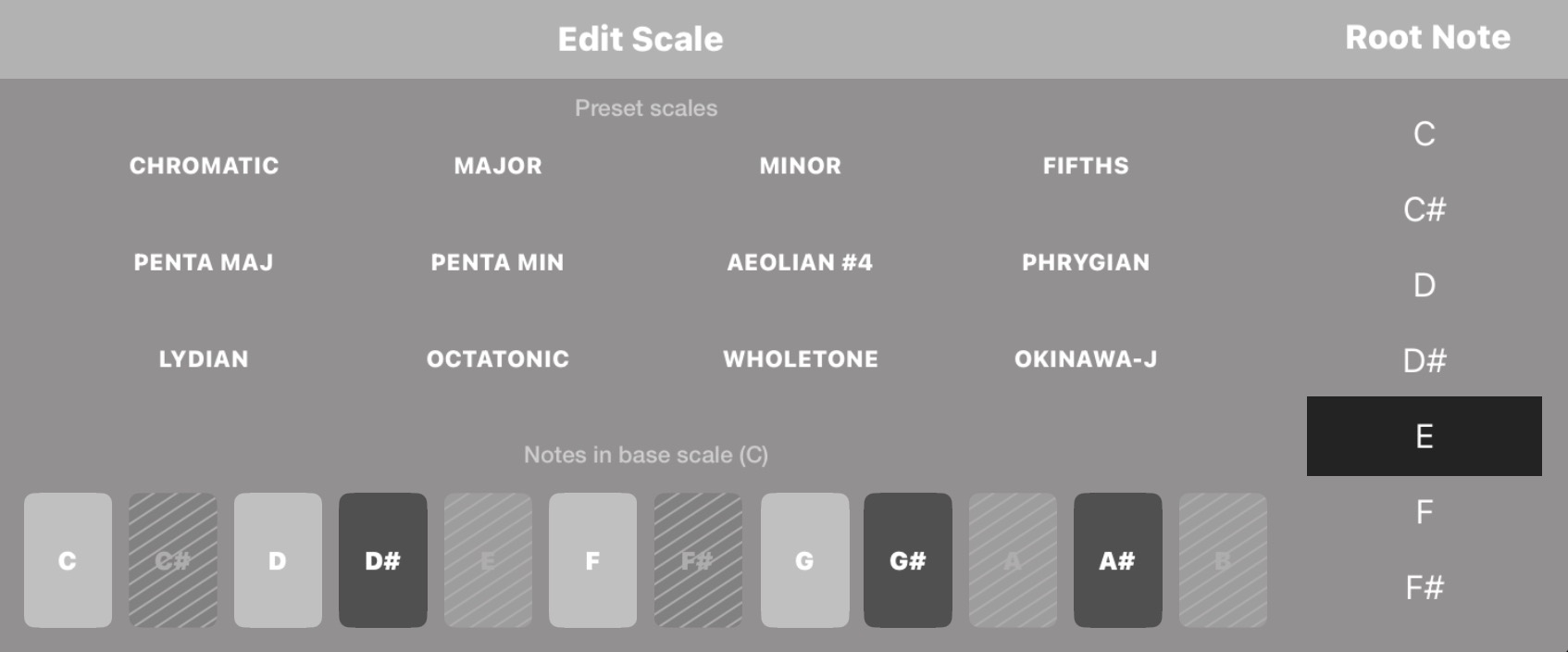
I think there might be some issue with the selector as I get this row of notes for several different note choices.

And here you can see I get notes that are greyed out in Emin like C#, D# and no E at all.

I actually get the same result in all other of your apps (Hilda, Solderbox) I tried. I either don't understand how to use it or something is wrong. The scale shown on the image above is very often the result whatever the choice (I reset by choosing chromatic and then something else, maybe that's not how to?)
No, restart doesn't fix it. The app looks fine initially, then I do a bit of resizing and it suddenly goes weird like that, and once it does, the arrows never come back until the AUv3 is reloaded. Then the same problem happens again once I fiddle with the size for a few seconds
@Pxlhg This seems to be by design.. I wish the display changed to show exactly what notes are being used when you change root notes.. not just a reference to a root note of C..
The example below shows notes for Cmin pentatonic yet the root note chosen is D.. so the app will play Dmin pentatonic even thought it doesn’t appear that way..
The note selector always shows the C base-scale. You use the root note table to shift the root (but that won't change the note selector display). But it looks like that's what you did.
The quantizer forces the random notes to the nearest note in the selected scale, so of course there is not guarantee that there's an E in there.
I'm now playing around with it, and it seems to behave as expected. But let me tinker some more.
Thanks for confirming. Let me stress-test it again on my 12.9".
No probs, I can probably send u video showing this too if u want, tmrw
For 13 inch iPads, does the full UI fit (no arrow)? In both standalone and in AUM?
No, there's always scrolling needed for the top-section. But everything will be significantly more comfortable to use than on smaller iPads.
13” Air M3 - no issues both standalone and in AUM - various window sizes in AUM - always 100% ok UI, but there is arrow for small scroll in standalone
so far this a blast. As much as I wanted more parameters, I realized the concept. Don't think about the small stuff, Get it close enough and perhaps later sound design it more. It also make me realize
I should try opening all the Bram apps that apply toe the project and then this. Little overkill, but if you wanted to focus on the acid bass more you could just add troublemaker{in AUM) or the others if you know what I mean. I think adding like one or 2 (of Bram app) things would still be safe in the more standalone feel. Or maybe just this and battalion, that could be nut if you played the decks right. Cheers, and again so much fun and the snap back knobs are ace so far. \oceans
>
I totally agree. I have never liked this way of managing scales in any of Bram's apps. I mean, where is the logic of having to translate in your head what a scale in E would look like if it were in C?? I just don't get it. I've learned to live with it though.
Yes, the Memory Slots (Snapshots) are exceptional, make you wonder why other programs don’t go that way (Ableton, Groove Rider 2, etc.).. There is so much that can be done here… Maschine Lock…. Edit.. morphing…
Oh.. That Scale feature… Sweet..
Thanks for such a great Box..
@brambos , I have the same resizing issue on a 2022 11’ M1 Pro. Sometimes it looks really ‘zoomed-in’.
I eventually finds a ‘resize’ where the arrows reappear.
@brambos I don’t know if this has already been reported, but I noticed if in standalone, and using the tempo arrows, I can adjust to the slowest tempo of 20. However, if you swipe down to adjust tempo it will go below 20. The app continues to work with the extremely low tempo down to about 2 or 3. After that you get an artifact sound and then silence. Bringing tempo back up doesn’t bring it back. You have to quit out and relaunch. You can actually go past 0 down to -99 for tempo. Seems like a bug.
Yes, that’s a known bug. Will be fixed asap! Thanks! 😃