Loopy Pro: Create music, your way.
What is Loopy Pro? — Loopy Pro is a powerful, flexible, and intuitive live looper, sampler, clip launcher and DAW for iPhone and iPad. At its core, it allows you to record and layer sounds in real-time to create complex musical arrangements. But it doesn’t stop there—Loopy Pro offers advanced tools to customize your workflow, build dynamic performance setups, and create a seamless connection between instruments, effects, and external gear.
Use it for live looping, sequencing, arranging, mixing, and much more. Whether you're a live performer, a producer, or just experimenting with sound, Loopy Pro helps you take control of your creative process.
Download on the App StoreLoopy Pro is your all-in-one musical toolkit. Try it for free today.
Comments
Steinberg Etude For iOS Demo!
Kindly provided by Ben Allen
Steinberg Verve For iOS Demo!
Kindly provided by Ben Allen
Cubasis 3.8 Update - Checking Out What's New - Lot's of Cool Stuff - iOS
Kindly provided by The Sound Test Room
Cubasis 3.8 - Huge Update! Everything that's included.
Kindly provided by Jamie Mallender
Cubasis 3.8 Update plus Verve & Etude by Steinberg for iOS - How To App on iOS!
Kindly provided by Jade Starr Music
https://www.youtube.com/live/zOmIvxW7O1c?si=lpY4vz9iVoSsFIma
Cubasis 3.8 is Here! New Amp Chains PLUS Two Powerful Pianos
Kindly provided by Lanewood Studios
New iPad soft from Steinberg : Cubasis 3.8 & Verve & Étude
Kindly provided by Nu-Trix The Synth Guy
I can confirm that Apple Pencil Pro has the same issue. Please take this deficiency seriously, because turning off 80% of the Pencil features every time before we work with Cubasis is not the solution. 🤗
@LFS congratulations on the release and I hope you are enjoying the best beta test team in the marketplace
Have to say that I have been enjoying the update very much and I have been so busy unwrapping Cubasis 3.8 that work on the family present pile has taken a back seat...
Hi @JohnnyGoodyear
Glad to read this - thank you...
Happy Holidays,
Lars
@LFS
It looks like Apple Pencil doesn’t work as expected.
I can add new notes on piano roll, but when I try to move existing notes it does nothing.
After I release pencil a note comes back where it was before.
It works fine with fingers.
I have iPadOs 26.2, iPad Pro m4 13", latest Cubasis..
Maybe there are some settings for pencil?
Only way I’ve found is to turn off hover. Other programs do the same. Frustrating
I am cleaning up my iPad and noticed Cubasis takes a whopping 50gb of storage. I flushed all of my recordings, saved my mixed downs and I cannot see anything left in the folders that might cause this amount of storage space it needs. The program itself is a little more over 1gb so I am clueless..
@LFS I was testing out the new AmpRack which can be found here.
I noticed a couple of problems. First, when you turn any effect 'on' or 'off' the sound cuts out completely for a second - for this jam I only wanted to use the wah wah in certain parts, but had to keep it on the whole time to avoid the cut outs. Second, I wanted to use 2 (same) delays before the amp, but you can only add 1, it would be nice to add as many as needed. Other than that, thanks very much, it's a great update and I'm looking forward to trying out the other amps.
Anybody else getting midi hang note with pretty much any midi apps. Even when no notes are being produced.
@LFS i use Helium as a Auv3 to browse my folder of midi files (imported in Helium) and drop them in Cubasis time line. This makes Cubasis crash. It also does it when I try to drop from the file manager into Cubasis.
Edit : I also try to import it in the media bay and still it crashes. I also tried to set Cubasis at the given BPM of the file with still no luck.
Make sure you empty the trash inside Cubasis. Then you might need to wait awhile or restart your device for the reduction to show.
Thanks!
Will try, thanks!
Lars,
Yes, turning off hover mode does fix the issue for me. This is 2nd gen pencil on m4 iPad Pro 13”.
Hi all,
Here is a quick update: we’re preparing Cubasis 3.8.1 to address the most critical issues reported since the release, plus your latest reports have been shared with our engineering.
Best,
Lars
Cubasis 3.8.1 Status Update
https://forums.steinberg.net/t/cubasis-3-8-1-status-update/1018848
Best,
Lars
@LFS I also find dealing with the velocity/expression a problem with Iconica Sketch and would love it if I could just use that very touchable graphic to manage all dynamics for all articulations - when I first saw it I thought that was what it was for.
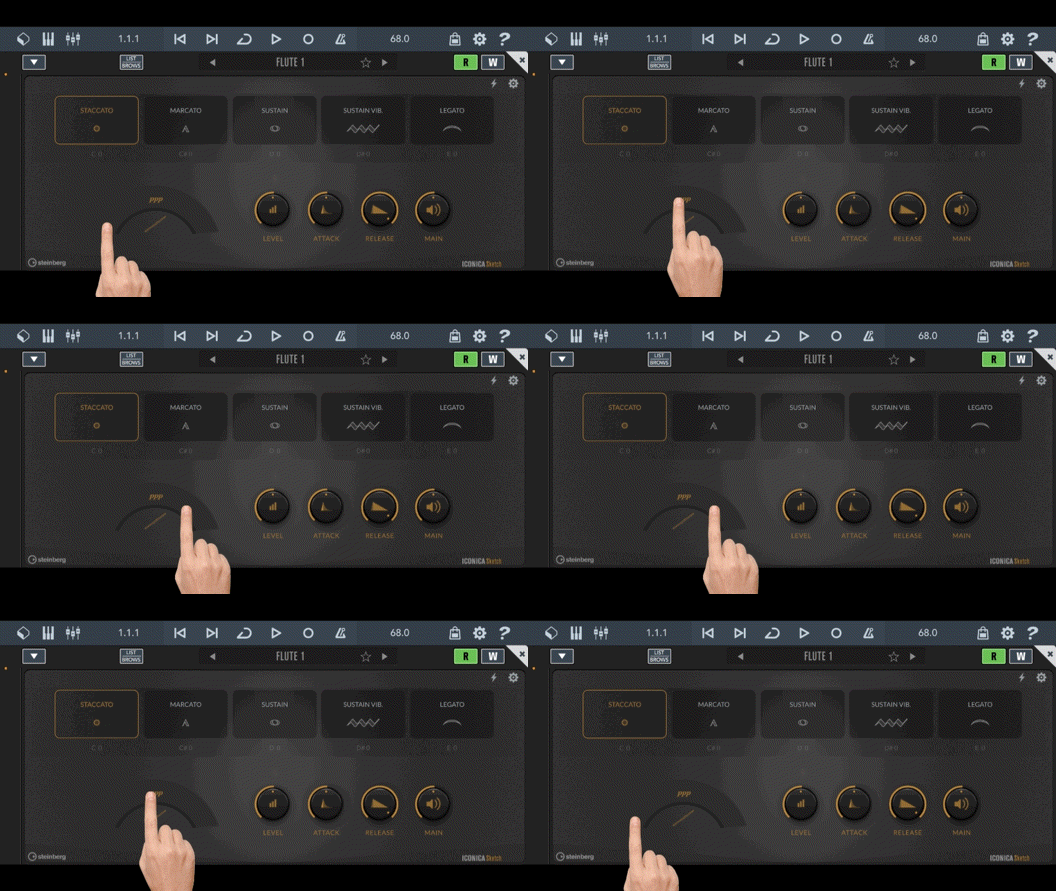
Hi all,
Cubasis 3.8.1 has been released a few minutes ago.
Please find out more right here:
https://forum.loopypro.com/discussion/67064/cubasis-3-8-1-now-available/
Best,
Lars
.ignore this comment
Lars, this is happening again. I resolved it the same as last time, but can there be an actual fix for this?
New bug: When I go to load Future Drummer as an Inter App Audio I don’t see it listed. None of the Lumbeat drummers are showing up under IAA. Loading the Lumbeat apps first doesn’t change anything.
There are two types of IAAs, Instruments and Generators.
IAA Instruments are loaded to MIDI tracks (Browser Inter-App) while IAA Generators are loaded on Audio Tracks (Routing Input - Inter-App).
Please be sure to check in both places, personally I've had zero issues with Cubasis 3.8.1 (except the 'trim' functionality) but other than that it's been smooth sailing.
I think your looking in the wrong place there are two ways to add IAA in Cubasis. Lumbeats app only show up under routing so you need add an audio track first then in routing tap on "Mono input" and then inter-app and you will find the Lumbeat apps.
Really love Cubasis and all the new stuff that Steinberg has added over the years! Thank you guys!
My pet peeve with Cubasis however was for several years (since its inception) and continues until this day the lack of linked clips / shared patterns.
By this I mean the ability to duplicate a MIDI or audio clip so that all its instances remain connected- edit one, and all the duplicates update automatically. This is a core workflow feature in many DAWs (often called linked clips, aliases, or shared patterns), and its absence in Cubasis makes pattern-based arranging unnecessarily tedious.
In practice, any change to a recurring groove, bassline, or motif requires manually updating every copy. On desktop this is annoying; on mobile it’s actively workflow-breaking. It discourages experimentation and makes Cubasis feel far less fluid for loop- or pattern-driven composition than it otherwise could be.
This isn’t about convenience or a “nice to have” feature—it fundamentally affects how you structure and evolve a song. I’ve personally been waiting for this for years, and every major update I keep hoping to see it addressed.
Is this something that’s on the roadmap or even being considered? Even a simple “duplicate as linked” option would be a huge step forward and would massively improve Cubasis as a compositional tool. I will be more than happy to pay for this feature as a standalone IAP!
@LFS said:
Will the major trim problem be addressed soon? @LFS