Loopy Pro: Create music, your way.

What is Loopy Pro?Loopy Pro is a powerful, flexible, and intuitive live looper, sampler, clip launcher and DAW for iPhone and iPad. At its core, it allows you to record and layer sounds in real-time to create complex musical arrangements. But it doesn’t stop there—Loopy Pro offers advanced tools to customize your workflow, build dynamic performance setups, and create a seamless connection between instruments, effects, and external gear.

Use it for live looping, sequencing, arranging, mixing, and much more. Whether you're a live performer, a producer, or just experimenting with sound, Loopy Pro helps you take control of your creative process.

Download on the App Store

Loopy Pro is your all-in-one musical toolkit. Try it for free today.

Is anyone else out here using Beatmaker 3?

2

Comments

  • @Telstar5 said:
    What’s Bm3 do that Koala cant do? Besides of course @Littlewoodg ’s previius detailed comments lol

    Apples to oranges, my friend. BM3 can do a lot more than Koala and goes pretty damn deep. One thing BM3 can do that Koala can't is host AUv3s. Then again, as Wim said, at the end of the day, sometimes we all just want to keep things simple. Koala is simple to sketch out ideas, sample oneshots from other AUv3s within AUM, etc etc etc.

  • wimwim
    edited December 2025

    btw @Littlewoodg - I'm not ignoring your question but it's going to take a bit of time to answer and things are a bit busy for me right now. I'm gonna ping @DMfan, who knows Zenbeats better than I do and may be able to answer better than me.

  • @wim said:
    btw @Littlewoodg - I'm not ignoring your question but it's going to take a bit of time to answer and things are a bit busy for me right now. I'm gonna ping @DMfan, who knows Zenbeats better than I do and may be able to answer better than me.

    Man, it's that time of year Mike. Recovering from Christmas cheer and prepping for the new year celebrations. I can't wait for the calm of January to be honest.

  • Thanks @AudioGus and great response again, @wim

  • The user and all related content has been deleted.
  • edited December 2025

    I have Koala and Beatmaker 3, and they are both great apps. Koala is like a trimmed-down version of BM3. I love Koala!! I could insert Koala into BM3, but not the other way around. BM3, in a way, was developed light-years before the rest. Its sampling engine is still up there with hardware like the Akai MPC. The time stretching algorithm is still the best, BM3 has macros, audio routing, envelopes / lfo's / filters per sample. The pads have scales, chords, multiple trigger possibilities, etc..The sampler is like an instrument. Its piano roll is not perfect and a bit dated, but nothing is perfect. The fix is that it has MIDI FX slots, which I insert Atom in if needed. It also has automation and scenes. Finally, it hosts Audio Units and Inter-App Audio. For around 25 bucks, it's still quite amazing and futuristic,

  • I'm still using it from time to time, mainly for testing MIDI Clock with apps.
    It's one of the few iOS apps that can sync to hardware gear perfectly, both with audio and MIDI tracks. It's better than Ableton Live in this regard.

  • edited December 2025

    @wim said:
    btw @Littlewoodg - I'm not ignoring your question but it's going to take a bit of time to answer and things are a bit busy for me right now. I'm gonna ping @DMfan, who knows Zenbeats better than I do and may be able to answer better than me.

    No worries, i personally have found chatting and thinking about the functionality of the app confusing, although less so now. Another factor is - maybe obviously - i prefer the thing to ZB, even though i have tried working with ZB since it was 1.0, desktop only, pre-Roland, named something else I can’t recall, and 35 bucks. BM3 for the win for all the usual personal reasons: appearance, workflow, nostalgia for fun with BM1 and 2.

  • @Samu said:
    Only things that bug me are the 'management of temp files' (ie. no 'project cleanup') and no way to add 'shortcuts/favorite locations' to the browser meaning everything has to be imported before use... (This is easily done using Files.app but still).

    ...I've have not had any crashes yet after deciding to re-install it after the latest update so on the 11" M1 iPadPro running iPadOS26.2 it's been smooth sailing for the most part but I'd suggesting disabling multi-tasking (from the control center) when using BM3 so the double-taps on the stop button won't trigger window re-size :sunglasses:

    Samu, how do I disable the multitasking feature? I hate that my screens are always changing when I double tap.

  • @Tones4Christ said:

    @Samu said:
    Only things that bug me are the 'management of temp files' (ie. no 'project cleanup') and no way to add 'shortcuts/favorite locations' to the browser meaning everything has to be imported before use... (This is easily done using Files.app but still).

    ...I've have not had any crashes yet after deciding to re-install it after the latest update so on the 11" M1 iPadPro running iPadOS26.2 it's been smooth sailing for the most part but I'd suggesting disabling multi-tasking (from the control center) when using BM3 so the double-taps on the stop button won't trigger window re-size :sunglasses:

    Samu, how do I disable the multitasking feature? I hate that my screens are always changing when I double tap.

    Check in the control center, you can turn it off and long-tap gives You options between Windowed or Stage Manager.
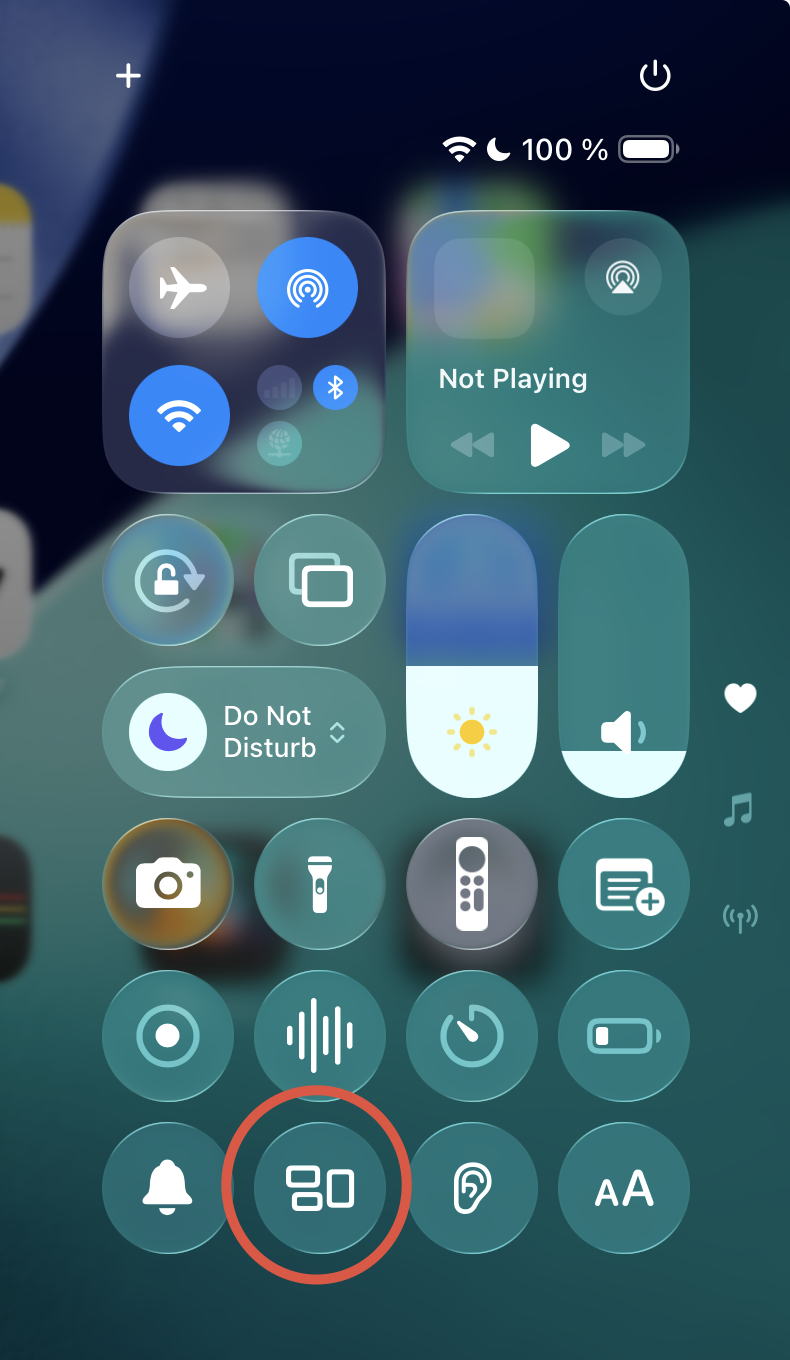
    If You don't have it in Your control center (it's easy to add)...
    ...You can also find in in setting Settings > Multi Tasking & Gestures (Choose Full Screen Apps)

  • @Antos3345 : Thanks for that !!

  • edited December 2025

    @Telstar5 said:
    What’s Bm3 do that Koala cant do? Besides of course @Littlewoodg ’s previius detailed comments lol

    For one, the sampler section is way more full featured. Lots of options. Very professional. Obviously BM3 can host AUv3 plugins. The mixer section is comprehensive. Tons of modulation. It just does more.

    Koala has a better more natural workflow and user interface IMO.

  • @Apex said:

    @Telstar5 said:
    What’s Bm3 do that Koala cant do? Besides of course @Littlewoodg ’s previius detailed comments lol

    For one, the sampler section is way more full featured. Lots of options. Very professional. Obviously BM3 can host AUv3 plugins. The mixer section is comprehensive. Tons of modulation. It just does more.

    Koala has a better more natural workflow and user interface IMO.

    @Apex : Can’t Koala host auv3 plug ins?

  • ****> @Telstar5 said:

    @Apex said:

    @Telstar5 said:
    What’s Bm3 do that Koala cant do? Besides of course @Littlewoodg ’s previius detailed comments lol

    For one, the sampler section is way more full featured. Lots of options. Very professional. Obviously BM3 can host AUv3 plugins. The mixer section is comprehensive. Tons of modulation. It just does more.

    Koala has a better more natural workflow and user interface IMO.

    @Apex : Can’t Koala host auv3 plug ins?

    Koala doesn't host plugins.. it is a plugin, not a DAW.
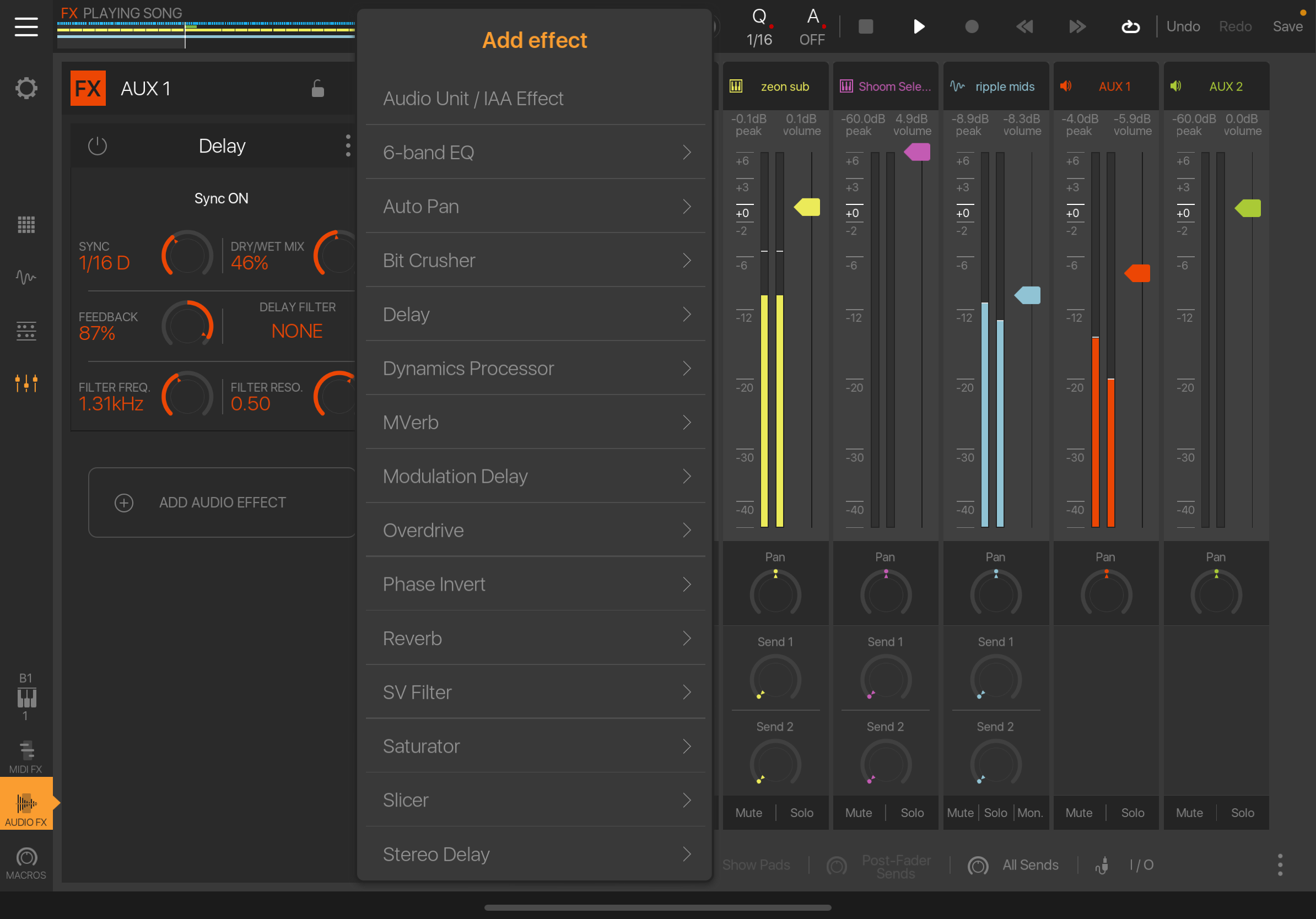
    The fix and processors are actually very pro.

  • edited December 2025

    BM was my original reason for buying an iPad ❤️
    It scratched my Maschine/MPC itch until I actually got both devices.
    I learned a lot from BM.
    As it stands now, I don’t use it anymore.
    Strike 1: It never made it to the iPhone as promised, Strike 2: crashed frequently, Strike 3: and did not like the MIDI fx implementation.
    I would definitely use it again if BM4 happens 🙏

  • @Stuntman_mike said:
    BM was my original reason for buying an iPad ❤️
    It scratched my Maschine/MPC itch until I actually got both devices.
    I learned a lot from BM.
    As it stands now, I don’t use it anymore.
    Strike 1: It never made it to the iPhone as promised, Strike 2: crashed frequently, Strike 3: and did not like the MIDI fx implementation.
    I would definitely use it again if BM4 happens 🙏

    Yah when midi fx were first implemented it was great, you could record it to the timeline, very sweet. But alas it had to change for some reason.

  • yes, and for some reason the porov miditools won't work anymore

  • @rototom said:

    yes, and for some reason the porov miditools won't work anymore

    I use one of them to route midi to the timeline and works fine.

  • ok, thx for the info! @Antos3345
    perhaps user error...
    i'll investigate

  • For me it is the MIDI chord devices, they do not behave the same in BM3 like they do AUM, Drambo, Cubasis, etc.
    I mean the built-in chord generator is okay, but I wanted to use Scaler and some others and it was funky.

  • edited December 2025

    @wim
    @Littlewoodg

    Not sure I can answer but I’ll give it a try. I am not familiar with what stuff is called in BM3, only tried it briefly years ago and left for NS2 and then Zenbeats. Problem being I am not sure exactly what you are asking about. I’ll add @MatthewAtZenbeats to the conversation as he has been developing the app since its Stagelight days, most likely he can elaborate more than I can😊.

    Zenbeats has two modes, a loop mode and a traditional timeline view, very much like Bitwig or Ableton.

    @Littlewoodg said:

    @wim said:

    @Littlewoodg said:
    The Bitwigian song/scenes/pattern workflow which took me a long time to suss out and which is unlike any othe iOS DAW.

    Zenbeats is similar.

    aside from superior sampler and IAPs, some things i thought only BW3 did (I haven’t had ZB on the device in a while):

    launch individual patterns from different scene columns selectively, (true clip launch without advancing scenes)

    Zenbeats has a loop mode with individual loop or whole column launching, you can also launch loops from different columns.

    launching timeline tracks selectively on the fly while launching individual patterns across scenes as above (except no pattern from a track can play while it ‘s corresponding is running)

    Not sure what you mean but in Zenbeats you work either in loop or traditional timeline view. Not sure what scenes are in BM3, it sounds like you want to play live? I have never tried mixing loop and timeline view, I usually record in loop view then transfer the project to timeline view in order to add vocals for example.

    mixing individual timeline tracks from here and patterns from there, on the fly, while switching back and forth between pattern and timeline on one track regardless of what’s happening on other tracks pattern-wise or timeline-wise

    See above

    switching from a timeline track as it plays to any pattern in any scene for that track, as above or from any pattern from your pattern list from that track, on the fly. (which moves you from timeline to any pattern slot to any scene column to set up that scene launch if that’s the next thing)

    See above

    switching patterns from your pattern list to the same pattern slot in it’s given scene, on the fly. Useful if you are working with scene columns in the conventional way, but want to choose from more patterns per given scene than you might have # of scenes for that track

    launching a scene column while exclude one track to be played on it’s timeline.

    You can mute a specific pattern or loop in Zenbeats.

    so one is given pattern, scene column, timeline track, and pattern list, to work with/launch independently and in combination except as above no fair playing a pattern and it’s timeline track simultaneously)

    it’s a complex matrix of function so I may have overlapped stuff.

    not sure about this one: does ZB let you make pattern lengths of whatever lengths, like 6 bars + whatever # of ticks BM3 calls “free” divisions?

    Yes, but I have no clue what a free division is🤣

    / DMfan🇸🇪

  • Hi everyone,

    Matt here from the Zenbeats team.

    Currently Zenbeats LoopBuilder and Timeline modes are separate and there is not a way to trigger clips while in timeline view. Of course there are workarounds, for example, if you wanted a long clip playing (like an entire song), you could trigger that clip first and then trigger other parts you want to mix in and out, etc.

    As for pattern lengths, yes you can go into a pattern and set the length to anything you want including disabling snap so lengths can actually fall in between grid lines if desired.

    Cheers!

    Matt

    @DMfan said:
    @wim
    @Littlewoodg

    Not sure I can answer but I’ll give it a try. I am not familiar with what stuff is called in BM3, only tried it briefly years ago and left for NS2 and then Zenbeats. Problem being I am not sure exactly what you are asking about. I’ll add @MatthewAtZenbeats to the conversation as he has been developing the app since its Stagelight days, most likely he can elaborate more than I can😊.

    Zenbeats has two modes, a loop mode and a traditional timeline view, very much like Bitwig or Ableton.

    @Littlewoodg said:

    @wim said:

    @Littlewoodg said:
    The Bitwigian song/scenes/pattern workflow which took me a long time to suss out and which is unlike any othe iOS DAW.

    Zenbeats is similar.

    aside from superior sampler and IAPs, some things i thought only BW3 did (I haven’t had ZB on the device in a while):

    launch individual patterns from different scene columns selectively, (true clip launch without advancing scenes)

    Zenbeats has a loop mode with individual loop or whole column launching, you can also launch loops from different columns.

    launching timeline tracks selectively on the fly while launching individual patterns across scenes as above (except no pattern from a track can play while it ‘s corresponding is running)

    Not sure what you mean but in Zenbeats you work either in loop or traditional timeline view. Not sure what scenes are in BM3, it sounds like you want to play live? I have never tried mixing loop and timeline view, I usually record in loop view then transfer the project to timeline view in order to add vocals for example.

    mixing individual timeline tracks from here and patterns from there, on the fly, while switching back and forth between pattern and timeline on one track regardless of what’s happening on other tracks pattern-wise or timeline-wise

    See above

    switching from a timeline track as it plays to any pattern in any scene for that track, as above or from any pattern from your pattern list from that track, on the fly. (which moves you from timeline to any pattern slot to any scene column to set up that scene launch if that’s the next thing)

    See above

    switching patterns from your pattern list to the same pattern slot in it’s given scene, on the fly. Useful if you are working with scene columns in the conventional way, but want to choose from more patterns per given scene than you might have # of scenes for that track

    launching a scene column while exclude one track to be played on it’s timeline.

    You can mute a specific pattern or loop in Zenbeats.

    so one is given pattern, scene column, timeline track, and pattern list, to work with/launch independently and in combination except as above no fair playing a pattern and it’s timeline track simultaneously)

    it’s a complex matrix of function so I may have overlapped stuff.

    not sure about this one: does ZB let you make pattern lengths of whatever lengths, like 6 bars + whatever # of ticks BM3 calls “free” divisions?

    Yes, but I have no clue what a free division is🤣

    / DMfan🇸🇪

  • @DMfan said:
    @wim
    @Littlewoodg

    Not sure I can answer but I’ll give it a try. I am not familiar with what stuff is called in BM3, only tried it briefly years ago and left for NS2 and then Zenbeats. Problem being I am not sure exactly what you are asking about. I’ll add @MatthewAtZenbeats to the conversation as he has been developing the app since its Stagelight days, most likely he can elaborate more than I can😊.

    Zenbeats has two modes, a loop mode and a traditional timeline view, very much like Bitwig or Ableton.

    @Littlewoodg said:

    @wim said:

    @Littlewoodg said:
    The Bitwigian song/scenes/pattern workflow which took me a long time to suss out and which is unlike any othe iOS DAW.

    Zenbeats is similar.

    aside from superior sampler and IAPs, some things i thought only BW3 did (I haven’t had ZB on the device in a while):

    launch individual patterns from different scene columns selectively, (true clip launch without advancing scenes)

    Zenbeats has a loop mode with individual loop or whole column launching, you can also launch loops from different columns.

    launching timeline tracks selectively on the fly while launching individual patterns across scenes as above (except no pattern from a track can play while it ‘s corresponding is running)

    Not sure what you mean but in Zenbeats you work either in loop or traditional timeline view. Not sure what scenes are in BM3, it sounds like you want to play live? I have never tried mixing loop and timeline view, I usually record in loop view then transfer the project to timeline view in order to add vocals for example.

    mixing individual timeline tracks from here and patterns from there, on the fly, while switching back and forth between pattern and timeline on one track regardless of what’s happening on other tracks pattern-wise or timeline-wise

    See above

    switching from a timeline track as it plays to any pattern in any scene for that track, as above or from any pattern from your pattern list from that track, on the fly. (which moves you from timeline to any pattern slot to any scene column to set up that scene launch if that’s the next thing)

    See above

    switching patterns from your pattern list to the same pattern slot in it’s given scene, on the fly. Useful if you are working with scene columns in the conventional way, but want to choose from more patterns per given scene than you might have # of scenes for that track

    launching a scene column while exclude one track to be played on it’s timeline.

    You can mute a specific pattern or loop in Zenbeats.

    so one is given pattern, scene column, timeline track, and pattern list, to work with/launch independently and in combination except as above no fair playing a pattern and it’s timeline track simultaneously)

    it’s a complex matrix of function so I may have overlapped stuff.

    not sure about this one: does ZB let you make pattern lengths of whatever lengths, like 6 bars + whatever # of ticks BM3 calls “free” divisions?

    Yes, but I have no clue what a free division is🤣

    / DMfan🇸🇪

    Thanks for looking at my messy essay!

    “Free” division is the BM3 version of the “none” choice of midi quantization, except that it’s not exactly none or “free” in that it’s still a division, just a tiny tiny tiny one, still visible as a tick on a measure’s division that your notes snap to…

  • edited December 2025

    BM3 is still my favorite iPad DAW though now that I know Loopy Pro can do linear now I’m trying to get up to speed. AUM has been my go to due to the ability to have multiple AUv3s open at the same time, Loopy does this too so it may just fill the bill for BM3 and AUM. I also still love and use BM2 even though it can’t host AUv3s.

  • edited December 2025

    @philowerx said:
    BM3 is still my favorite iPad DAW though now that I know Loopy Pro can do linear now I’m trying to get up to speed. AUM has been my go to due to the ability to have multiple AUv3s open at the same time, Loopy does this too so it may just fill the bill for BM3 and AUM. I also still love and use BM2 even though it can’t host AUv3s.

    I used Loopy a couple years ago and really enjoyed it. I must try the new version. I hear it can do a lot more and works as a DAW.
    I never liked the fact the mixer view looked small and I couldn't just see the mixer with longer faders, but maybe I didn't know how . I may have to upgrade my Loopy soon.

  • wimwim
    edited December 2025

    @Antos3345 said:

    @philowerx said:
    BM3 is still my favorite iPad DAW though now that I know Loopy Pro can do linear now I’m trying to get up to speed. AUM has been my go to due to the ability to have multiple AUv3s open at the same time, Loopy does this too so it may just fill the bill for BM3 and AUM. I also still love and use BM2 even though it can’t host AUv3s.

    I used Loopy a couple years ago and really enjoyed it. I must try the new version. I hear it can do a lot more and works as a DAW.
    I never liked the fact the mixer view looked small and I couldn't just see the mixer with longer faders, but maybe I didn't know how . I may have to upgrade my Loopy soon.

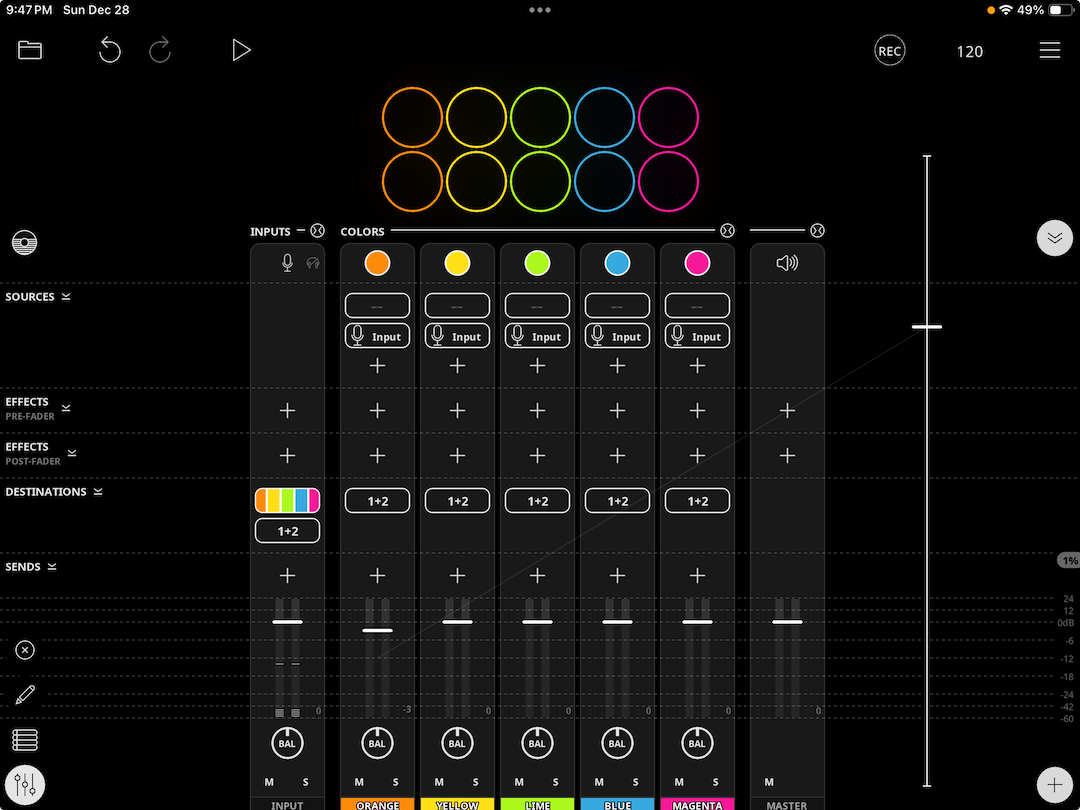
    The mixer is much, much improved, but the faders are still essentially the same.

    Truthfully, it doesn't matter except perceptually. You can control the faders with exceptional accuracy by moving your finger away from the fader without releasing your touch. Take a look at the thin white bar at the right of the screenshot below. That's me controlling the Orange color fader. Look at the throw length. You can also control faders with dedicated widgets that can be the full height of the screen if you like.

    OK, if you need bigger meters, that's not addressed. That doesn't matter at all to me but ymmv of course.

    Not trying to sell you on Loopy Pro. Just providing info regarding the last sentence in your post:
  • edited December 2025

    @Littlewoodg said:

    @DMfan said:
    @wim
    @Littlewoodg

    Not sure I can answer but I’ll give it a try. I am not familiar with what stuff is called in BM3, only tried it briefly years ago and left for NS2 and then Zenbeats. Problem being I am not sure exactly what you are asking about. I’ll add @MatthewAtZenbeats to the conversation as he has been developing the app since its Stagelight days, most likely he can elaborate more than I can😊.

    Zenbeats has two modes, a loop mode and a traditional timeline view, very much like Bitwig or Ableton.

    @Littlewoodg said:

    @wim said:

    @Littlewoodg said:
    The Bitwigian song/scenes/pattern workflow which took me a long time to suss out and which is unlike any othe iOS DAW.

    Zenbeats is similar.

    aside from superior sampler and IAPs, some things i thought only BW3 did (I haven’t had ZB on the device in a while):

    launch individual patterns from different scene columns selectively, (true clip launch without advancing scenes)

    Zenbeats has a loop mode with individual loop or whole column launching, you can also launch loops from different columns.

    launching timeline tracks selectively on the fly while launching individual patterns across scenes as above (except no pattern from a track can play while it ‘s corresponding is running)

    Not sure what you mean but in Zenbeats you work either in loop or traditional timeline view. Not sure what scenes are in BM3, it sounds like you want to play live? I have never tried mixing loop and timeline view, I usually record in loop view then transfer the project to timeline view in order to add vocals for example.

    mixing individual timeline tracks from here and patterns from there, on the fly, while switching back and forth between pattern and timeline on one track regardless of what’s happening on other tracks pattern-wise or timeline-wise

    See above

    switching from a timeline track as it plays to any pattern in any scene for that track, as above or from any pattern from your pattern list from that track, on the fly. (which moves you from timeline to any pattern slot to any scene column to set up that scene launch if that’s the next thing)

    See above

    switching patterns from your pattern list to the same pattern slot in it’s given scene, on the fly. Useful if you are working with scene columns in the conventional way, but want to choose from more patterns per given scene than you might have # of scenes for that track

    launching a scene column while exclude one track to be played on it’s timeline.

    You can mute a specific pattern or loop in Zenbeats.

    so one is given pattern, scene column, timeline track, and pattern list, to work with/launch independently and in combination except as above no fair playing a pattern and it’s timeline track simultaneously)

    it’s a complex matrix of function so I may have overlapped stuff.

    not sure about this one: does ZB let you make pattern lengths of whatever lengths, like 6 bars + whatever # of ticks BM3 calls “free” divisions?

    Yes, but I have no clue what a free division is🤣

    / DMfan🇸🇪

    Thanks for looking at my messy essay!

    “Free” division is the BM3 version of the “none” choice of midi quantization, except that it’s not exactly none or “free” in that it’s still a division, just a tiny tiny tiny one, still visible as a tick on a measure’s division that your notes snap to…

    Edit: also thanks for reminding the name of the app (Stagelight!) when i first bought in. Though bought in is not quite right, i think it was a free entry and then a pittance footer the full version). I remember Linkin Park was closely involved with the project and had contributed sample banks…

    Meantime, apologies for derailing the thread. To the topic, yeah I’m still using BM3. I’m promiscuous though, so i skip around among other DAWs. But I’m really enjoying BM3, it has workflow most like my preferred desktop app, though I wish it had DAWproject export format like Cubasis, which would make it the most direct way to ship between favorites across the 2 platforms. If wishes were horses…

  • Still my go-to to sketch something up using apps or hardware.
    Sometimes I export tracks to finish up on reaper... or to and from AEMS on ios/android.
    But most of the time I feel its reliable to do it all in BM3 in my old ipad mini 2 :lol:

  • @MatthewAtZenbeats
    In my opinion, Zenbeats had the potential to blow the competition out of the water—Drambo included—but it feels like the project has been abandoned. Here’s why:
    1. It would be great if clips (or loops) could be launched freely instead of being forced into a specific order.
    2. The clip recording workflow is bordering on ridiculous. You record, and then you still have to manually jump inside the loop to fix the In and Out points, even when it’s set to a 1-bar length.
    3. The UI is terrible—it feels "clunky" and oversized. For 2026, this is honestly embarrassing.
    4. It’s absurd that I constantly have to zoom in and out just to see the basic controls on a clip!
    5. The Piano Roll is awful and poorly designed.
    I’ve believed in this project since the early versions, thinking that as the revenue came in (and we’re talking about Roland here, for God's sake!), you would have drastically improved the app. Instead, you’ve done next to nothing. This is classic Roland: never listening to your customers and just doing whatever you feel like.

Sign In or Register to comment.