Loopy Pro: Create music, your way.
What is Loopy Pro? — Loopy Pro is a powerful, flexible, and intuitive live looper, sampler, clip launcher and DAW for iPhone and iPad. At its core, it allows you to record and layer sounds in real-time to create complex musical arrangements. But it doesn’t stop there—Loopy Pro offers advanced tools to customize your workflow, build dynamic performance setups, and create a seamless connection between instruments, effects, and external gear.
Use it for live looping, sequencing, arranging, mixing, and much more. Whether you're a live performer, a producer, or just experimenting with sound, Loopy Pro helps you take control of your creative process.
Download on the App StoreLoopy Pro is your all-in-one musical toolkit. Try it for free today.
Comments
I did that Wim, then pressed Save, but the UI still looks the same.
I just checked with a midi monitor and after making that change, it is now sending out 12 different CC messages.
I should mention a couple of other things - I actually need something that won’t require double taps, as I need to work very fast, sending rapid messages at very precise times. Think of drumming - you wouldn’t want to double tap to get a single hit at a particular time! Also, the ideal for me would be if I could use a button on a hardware controller to trigger the randomise action in Mozaic. Is Drambo a better candidate then? If so, how would one go about this?
You have to "upload" the script after making the change. Then save it if it's working as it should.
Ah OK thnx
Yep, looks like that worked. Do you know if there is a way for me to map a button on a hardware controller to trigger the double tap on the Randomize knob by any chance?
As mentioned in the help of the script ...
You can trigger it from a midi controller by sending to the knob 1
knob 0AU parameter.It wouldn't take long at all to cobble together a stripped down version of this script. I would consider doing that, but not tonight as it's time to hit the hay.
I'm not saying Drambo is a better candidate, but it would avoid coding. I was under the impression you were pretty well versed with Drambo. Maybe I'm misremembering.
I'm sure there are way better ways to do it than what I quickly tired, but something simple like this, with the button midi mapped to a controller?
The double-tap isn't required. That's just a mozaic shortcut to setting knobs to the middle position. The knob just needs to be turned to 64 or greater. Each knob has an AU parameter. So all you need to do is trigger a value greater than 64 to the
knob 0AU parameter. (Sorry for the typo in my earlier post).Good luck @Gavinski. I'll check back in the morning to see if you still need a custom script.
Thanks so much Wim, I’ll check that out. I did read that line in the script help, btw, but I maybe read it too quickly as I didn’t entirely get what you were saying, but I understand now. Re Drambo, no, I have only the tiniest familiarity with it, have almost never used it
Hi @Gavinski - I was in the mood for some coding, so I made a streamlined single random cc value trigger script. No worries if you don't make use of it - I just did it for the heck of it.
https://patchstorage.com/one-shot-random-cc-trigger/
Thanks > @wim said:
Thnx Wim, I'm already using the other one in a project I'm working on, invaluable really, it solved a problem I couldn't have solved otherwise. I'll download this too for future use, thnx!
Is there a Mozaic script which will do this?:
I’d like to press a button on an external MIDI controller, routed through Mozaic, and have Mozaic send a random Program Change to an AUv3 synth in AUM each time the button is pressed. The script would need a way to set a minimum and maximum PC range.
Might also be useful if there's an option to use a note message (either a single defined note, or just any note) as the input trigger for Mozaic.
Also ideal if there was an option to just do all this inside Mozaic itself with a button press, without need for an external controller.
I was fooling around tonight checking out how good ChatGPT is at programming Mozaic, and it turns out to be really quite good, I think. Here's a script that took just a few minutes to create and test, exactly as it came from ChatGPT, with no edits. It seems to work fine for pressing a pad to create a random PC message. I didn't test it for the external note trigger, but I did ask it to put that logic in there. Read the code, especially header at the beginning that gives a little more context. It could use refining, but if this is close to what you want let me know what needs to be changed.
In case anyone's interested, here's the exact prompt that generated the script above. I was already in a session where I had asked it to review the Mozaic documentation and projects on Patchstorage, and I was having it help me with a different utility. Part of the prompt is literally copied from the post above where @Gavinski asked his question:
@hes, nice one, that mostly works hehe. Pressing for a random PC messages works, and I was able to get it to learn which note would trigger a random PC message being sent. The UI is not set up to let me use any note input to trigger a random PC message. But then I realised I can just map any note or button to Mozaic Pad 1 using AUM’s midi mapping. Cheers!
But actually, it would still be useful to have something in the UI allowing any note to trigger a PC change - as I can’t set that up in AUM’s system, I would always need to define a specific note.
Also, btw, all the knob are displaying decimal values too when changed, would be better if they didn’t
@hes I tried to get ChatGPT to fix it but it didn’t do it right, Claude came through though, here is a slightly improved version with a third pad added and no decimals (edited this to fix a problem where it wa sending on wrong channel)
As I said, I haven't tested, but for allowing any note to trigger the PC message you should just set up Mozaic in AUM's usual routing matrix to have an external keyboard (or, actually, just anything, internal or external, that sends notes) as input. Just regular input to Mozaic. You don't go through AUM's AUv3 control system, which seems like what you must be doing if you're using external midi to trigger Pad 1. Then you make sure Knob 3 is set to 1:
// Knob 3: Note Trigger Mode
// 0 = Off
// 1 = Any Note triggers
// 2 = Specific Note triggers
The knob labels can be easily changed using the Round (or RoundDown) function.
Ah ok, see my last post though, that version is working fine, must have missed the knob functionality you mention, but the revamped script is clear and is working, thnx again
edited this to fix a problem where it wa sending on wrong channel
Cool, glad you got it working. Main takeaway for me is that AI has improved a lot at coding since last time I checked it out. Knowing how to actually program definitely helps in subtle ways when crafting prompts, and in helping the AI fix things when there are bugs or it's not working quite as you want it.
This kind of coding, using AI to write the code in response to user prompts, has gained the name of 'vibe coding'. There are varying degrees of it, in most extreme the user ends up with a program without having written or directly edited any of the code at all. I think that's what we did here. Although actual programming skill helps a lot, as I said in previous paragraph, I have read many stories of non-programmers persisting and through iteration getting what they want, even though they don't understand the code. (Whether this is generally a good thing is debatable. But whatever your take on that, in context of simple scripts like this with Mozaic, seems like a good thing to me.)
Anyone know what happened to the mfxPan app by Audeonic? Seems it is not available on the Appstore any more. Looks pretty interesting, and seems there is not (yet?😛) a Mozaic script on Patchstorage for this. This is the feature set:
Performance Responsive Auto Panner - incoming events will generate complementary pan controller messages (CC 10) on the same channel as the incoming notes. Pans can be triggered by note (velocity), aftertouch or controller events. Pans are triggered if the incoming trigger event is within a specified range and the depth of the pan can be proportional to the range set. There are different styles of pans and each can be given a maximum depth, cycle time and pre delay.
The plugin is divided into two sections; TRIGGER, where the pan trigger characteristics are set and PAN where the pan related parameters are set:
trigger (menu) - selects what type of event should trigger an auto pan.
range from/to (menus) - a lower and upper range can be set so that a pan will only happen if a trigger event is within the set range. The default of 1 to 127 indicates that a pan will happen with any trigger event (subject to the threshold value below).
threshold (slider) - the minimum trigger event value to start a pan cycle.
pan limit (menu) - normally, the pan will cycle to the depth specified (PAN section), but setting this to 'scaled' will scale the depth of the pan to the trigger value. Setting to scaled means that the higher the trigger value, the further the pan will move (and vice versa)
parallel pans (menu) - normally, mfxPan will only start a new pan when the current pan cycle has finished. Setting this value to 'yes' disables that restriction and multiple concurrent pan cycles are permitted. This creates very interesting pan effects as when playing multiple notes simultaneously, the pans will 'work against' each other and the pan will push and pull in unexpected directions.
pan (menu) - selects the direction of the pan. A variety of styles are available.
depth (slider) - this is the maximum depth of the pan. The higher the number (max 64) the further right or left the pan will extend to.
cycle time (slider) - this is the length of time that the complete pan will take from start to finish, in milliseconds. Low numbers will create fast pans and higher numbers will create long sweeps.
pre delay (slider) - adding a pre delay in milliseconds will delay the pan following a trigger.
I tried Claude the other day on mosaic scripts, I’m pretty sure that post would be a solid prompt for it @Gavinski
I gave it a few tries but didn’t get a working script out of it so gave up. Here’s a cleaner, tighter version of your request, based on the musically stronger “shift by scale degrees relative to the incoming note” approach:
Another Mozaic idea/request:
I love Rozeta Scaler, but a transpose slider isn’t always ideal. Imagine, instead, selecting a scale (preset or custom), and then having buttons representing the scale degrees rather than semitone offsets. For a diatonic scale, that would be seven degree buttons, plus two direction buttons: + and –
When a degree is selected, incoming MIDI notes would first be quantized to the chosen scale, then shifted up or down by that number of scale steps relative to each note. So “3” with “+” active would move each note up by two scale degrees. Selecting “1” would result in no transposition.
The advantage over a slider is that this would allow instant jumps to exact diatonic intervals without passing through out-of-scale notes. Great for live jamming.
I guess/know this is probably complicated, but wonder if anyone is up to the task (and the above one too haha!)
Edit: Also, rather than + or - buttons, just having rows of buttons similar to the way it is done in Fugue Machine Rubato, see below, is probably much better:
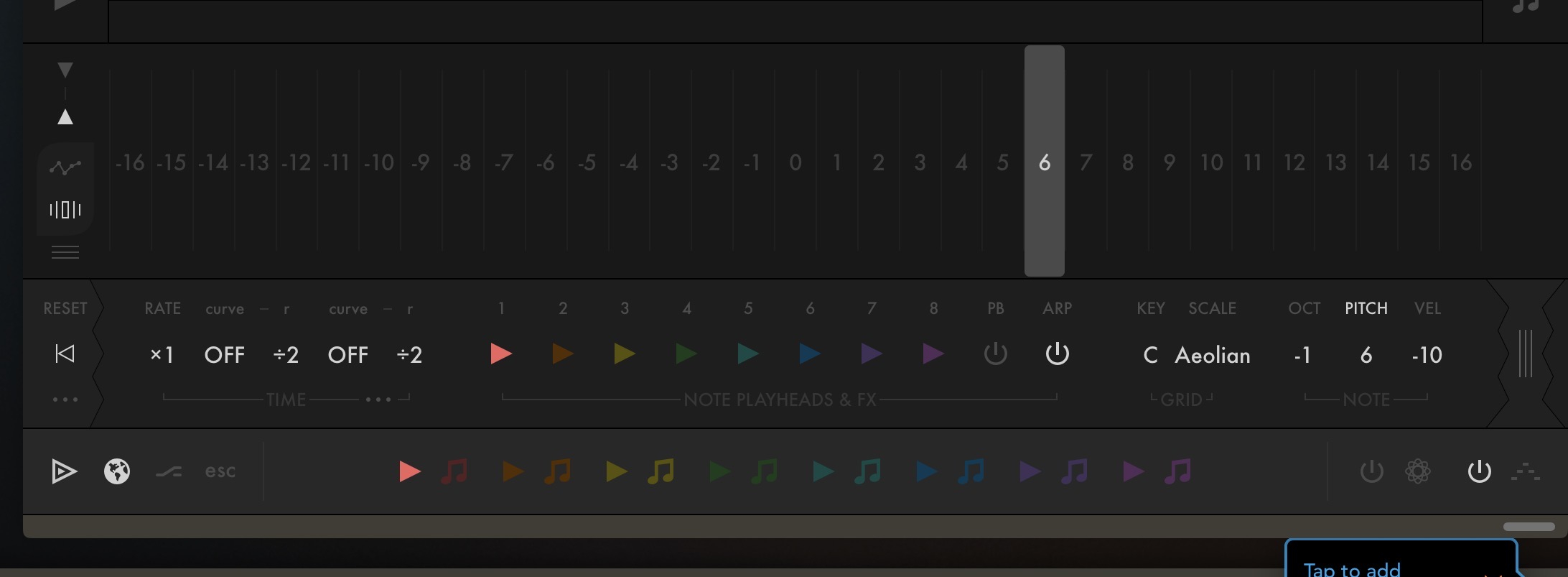
@Gavinski ahh gutted, fingers crossed wimBOT is in the mood 😅
Ha ha! Not today.
Grandkid making sure I can't focus on anything for more than 20 seconds at a time, and wife who will surely beat me over the head with my iPad if I'm doing coding on Valentines day. 😂
Is there already a script that can do MIDI ratcheting on incoming notes? Or would any lovely soul here consider making one?
Ideally, the user could define a rate (1/16, triplets, dotted), with different buttons for different numbers of ratchets, and the ratchet would continue while a button is pressed, stopping at the next clock subdivision after the button is released.
It could maybe also have a simple burst mode, with a button press triggering a user-defined fixed number of repeats regardless of how long you hold it.
Would maybe be good to have some velocity controls with ramp up / down options.
Tried searching the Mozaic Patchstorage page for 'ratchets' but didn't get any relevant results. Thnx!
This! This, This please.
Should be doable with any plug-in that provides Midi-Echo like Mela? (Ie. set the interval and number of repeats?!).
(I'm not saying I would write such a script, but those questions would need to be answered no matter who wrote one.)
@wim thanks haha, I knew there must be many aspects I hadn’t considered. Tbh I don’t have strong opinions about the above, I guess wiser minds might have to decide what’s most desirable/feasible