Loopy Pro: Create music, your way.

What is Loopy Pro?Loopy Pro is a powerful, flexible, and intuitive live looper, sampler, clip launcher and DAW for iPhone and iPad. At its core, it allows you to record and layer sounds in real-time to create complex musical arrangements. But it doesn’t stop there—Loopy Pro offers advanced tools to customize your workflow, build dynamic performance setups, and create a seamless connection between instruments, effects, and external gear.

Use it for live looping, sequencing, arranging, mixing, and much more. Whether you're a live performer, a producer, or just experimenting with sound, Loopy Pro helps you take control of your creative process.

Download on the App Store

Loopy Pro is your all-in-one musical toolkit. Try it for free today.

Cubasis midi note not triggering synth

edited February 21 in Cubasis

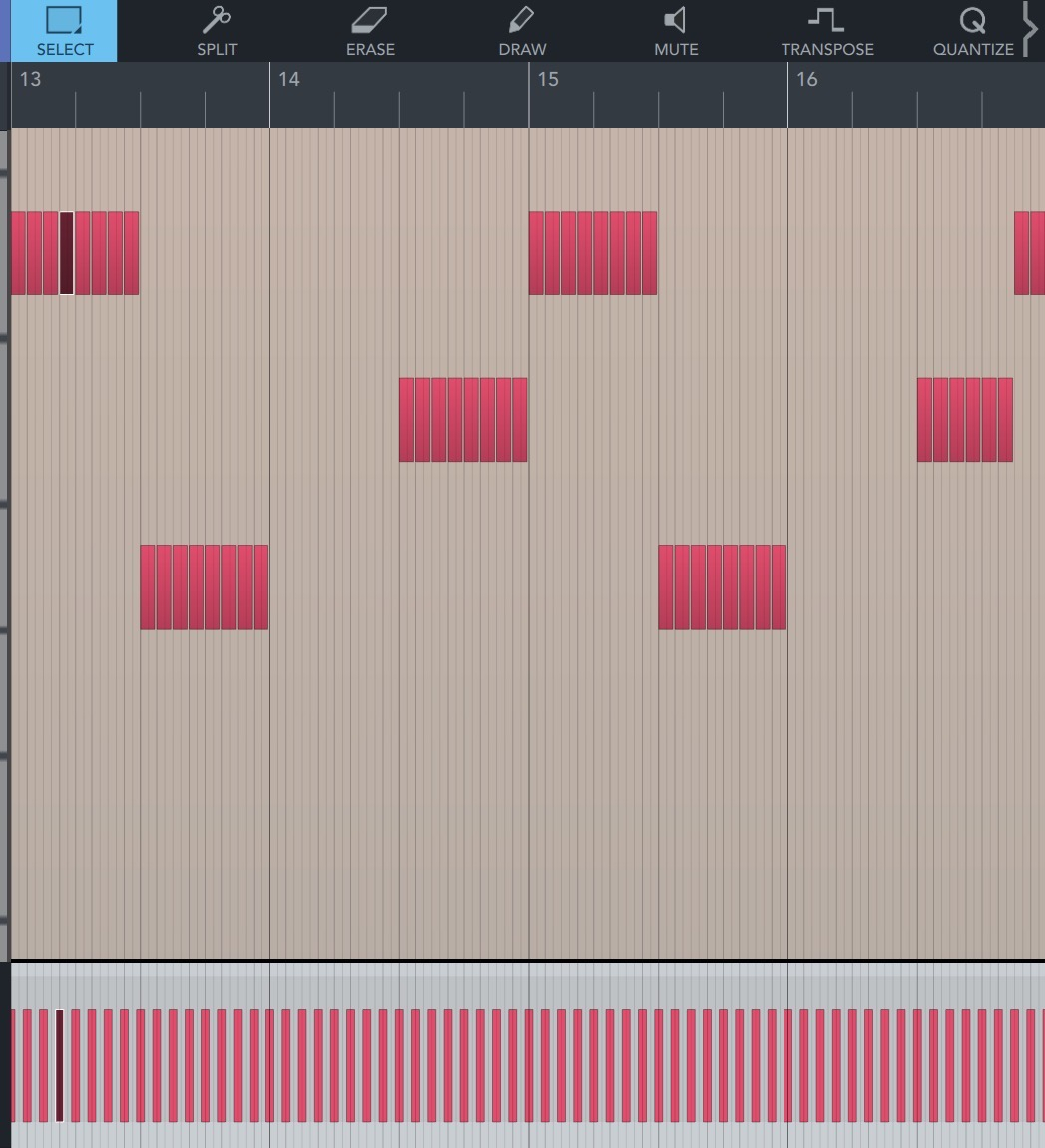
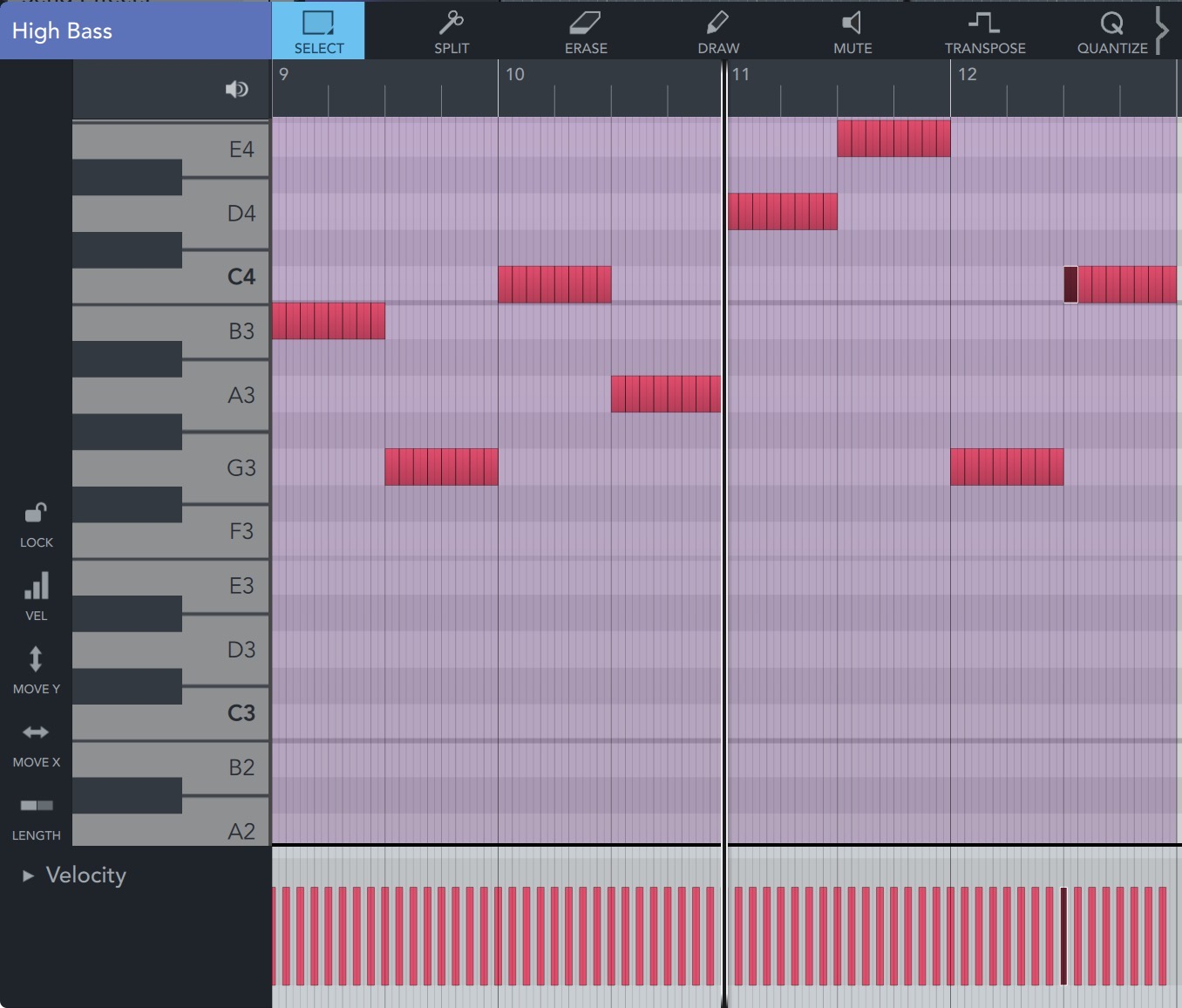
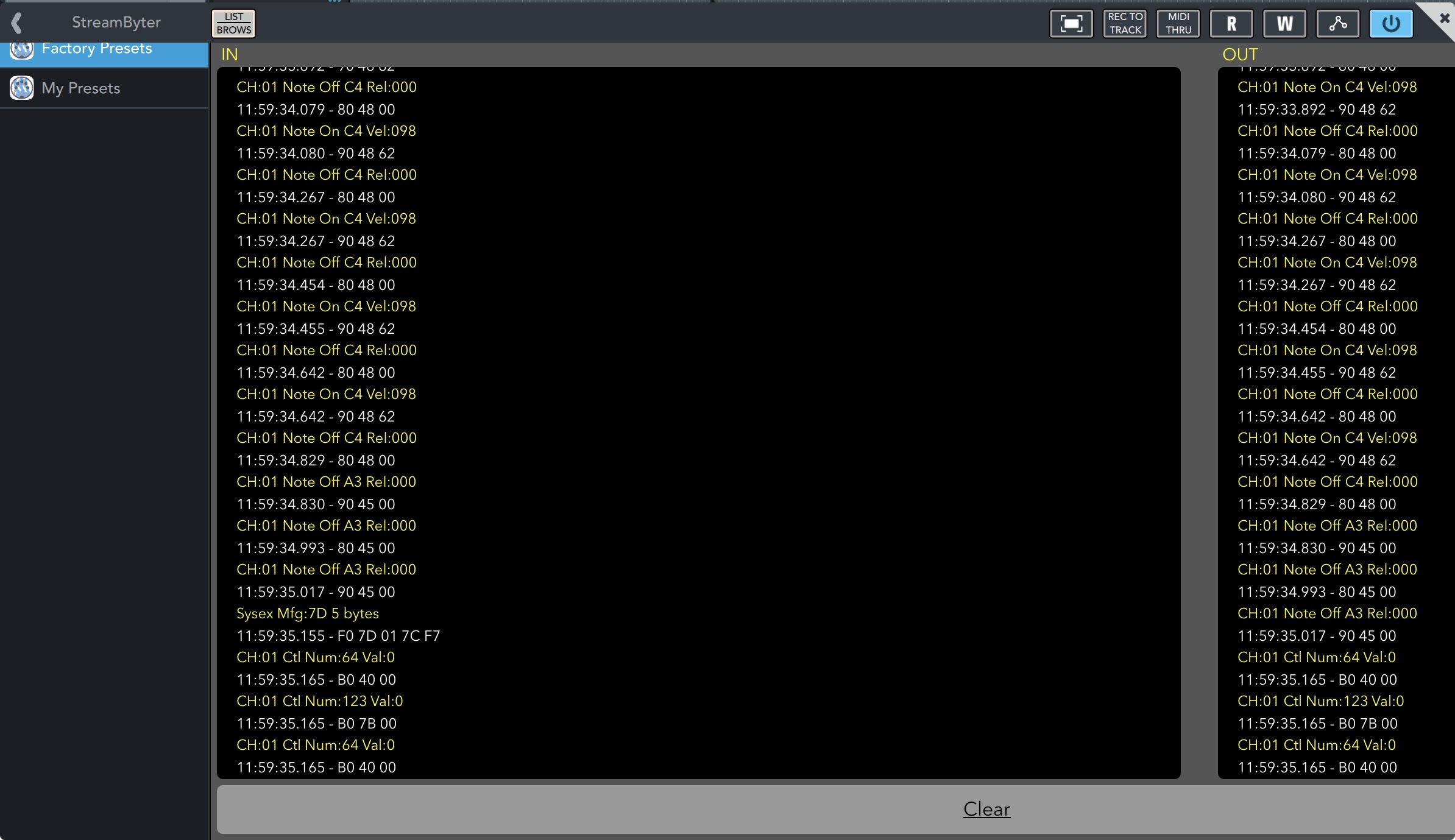
@LFS Once in a while i get all the notes in a midi region in Cubasis (many versions) that the notes do not generate any sounds. I put steambyter looking at the C4 who produce sound and the A3 that produce no sound. The only thing i see is that one does not generate velocity and note On event. The C4 is in a midi region where all the note play and the A3 is in another region where none play. Both region have multiple notes, not juste the CA and A3. Both note have a velocity in Cubasis. Where’s the difference ?
Comments

  • I don’t know the answer but I find all kinds of strange behavior with the midi in Cubasis , so i only use it for a few things instead of full on projects anymore 🤷‍♂️ kindof a bummer too cuz there’s a lot of good potential and the UI feels intuitive to me

  • edited February 22

    @ambrosiajam said:
    I don’t know the answer but I find all kinds of strange behavior with the midi in Cubasis , so i only use it for a few things instead of full on projects anymore 🤷‍♂️ kindof a bummer too cuz there’s a lot of good potential and the UI feels intuitive to me

    Cubasis used to be super stable. I don’t know if it’s when they added the tempo track that things went off the rails.

    I have confidence they will bring it back but it is frustrating when your trying to get things out.

  • @ambrosiajam said:
    I don’t know the answer but I find all kinds of strange behavior with the midi in Cubasis , so i only use it for a few things instead of full on projects anymore 🤷‍♂️ kindof a bummer too cuz there’s a lot of good potential and the UI feels intuitive to me

    Make sure to contact their support and supply demonstrations/examples so they can address the issues you are encountering.

  • LFSLFS
    edited July 28

    Hi @ecou,

    Sorry for my late reply, due to overlooking this post as I didn't receive any automated messages or notifications.

    We're in preparation for the next maintenance update, which is planned to be released soon.
    Please let me know if the problem is still persistent after the update is out.

    Thanks,
    Lars

  • Hi @ambrosiajam

    but I find all kinds of strange behavior with the midi in Cubasis

    I'm afraid the only way we can do something about this is if you provide us with more details about the issues you're experiencing. Otherwise, there is nothing we can do to investigate or help resolve it.

    Best,
    Lars

  • @ecou said:
    @LFS Once in a while i get all the notes in a midi region in Cubasis (many versions) that the notes do not generate any sounds. I put steambyter looking at the C4 who produce sound and the A3 that produce no sound. The only thing i see is that one does not generate velocity and note On event. The C4 is in a midi region where all the note play and the A3 is in another region where none play. Both region have multiple notes, not juste the CA and A3. Both note have a velocity in Cubasis. Where’s the difference ?
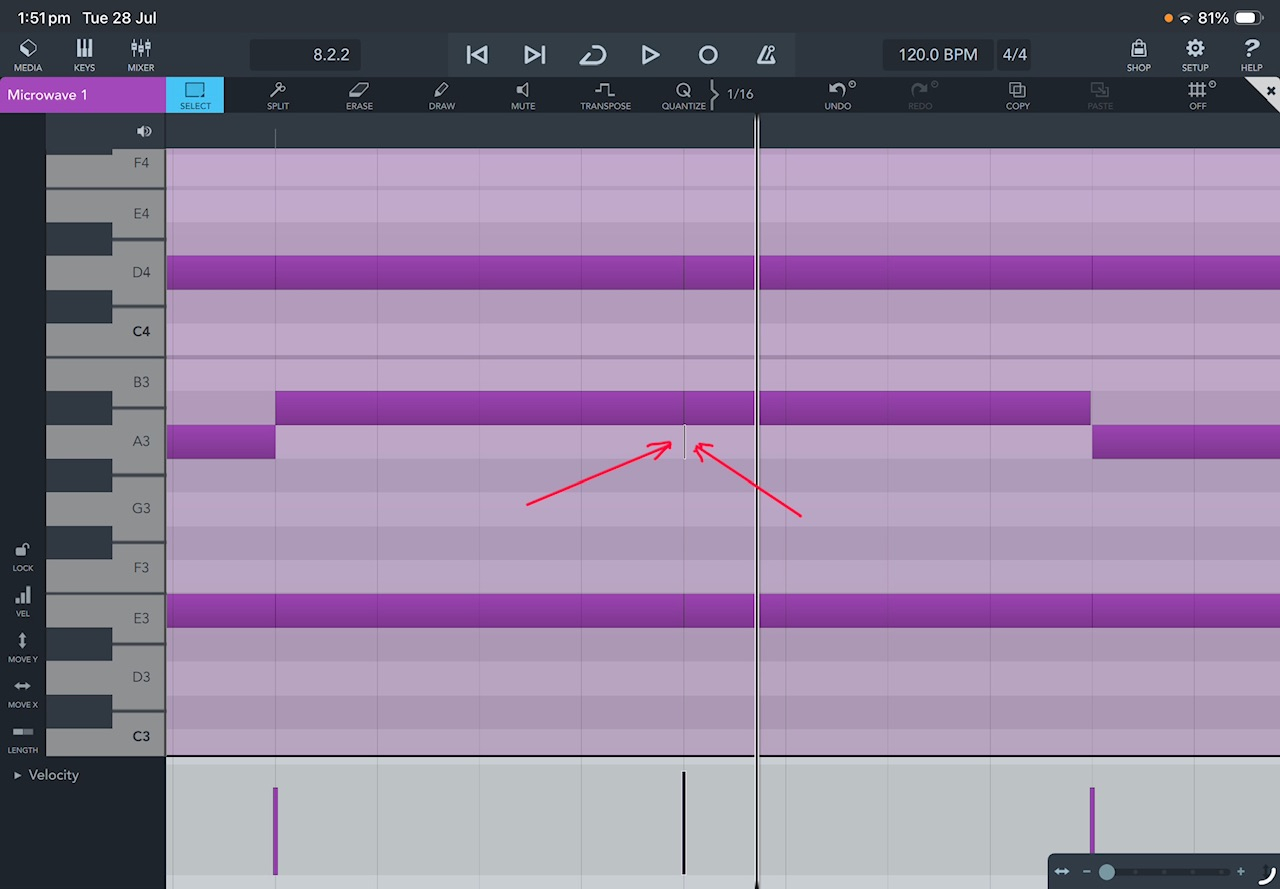
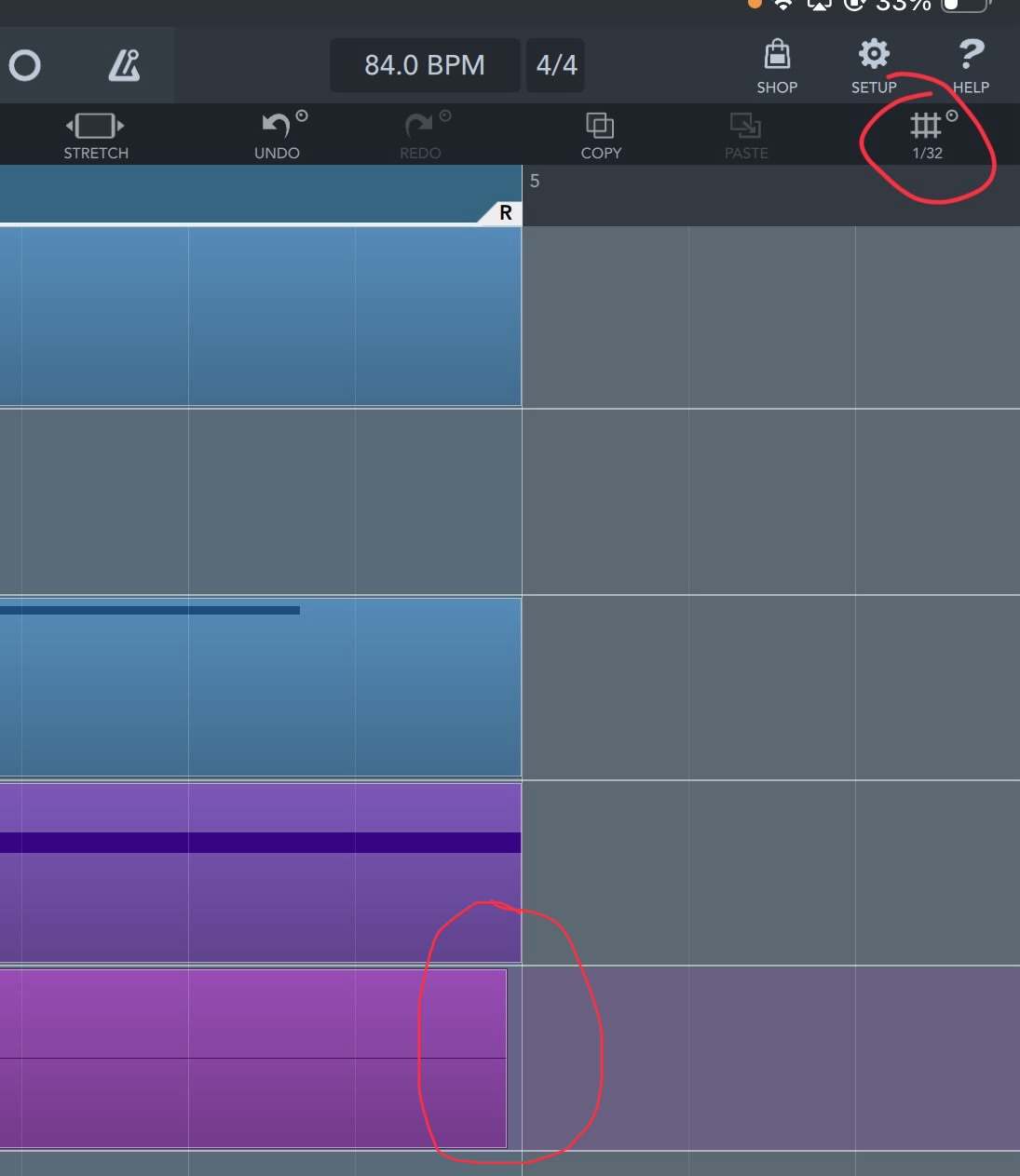
    I have come across this situation many times and I know exactly what is happening - in my case anyway, but give this a try, sometimes I would slice a MIDI note into smaller notes and all notes play as expected, but on the odd occasion where one of the CUT notes remains silent I would select the note before and the note that is silent and drag it up a semitone, do not draw a box around the two notes , now expand the centre of the two notes, select the original start of the silent note to highlight it and you should see a very thin line as shown in my screenshot below, this causes an instant ‘Note Off’, just delete this anomaly and move your notes back into position. I don’t know why thus happens, it’s been happening for the past few years, I have reported it in the past but it’s not always reproducible.
    Hope this helps
    Mike

  • edited July 28

    @LFS said:
    Hi @ambrosiajam

    but I find all kinds of strange behavior with the midi in Cubasis

    I'm afraid the only way we can do something about this is if you provide us with more details about the issues you're experiencing. Otherwise, there is nothing we can do to investigate or help resolve it.

    Best,
    Lars

    Hi @Lars,
    I have reported this issue on the Cubasis forum (@fixitmania53) a long while ago but I couldn’t reproduce it at that particular time, but as I explained in my post to @ecou above, it now happens more regularly for no reason. Even though I now know where to look in these situations, it doesn’t mean I can detect these anomalies when a chord is slices into smaller note values, it’s only by listening to each set of chord notes in SOLO mode that the occurrence is noticeable.
    Mike

  • edited July 29

    @rapidfire said:

    @ecou said:
    @LFS Once in a while i get all the notes in a midi region in Cubasis (many versions) that the notes do not generate any sounds. I put steambyter looking at the C4 who produce sound and the A3 that produce no sound. The only thing i see is that one does not generate velocity and note On event. The C4 is in a midi region where all the note play and the A3 is in another region where none play. Both region have multiple notes, not juste the CA and A3. Both note have a velocity in Cubasis. Where’s the difference ?
    I have come across this situation many times and I know exactly what is happening - in my case anyway, but give this a try, sometimes I would slice a MIDI note into smaller notes and all notes play as expected, but on the odd occasion where one of the CUT notes remains silent I would select the note before and the note that is silent and drag it up a semitone, do not draw a box around the two notes , now expand the centre of the two notes, select the original start of the silent note to highlight it and you should see a very thin line as shown in my screenshot below, this causes an instant ‘Note Off’, just delete this anomaly and move your notes back into position. I don’t know why thus happens, it’s been happening for the past few years, I have reported it in the past but it’s not always reproducible.
    Hope this helps
    Mike

    Thank you Mike, i will take a look at what you said next time it happens.

  • edited July 29

    @LFS said:
    Hi @ambrosiajam

    but I find all kinds of strange behavior with the midi in Cubasis

    I'm afraid the only way we can do something about this is if you provide us with more details about the issues you're experiencing. Otherwise, there is nothing we can do to investigate or help resolve it.

    Best,
    Lars

    Thank you for the follow up @LFS ,

    I have not made much music lately bu it will send you the file when it happens again. While i have you, i have another bug. When i record (punch in) my guitar between two locators, i always have a small sliver not recorded at the end of the right locator.
    These are my recordin settings. Also why do i have to keep re activating Punch In and Punch out every couple takes ?

  • @rapidfire said:

    @LFS said:
    Hi @ambrosiajam

    but I find all kinds of strange behavior with the midi in Cubasis

    I'm afraid the only way we can do something about this is if you provide us with more details about the issues you're experiencing. Otherwise, there is nothing we can do to investigate or help resolve it.

    Best,
    Lars

    Hi @Lars,
    I have reported this issue on the Cubasis forum (@fixitmania53) a long while ago but I couldn’t reproduce it at that particular time, but as I explained in my post to @ecou above, it now happens more regularly for no reason. Even though I now know where to look in these situations, it doesn’t mean I can detect these anomalies when a chord is slices into smaller note values, it’s only by listening to each set of chord notes in SOLO mode that the occurrence is noticeable.
    Mike

    Thanks Mike that helps tremendously.
    I have a suggestion that may be an easier way to deal with this until they fix it. Don’t slice the original notes, instead shorten them to the desired length and then simply duplicate them into the desired position.

  • @CracklePot said:

    @rapidfire said:

    @LFS said:
    Hi @ambrosiajam

    but I find all kinds of strange behavior with the midi in Cubasis

    I'm afraid the only way we can do something about this is if you provide us with more details about the issues you're experiencing. Otherwise, there is nothing we can do to investigate or help resolve it.

    Best,
    Lars

    Hi @Lars,
    I have reported this issue on the Cubasis forum (@fixitmania53) a long while ago but I couldn’t reproduce it at that particular time, but as I explained in my post to @ecou above, it now happens more regularly for no reason. Even though I now know where to look in these situations, it doesn’t mean I can detect these anomalies when a chord is slices into smaller note values, it’s only by listening to each set of chord notes in SOLO mode that the occurrence is noticeable.
    Mike

    Thanks Mike that helps tremendously.
    I have a suggestion that may be an easier way to deal with this until they fix it. Don’t slice the original notes, instead shorten them to the desired length and then simply duplicate them into the desired position.

    Hi @CracklePot,
    Thanks for your suggestion, I could also use the pen tool and draw in the sort note values, it’s sometimes easier to select a whole chord and slice at specific points within that chord.
    I only just realised that I was responding to @ecou topic dated February lol
    Mike

  • @ecou said:

    @rapidfire said:

    @ecou said:
    @LFS Once in a while i get all the notes in a midi region in Cubasis (many versions) that the notes do not generate any sounds. I put steambyter looking at the C4 who produce sound and the A3 that produce no sound. The only thing i see is that one does not generate velocity and note On event. The C4 is in a midi region where all the note play and the A3 is in another region where none play. Both region have multiple notes, not juste the CA and A3. Both note have a velocity in Cubasis. Where’s the difference ?

    I have come across this situation many times and I know exactly what is happening - in my case anyway, but give this a try, sometimes I would slice a MIDI note into smaller notes and all notes play as expected, but on the odd occasion where one of the CUT notes remains silent I would select the note before and the note that is silent and drag it up a semitone, do not draw a box around the two notes , now expand the centre of the two notes, select the original start of the silent note to highlight it and you should see a very thin line as shown in my screenshot below, this causes an instant ‘Note Off’, just delete this anomaly and move your notes back into position. I don’t know why thus happens, it’s been happening for the past few years, I have reported it in the past but it’s not always reproducible.
    Hope this helps
    Mike

    Thank you Mike, i will take a look at what you said Ned time it happens.

    It is quite annoying when it does happen to different notes in different chords, it can be very time consuming searching for those tiny anomalies. I hope it will be eventually fixed.
    Mike

Sign In or Register to comment.