Loopy Pro: Create music, your way.
What is Loopy Pro? — Loopy Pro is a powerful, flexible, and intuitive live looper, sampler, clip launcher and DAW for iPhone and iPad. At its core, it allows you to record and layer sounds in real-time to create complex musical arrangements. But it doesn’t stop there—Loopy Pro offers advanced tools to customize your workflow, build dynamic performance setups, and create a seamless connection between instruments, effects, and external gear.
Use it for live looping, sequencing, arranging, mixing, and much more. Whether you're a live performer, a producer, or just experimenting with sound, Loopy Pro helps you take control of your creative process.
Download on the App StoreLoopy Pro is your all-in-one musical toolkit. Try it for free today.
Descent Granulator by Audio Damage (Released on iOS)

https://apps.apple.com/us/app/descent-granulator/id6759299476
Intro Price! Descent transforms audio into evolving, otherworldly textures with real-time granular processing. Shimmer, freeze, scatter, reverse-studio-quality on iOS.
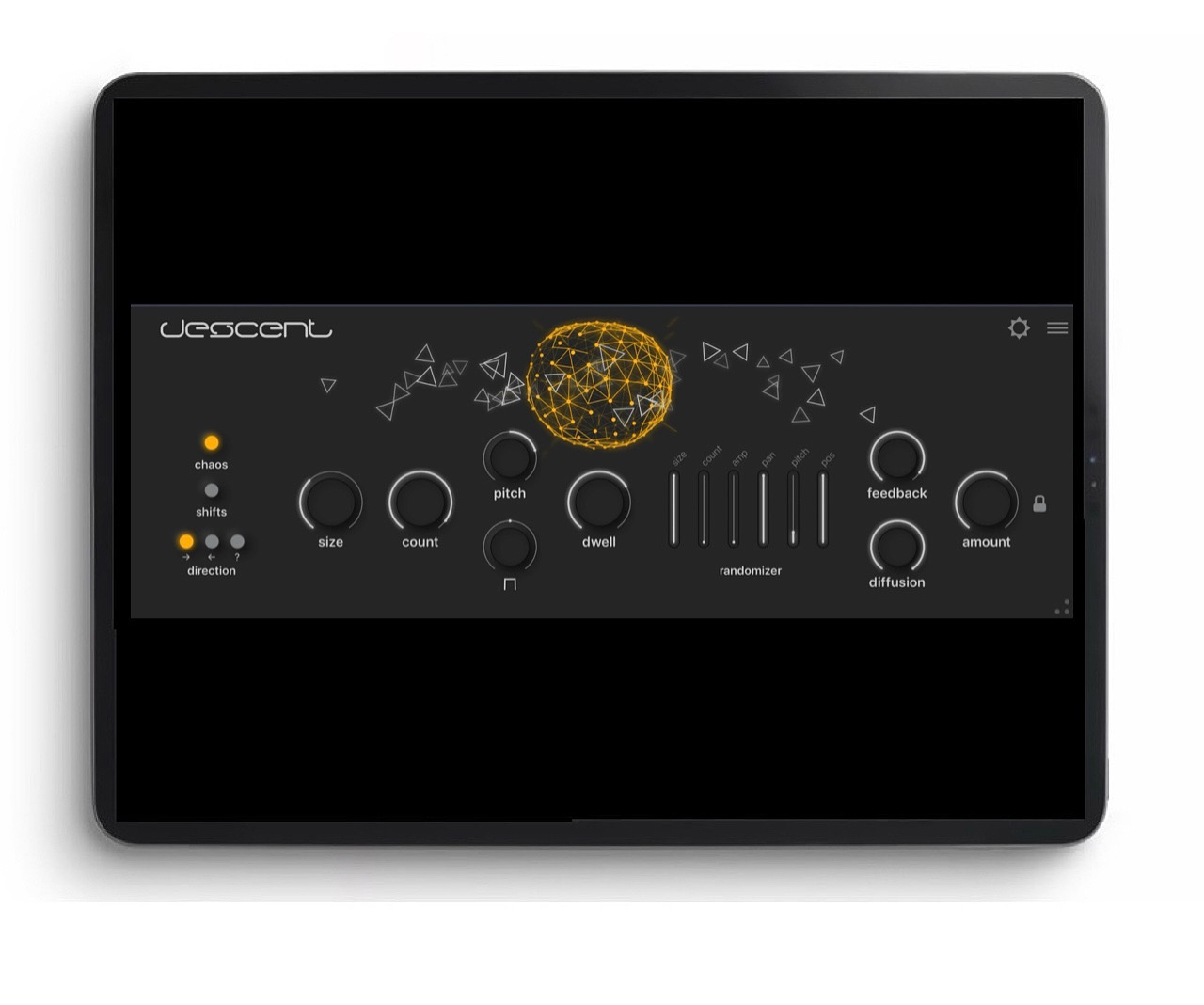
Descent is a real-time granular effect that captures incoming audio, breaks it into tiny grains, and scatters them across time and pitch. The result: everything from subtle thickening and rhythmic delays to vast frozen soundscapes and shimmering pitch-shifted clouds.
GRANULAR ENGINE
Control up to 50 simultaneous grains with independent settings for duration, overlap, and envelope shape. Play grains forward, reverse, or randomly mixed for tape-style effects, reverse swells, and glitchy textures.
PITCH SHIFTING WITH QUANTIZATION
Transpose from -24 to +24 semitones. Lock pitch shifts to specific intervals-octaves, fifths, or any chromatic combination-for harmonically correct shimmer and transposition effects.
PITCH SHIFTING WITH QUANTIZATION
Transpose from -24 to +24 semitones. Lock pitch shifts to specific intervals-octaves, fifths, or any chromatic combination-for harmonically correct shimmer and transposition effects.
SIX-AXIS RANDOMIZATION
Independently randomize pitch, pan, position, amplitude, duration, and grain count. Dial in subtle organic movement or push into complete textural chaos.
DIFFUSION AND FEEDBACK
High-feedback mode with a diffusion control transforms delays into lush, reverb-like washes that never get harsh or run away from you.
TEMPO SYNC
Lock grain timing to your session's tempo or let textures evolve freely in untethered mode.
35 FACTORY PRESETS
Covering shimmers, delays, reverbs, pitch effects, and experimental sound design. Cross-platform
XML presets are compatible across all Audio Damage plugin formats and operating systems.
SOUND DESIGN IDEAS
Add subtle depth with a few long grains and minimal randomization
Create rhythmic delays with short, quantized grains at high feedback
Build infinite sustain pads by freezing audio with high grain count and overlap
Craft shimmer effects by quantizing pitch to octaves and fifths
Transform vocals into ethereal textures with diffusion and wide panning
AUv3 compatible. Runs standalone or hosted in AUM, ApeMatrix, Audiobus, Cubasis, GarageBand, and other AUv3 hosts on iOS 13 or newer.
From Audio Damage-making creative software for discerning musicians since 2002.
Comments
Thx @ninobeatz this was a nice surprise. Sounds great so far. I really like the evolving element. universal multi-granularizer for 2.99. Good Stuff.
Bought it!
@Meek3 so much better than replicant 3, this one's a banger. What do you think so far?
I’ve never had pleasant exchanges with this dev… quite the contrary… but dayum they make cool 😎 interesting, unique, beautifully designed apps and interfaces.
Can’t resist these. One of the few devs that I don’t need to see a demo first before buying
I think it’s great so far.
Well worth the money.
Some unique results come out of this.
Yeah, feel the same- really like the effects.
Irresistible at $2.99. This and Other Desert Cities are no-brainers.
(Personally I like and respect the developer's no-shit attitude. I'll take honesty over "the customer is always right" BS any day.)
And that’s why this app is £2.99.
But hey, it’s fine by me - I’ll buy this for three quid all day long!
No brainer at $2.99
Had an absolutely horrific volume spike just now while using this. Luckily I had my volume very low, as it was the kind of thing that can destroy ears and earphones. Proceed with caution, maybe use a limiter.
Good looking out @Gavinski awesome video btw
I was just going through my granular apps to find which ones sound best processing my electric guitar, and then this pops up. Seems like a great contender. SYNCHRONICITY!
(GRFX sounds fantastic on guitar btw 👍)
I mean, for 3 bucks, why the heck not?
I agree, and I used to have the same opinion about this dev originally… but that’s not what I’m talking about. I’m talking about insults and ridicule when you merely report a bug in their apps that is frustrating them. Instead of just taking the bug report, they/he will sometimes just sling insults about your gear isn’t the latest or even personal insults.
I like their apps… just as long as I never have to report buggy behavior in them. Not worth it.
Luckily… they tend to fix them when they’re enough bug reports. I just don’t bother reporting those bugs to them myself any more. I simply put the app aside and wait for them to eventually fix it, and historically they tend to… eventually.
That said… even so… I’ve purchased every one of their apps as well as this one. No regrets and still look forward to whatever brilliantly designed app they create next, and will likely buy that too.
I've had a similar experience. They acknowledged a bug I reported, released a fix for desktop, but the fix never made it to the iOS version. They acknowledged that the reason for that was that their iOS build/release script was broken but never bothered to fix that.
Like I've said elsewhere: I like the vision of their products and how they stick to it, and they've provided a thoughtful rationale for iOS versions being cheaper that their desktop counterparts, so they do seem to understand their audience. I just find them sloppy when it comes to bugfixing.
Yeah, I’ve only ever purchased the iOS versions. I don’t tend to have many issues with their apps to be honest. Just occasionally, and the few times the bugs I experienced, were eventually fixed.
Their iOS apps are high value for me, especially for what they charge… so I can’t really complain much. I just decided it wasn’t worth it to interact with them for support or bug reports.
As I said, fortunately it’s not often necessary anyway
I really love the minimalist and sometimes sophisticated generative visual elements they’ve worked into their interfaces for the last several releases. They don’t seem essential often, but they really increase the pleasure of playing with their apps… at least for me they do.
Yeah. Even though I’m a stoic when it comes to eye candy, and generally don’t care how an app looks if it isn’t horrendous, the visual elements on thins and ODC really do make them more pleasing to use.
I was close to buying it because of the price, until I listened to the demos. To get straight to the point: GRFX by Imaginando can do significantly more, is incredibly flexible, and last but not least sounds much more musical to my ears (which is of course always subjective). Because of that, it is also usable across a much broader range of production contexts.
It features two multi-FX chain inserts, whose parameters can be assigned very easily via drag and drop to four LFOs, which can also modulate each other.
It was on sale in November last year for $3, and occasionally in between for $4. So if you’re not in a hurry - and honestly even if you are - I’d recommend going with GRFX instead. In my view it’s simply the better granulizer.
GRFX is better, I totally agree. But GRFX is very sore on my iPad’s battery, it overheats the iPad too, and this doesn’t. Still, Descent comes pretty far down the pile for me, in terms of Granular FX. For $3, and with that sexy UI, it is probably worth grabbing, for many here, but it is very slim on features compared to most granulars. I’m definitely running into the limitations as I play with it
Hmmm… running a single instance using all four LFOs barely loads my aging A12 Bionic CPU. In AUM the DSP meter shows 15%, and even after 20 minutes of continuous load it barely gets warm. Strange that you’re having a different experience.
Who knows, M1 iPad. Yeah it ran very hot on it so I haven't used it in many months, dunno whether an update might have fixed anything, might be worth giving it another whirl.
I always found GRFX to be a CPU hog on my M1 iPad as well...
I find it quite difficult to get usable results from GRFX, whereas I was able to make some nice noises with Descent straight away. I’ve noticed the heat thing too.
Sometimes less is more, but at these prices, just get both.
Yes, many people complained about it when it was released.
But yeah, sincerely, GRFX really does blow this out of the water as far as I'm concerned, no competition
I have GRFX too and haven’t ever noticed any cpu issues on an iPad mini 5 or M1 Pro. Maybe 🤔 I don’t drive it as hard?
I love GRFX too, and if I could only have one… I might lean toward it’s extended functionality… but, Descent is just the right amount of control for my own use… for experimenting and getting interesting results, without any real learning curve and without having to get too far into the settings weeds. Just instantly fun to play with and looks great too
Anyone getting multiple crashes? Crashing both in logic and AUM
I instantly fell in love with GRFX because with some of the included presets, without further ado, I could immediately multiply the number of presets of all my synths giving them a fascinating twist while still sounding musical and not getting weird.
Honestly, considering how much it can do, I think the UI is actually pretty well designed. It’s clean and not that hard to wrap your head around. And the drag&drop workflow makes assigning LFOs super easy. But yeah, fewer features obviously means less stuff to deal with.
Also, I personally prefer Imaginando’s preset browsers. I still don’t get why marking favorites isn’t just standard everywhere.
Anyway, at the end of the day I simply prefer the sonic output of GRFX with all its diversity.