Loopy Pro: Create music, your way.

What is Loopy Pro?Loopy Pro is a powerful, flexible, and intuitive live looper, sampler, clip launcher and DAW for iPhone and iPad. At its core, it allows you to record and layer sounds in real-time to create complex musical arrangements. But it doesn’t stop there—Loopy Pro offers advanced tools to customize your workflow, build dynamic performance setups, and create a seamless connection between instruments, effects, and external gear.

Use it for live looping, sequencing, arranging, mixing, and much more. Whether you're a live performer, a producer, or just experimenting with sound, Loopy Pro helps you take control of your creative process.

Download on the App Store

Loopy Pro is your all-in-one musical toolkit. Try it for free today.

Musyc2 - New app by Fingerlab - Open for Beta-test

2

Comments

  • how do a set a scale in auv3?

  • @EnvelopeFollower said:
    how do a set a scale in auv3?

    Same way you do it in stand alone, the simple ring item.

  • @Pxlhg said:

    @EnvelopeFollower said:
    how do a set a scale in auv3?

    Same way you do it in stand alone, the simple ring item.

    ok thanks. takes time to get the concept.

  • @EnvelopeFollower said:

    @Pxlhg said:

    @EnvelopeFollower said:
    how do a set a scale in auv3?

    Same way you do it in stand alone, the simple ring item.

    ok thanks. takes time to get the concept.

    I can highly recommend Jakob Haqs video, both fun and educational.

  • Hey Aurelian @relpot , Just noticed that on the ipad version , under the midi settings it says that “Audio background must be on, to use midi out with other instruments” (or words to that effect). Might this be the issue when trying to use it standalone on my macbook?

  • @relpot said:

    @Robin2 said:

    @Pxlhg said:
    By mistake did I post this in Gavinski's walkthrough thread for M2, makes more sense here:

    A pretty substantial update to the beta came through today and thanks to the Haq video a while back, a few nice changes and a lot of Haq presets and also some new sounds. Cool!

    I don’t suppose the update added a chromatic scale option did it? Can’t see it in the release notes so I assume not. @relpot?

    Yes indeed, the last update v3.0-2 did'nt have chromatic scale, but I have added it and a new update v3.0-3 is now available on TestFlight with the chromatic scale.

    That’s great to hear, thank you!

  • @Kashi said:
    Hey Aurelian @relpot , Just noticed that on the ipad version , under the midi settings it says that “Audio background must be on, to use midi out with other instruments” (or words to that effect). Might this be the issue when trying to use it standalone on my macbook?

    No I don't think so as the AudioBackground mode is always on with Mac version...

  • Bad Seaquense Copy (but I have so much fun with this crazy app)
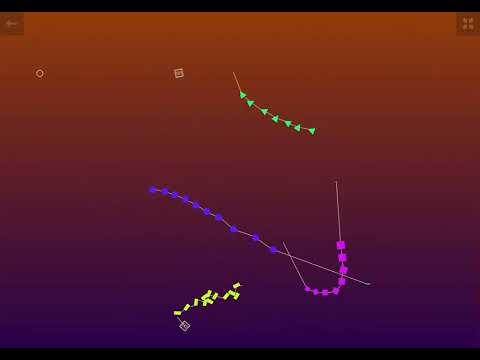
  • @Pxlhg said:
    Bad Seaquense Copy (but I have so much fun with this crazy app)

    So nice! I didn't even know that you can do that with Musyc2 ;p

  • @Pxlhg said:
    Bad Seaquense Copy (but I have so much fun with this crazy app)

    Brilliant, really like that.

  • @relpot I have some wishes, Can't remember all Jakob brought up so maybe I'm repeating.
    Anyway:
    1. An option not to autoplay when opening a file, this because if you build something complex in pause mode and then close and duplicate your complex build for later use it plays when you open the dupe which is such a chocker the first time 😅 and since you closed the original that one too is fucked (pardon!)
    2. Redo and more undo steps.
    3. Duplicate (or copy/paste) items on stage to save some repetitive work.

    Maybe some selection and move tools could come in handy but maybe that's next level advanced.

    I for one would really appreciate the option to not have autoplay, hope that one is possible.

    Best,
    Ulf

  • +1 for no auto play

  • edited March 7

    @Pxlhg said:
    @relpot I have some wishes, Can't remember all Jakob brought up so maybe I'm repeating.
    Anyway:
    1. An option not to autoplay when opening a file, this because if you build something complex in pause mode and then close and duplicate your complex build for later use it plays when you open the dupe which is such a chocker the first time 😅 and since you closed the original that one too is fucked (pardon!)
    2. Redo and more undo steps.
    3. Duplicate (or copy/paste) items on stage to save some repetitive work.

    Maybe some selection and move tools could come in handy but maybe that's next level advanced.

    I for one would really appreciate the option to not have autoplay, hope that one is possible.

    Best,
    Ulf

    Thanks for your feedback Ulf, here is my comments:
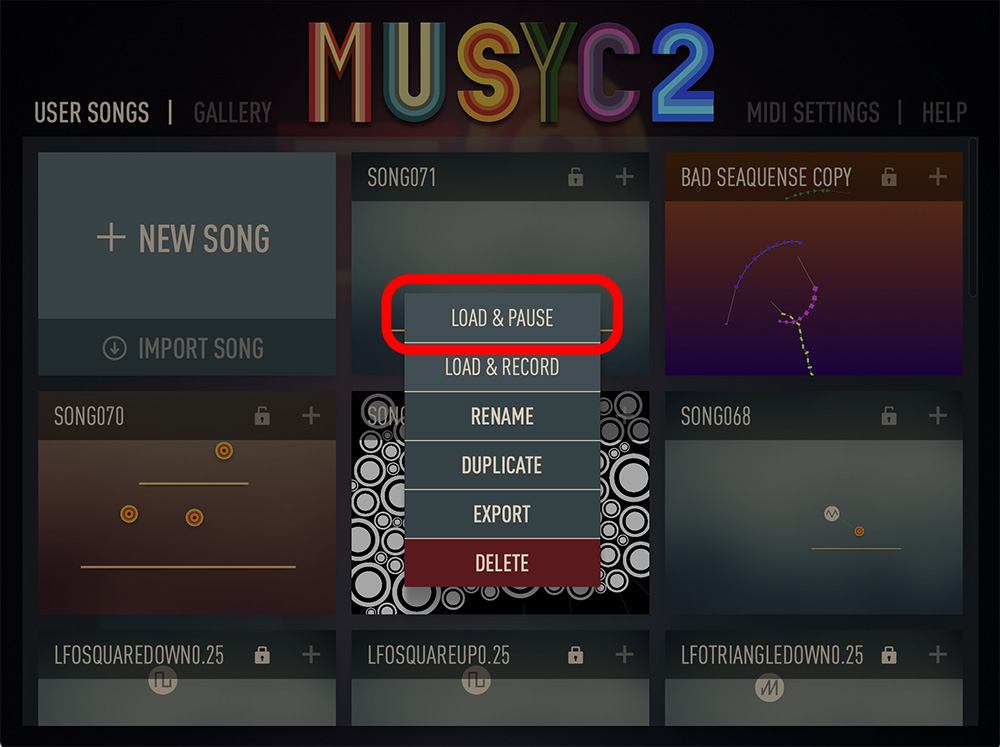
    1 - Autoplay: there is already a way to load a song without playing it. You can do that by tapping the "+" button on a song and choose the LOAD & PAUSE option (see screenshot below). Did you try it ? Does it works for you ?

    2 - About Redo, I will try to add it in the next update v4.0 coming in April. About having more undo steps, the undo count is currently 10, I will increase it to 30 right now, a new testflight with it will be available in a few hours.
    3 - Duplicate (or copy/paste) items on stage to save some repetitive work / selection and move tools: I plan to work on this in future update, but it's a difficult subject so it might takes time, perhaps for v4 (coming in April) or in v5 (coming in july).

    Best
    Aurelien

  • @relpot said:

    @Pxlhg said:
    @relpot I have some wishes, Can't remember all Jakob brought up so maybe I'm repeating.
    Anyway:
    1. An option not to autoplay when opening a file, this because if you build something complex in pause mode and then close and duplicate your complex build for later use it plays when you open the dupe which is such a chocker the first time 😅 and since you closed the original that one too is fucked (pardon!)
    2. Redo and more undo steps.
    3. Duplicate (or copy/paste) items on stage to save some repetitive work.

    Maybe some selection and move tools could come in handy but maybe that's next level advanced.

    I for one would really appreciate the option to not have autoplay, hope that one is possible.

    Best,
    Ulf

    1 - Autoplay: there is already a way to load a song without playing it. You can do that by tapping the "+" button on a song and choose the LOAD & PAUSE option (see screenshot below). Did you try it ? Does it works for you ?

    I had totally missed that option and lost some heavy experiments in the process but now I know and it works just fine, thank you!

  • @Pxlhg said:
    Bad Seaquense Copy (but I have so much fun with this crazy app)

    👂🏻 👍🏻

  • @relpot There's a bug that I'm surprised you haven't caught yet but maybe you don't have time to mess around 😃 Anyway: I don't know how to reproduce it but it shows up often when binding two objects. E.g a circle with a line, all of a sudden you can't (the active line symbol just goes back to grey) and then the line in question can't be deleted either i.e the eraser doesn't work. Sometimes a restart of the app fixes it but not always. I can probably show you a video when it's already happened but not on how it happens. I'm on latest iOS and using an iPad Pro M1

  • @Pxlhg said:
    @relpot There's a bug that I'm surprised you haven't caught yet but maybe you don't have time to mess around 😃 Anyway: I don't know how to reproduce it but it shows up often when binding two objects. E.g a circle with a line, all of a sudden you can't (the active line symbol just goes back to grey) and then the line in question can't be deleted either i.e the eraser doesn't work. Sometimes a restart of the app fixes it but not always. I can probably show you a video when it's already happened but not on how it happens. I'm on latest iOS and using an iPad Pro M1

    Ok sorry for this bug. Could you send me a song project file with the bug if you have one ? It would be very helpful to find what is going wrong and to fix it.

  • @relpot said:

    @Pxlhg said:
    @relpot There's a bug that I'm surprised you haven't caught yet but maybe you don't have time to mess around 😃 Anyway: I don't know how to reproduce it but it shows up often when binding two objects. E.g a circle with a line, all of a sudden you can't (the active line symbol just goes back to grey) and then the line in question can't be deleted either i.e the eraser doesn't work. Sometimes a restart of the app fixes it but not always. I can probably show you a video when it's already happened but not on how it happens. I'm on latest iOS and using an iPad Pro M1

    Ok sorry for this bug. Could you send me a song project file with the bug if you have one ? It would be very helpful to find what is going wrong and to fix it.

    No apology needed. I unfortunately deleted the project I had issues with but:
    1. I'm sure it's going to happen again.
    2. If it's the same on our iPad you should bump in to it too if you play around with, say: some circles and a line/s and connecting them to the line.

  • @Pxlhg said:

    @relpot said:

    @Pxlhg said:
    @relpot There's a bug that I'm surprised you haven't caught yet but maybe you don't have time to mess around 😃 Anyway: I don't know how to reproduce it but it shows up often when binding two objects. E.g a circle with a line, all of a sudden you can't (the active line symbol just goes back to grey) and then the line in question can't be deleted either i.e the eraser doesn't work. Sometimes a restart of the app fixes it but not always. I can probably show you a video when it's already happened but not on how it happens. I'm on latest iOS and using an iPad Pro M1

    Ok sorry for this bug. Could you send me a song project file with the bug if you have one ? It would be very helpful to find what is going wrong and to fix it.

    No apology needed. I unfortunately deleted the project I had issues with but:
    1. I'm sure it's going to happen again.
    2. If it's the same on our iPad you should bump in to it too if you play around with, say: some circles and a line/s and connecting them to the line.

    Edit: I'm using a pen 99% of the time and it seem to happen when I click above the line I'm intending to connect to, again I can't reproduce it when I want to so I'm not sure.

  • @Pxlhg said:

    @Pxlhg said:

    @relpot said:

    @Pxlhg said:
    @relpot There's a bug that I'm surprised you haven't caught yet but maybe you don't have time to mess around 😃 Anyway: I don't know how to reproduce it but it shows up often when binding two objects. E.g a circle with a line, all of a sudden you can't (the active line symbol just goes back to grey) and then the line in question can't be deleted either i.e the eraser doesn't work. Sometimes a restart of the app fixes it but not always. I can probably show you a video when it's already happened but not on how it happens. I'm on latest iOS and using an iPad Pro M1

    Ok sorry for this bug. Could you send me a song project file with the bug if you have one ? It would be very helpful to find what is going wrong and to fix it.

    No apology needed. I unfortunately deleted the project I had issues with but:
    1. I'm sure it's going to happen again.
    2. If it's the same on our iPad you should bump in to it too if you play around with, say: some circles and a line/s and connecting them to the line.

    Edit: I'm using a pen 99% of the time and it seem to happen when I click above the line I'm intending to connect to, again I can't reproduce it when I want to so I'm not sure.

    You mean an Apple Pencil ? I d'ont have one so I can't test with it, but it should be the same as with a finger.
    I have tried to have the same bug as you by connecting circle to line but I can't succeed to reproduce this bug for now...

  • @relpot said:

    @Pxlhg said:

    @Pxlhg said:

    @relpot said:

    @Pxlhg said:
    @relpot There's a bug that I'm surprised you haven't caught yet but maybe you don't have time to mess around 😃 Anyway: I don't know how to reproduce it but it shows up often when binding two objects. E.g a circle with a line, all of a sudden you can't (the active line symbol just goes back to grey) and then the line in question can't be deleted either i.e the eraser doesn't work. Sometimes a restart of the app fixes it but not always. I can probably show you a video when it's already happened but not on how it happens. I'm on latest iOS and using an iPad Pro M1

    Ok sorry for this bug. Could you send me a song project file with the bug if you have one ? It would be very helpful to find what is going wrong and to fix it.

    No apology needed. I unfortunately deleted the project I had issues with but:
    1. I'm sure it's going to happen again.
    2. If it's the same on our iPad you should bump in to it too if you play around with, say: some circles and a line/s and connecting them to the line.

    Edit: I'm using a pen 99% of the time and it seem to happen when I click above the line I'm intending to connect to, again I can't reproduce it when I want to so I'm not sure.

    You mean an Apple Pencil ? I d'ont have one so I can't test with it, but it should be the same as with a finger.
    I have tried to have the same bug as you by connecting circle to line but I can't succeed to reproduce this bug for now...

    Yeah, Apple pencil, always using it and get annoyed when I can't. It happens a lot BUT to get a permanent one seems harder, i.e one that doesn't solve with a restart. We'll get there in due time. 😄

  • Hey @relpot , got so excited when I just saw the update was released… but there’s still no midi going from standalone Musyc to Ableton 😣 Any suggestions?

  • Anyone else using this on a mac, standalone?
    The update yesterday has solved the above problem (midi not sending to Ableton), and I’m getting some wild and wonderful sounds coming out, but Musyc 2 is crashing frequently. M4 Macbook Air running Sequoia 15.7.4 @relpot

  • @Kashi said:
    Anyone else using this on a mac, standalone?
    The update yesterday has solved the above problem (midi not sending to Ableton), and I’m getting some wild and wonderful sounds coming out, but Musyc 2 is crashing frequently. M4 Macbook Air running Sequoia 15.7.4 @relpot

    Hello Kashi,
    I'm glad that MIDI out works fine now on Mac since the last update v3.0.
    About the crashes, I will check that to find what is going wrong, I will sent you a MP if I need more informations.

  • Hi all,
    I just want to let you know that a new Musyc2 update v4.0 is available for beta-testing on TestFlight:
    https://testflight.apple.com/join/WMFZpjVG

    Here is the update changes:
    This major update adds 12 sound kits, 2 graphic skins, new Star physic object, a new Thickness parameter for the Line object, upload module to the Musyc2 Gallery and many other new features & improvements.

    Here’s the list of changes:
    -Added 8 new melodic sound kits: Catch, Flexible, Shrine, Industrial, Klub, Org, Grand & Dooble
    -Added 4 new rhythm sound kits: Digital, Plaits, Timpani & Tiny
    -Added 2 new graphic skin: Chocolate & UFO
    -Submit & upload your best songs to the Musyc2 Gallery
    -Added new Star physic object
    -Added new FX3 & FX4 objects
    -Added Thickness parameter for Line object
    -Added Spin parameter for Cross & Star object
    -LFO object can now modulate another LFO object
    -Added Line Thickness parameter to LFO object
    -Added Master Volume parameter for LFO object
    -Fixed issue with AudioUnit Midi and Mixer Length parameter

    We are currently working on the next major update which will include new physic objects (Portal, Repulsor, Anti-Sequencer), new FXs, new Sound Kits, a User Scales creation module and other new features and improvements.

  • @relpot said:
    Hi all,
    I just want to let you know that a new Musyc2 update v4.0 is available for beta-testing on TestFlight:
    https://testflight.apple.com/join/WMFZpjVG

    Here is the update changes:
    This major update adds 12 sound kits, 2 graphic skins, new Star physic object, a new Thickness parameter for the Line object, upload module to the Musyc2 Gallery and many other new features & improvements.

    Here’s the list of changes:
    -Added 8 new melodic sound kits: Catch, Flexible, Shrine, Industrial, Klub, Org, Grand & Dooble
    -Added 4 new rhythm sound kits: Digital, Plaits, Timpani & Tiny
    -Added 2 new graphic skin: Chocolate & UFO
    -Submit & upload your best songs to the Musyc2 Gallery
    -Added new Star physic object
    -Added new FX3 & FX4 objects
    -Added Thickness parameter for Line object
    -Added Spin parameter for Cross & Star object
    -LFO object can now modulate another LFO object
    -Added Line Thickness parameter to LFO object
    -Added Master Volume parameter for LFO object
    -Fixed issue with AudioUnit Midi and Mixer Length parameter

    We are currently working on the next major update which will include new physic objects (Portal, Repulsor, Anti-Sequencer), new FXs, new Sound Kits, a User Scales creation module and other new features and improvements.

    Sweet! I haven't had time to play around with M2 as much as I want, hopefully can get some soon.

  • Yes! This app just gets better and better! Looking forward to these new additions. Thanks @relpot

  • Hi all,
    I just want to let you know that a new Musyc2 update v5.0 is available for beta-testing on TestFlight:
    https://testflight.apple.com/join/WMFZpjVG

    Here is the update changes:
    This major update adds 2 new physical objects (Anti-Sequencer and Repulsor), 12 new sound kits, a user scale creation module, 2 new effects (Tremolo and Flanger) and 6 new demo songs created by Musyc2 users.

    Here’s the list of changes:

    • New Anti-Sequencer physical objet
    • New Repulsor physical objet
    • 12 new sound kits
    • User scales creation module
    • 2 new effects Tremolo & Flanger
    • 6 new demo songs made by Vincent, JawSide, Loca and YosheyX2
    • Fixed various bugs

    The next major update will add new physical objects, new effects and new sound kits.

  • Amazing! My preferred generative app keeps getting better!

  • edited May 8

    Great, I bought it the other day so (unaware) I was kicked out of the beta, back on it now.

Sign In or Register to comment.