Loopy Pro: Create music, your way.
What is Loopy Pro? — Loopy Pro is a powerful, flexible, and intuitive live looper, sampler, clip launcher and DAW for iPhone and iPad. At its core, it allows you to record and layer sounds in real-time to create complex musical arrangements. But it doesn’t stop there—Loopy Pro offers advanced tools to customize your workflow, build dynamic performance setups, and create a seamless connection between instruments, effects, and external gear.
Use it for live looping, sequencing, arranging, mixing, and much more. Whether you're a live performer, a producer, or just experimenting with sound, Loopy Pro helps you take control of your creative process.
Download on the App StoreLoopy Pro is your all-in-one musical toolkit. Try it for free today.
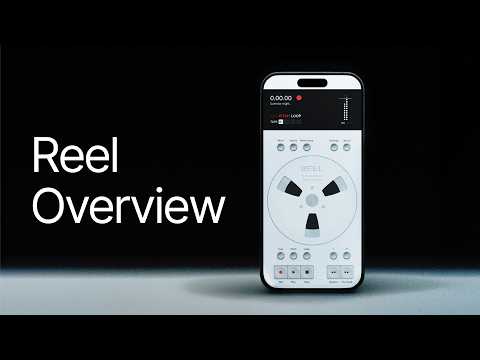
Reel: 4-Track Recorder By 24bit Studio - Info & Walkthrough Video
Just bought this, it’s really lovely.
There’s a bit of discussion around it so I thought I’d clarify what I know.
It’s 9.99 for the app and the ‘Reel Founder Lifetime Unlock’ IAP is free for the first 500 people who buy the app. The standard price for the IAP will be 9.99. When you first open the app you automatically get the founder offer below. Assume that will not be the case after 500 purchases.
From the website:
‘’Be one of the first 500
First 500 to download Reel get every premium add-on we ship. Free, forever.
Redeem code FOUNDER in the App Store after purchase.’
Here’s the walkthrough video from the dev at 24bit Studio so you can see how well designed it is:
Comments
Here’s the website and AppStore links too:
https://www.reelaudio.app/
https://apps.apple.com/app/reel-4-track-recorder/id6760545075
Picked it up this morning very nice gui.
Haven't watched the vid, but just looking at the ui and AppStore screenshots, I saw no landscape shots. Does it work in landscape?
AUv3 is in the development backlog according to the devs reply in the video comments
Gorgeous isn’t it - file sizes are a little too big, compared to recordings straight out of AUM, but I’ll write to the dev and hopefully that can be addressed in the near future. For now, having such a beautiful app for listening to bounces and capturing new ideas made me happy
No, not currently.
Nice that it can save directly to iCloud Drive so I can use my phone as a field recorder and have that available seamlessly on my iPad. Would love for it to have a Control Center widget like Voice Memos does.
Ah, that’s a pity, nothing annoys me more on a 13 inch iPad, he should definitely make a landscape mode, thanks for the info
But yeah, looks pretty cool, lovely ui!
On the file size, I think the difference is my AUM Sample Rate is set to 48kHz and Reel was set to 96kHz but this can be adjusted in settings to 48kHz or 44kHz. Reel is also 32-bit float, does anyone know what AUM is?
What’s the current perceived wisdom here, is 48kHz Sample Rate good enough pre mastering/release, do people then switch to 96kHz before final mastering and release or just stick at 48kHz?
Yes agreed, I wish all apps considered iCloud saving including favoriting patches on synths
Haha! What were you saying earlier about entitlement? 😉
Ouch 😂
Before I get too excited, I imported 5 different project bounces from AUM into Reel and here are the resulting file size differences. The AUM Sample Rate on recording was set to 48kHz and, on import, Reel was set to 96kHz. Anyone shed some light on what might be going on?
10.2 MB AUM vs 27.3 MB Reel
18.4 MB AUM vs 49.2 MB Reel
21.3 MB AUM vs 56.8 MB Reel
14.4 MB AUM vs 38.4 MB Reel
4.8 MB AUM vs 14 MB Reel
Hard pass with portrait only as I mainly only use the iPad.
I think I’d use the iPhone more if I had a working port for my audio interface. I’m surprised I’ve gotten by for about five years now without a port.
Yes but as I say they were recorded in AUM at 48kHz and only imported into Reel when it was set to 96kHz?
Ah ok but I wonder why when the quality can’t improve and the recorded time obviously identical. Both set to 48kHz now so will just keep an eye on the file sizes
It’s a strange launch offer as it’ll probably put as many off as it’ll entice because of the assumption they’ll have missed out - they really should have put some sort of counter on the website to let people know if any of the 500 were still available.
I agree. It's designed to create fomo but can put ppl off haha
Yep, agree with the two comments above. I’m tempted, but feel sure that the first 500 buyers have already bought….
IMO that's actually unlikely. iOS music stuff is a tiny market, and a new app like this is not going to shift a lot of units overnight.
The music apps we buy do not sell in large quantities, and this one is more niche than most.
Pretty cool tape app - but the pitch algorithm I wish sounded better on these demos.
So you have to buy it, and then get an iap as well? Really weird marketing / value offer, who knows what it really means?
.
just bought it and they haven't got to 500 yet - yay!!
Me too, I'm now a founder!