Loopy Pro: Create music, your way.
What is Loopy Pro? — Loopy Pro is a powerful, flexible, and intuitive live looper, sampler, clip launcher and DAW for iPhone and iPad. At its core, it allows you to record and layer sounds in real-time to create complex musical arrangements. But it doesn’t stop there—Loopy Pro offers advanced tools to customize your workflow, build dynamic performance setups, and create a seamless connection between instruments, effects, and external gear.
Use it for live looping, sequencing, arranging, mixing, and much more. Whether you're a live performer, a producer, or just experimenting with sound, Loopy Pro helps you take control of your creative process.
Download on the App StoreLoopy Pro is your all-in-one musical toolkit. Try it for free today.
Dahlia Tape Delay by Flora Creative Ltd. (Released)

https://apps.apple.com/app/id6761359971
Dahlia Tape Delay is a stereo AUv3 with analog-modelled wow, flutter, and tape head emulation. Built for producers who want delays that sound like tape — not like processing.
WOW & FLUTTER
Perlin noise oscillators drive pitch modulation that never repeats — the same organic variation you'd hear from tape aging. Sway, swim, or smear.
TAPE HEAD EQ
An SVF filter models the frequency response of the playback head, adding warmth and high-end roll-off in the feedback path. Lush and smooth, or eroded and unstable.
FEEDBACK YOU CAN TRUST
A tape compression algorithm lets you push feedback to its limits without fear of runaway.
STEREO
Independent left/right delay times, ping-pong mode, stereo width, and spread controls. From subtle widening to full stereo chaos.
FEATURES
• Four delay time modes — free milliseconds, host sync, dotted, triplet
• Independent left/right delay times via Spread
• Ping-pong stereo with adjustable width
• Tape wow + flutter modulation, driven by Perlin noise
• Feedback path with tape EQ and head response filtering
• Drift-compensated delay lines for stable long delays
• 12 factory presets, plus user preset save/recall
COMPATIBILITY
Runs standalone and as an AUv3 audio unit. Compatible with Logic Pro for iPad, GarageBand, AUM, Cubasis, BeatMaker 3, and any host that supports AUv3 effects on iOS 17 / iPadOS 17 or later. Universal app — runs natively on iPhone and iPad.
Details:
Universal: Yes
Minimum OS version: 17.0
Comments
Curious to hear a dev opinion on this feature set. @Rob_Jackson_Music would this sound, from the description, like it's approaching things differently from any of the gazillion other tape delays available?
Hey @Gavinski,
Well, ignoring the obvious sloppy AI-generated-techno-waffle (e.g. "universal", "runs natively", you don't need to add "filter" after SVF)...
IMHO...
If you're modelling anything analog, aka trying to make it sound ANALOG-eeeeee...
There are so many tiny little decisions that you, as a developer, or your friendly agentic coding assistant might make, I'd be amazed if two tape emulation delays sounded exactly the same. Unless the code is identical of course.
I guess the obvious question is then, does it sound different enough from the one(s) you already have and that's very subjective.
As you know, I've done loads of delays, and I like to think they all have their own thing going on, and they certainly have quite different implementations. But I know some folks think they all sound the same.
As a nerdy aside, the use of Perlin noise is interesting. I'd normally associate that with graphics - gradient fills - that sort of thing, but it's been used here to emulate mechanical wow and flutter.
Whoever came up with the idea is clearly very proud of the fact as it gets mentioned twice I've got my own way of doing that sort of stuff which I'd wager is a little more CPU-friendly. Perlin sounds a bit overkill to me...
https://en.wikipedia.org/wiki/Perlin_noise
And hate to say it, but that really sounds like something an AI coding agent might suggest...
But, as I think we all would agree, if it sounds good, and doesn't crash as soon as @Gavinski starts kicking its tyres, then "woo hoo".
Haha, I'm sure you enjoyed writing this as much as I enjoyed reading it Rob, thnx 😂
PS. May have also been jumping to conclusions on the AI usage as that dev has got stuff in the Store from 5 and 10 years ago. There's even a delay with (nearly) the same name.
Ah, the good old days, when we had to type our own curly braces...
Yes, I also noticed that actually, but forgot to mention I my last reply to you. First app came out 10 years ago or so
The AppStore description is still AI-written tho for sure.
My gold standard for a delay effect is whether it can reproduce the decaying electronic hiss sound you get when you keep that feedback gain just under unity, without even needing an initial impulse. The Martian gooseneck sound from War of the Worlds.
I've never heard a digital delay do it, even the ones that go to some lengths to advertise their fidelity to tape.
https://horse-parade.com/about/
I wonder if there is any connection to this $500 pedal, other than the name:
Dahlia Dual Analog Delay Pedal
https://flower-pedals.com/products/dahlia-dual-analog-delay
Even the dev name is similar. Flower / Flora
I can imagine that after all the hard work that went into this, the developer must have been too tired to make a little demo video.🙄
They mangaged to make this one without AI about 8 years ago so I believe they are capable of making a tape delay.
https://apps.apple.com/gb/app/dahlia-delay/id1006375672
They used to have a whole line of effects based on flowers. Simple and effective AUv3s. Foxglove Flanger, Cornflower compressor, etc. They were good, some of the first AUv3s too when adoption was slow. But many have been delisted.
I had several apps from them in the old days. Wasn’t there a delay, flanger, distortion and 2-3 other simple effects? They don’t show up in my purchases any more. 😎✌🏼
The developer posted in the Auv3 Facebook group. Regarding his older apps:
https://www.facebook.com/share/p/1FW3HHsjA5/
Hey folks,
I'm the developer of this app - so I think it's very cool seeing this thread popup, definitely some folks with their finger on the pulse here! I'd like to note that a lot of the marketing stuff has been a little bit rushed (and AI assisted, as noted) in an effort to not delay actually delivering a solid app. I can assure you that the audio engine and UI are all written by me, by hand, over the last 3 years or so, but wasn't really expecting anyone to take note until I had an opportunity to push out an update. I'm working on a demo video for this currently, but didn't wanna let that be a blocker to actually making the app available.
Happy to share any of the technicals behind the implementation if people are curious, I think the main point of interest wrt Perlin noise for warble is that in order to get a delay that's not gonna result in drifting the read head from the write head I walk a circle in a 2D noise field to create a seamless random loop – since it's pre-computed into a buffer it's going to be about as friendly on the CPU as possible.
EDIT: Also wanna point out that the original app Dahlia Delay was, I believe, the 3rd app to support running as an AUv3 effect app available on the App Store.
Awesome. Welcome back! I have used all your apps to date.
Welcome!
Not wanting to detract away from the developer’s app but since they’ve just confirmed that the marketing was AI assisted, educate me, what are the give aways that text has been generated by AI? I’ve just read the AppStore listing and apart from one clumsy, awkward sentence I’ve got to be honest and say that I wouldn’t have known. What am I missing?
I mean, I might be wrong but I doubt it. These lines pop out:
Built for producers who want delays that sound like tape — not like processing
Perlin noise oscillators drive pitch modulation that never repeats — the same organic variation you'd hear from tape aging.
this text isn't as egregious as other recent app descriptions, but the persistent use of em-dashes is an indicator.
Hi @wizardjenkins - very happy to hear the code was hand crafted.
Interesting insight re Perlin noise. I'd guess the buffer's not that big either.
Just thinking, there's also sorts of interesting stuff you could do with that... A big element in my stuff is the randomisation of seemingly tiny little details, but as I'm sure you know, they all contribute to adding "character".
Cheers, -Rob
@drewinnit - I actually saw a video the other day where the presenter was suggesting you give your AI agent a rule to not use em-dashes so it doesn't sound like your stuff was written by an AI...
What a time to be alive.
And yes, some previous ones were quite cringe-worthy imho.
Yeah, that first example was the clumsy, awkward line I was referring to but I wouldn’t have known that it indicated possible AI use if I’m honest.
@drewinnit, didn’t know that about dashes, rightly or wrongly I’m always using dashes. Maybe I am a replicant? Yikes!
@Rob_Jackson_Music, well, of course, one consequence of identifying the giveaways is that people will tell AI to avoid them if they want to be deceitful about their use of AI. The suspected ‘AI interfaces’ we’re all seeing will almost certainly not be the AI generated norm going forward.
So much worry to do with generative AI could be avoided if only all AI content, in any form, carried a permanent digital signature which identified it as being AI generated. The only possible reason I can think of for not having this from day one (other than admittedly the technical difficulties…but, c’mon, you can develop AI but a truly permanent digital watermark is beyond you?) is to allow people to use AI and pretend they’re not. As you say, Rob, what a time to be alive!
having discussed all that, it seems unfair to be focusing on AI when this is an OG of the AUv3 world returning.
I say welcome back, good to see some kiwi developers (Wellington is one of my favourite cities!)
I look forward to hearing this effect in a demo, and hopefully the return of some of those olders effects that existed before I bought an iPad
I'll have to send these comments to the dev via the support link.
Not bad. Definitely more "tapey" than most others.
Unhighlited text is illegible. Needs contrast.
100% feedback could use just a touch more. I'd like to get closer to actual overload.
Erosion is not useful at all as tape emulation. Far too digital in character. Sound like simple bit degradation.
Thnx for the feedback, no pun intended
These days it's important to avoid being accused of vibe coding. Using generative AI for a description is a risky business without spending the ~1 hour to edit the thing.
I use a custom GPT to "write" for a living. Even with the most specific instructions baked into the top of its rules, it still abuses em-dashes. It'll get rid of them if you kick it in the shins. But on a short document it's faster to edit by hand.
I've purchased this app and look forward to messing with it, even if it's "tape-ish" in some regards.
Thanks for the warm welcome and all the lovely feedback coming in. I'm really thrilled that a lot of the comments have been along the same lines of things I'm already working on, or things that I know I can improve. This community has been super welcoming and I'm really glad to be back.
@Rob_Jackson_Music – I just had a bit of a hunt for where I found this Perlin noise loop technique and came across this gif from Golan Levin
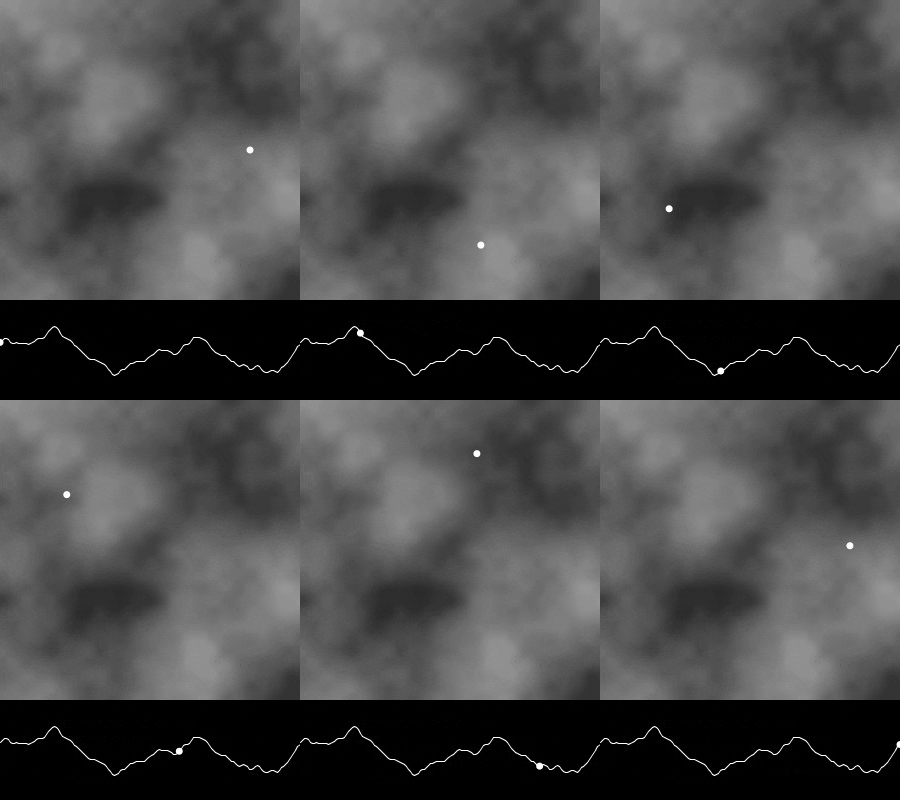
and also this great blog post from Etienne Jacob – https://necessarydisorder.wordpress.com/2017/11/15/drawing-from-noise-and-then-making-animated-loopy-gifs-from-there/
There's also a great coding train video on youtube explaining the technique in depth.
It's a pretty great for giving seamless loops of noise, while still being ridiculously controllable from the underlying noise map. In my case I was able to pick particular harmonics and lacunarity that felt right for this specific use case. To my knowledge (since it's a relatively new technique, from a different field) isn't something that has been widely applied in audio processing algorithms, but might have some pretty cool applications for audio rate oscillators, rather than the control rate ones I'm applying it to.
Watching this go round and round has provided a fun evening's entertainment. #easilyamused
Hello,
I've just pushed out a 1.1 version to the App Store this morning which addresses a few issues with layout and accessibility, and has also provided me the push to remove the em-dashes from the App Store description and also rephrase a lot of it in my own words.
I'm currently working on some changes to the erosion algorithm, and will use that to make a demo video for the App Store listing and website too, which will land in a 1.2 update soon.
Dahlia Tape Delay 1.1:
• New accessible theme available from the settings menu.
• Reduce Motion toggle, honoured by faders and radios.
• Fixed a preset loading bug and a fader indicator lag.
• More reliable breakpoints for compact vs full layout.
• Updated manual.
Thanks for the update. I been really liking the character of the, whatever this does to a signal, different than the other tape apps i have. I think it’s the saturation flavor that i like? I love the simplicity of the filter too.
Disclaimer, i don’t own TAIP and never used a tape machine. I