Loopy Pro: Create music, your way.
What is Loopy Pro? — Loopy Pro is a powerful, flexible, and intuitive live looper, sampler, clip launcher and DAW for iPhone and iPad. At its core, it allows you to record and layer sounds in real-time to create complex musical arrangements. But it doesn’t stop there—Loopy Pro offers advanced tools to customize your workflow, build dynamic performance setups, and create a seamless connection between instruments, effects, and external gear.
Use it for live looping, sequencing, arranging, mixing, and much more. Whether you're a live performer, a producer, or just experimenting with sound, Loopy Pro helps you take control of your creative process.
Download on the App StoreLoopy Pro is your all-in-one musical toolkit. Try it for free today.
Comments
@Schmotown I found that also in Loopy Pro and ApeMatrix.
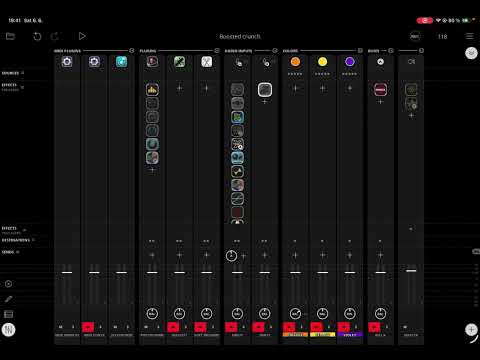
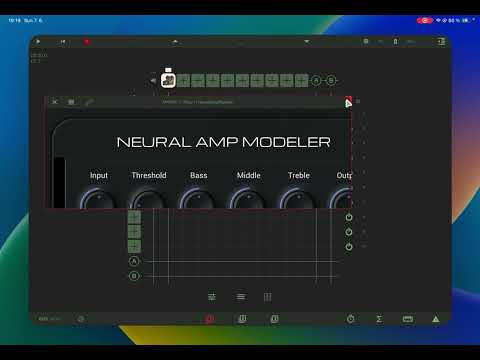
AUM users- could you please check if the Studio Camera NAM AUv3 layout is responsive or not there?
Loopy Pro:
ApeMatrix:
Hey guys, so.. I use Atkinson’s code as is. In his a2 announcement video I remember him saying Gateway was a fork of his original repo. I made a quick search and I didn’t find the fork, maybe it’s private.
Idk if it’s possible to make it rearrange controls as window expands/shrinks because the UI sdk(iPlug 2) is very lightweight and ment for performance.
Anyway, I’m building a new auv3 host pedal like interface so I fix 3 things:
1: people think studio camera is weird name for a NAM loader(it is because the intention of the app is to record videos mixing channels so I don’t have to edit my videos and sync audio).
2: adding a bypass parameter so I can control it with a midi controller.
3: better control of UI.
But since I’m also using iplug2 it won’t be responsive, but maybe it will fit better than original NAM.
Sneak speek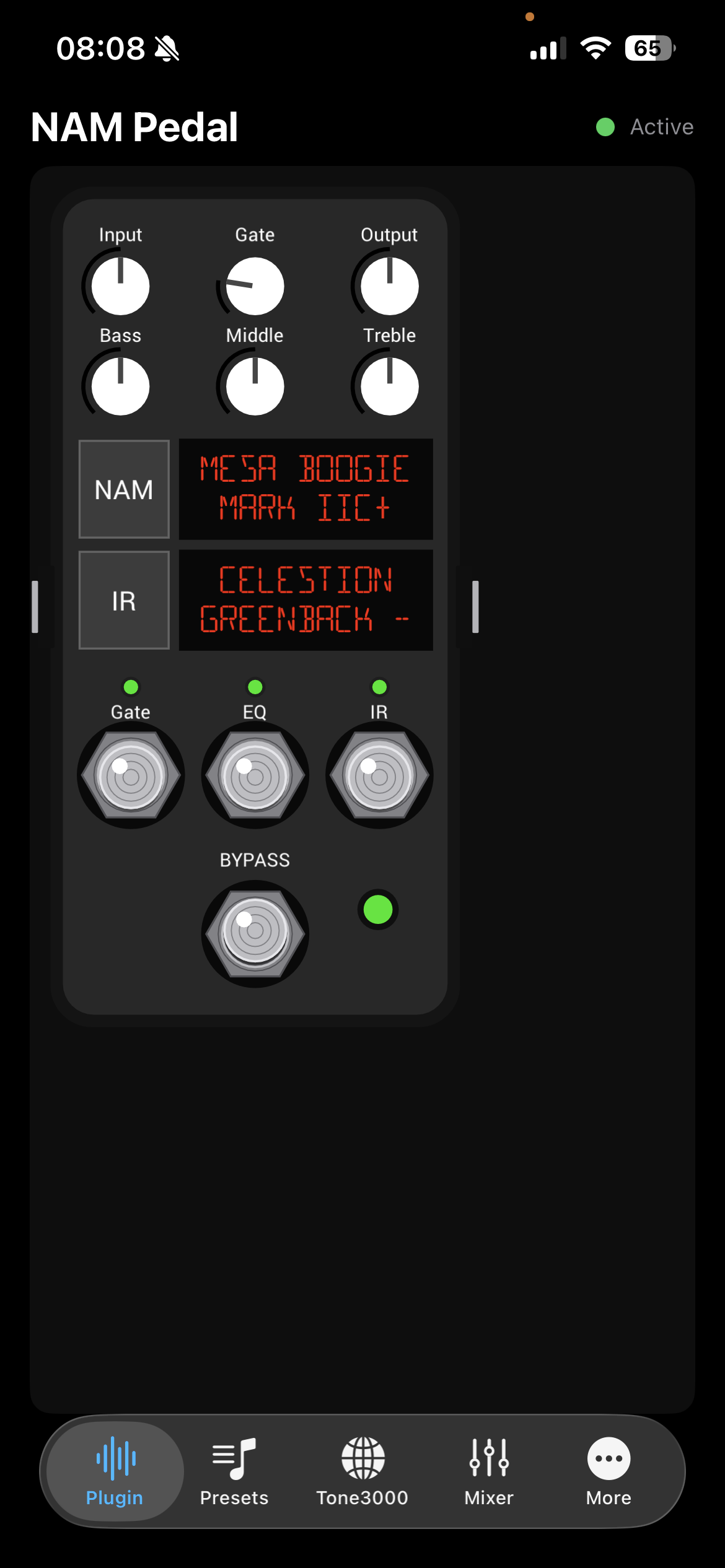
Could it be possible to upload an entire set of profiles in your app as it is possible in Namxt?
I don’t own a copy of namxt because it’s freaking expensive. You can upload as much as you can using finder, just drag the profiles to the app. Or use tone3000 integration to download as many profiles as you want.
But if you upload a video with the “profile import” from namxt I can mimic it.
My opinion: I’m not spending a lot of time messing with the NAM player, I just need to be usable. It looks like the new player is going to be very usable as-is and I’m glad to see this development.
As long as you can use auv3 presets to switch out the capture/ir and settings, I’m good. Barebones and not laden with bells and whistles is fine with me.
There’s an update to the NAM pedal on the App Store. Dual IRs, numbers on the dials, the “slim” knob works as well. I’ve traded some emails with the dev and he is working on updates. He mentioned he appreciates the feedback. I think this app is going to get even better.
I really appreciate @rafabertholdo for creating and improving this useful little app.
Yeah I think he's out on vacation. Thankfully the A2 nam loader in the camera app works fine so I'm not going stir crazy.
Does the Studio Camera loader have that whole Slim knob thing cranked/“on” or is it just compatible with the A2 format? I dont wanna be missing out on any toanage;)
The slim knob is only for A2 captures. By default it loads the capture at 0, so the slimmest capture. I typically put it at 0.5. I honestly can't tell the difference lol.
The NAM loader in studio camera has the slim knob. You click it and it opens up a pop up with the adjustment.
Ohhhh thank you! Found it.
( @maxxpower18 I can’t either, but now I’ll sleep better at night knowing I’m maxxed haha)
I turn the slim knob to 1. It adds a few % of dsp in loopy pro. Not enough to worry about it.
I think I hear a little more clarity on the top end (using a fender twin capture) and a slight rounder bottom end..
Am I wrong to assume that the pedal captures will be a2 format as well?
Depends on where you get them from. Anything trained on the T3K website is automatically retrained to be A2.
The A2 models we have reviewed contain two sub-models, and the knob is clearly not morphing between them. Instead, it behaves more like a switch at a certain threshold.
In practice, this means the model stays in either the lower-quality or higher-quality state until the threshold is crossed, rather than continuously interpolating between the two.
We had already considered implementing this as a switch and asked Steve about his future plans. For now, we will use the knob mainly for future-proofing, similar to his approach.
The A2 implementations for GigFast and NAM XT are now complete, and we are currently running tests.
Thanks @ArteraDSP. Looking forward to the update.
Also there is a very serious newcomer to the ipadOS that currently not supports AUv3 but supports A2 and we also collaborated with them.
I wondered about this because when training the model it only trains 2 models, so I didn't quite understand how it could be a range knob rather than a binary on/off switch.
Glad to hear about the A2 implementation. your apps are great ! Any idea when we can expect the release?
Would it be difficult to implement a way to reorganize the captures library into folders/sub folders? Or at least add the possibility to set this before importing (an app like IMPULSation from Gospel Musicians let the user do it). That could be a huge time saver.
Another thing, there is this iOS annoying bug that displays batch imports into random order. Probably not possible to fix on iOS, but asking just in case your developer knows a workaround to reorganize the display order of an existing library.