Loopy Pro: Create music, your way.
What is Loopy Pro? — Loopy Pro is a powerful, flexible, and intuitive live looper, sampler, clip launcher and DAW for iPhone and iPad. At its core, it allows you to record and layer sounds in real-time to create complex musical arrangements. But it doesn’t stop there—Loopy Pro offers advanced tools to customize your workflow, build dynamic performance setups, and create a seamless connection between instruments, effects, and external gear.
Use it for live looping, sequencing, arranging, mixing, and much more. Whether you're a live performer, a producer, or just experimenting with sound, Loopy Pro helps you take control of your creative process.
Download on the App StoreLoopy Pro is your all-in-one musical toolkit. Try it for free today.
Comments
@wim @wagdog
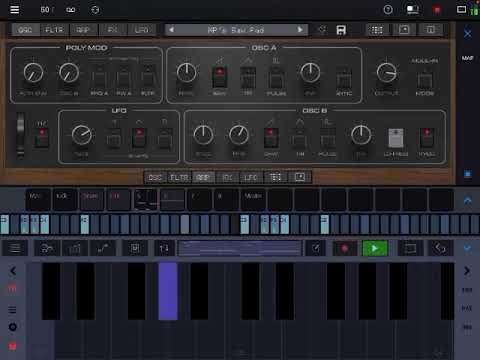
Reduce the keyboard. Choose the panel you want on the top row - say Osc. Then tap Osc. button repeatedly until you get the panel you want on the bottom row. If you want a different panel on the top row, tap on its button and then continue to tap it until you get the panel you want on the bottom row. There can be more to it than that but I find the upper approach to be pretty straightforward and my feeble mind can remember it. 😎✌🏼
It is just a simple duplicates bump right approach, yo.
Thanks @anickt - that's basically what I guess I do randomly. It's not that terrible. But I think every tap tweaks that reflexive part of me that wants to make sense of everything. There's this deep thing that's always trying to understand the logic behind things, and more importantly ... what the heck was the thought process behind things. I find it comical that I actually end up resisting making layout changes as my psyche rebells against being poked like that. 😂
NanoStudio and Caustic locked into my thought process the way most others don’t. When using them I always felt “that’s the way I’d do it”. 😁😎✌🏼
I wonder if hitting a panel select when stacked panels are showing could select the top panel and pop up a time-limited selector for the bottom panel? That would make 2 panel selection tap tap, and if you only want to select the top just ignore the popup and it’ll go away?
Anyway how, it just takes away the flow of working with (in my opinion) a great synth. Just like we have an option to remove that hideous cartoon icon, there should be a simple option to fix the tabs horror. That is my only point of criticism.
There's actually another way, recently added. Tap on the About icon (far right) and enable Show Middle Nav Buttons. Then you can directly select the lower panel.
Is that not the current default? Because mine is set to that but I don’t remember setting it manually
Not for me, and apparently not for the people discussing it above. It may be the default for the AUv3.
Yeah I only looked at AUv3, I guess it might be the default there then. Unless I changed it and don’t recall having done so, but I don’t think so
I don’t understand why when I click one of the middle buttons, it sets the bottom panel, and changes the top panel to the panel after the bottom panel… unless you click a button to the left of the current panel, then the bottom changes but the top stays the same, sometimes. Then clicking the top buttons leaves the bottom panel untouched, sometimes, maybe it works the same as the middle, I think it does?
It’s just inconsistent and non-intuitive, especially when you’re new to the app and don’t know what panel is what just yet and what each panel icon represents.
Why not make the bottom button affect the bottom panel and the top affect the top only? What’s the purpose of making the middle buttons optional?
I believe the bottom selection only affects the upper panel when you select tne same panel. The app is averse to displaying the same controls twice. The same thing has always applied when you make the upper panel match the lower. All the AudioKit synths work this way, and it has been discussed at length over the years. I believe the middle buttons are optional because they are a new feature.
Interestingly, the old AudioKit Synth One does it differently. Each panel has left/right arrows at the side. And they magically step over the matching panel, so you hardly realize that it's being skipped. The disadvantage is that you cannot jump to a specific panel; you have to iterate around the cycle. But I believe that was from a different author.
Hey everyone, I want to thank you all for the kind words and good community energy around this release.
As more people have had a chance to actually play the app, the response has been really encouraging. I was starting to get worried at first, shew!
This is the kind of thing that makes this forum feel different from most music and gear forums. People can share honest thoughts, report bugs, ask hard questions, and still keep it human.
I really appreciate it.
Here's a cool video of the App with Drambo:
Apple finally approved a massive update for PRO-A5 today. And, I have an even bigger update that I’m working on for next week.
The new 1.1 version released today confirmed everything in the "fixed" list for at least one user. But, every device is different. So if you’re still experiencing them, please email me, and we’ll get all the edge cases fixed.
Version 1.1. BIG UPDATE:
• NEW: FREE Preset bank By Sander R Wolff.
• NEW: Anti-aliased, 2x Oversampled Oscillators
• NEW: Improved noise oscillator, now closer to the original hardware behavior
• IMPROVED: 25% more memory efficient in AUv3!
• NEW: Program Change MIDI Mapping
You can now use a custom MIDI CC to change presets. Go to the About Page [i], tap “MIDI Mapping,” then “Add/Edit Mapping.” Choose “Program Change,” then enter the CC you want to use.
• FIXED: OSC Sync edge cases
• FIXED: Mono legato could sometimes behave duophonically
• FIXED: OSC B Volume could occasionally stop following the knob correctly
• FIXED: Clicks and crackles with long-release sounds during voice stealing
• FIXED: Several other small bugs and edge cases
Note: In mono non-legato mode, this app intentionally allows analog-style single-note polyphony so releases can continue to play out naturally.
Some of these fixed items might still be affecting certain devices. If so, please email me your setup.
I’m working on improving the app daily. If you run into bugs, weird behavior, or anything that does not feel right, you can email me directly:
[email protected]
Thanks!
And ICYMI, really nice free Twin Peaks bank by Jade Starr in last update:

Nice. I got the 1.04 update today but not the 1.1.
Thanks @AnalogMatthew , looking forward to playing this tonight.
Nice update @AnalogMatthew
When I play Radiohead with the Kid A presets, I’m not getting crackles anymore. Those presets seem to sound a bit cleaner too - not sure if that’s the oversampling or it’s just handling multiple notes better.
Also I tried the sync bug that you described @BeatsMe and that seems to be sorted.
Not sure about the phasey noise bug - my tired ears are failing me on that one!
I retract my statement. App Store screwed up and was displaying the change for update 1.04.
I’m getting a weird bug. After selecting the first preset in the Sander R Wolff bank it makes all the presets out of tune, even after restarting the app. The only way it fixed it was loading a project with an existing instance of the app.
Just downloaded the 1.1 update. Is it me or is everything out of tune now?
Hah yes we posted at the same time. You are right after selecting a Sander R Wolff preset.
For some season if you go to “0: Bank A” and select “1: Fragile Syn Piano”, it fixes it.
Re: Tuning.
A big new tuning feature has been in the works, and part of it accidentally made its way into the latest build.
Sorry about that.
More info: If you don't load preset "SRW - Tintabulation Too" in a session, everything will remain in tune.
Otherwise, you'll be in "Grady: Poole 17" microtonal scale until you load Preset 2 "Fragile Syn Piano", which will reset it to a 12-tone scale
The good news is, the fix is already done. And instead of waiting, I’m just going to unlock the whole feature early. Submitting to the app store now.
SURPRISE: Everyone is getting a Microtonal P5 🎉
This is great! I can confirm the clicks and pops are gone from long releases.
Might have found another bug. Is the noise supposed to disappear when I enable filter key tracking? If I use the Kybd button in the filter section, the noise cuts off. If I use the Keytrack knob in the More filter sub-section, the noise goes down as you turn the Keytrack knob up.
Steps to reproduce:
Good ear. That's always been the behavior of the noise with keytracking on. It's a little more pronounced now that much of the new noise oscillator's freq response is concentrated in a higher freq. It's pretty close to how it was before the 1.1 update. But, I'll do some more A/B-ing and will try to match it closer if there's still a delta
Very much enjoying Pro-A5 so far. I never had a 5, but I did have a Prophet 600 for several years.
Nice to have some of those John Carpenter vibes back;)
One question, that is probably just user error;)
In AUv3 mode, the Pro-A5’s built-in keyboard doesn’t show up, hence also no “Hold” button. Is there a way to access the keyboard in AUv3 (or just the “Hold” button would be fine)?
And, if not, is there an alternate way to latch the arpeggiator?
The microtonal update is wild!
I have no idea what I’m doing or what to do with it, but that’s never held me back.
Cool stuff!
yay! put it in all ak apps. please
Behaviour of noise and keyboard tracking is quite strange. Starting from the Init Preset turn noise full up in the Mixer. Play a note and you’ll hear saw plus noise. Tap Kybd on and off while holding middle C. Little audible change to the saw (filter is wide open), with Kybd on noise almost disappears! (Expected behaviour would be no change).
and the microtonal keyboard (synth one style) would be nice too