Loopy Pro: Create music, your way.

What is Loopy Pro?Loopy Pro is a powerful, flexible, and intuitive live looper, sampler, clip launcher and DAW for iPhone and iPad. At its core, it allows you to record and layer sounds in real-time to create complex musical arrangements. But it doesn’t stop there—Loopy Pro offers advanced tools to customize your workflow, build dynamic performance setups, and create a seamless connection between instruments, effects, and external gear.

Use it for live looping, sequencing, arranging, mixing, and much more. Whether you're a live performer, a producer, or just experimenting with sound, Loopy Pro helps you take control of your creative process.

Download on the App Store

Loopy Pro is your all-in-one musical toolkit. Try it for free today.

New Aqeel Aadam app Coastline. Out now

1235

Comments

  • @wim said:

    @oldsynthguy said:
    So this one seems to have beefed up the fx side of things, and is focusing on that.

    Hummm ...
    That could be totally right, but that isn't how I see it really. It feels to me like an tool primarily to build ambience closely related to the original input sound.

    Tide is extending on one of the modes of Outgrowth. It's analyzing the input and re-synthesizing it using sine (and other) waves rather than outputting a modification of the original sound.

    Glade is taking parts of the sound and playing them back in a sort of granular way. It's closest to Ridgewalk, but also kind of like Weeping wall.

    Sure, there's Chorus and Reverb FX, plus ways to introduce distortion, but I don't see those so much as the emphasis ... but I'm realizing as I type this that they can just as well be. Either way works. 😉

    I think I need to expand my way of looking at this thing.

    Are the Tide and Glade modes significantly different enough from their Outgrowth Additive and Granular counterparts to get extra mileage from them?

  • @Robin2 said:

    @wim said:

    @oldsynthguy said:
    So this one seems to have beefed up the fx side of things, and is focusing on that.

    Hummm ...
    That could be totally right, but that isn't how I see it really. It feels to me like an tool primarily to build ambience closely related to the original input sound.

    Tide is extending on one of the modes of Outgrowth. It's analyzing the input and re-synthesizing it using sine (and other) waves rather than outputting a modification of the original sound.

    Glade is taking parts of the sound and playing them back in a sort of granular way. It's closest to Ridgewalk, but also kind of like Weeping wall.

    Sure, there's Chorus and Reverb FX, plus ways to introduce distortion, but I don't see those so much as the emphasis ... but I'm realizing as I type this that they can just as well be. Either way works. 😉

    I think I need to expand my way of looking at this thing.

    Are the Tide and Glade modes significantly different enough from their Outgrowth Additive and Granular counterparts to get extra mileage from them?

    Yes because Outgrowth's additive and granular modes are just changing the way samples are played back. Coastline is actually making little loops of incoming audio and resynthesizing them. If you're familiar with Outgrowth and you watch my video on Coastline, the difference between the two apps will be abundantly clear tbh

  • @Gavinski said:

    @Robin2 said:

    @wim said:

    @oldsynthguy said:
    So this one seems to have beefed up the fx side of things, and is focusing on that.

    Hummm ...
    That could be totally right, but that isn't how I see it really. It feels to me like an tool primarily to build ambience closely related to the original input sound.

    Tide is extending on one of the modes of Outgrowth. It's analyzing the input and re-synthesizing it using sine (and other) waves rather than outputting a modification of the original sound.

    Glade is taking parts of the sound and playing them back in a sort of granular way. It's closest to Ridgewalk, but also kind of like Weeping wall.

    Sure, there's Chorus and Reverb FX, plus ways to introduce distortion, but I don't see those so much as the emphasis ... but I'm realizing as I type this that they can just as well be. Either way works. 😉

    I think I need to expand my way of looking at this thing.

    Are the Tide and Glade modes significantly different enough from their Outgrowth Additive and Granular counterparts to get extra mileage from them?

    Yes because Outgrowth's additive and granular modes are just changing the way samples are played back. Coastline is actually making little loops of incoming audio and resynthesizing them. If you're familiar with Outgrowth and you watch my video on Coastline, the difference between the two apps will be abundantly clear tbh

    Cool, thanks @Gavinski, planning to watch your video today. Cheers.

  • @Gavinski awesome video. Thanks!

  • Examples on a simple synth loop + bass and guitars
  • @skiphunt said:

    @Squishy said:
    @skiphunt
    I find this one to be pretty similar to some of what’s goin on in exosphere, and I remember you really liking exosphere, so I think you’ll probably dig this one

    That’s true… love exosphere. Is it somewhat redundant then? Or just similar ambient vibe in a new interesting way?

    Intrigued for sure

    “Redundant”? I don’t think so. The Glade section is pretty close to certain sections of exosphere (I forget the names haven’t used it in a while). But the Tide section is not and I find it to my favorite part of the app. Def check out some demos

  • Bought it now after watching @Gavinski’s video (thanks). Very impressive app.

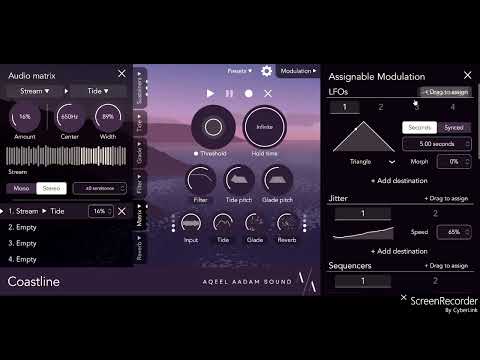
    As already confirmed by others, pitches can be automated from within the host app but I’m somewhat disappointed that they’re not available as modulation destinations for the built in modulators. I realized that sequencing the pitch in a predictable way had to be done via outside automation or via Waymaker but I at least expected to be able to be able to apply, for example, an lfo or jitter to the pitch from within the app.

  • @Robin2 said:
    Bought it now after watching @Gavinski’s video (thanks). Very impressive app.

    As already confirmed by others, pitches can be automated from within the host app but I’m somewhat disappointed that they’re not available as modulation destinations for the built in modulators. I realized that sequencing the pitch in a predictable way had to be done via outside automation or via Waymaker but I at least expected to be able to be able to apply, for example, an lfo or jitter to the pitch from within the app.

    That is a bit of a weird omission, you should request it for sure

  • @Gavinski said:

    @Robin2 said:
    Bought it now after watching @Gavinski’s video (thanks). Very impressive app.

    As already confirmed by others, pitches can be automated from within the host app but I’m somewhat disappointed that they’re not available as modulation destinations for the built in modulators. I realized that sequencing the pitch in a predictable way had to be done via outside automation or via Waymaker but I at least expected to be able to be able to apply, for example, an lfo or jitter to the pitch from within the app.

    That is a bit of a weird omission, you should request it for sure

    Just have, thanks @Gavinski.

  • I wonder what this might compare to in hardware, anyone know of a pedal that comes close to this?

  • @timfromtheborder said:
    I wonder what this might compare to in hardware, anyone know of a pedal that comes close to this?

    Maybe Infinite Jets?

  • @Squishy said:

    @timfromtheborder said:
    I wonder what this might compare to in hardware, anyone know of a pedal that comes close to this?

    Maybe Infinite Jets?

    I read “Infinite Jest” at first and thought the thread was going to go all literary

  • @audiblevideo said:

    @Squishy said:

    @timfromtheborder said:
    I wonder what this might compare to in hardware, anyone know of a pedal that comes close to this?

    Maybe Infinite Jets?

    I read “Infinite Jest” at first and thought the thread was going to go all literary

    Heard the footnotes in that manual are longer than the manual itself. (Big fan of that novel)

  • wimwim
    edited June 27

    @Robin2 said:
    Are the Tide and Glade modes significantly different enough from their Outgrowth Additive and Granular counterparts to get extra mileage from them?

    You've since gotten the app, but to me they're not radically different ... just deeper and more evolved.

    The main difference to me is Outgrowth produces instruments working from recorded samples where this is a realtime effect. Sounds like maybe you were hoping to use it more like an instrument.

  • wimwim
    edited June 27

    I think if I wanted to use Coastline more like an instrument, I'd just use it with the the Input mixed to zero and short hold times. You could also use the Sidechain input instead

    (It's hard to be clear about the input level. What I mean is turning the "output of the input" down to zero.)

  • @wim said:

    @Robin2 said:
    Are the Tide and Glade modes significantly different enough from their Outgrowth Additive and Granular counterparts to get extra mileage from them?

    You've since gotten the app, but to me they're not radically different ... just deeper and more evolved.

    The main difference to me is Outgrowth produces instruments working from recorded samples where this is a realtime effect. Sounds like maybe you were hoping to use it more like an instrument.

    Very perceptive of you @wim, yes, I was hoping to use it more like an instrument. I like very much what it does as an effect (and appreciate that it was designed as such) but I’m interested in also creating things other than the drone like atmospheres it excels at. Maybe foolish of me and maybe Klevgrand Parrot would have suited me better after all, more experimentation will tell.

    Thanks for the suggestion regarding short hold times and yes, I understand what you mean about the input level! Cheers.

  • @Gavinski said:

    @Robin2 said:
    Bought it now after watching @Gavinski’s video (thanks). Very impressive app.

    As already confirmed by others, pitches can be automated from within the host app but I’m somewhat disappointed that they’re not available as modulation destinations for the built in modulators. I realized that sequencing the pitch in a predictable way had to be done via outside automation or via Waymaker but I at least expected to be able to be able to apply, for example, an lfo or jitter to the pitch from within the app.

    That is a bit of a weird omission, you should request it for sure

    Another side note: this is an example of why I think @Gavinski has integrity… because even though he’s been paid to make a video and promote this devs app, he’s still willing to call out shortcomings, etc.

    I think what I wish we had was some source that wasn’t paid by the dev and just gave unabashed impressions of an app that they had actually paid for themselves… rather than somewhat beholden to the dev who’d just paid them for a video.

    Something like that guy “Tim”? (I don’t recall his name, but he had a site that reviewed new apps and was funded primarily from site ad banners.

    That evidently didn’t work out so well ultimately, but there has to be some way to make that work. And, even though I don’t always agree with Gavinski’s opinion on design decisions, I think he’s always honest and legit.

    I’d actually put @wim in that category as well. Maybe a dual reviewer angle between these two users.

    It would need to be profitable, but not directly related to how much financial benefit they enjoyed from the dev directly. There has to be a way that could work.

  • @skiphunt said:

    @Gavinski said:

    @Robin2 said:
    Bought it now after watching @Gavinski’s video (thanks). Very impressive app.

    As already confirmed by others, pitches can be automated from within the host app but I’m somewhat disappointed that they’re not available as modulation destinations for the built in modulators. I realized that sequencing the pitch in a predictable way had to be done via outside automation or via Waymaker but I at least expected to be able to be able to apply, for example, an lfo or jitter to the pitch from within the app.

    That is a bit of a weird omission, you should request it for sure

    Another side note: this is an example of why I think @Gavinski has integrity… because even though he’s been paid to make a video and promote this devs app, he’s still willing to call out shortcomings, etc.

    I think what I wish we had was some source that wasn’t paid by the dev and just gave unabashed impressions of an app that they had actually paid for themselves… rather than somewhat beholden to the dev who’d just paid them for a video.

    Something like that guy “Tim”? (I don’t recall his name, but he had a site that reviewed new apps and was funded primarily from site ad banners.

    That evidently didn’t work out so well ultimately, but there has to be some way to make that work. And, even though I don’t always agree with Gavinski’s opinion on design decisions, I think he’s always honest and legit.

    I’d actually put @wim in that category as well. Maybe a dual reviewer angle between these two users.

    It would need to be profitable, but not directly related to how much financial benefit they enjoyed from the dev directly. There has to be a way that could work.

    That was Tim, now Emily, Webb. The channel was hit hard when Apple discontinued the affiliate program.

  • wimwim
    edited June 27

    @skiphunt - Not that I'd entertain the idea, but the only way I can think something like that could work is if it was by subscription and there were enough subscribers to fund the channel. For anyone to be able to dedicate the amount of time needed to do a quality job would require more time than most people would be able to dedicated on a consistent basis. Then also, they'd have to purchase the apps in order to avoid accepting them for free from developers.

    Generally it seems that Patreon is the closest thing to that model. If anyone has been very successful with that (i.e getting reasonable return for their efforts), I haven't heard of it.

    tbh, gleaning opinions you trust from here, and listening to demos is the most "objective" source I can think of. Somewhat random and time consuming however.

  • I hate like heck to bring this up, but AI search done carefully can be helpful. Prompts like "Summarize all the opinions about the Coastline app from the discussion at https://forum.loopypro.com/discussion/68794/new-aqeel-aadam-app-coastline-out-now" do actually work pretty well for saving time.

  • I would like to be able to change the pitch of individual Sustainers e.g. maybe to have a Pitch Offset for each one, which would be combined with the overall Tide/Glade pitch setting? They can already be panned individually, so I wonder what other parameters it would be useful to vary per sustainer?

  • . > @wim said:

    Generally it seems that Patreon is the closest thing to that model. If anyone has been very successful with that (i.e getting reasonable return for their efforts), I haven't heard of it.

    Exactly, fan funding is a good way. People should support the YouTuber(s) they watch regularly. And Patreon is a good way indeed. If that means buying a few less apps a year, so be it. And then as a bonus they get the warm glow of knowing that they're now engaging in a fair exchange of value with the creator.

  • I see some people saying this has a lot of depth, videos suggest otherwise. Reminds me of PaulXStretch: Kind of cool, everything ends up sounding similar. Hey, prove me wrong!

  • wimwim
    edited June 28

    @ChimmyChungaFace said:
    Hey, prove me wrong!

    Why?

  • @wim said:

    @ChimmyChungaFace said:
    Hey, prove me wrong!

    Why?

    It’s a way to engage and elicit further discussion and examples. People say there’s depth, I have yet to see it. On face value and from descriptions this sounds like a nice multi fx app, in practice doesn’t really seem like it. So which is it? That’s what forums are for, no?

  • . > @ChimmyChungaFace said:

    I see some people saying this has a lot of depth, videos suggest otherwise. Reminds me of PaulXStretch: Kind of cool, everything ends up sounding similar. Hey, prove me wrong!

    If you want something that you just slap on incoming audio and it immediately transforms it in diverse and very in-your-face ways, like Bleass Motion for example, this is not that.

    The Tide section is the most interesting aspect for me, and I really like how you can play with which frequencies are dominant. The interesting bit, I think, lies in tweaking that in interesting ways, live.

    Like here, where I'm playing with Offset and other controls to change the tone and timbre:

    https://youtube.com/shorts/WYKIfEv_dWw

    There's also gonna be a lot of room to do weird shit using the modulation section. I don't think my videos by any means reflect everything this is capable of, because I've only started exploring it, it would take a lot more experimenting with the modulation section to see all that it can do.

    It's very possible it's just not for you though, everyone has their own taste. If that's the case, brilliant, you've just saved yourself $12.

    I agree about PaulXstretch btw, the novelty wore off quickly for me. Will that happen with this? Who knows, time will tell.

  • wimwim
    edited June 28

    @ChimmyChungaFace said:

    @wim said:

    @ChimmyChungaFace said:
    Hey, prove me wrong!

    Why?

    It’s a way to engage and elicit further discussion and examples. People say there’s depth, I have yet to see it. On face value and from descriptions this sounds like a nice multi fx app, in practice doesn’t really seem like it. So which is it? That’s what forums are for, no?

    If you watched the videos, particularly the developer’s hour long demo of every feature, and that’s your conclusion, then I can’t fathom what else to say that would be relevant.

  • wimwim
    edited June 28

    @wim said:

    @ChimmyChungaFace said:

    @wim said:

    @ChimmyChungaFace said:
    Hey, prove me wrong!

    Why?

    It’s a way to engage and elicit further discussion and examples. People say there’s depth, I have yet to see it. On face value and from descriptions this sounds like a nice multi fx app, in practice doesn’t really seem like it. So which is it? That’s what forums are for, no?

    If you watched the videos, particularly the developer’s hour long demo of every feature, and that’s your conclusion, then I can’t fathom what else to say that would be relevant.

    That said, it is true that Aqeel's video is more about just covering all the features than demonstrating all you can do with the app. Also, the audio input he used was kind of same-same across the board, and didn't do as much to demonstrate depth. As a "video manual" it seems to be mostly focused just on covering the mechanics of all the features. If he treats this one as he usually does, there will be follow-up videos that show a lot more of the creative potential.

  • @wim said:

    @wim said:

    @ChimmyChungaFace said:

    @wim said:

    @ChimmyChungaFace said:
    Hey, prove me wrong!

    Why?

    It’s a way to engage and elicit further discussion and examples. People say there’s depth, I have yet to see it. On face value and from descriptions this sounds like a nice multi fx app, in practice doesn’t really seem like it. So which is it? That’s what forums are for, no?

    If you watched the videos, particularly the developer’s hour long demo of every feature, and that’s your conclusion, then I can’t fathom what else to say that would be relevant.

    That said, it is true that Aqeel's video is more about just covering all the features than demonstrating all you can do with the app. Also, the audio input he used was kind of same-same across the board, and didn't do as much to demonstrate depth. As a "video manual" it seems to be mostly focused just on covering the mechanics of all the features. If he treats this one as he usually does, there will be follow-up videos that show a lot more of the creative potential.

    That’s probably what I’m waiting for. The background harmony drones are a nice effect, and sound great in the @Gavinski demo a few posts above, but I quite like doing that bit myself with a synth or guitar. Plus it’s a relatively easy thing to do in building a track.

    Interested in hearing more complex sequenced/rhythmic/modulated stuff (if it can do that), though I reckon I’m missing the point of this app!

    I guess I’m trying to talk myself into buying it, as I really enjoy the devs UI/UX, but think this one probably isn’t for me. I haven’t got his sequencer yet, so might just grab that one instead.

  • @oldsynthguy said:

    @wim said:

    @wim said:

    @ChimmyChungaFace said:

    @wim said:

    @ChimmyChungaFace said:
    Hey, prove me wrong!

    Why?

    It’s a way to engage and elicit further discussion and examples. People say there’s depth, I have yet to see it. On face value and from descriptions this sounds like a nice multi fx app, in practice doesn’t really seem like it. So which is it? That’s what forums are for, no?

    If you watched the videos, particularly the developer’s hour long demo of every feature, and that’s your conclusion, then I can’t fathom what else to say that would be relevant.

    That said, it is true that Aqeel's video is more about just covering all the features than demonstrating all you can do with the app. Also, the audio input he used was kind of same-same across the board, and didn't do as much to demonstrate depth. As a "video manual" it seems to be mostly focused just on covering the mechanics of all the features. If he treats this one as he usually does, there will be follow-up videos that show a lot more of the creative potential.

    That’s probably what I’m waiting for. The background harmony drones are a nice effect, and sound great in the @Gavinski demo a few posts above, but I quite like doing that bit myself with a synth or guitar. Plus it’s a relatively easy thing to do in building a track.

    Interested in hearing more complex sequenced/rhythmic/modulated stuff (if it can do that), though I reckon I’m missing the point of this app!

    I guess I’m trying to talk myself into buying it, as I really enjoy the devs UI/UX, but think this one probably isn’t for me. I haven’t got his sequencer yet, so might just grab that one instead.

    Sure it can do the rhythmic modulated stuff, it has all those LFOs and other mod sources built in. Mod the Tide level, for example, with a fast square lfo and you have interesting gating fx. Set that to a free rate and mod its rate with other modulators etc etc. The sky is the limit.

Sign In or Register to comment.