Loopy Pro: Create music, your way.
What is Loopy Pro? — Loopy Pro is a powerful, flexible, and intuitive live looper, sampler, clip launcher and DAW for iPhone and iPad. At its core, it allows you to record and layer sounds in real-time to create complex musical arrangements. But it doesn’t stop there—Loopy Pro offers advanced tools to customize your workflow, build dynamic performance setups, and create a seamless connection between instruments, effects, and external gear.
Use it for live looping, sequencing, arranging, mixing, and much more. Whether you're a live performer, a producer, or just experimenting with sound, Loopy Pro helps you take control of your creative process.
Download on the App StoreLoopy Pro is your all-in-one musical toolkit. Try it for free today.
Comments
Thank you for raising these questions. The effects slot question is related to a core decision related to the AUv3 type that I’m totally willing to revisit if it gets in the way of usability. Grainsmith is a “midi controlled effect” type which allows it to process incoming audio while also being addressable by midi. It does mean it sits in the effects slot in AUM. The other option is to create separate instrument and FX versions, which many developers do, though I personally find can also be confusing.
The instrument mode switches trigger to midi input, with the envelope applied (AR adjustable in settings) and pitch shifted by midi note. With no explanation I can see how this is not at all clear! I will work on adding a first time affordance.
Ah okay, no I missed that (midi note input) but will try now that I know. Thanks!
It's out. App Store link: https://apps.apple.com/us/app/id6760624826
Intro price $9.99 (July 25 it goes to $11.99).
The feedback here shaped what shipped. The exposed parameters fix, MIDI control helper, state saving, controller profiles, area select all came from posts in this thread. Thank you for that.
Included in this final launch version:
If you find anything that broke in the transition from TestFlight to the release build, let me know here. I'll be watching. Excited to hear your granular creations.
Andy / Plastic Factory
bigups Andy!!!
welcome to ios scene:)
and thnx for the in str u ment!!!
Congrats on the release. This one sounds really good (for anyone who have't tried)!
I’m really liking this one… more than I thought would. Only because I have several other great grain app, but this one has just the right amount of control and intuitive interface, without any extra bloat to get in the way. I’m going to use this one a lot I think.
This isn’t a criticism, just an observation. Two apps, one called Field, one called Fields, both released within the last 2 weeks or so, with icons that are incredibly similar
Hey everyone,
Grainsmith Field launched on June 25 and I wanted to post an update for the folks here who picked it up early. A few things have shipped since, and a big one just went live.
Already shipped:
1.1.1 extended the recording length from 20 seconds to 90 seconds. That came straight from a request in the first few days, so thank you for that.
1.1.2 added pitch snap modes to the pitch slider: Free, Chromatic, Scale, Octaves, and Octaves+5ths, and the pitch probability xy control can follow those same patterns (independent of the pitch slider). 12 scales to choose from. Also updated the Roto-Control hardware support with a profile you can import.
Just landed (1.2):
This is the one I'm most excited about. Multiple playheads: you can run up to three grain streams from the same sample at once, each with its own speed, pitch, and level. Grab a playhead on the waveform and drag it on its own, or move them together. In practice you get instant harmony or octave layering by dropping a second head at a different pitch, and the streams blend into one granular texture instead of sounding stacked. For older devices there's an eco mode in the settings which cuts down on number of grains spawned, since this can get more intense dsp-wise.
1.2 also adds an improved preset browser with the ability to favorite ones you want quick access to.
It's live on the App Store now. If anything behaves weirdly or you have requests, I'm reading here and watching the reviews.
(Also, if you happened to download ~10 hours ago, there was an issue with the playhead control for iOS 17 devices that has now been fixed.)
Andy
Really?! I never would’ve bought this if i thought the recording length had a limitation. Especially one so small as 90 seconds 😔
I am probably being overly cautious about performance on older devices and usability with longer waveforms, but creating an option to extend is certainly feasible. I can see longer buffers being particularly useful with a slice feature I'm working on. Let me give it a crack - what would you be looking for/expect? 5 minutes?
This is very interesting. I was wondering if you could do some similar in iDensity. Sort of but not quite.
Can also adjust the mainline of controls independently for each if the 3 heads?
I’m not saying it should work that way… just figuring out how much you can do.
Might be cool to set which head you want to apply each xy pad to.
This seems like a level of grain control of one recording that I’m not sure exists in the other various grain apps… at least I can’t recall one that can do this sort of control on the same recording…
Maybe iDensity if you set all four heads to live input. I could be mistaken though.
Very cool!!!!
That's definitely the question - how many parameters to expose per playhead? What's the right balance of features and simplicity in the UI? In the desktop version, there are two layers, each with the full set of controls.
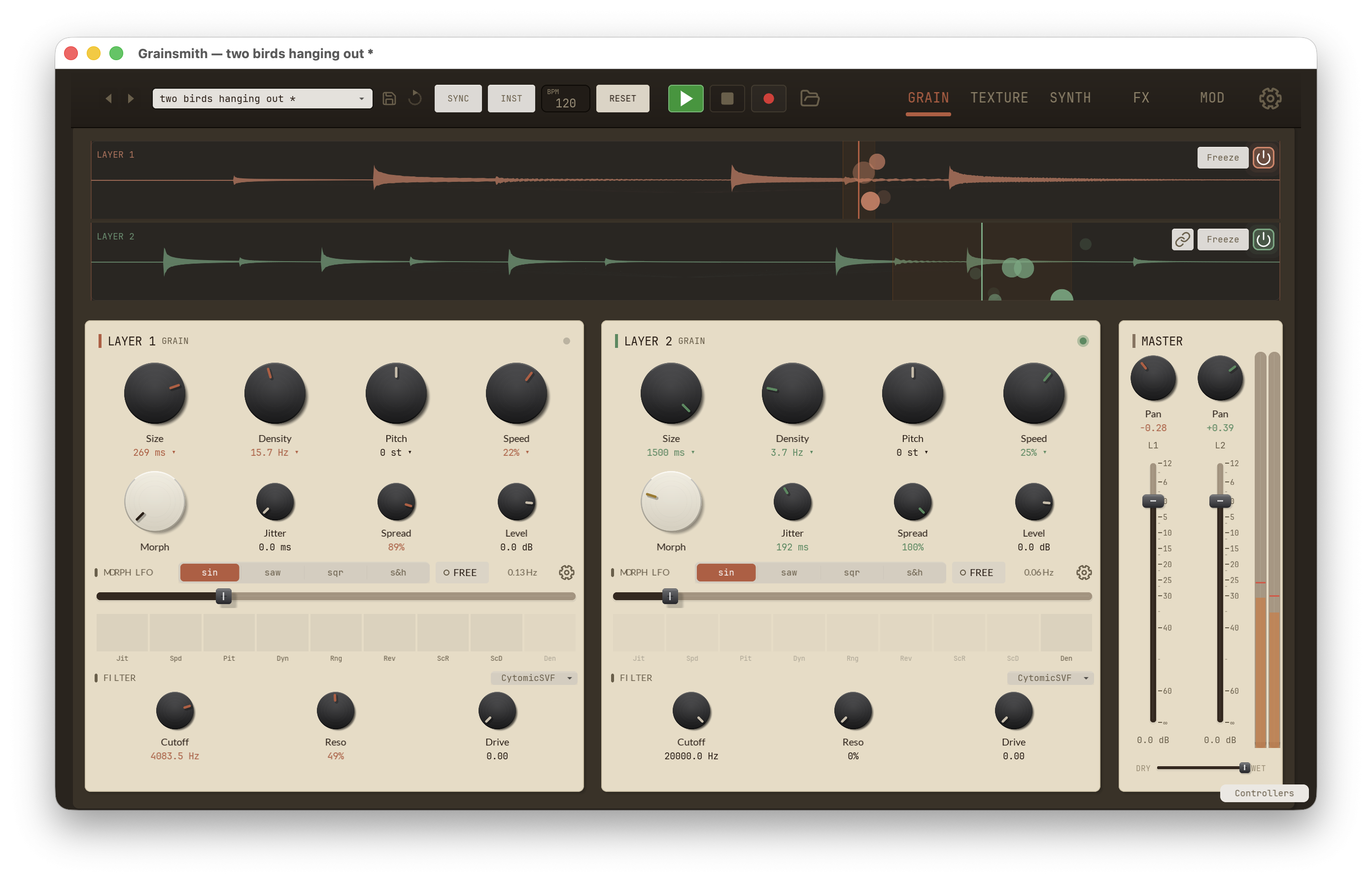
My initial version of Grainsmith Field was a straight port, and it was not a fun experience. But there is definitely room to get more out of the engine, especially since all the plumbing is there. Adding a couple more parameters for each playhead, like density and size, would help. I also like approaches similar to what Morphagene does in the modular world, where a single knob drives increasing variance from first playhead.
And I really like the idea of being able to select which playheads the xy pads target. I'm going to play around with that - thank you!
There's a separate desktop version too? I noticed that it can be installed on macOS silicone but I haven't tried yet. Or, are you referring to a separate desktop purchase version?
Again, not necessarily making requests... just very fascinated with this one and the way it's evolving!
Merely kicking the tires to see what all you can do with it.
Thank you!
I should have been clearer about that - Grainsmith Field should in fact work just fine on Apple silicone, but the core desktop Grainsmith is a separate product for Mac and Windows + VST/AU/AAX (and Linux and CLAP in the works). It's more geared toward Pro Tools/Ableton workflows. Having said that, if there are things that make sense to pull in to the Field version, I'm all for it.
I personally like that you seem to be sensitive to not adding bloat, but only adding and evolving what makes sense
I like the decisions you’ve made so far, so no particular requests here yet… though I do think the added functionality discussed in my previous post would be fun and offer a whole other level of complex sound with playable movement
This is exciting. What a fun musical instrument this makes our phones. And the enthusiasm to build upon, yet keep it within your vision is admirable. I’m sure you’ll find the right balance. Thanks for listening to the community. We realllly love these apps.
I owe you an apology @azsmith . Scroll up a bit and you’ll see a post from me, from June 29th, commenting on the similarity in name and icon of your app and the AudioThing Fields app. So, when I saw this thread, I thought I was looking at the Fields thread

I don’t mind admitting what an absolute moron I am - most regulars here know this already (and it’s ok to call myself a moron folks)..
Anyway, Fields having a recording limitation of 20 secs , or 90 secs, would be utterly ridiculous…which is why my post sounded so astonished. I haven’t even bought your app (yet) !!
Again, accept my apologies
Guess it kinda validates my other post though (!) - the names and icons caused me to mix them up...
I can definitely see how you’d mix them up based on icon and name… and how the shorter record time for the grain app would seem ludicrous for a field recorder… so in that respect I don’t think the moron label is appropriate
Back to the app though… I really enjoy playing with many of the granular apps, and this one seems to be evolving into a very unique one among granular apps
No apology necessary, Kalshi - it actually was helpful to start figuring out some hard things dealing with memory constraints running AUv3s within AUM. And also point taken on the naming - naming is so hard. I'll think about ways to reinforce differentiation so it's less of an issue over time. And thank you Skiphunt and Cuezaireekaa for the feedback!
I find the recording options confusing.
And how do you export?
The three recording options are one-shot (one time recording up to 120 seconds), live mode (variable length up to 20 seconds) that continuously refills the buffer, and a live mode with configurable feedback level ("loop"), that allows you set how much of the previous generations of audio to retain with each pass. The options could definitely be simplified or at least clarified - I'll have a think on that.
To save the audio you have captured, long press on the waveform and select "Export audio...". I admit the long press popups are not the most discoverable - that's also where the option to edit the start and end point lives.