Loopy Pro: Create music, your way.
What is Loopy Pro? — Loopy Pro is a powerful, flexible, and intuitive live looper, sampler, clip launcher and DAW for iPhone and iPad. At its core, it allows you to record and layer sounds in real-time to create complex musical arrangements. But it doesn’t stop there—Loopy Pro offers advanced tools to customize your workflow, build dynamic performance setups, and create a seamless connection between instruments, effects, and external gear.
Use it for live looping, sequencing, arranging, mixing, and much more. Whether you're a live performer, a producer, or just experimenting with sound, Loopy Pro helps you take control of your creative process.
Download on the App StoreLoopy Pro is your all-in-one musical toolkit. Try it for free today.
Comments
Right now thats not possible. But that's a good suggestion; we'll add a ticket with it for further discussion
I am struggling to use LK as a sequencer inside drambo. If I record normally with record and play it will put all the clip together in one clip.
If I manage to use the poay button it will record it properly but I miss the sync (and the pointbof usung LK as sequencer).
Midi in: none, midi out: drambo
I am not sure if I made my point clear, but any suggestion?
Hi . How can I transfer presets created on iPad to iPhone in LK Matrix? Or how can I share presets in general?
When I export to LK on my iPad, it gives me a file named ( Local.lbe ) but when I import it to my iPhone in Lk, the presets are not visible.
Is there anyone who can solve this problem? I sent an email to the LK support team but I did not receive a response.
lk is not included in the share list for sharing presets .why ?
Is there a tutorial that helps us learn this app which has the newer look and features? I feel like most tutorials have a look and feel that is different from the current version.
Hello @sinosoidal and @xglax , could we have some insights on which functionalities are available in LK and BAM regarding the MIDI controllers compatible?
I know that it represents quite some work, because your app is compatible with a lot of them.
A simple table would be nice.
I have a Launchpad Pro, some buttons are lit, but I’m not sure what is available or not.
Thanks a lot.
@sinosoidal . @xglax
Hello, are you available here so I can share a few small issues with you about LK Martix?
Yes, sure! Please do
Hello @sinosoidal again.
I have 3 problem with lk matrix .
1: please do these steps.
1, Disable Recording Fixed Length (off).
2, enable Arme track in the Mixer section .
3, tap on a blank clip automatically create a new clip and start a recording. (quick recording mode )
4, Record note frome external keyboard or plugin keyboard.
5, After end of recording, press stop button. ( Square button ) .
When press play for hearing notes , Very loud distorted sounds are heard.
There is this problem in 1,13,4 and latest new version 1,15 ,10 .
iPhone XS and ipad air 2 .
2: the tracks volume level meters doesn’t show correctly levels. It shows maximum value of volume even though I set the level very low with the volume faders.
There is no this problem with 1,13,4 old version on ipad air 2.
3, When we create a note with touch in pianoroll, its velocity is 127 by default, which is too high. Is it possible to lower it, for example, 100 or 80? Or add the option for the user to choose a default velocity in the settings section?
@sinosoidal .
And two other problems that I forgot to send you in the previous post.
4, Did you know that in the LK Piano Roll, the grid lines show the 1/2T, 1/4T, 1/8T, 1/16T and 1/32T incorrectly?
For example: 1/8T = 3 notes per beat = 12 notes per bar in music theory.
But Lk shows 6 gridline per Bar insted of 12 grid lines.
This means that 1/8T in LK means 1/4T in music theory.
This is evident in Cubasis , Helium, or other sequencers that display piano rolls well, and you can easily research this in those applications.
5, in iphone in controller section. Explanation in screenshot.
@sinosoidal .
Problem 6 : solo and mute tracks, doesn’t state saves in Plugin mode .
1, create some tracks in matrix in AUM as plugin
2, solo or mute some of them
3, close AUM
4, reopen AUM and open last state
Tracks that were mute or solo are no longer mute or solo.
I believe the Launchpad Pro offers the most functionality compared to the other supported controllers.
In general, all controllers allow you to trigger scenes and clips, control track volume, pan, and sends, as well as arm, solo, and mute tracks. You can also control the viewport by shifting tracks left/right and scenes up/down. The Launchpad Pro, however, includes a few additional features:
@pejman We've just released a new beta that fixes some of the issues you reported. Since it was only submitted recently, it may take a few hours for Apple to approve it. Please look for build 355, as the current beta (build 354) does not include these fixes yet.
1 - wasn't able to reproduce. Can you please try on the latest beta?
2 - Fixed
3 - Fixed. Notes are now created with velocity 100
4 - We have open a ticket
5 - Fixed
6 - We have open a ticket
Thank you for these reports
We've launched a beta for 1.16.0. The main new thing is the Step Sequencer, a new module for quickly sequencing patterns. It outputs MIDI notes and CCs with some of the expected tools, including:
Random pattern generation and probability based step playback
Random range (press a lane property, such as Pitch or Gate, to select it, then press again)
Playback direction and speed
Keys, scales and presets (the same ones you'll find in the Matrix module)
Be sure to explore the Shift button, it enables some useful interactions.
Here's a link to join the beta: https://testflight.apple.com/join/yXOMtpze
Let us know what you think! We're open to feedback, suggestions and requests.
@xglax .
Thanks for reply.
Ok i am waiting for 355.beta
❤️❤️🔥 new feature STEP SEQUENCER . that’s greate . Thanks for LK App . That is love .
I will try and test it .
@xglax .
I tried the step sequencer, it is very interesting and powerful, and it is interesting that there is no limit to the number with user friendly UI 🙏. So far I have not found any problems with it.
But I have a suggestion. I think it has the ability to be a powerful arpeggiator with all these features, with the difference that instead of playing a fixed note in each step, it can play one of the notes of the chord taken. I mean the programming model, for example, it can play the third note of the chord taken in step 1, and in the second step, the first and fourth notes of the chord taken.
@xglax .
Unfortunately there is same problem number 1 in 355 beta version.
please do these steps again .
1, Open LK matrix without any tracks in midi plugin mode in AUM .
2, Disable Recording Fixed Length (off) in setting.
3, create one track . (Don’t create slot) .
4, enable record button.
5, enable Arme track in the Mixer section .
6, SINGLE tap on a blank clip automatically create a new clip and start a recording. (quick recording mode )
7, Record note frome external keyboard or plugin keyboard.
8, After end of recording, press stop button. ( Square button ) .
9, connect LK output to one instrument plugin like fontstack app or bismark app.
When press play for hearing notes , Very loud distorted sounds are heard.
If you have recorded just one note, like in the screenshot, when playing it back, it will sound like that note is played and cut off thousands of times, creating a very loud and damaging sound to both the device and your ears.
I took a monitor of the playback of note A after recording that note, by LK, which you can see in the screenshot. And the config or settings that were made before the recording steps, which you can see in the screenshot.
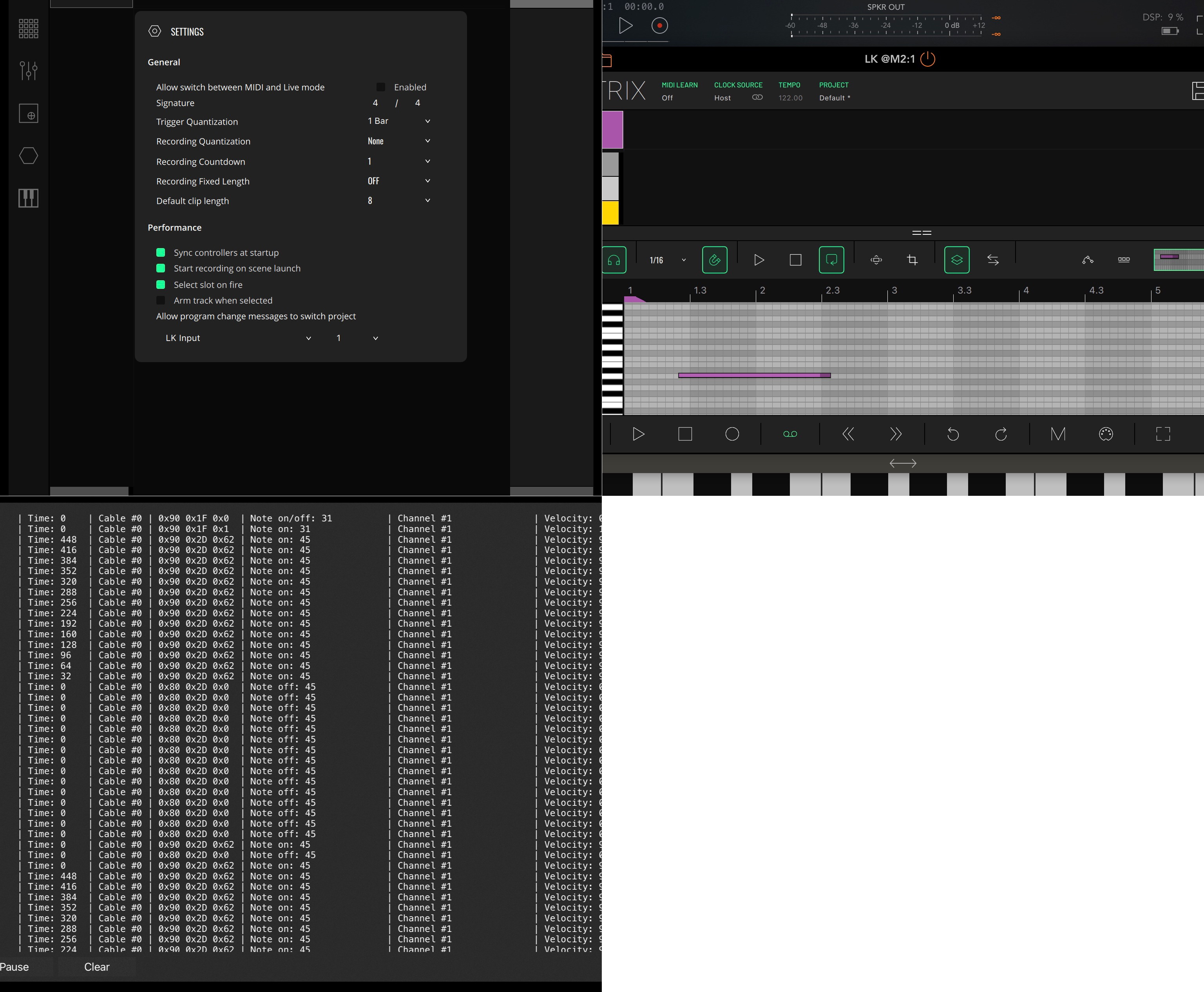
I just took a screenshot of a page of the monitored data. The number of duplicate notes generated is very high.
@pejman I haven't been able to reproduce this issue on my end. It looks like there may be a feedback loop somewhere in your session.
Could you please share the LK track's input/output settings as well as your AUM routing configuration? Also, does the same issue occur when using AUM's built-in keyboard?
The sequencer can't randomly select a note from a chord, but have you tried the Random feature? If you tap the "P" button (the pitch mode selection), you'll enter Random mode. From there, you can set a random range for each step, and the sequencer will play a random note within that range. If a scale is selected for the track, the generated notes will always conform to the selected scale. This random feature also works for the other parameters
@xglax .
One thing about this quick record method that I use most often is that when I use the main record or arm track button instead of stop, this problem doesn't occur, but I always have to remember not to use the stop button because all my recorded notes start to sound distorted.
AUM keyboard or LK internal keyboard to Lk .
Track : input Lk All channel , LK Autput , channel 1
Midi output from Lk to fontstack app.
The issue here is that when I record using methods other than quick record , i.e. first a create slot with double tap , say 4 bars, and then enable record button and arm track and then press play button, this problem does not occur.
If this information still doesn't help you, I can send you a video of this problem.
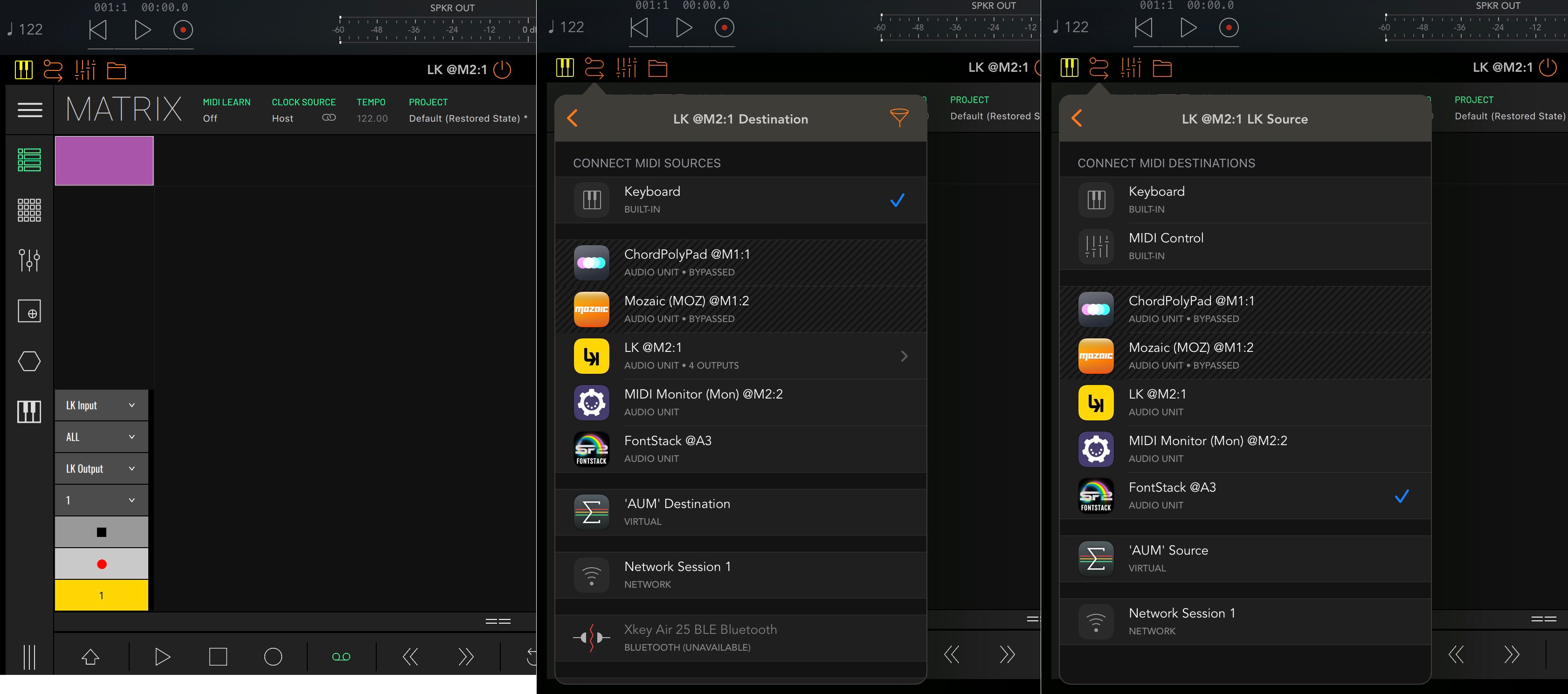
@pejman Can you please tell me which LK version you're using in those screenshots? And can you share a screenshot of AUM Midi Routing panel? And if you could also send a video it would be nice
@xglax . I first tested it with version 355 as you said, and when I was sure that the problem still existed, I sent you the screenshots from the iPad because it was easier to work with.
Lk 1,13,4 with ipad air 2. Ios 15,8
Lk 355 with iphone xs .
The exact same problem exists in both.
Should I send the video from the old version of Lock on the iPad or from version 355 installed on the iPhone?
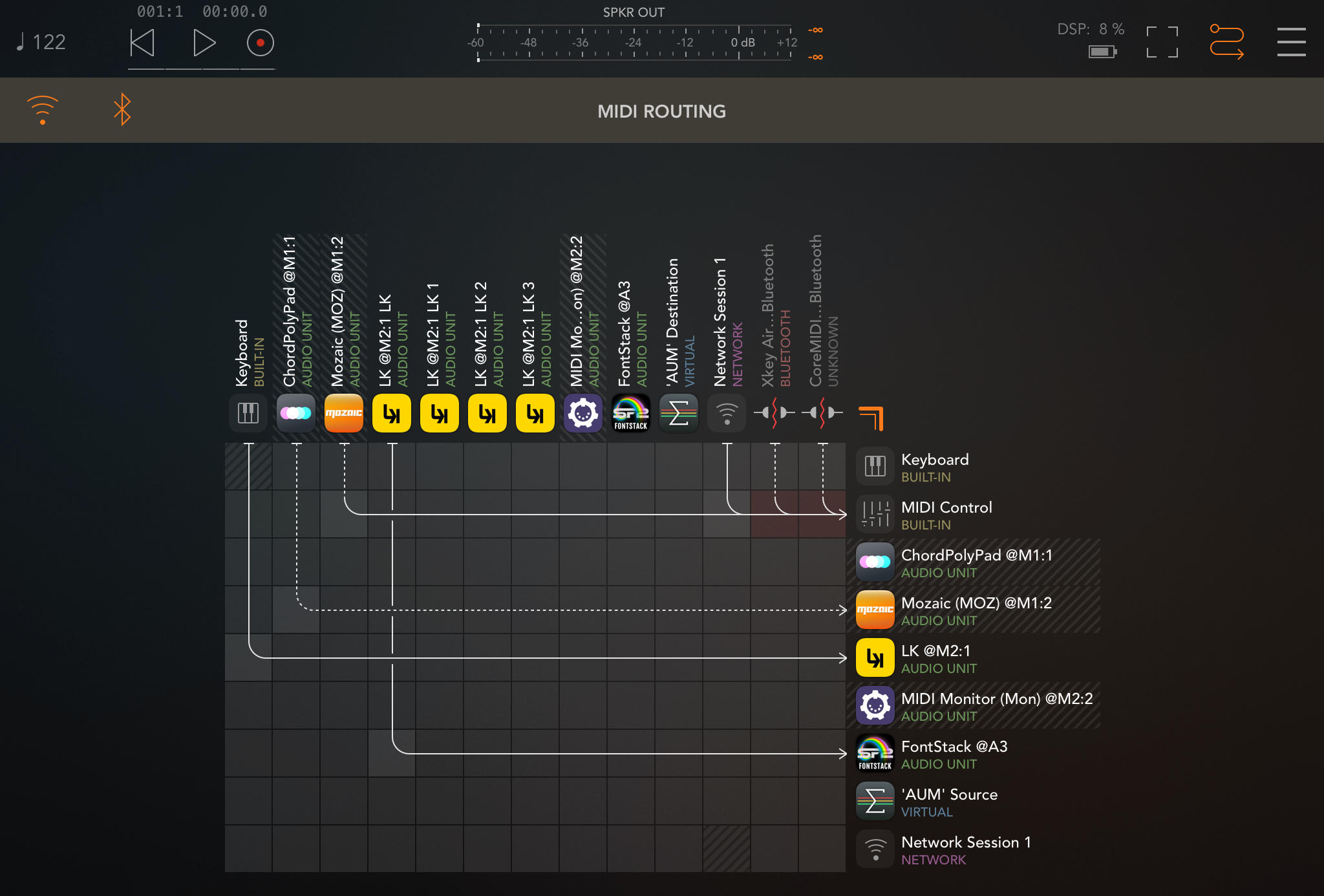
@xglax .
I discovered something new. After following all the steps I did for the quick record, I added a few notes with my finger to the same piano roll where the notes were recorded and had a distorted sound. After playing, the notes I added with my finger also played with a distorted sound.
@xglax .
And in two other cases,
1: I exported those distorted notes and saved them in the file app and then imported that file into another slot and those notes played without any problems and with a natural sound.
2: And another experiment was that I copied that distorted slot and copied it into a new slot, played the new slot, and the notes were played with distorted sound.
I have a quick question for those of you who own LK along with all of the available modules (either purchased individually or as a bundle.) I've notified the people at Imaginando about the issue, but I thought I'd ask here just to see if my experience is an isolated one or not. If you log into your account on Imaginando's website where it shows the apps/plugins that you own, does the status for LK show up in your account as "owned" or as "demo." Because currently, both LK (including the latest beta) and TKFX are showing up as "demo" products in my account, despite owning all IAPs for both. I know it's not exactly an urgent or important matter, but it's something I just happened to notice recently and I'm not sure if I'm the only one experiencing this.
@betamax999 .
It's the same for me, who is using the beta version, and the product I purchased in lk doesn't show me that I bought it before. Maybe this is because it's beta, or maybe this needs to be fixed.
And now I have a question for you: have you ever experienced this problem that I shared with the LK team in recent posts, or can you do the experiment to see if this happens to you too? Of course, if you have the time and desire?
please do these steps again .
1, Open LK matrix without any tracks in midi plugin mode in AUM .
2, Disable Recording Fixed Length (off) in setting.
3, create one track . (Don’t create slot) .
4, enable record button.
5, enable Arme track in the Mixer section .
6, SINGLE tap on a blank clip automatically create a new clip and start a recording. (quick recording mode )
7, Record note frome external keyboard or plugin keyboard.
8, After end of recording, press stop button. ( Square button ) .
9, connect LK output to one instrument plugin like fontstack app or bismark app.
When press play for hearing notes , Very loud distorted sounds are heard.
If you have recorded just one note, like in the screenshot, when playing it back, it will sound like that note is played and cut off thousands of times, creating a very loud and damaging sound to both the device and your ears.
That's an open question we need to sort out. Since LK is composed by several modules, owning 1 gives you the status of owned? Or should we should 1/6? instead? And if you have all the modules, say "owned". I would love to hear your thoughts.
@sinosoidal .
I bought a module and lk shows it as purchased in the module list and I have no problem with this, although when I bought it it did not show me as the owner of the module several times which I raised with your team via email and I do not know why this was happening, but there is no problem now. Maybe I had a problem with the internet before or maybe it was a problem with lk itself which has been resolved.
@xglax .
I have good news. I found the problem.
But please answer one question: Did you use single tap to create the slot to perform the steps I told you or double tap because you could not identify this problem?
Ah, great! What was causing the problem?
In my tests, I followed the exact steps you described: I created a track with no clip, disabled Fixed Length, armed the track, and tapped an empty slot once to create a clip with no predefined length. I then recorded a few notes using AUM's built-in keyboard and stopped the recording by pressing the track's Stop button.
@xglax .
And did you connect it to a sound source like an instrument like a piano (not a drum) to hear the sound?
As you can see in the screenshot, the area I've highlighted in red shows that after following those steps and pressing the stop button, the loop indicators bar's start and end points are both incorrectly set to point 0. This causes one note to be repeated too many times, even though the playhead exits the loop and continues on its path.
This problem can be fixed manually by setting the end of loop locator bar to somewhere after the recorded notes have finished.
I also did these tests with version 355.
This problem does not occur when we use the record or arm button after the end of the record and the end of loop locator is set to its correct position.
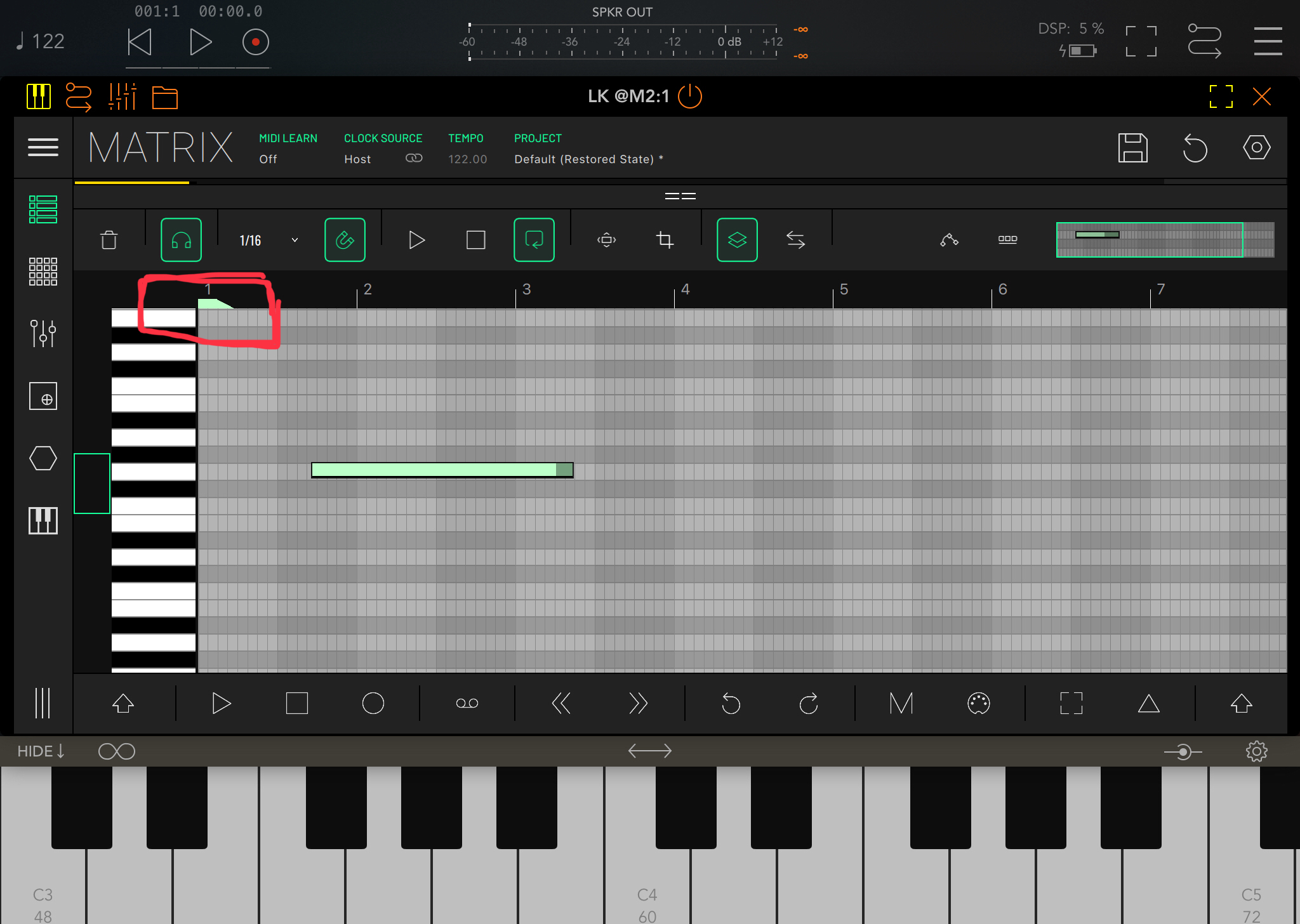
@pejman I've now been able to reproduce the issue. You're stopping the recording using the Stop button in the transport bar, right? In my previous tests, I was using the track's Stop button instead, which respects the trigger quantization. It looks like using the Stop button in the transport bar while the clip is created without a pre defined length is causing it to have zero length.
I'll open a ticket for this. In the meantime, please use the track's Stop button to avoid the problem until we have a fix available.