Loopy Pro: Create music, your way.
What is Loopy Pro? — Loopy Pro is a powerful, flexible, and intuitive live looper, sampler, clip launcher and DAW for iPhone and iPad. At its core, it allows you to record and layer sounds in real-time to create complex musical arrangements. But it doesn’t stop there—Loopy Pro offers advanced tools to customize your workflow, build dynamic performance setups, and create a seamless connection between instruments, effects, and external gear.
Use it for live looping, sequencing, arranging, mixing, and much more. Whether you're a live performer, a producer, or just experimenting with sound, Loopy Pro helps you take control of your creative process.
Download on the App StoreLoopy Pro is your all-in-one musical toolkit. Try it for free today.
Comments
Yes , i use stop button in transport bar .
That’s great that you able to reproduce the issue.
Yes, I am fully familiar with the sequencer functionality you added, but what I mean is adding an arpeggiator to this set with the capabilities that this sequencer has.
Because the arpeggiator plays exactly the notes that we are playing chords on the keyboard at that moment.
@pejman can you check if latest build (356) fixes the record problem?
Yes sure.
@xglax .
It is solved in 356.
@xglax . @sinosoidal .
These are the requests I made to you via email 2 years ago to Henrique and Nuno .
I know that even a small request requires a lot of changes and hundreds of lines of code added to the script, I have had this experience in mozaic app for three years.
I would be very grateful if you would accept at least the first 3 items.🙏
1, please add ( swing - ) : at the moment there is swing + in Lk . ( swing - ) is Opposite with swing + , That is, instead of the notes moving away from the accented notes, the notes get closer to the accented notes .
2 , please add 1/4 , 3/4 , 3/8 , 3/16 swing values , To create more rhythms or swing feels.
3 , please add strength % for Quantize
4, please add solo mode for launch slots
For example when i touch slot 4 of track 8 , i need to play only that slot . (with one slot selecting other/previous slot deactivate automatically)
5, insted of only octave range , add note and octave range for chord&melody Generation section .
for example i want range between D4 and A4 notes.
6 , please add humanize option ( random change note position ) in transform action with chosen values for the random parameters.
7 , please add global measurement for scene play mode ( start from global measure ) . at the moment there are 3 modes in play modes : ( play from start , last , loop ) . But with global measure mode : Imagine that the scenes are running and we touch one of the scene that is in the stop mode when the other scenes are in the running mode in the second measure themselves , the touched scene starts running from the second measure . Like Drambo app .
@xglax .
One question.
What is the use of volume on the master track? It has no effect on the overall volume of the tracks.
Is there still a chance I can let you know if there is another problem?
@sinosoidal I own all of the current modules for LK. When I go into my account on the Imaginando site, on the main dashboard where all my products are listed, LK (and TKFX) is tagged as a “demo”. If I click on LK in my profile to get more information, it does show all 6 modules as “owned”. So perhaps I’m just looking at things the wrong way, since it is an app based around multiple optional modules as in-app purchases. As a result, I’m guessing that’s why it shows up as a “demo” product, because technically it is a demo product until one chooses to buy the modules.
Honestly, I’m probably making an issue out of something that isn’t really an issue or anything that important. As long as my account recognizes that all modules are “owned”, then it doesn’t really matter if there’s a green “owned” box next to the LK app itself. I just have OCD tendencies (to put it lightly), so when I log into my Imaginando account and it says I own 8 out of 10 of your products, it makes me cringe a little bit, because I own 10 out of 10 of your products, but the site doesn’t recognize LK or TKFX as owned, but like I said, it does recognize that all the modules for both apps are owned.
Amongst the options you presented with regards to what should justify the product as “owned” vs “demo”, my preference would be for it to switch from “demo” to “owned” IF you’ve purchased all of the modules, either as a bundle or one at a time. It’s such a minor problem in the grand scheme of things though, I feel like I’m wasting everyone’s time by even bringing it up.
We have made a few changes. This is how it looks now:
Having a single module per platform is enought to increase the counter. Please let me know what you think. I can relate with that OCD tendencies
I like the change. Now it says I own all 10 products and all modules (except the sequencer, since that IAP is still in beta.) Thanks for your help and for even bothering to address such a nit-picky issue.
Thanks for being a loyal customer!
@xglax .
Generate chord and mutate chord , They exceed the specified note range.
The range is only applied to the root note of a chord, not to the other notes it contains. We designed it this way so that chords can still be played when the root note is close to the upper limit of the selected range.
@xglax .
These LK features are very interesting and useful to me. You mentioned an interesting point that I had not paid attention to at all.
But when I set the root note to the lowest possible minimum range, the progression of the chord notes goes up two octaves and becomes sharper than I expected.
In this example in the screenshot I have set a custom scale with the notes C E G.
As you can see in the image, the chord note has advanced to the E note of the 5th octave.
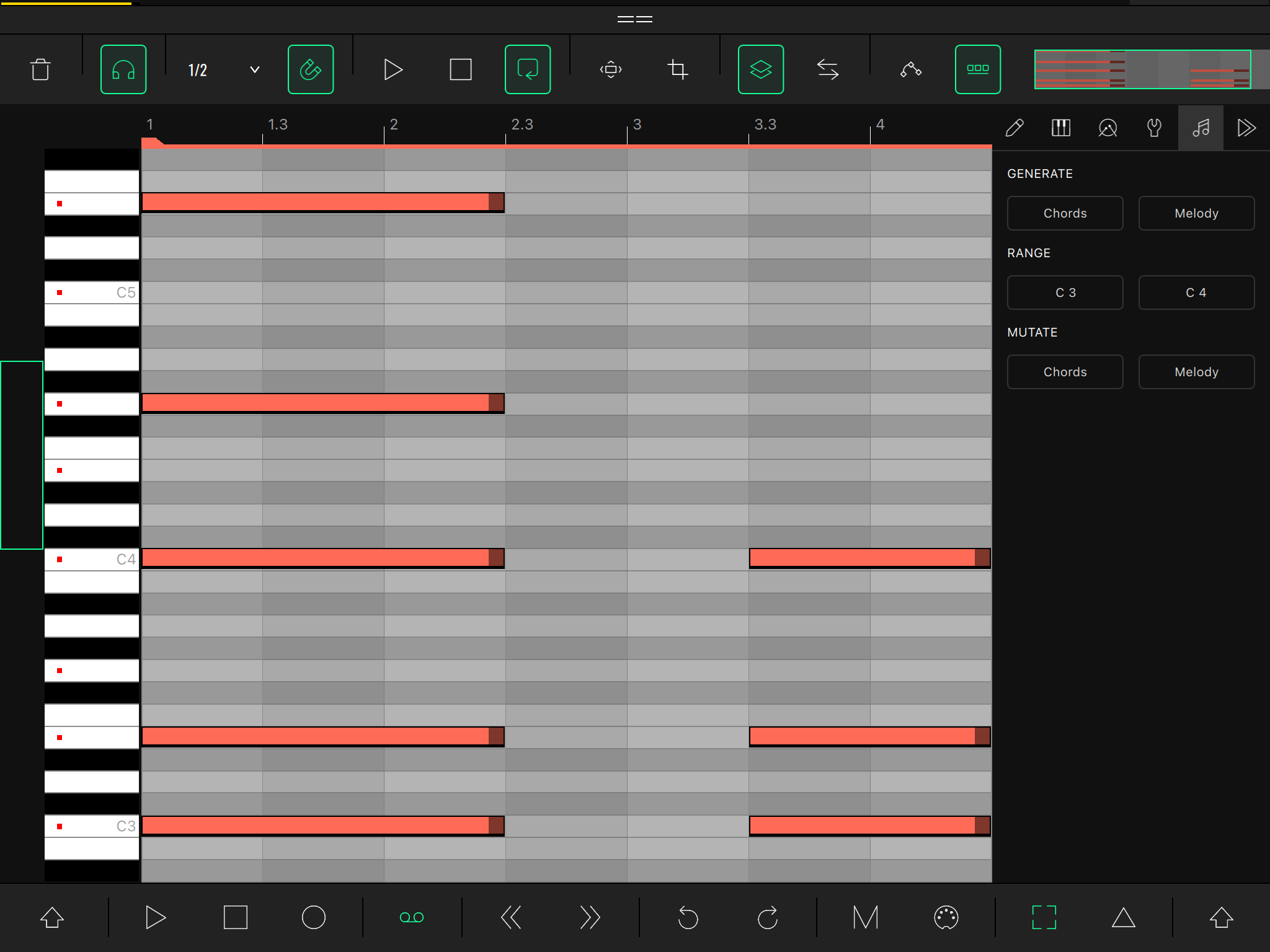
That's expected behavior. The chord generator can create chords with 3, 4, or 5 notes. In your case, since your custom scale only contains 3 notes, a generated 5 note chord has a higher probability of creating notes from higher octaves. We could try to limit the chord notes to the octave next to the upper limit
@xglax .
Yes, this allows the user to use a wider octave range if they need open chords, and one or two octaves if they only need closed chords. This is great.
@xglax .
Is there any chance we can use the new lk on older iOS’s?
For example ios 15.
@sinosoidal . @xglax .
I noticed that LK cannot record notes higher than 15 notes per beat.
This is while in other apps like Helium the note sampling accuracy is even up to 100 notes per beat. Is this limitation in lk intentional?
I found this out through a midi effect that is capable of sending 100 notes per beat as a ratchet effect.