Loopy Pro: Create music, your way.
What is Loopy Pro? — Loopy Pro is a powerful, flexible, and intuitive live looper, sampler, clip launcher and DAW for iPhone and iPad. At its core, it allows you to record and layer sounds in real-time to create complex musical arrangements. But it doesn’t stop there—Loopy Pro offers advanced tools to customize your workflow, build dynamic performance setups, and create a seamless connection between instruments, effects, and external gear.
Use it for live looping, sequencing, arranging, mixing, and much more. Whether you're a live performer, a producer, or just experimenting with sound, Loopy Pro helps you take control of your creative process.
Download on the App StoreLoopy Pro is your all-in-one musical toolkit. Try it for free today.
Comments
I'm enjoying Timeless. I'm a bit tempte to get Saturn now look
Great! monzo
@monzo the grand and wonderful pity is that they're all good.
Yeah, Volcano and Pro Q could easily slip in there as well. I really enjoyed mucking about with iFretless via Auria/Timeless in a live jam thing, I could have started at least three new tunes out of my noodlings, and at one point I was Steve Hillage
Oh, ye? Monzo.
uFretless, iWorryless!
nominated for Joke of the Month Club.
Yes, it's getting better at a 1:1.2 or 1:1.5 ratio on the channelstrip's expander.
However, I mentioned this earlier, by using the internal side chain in pro-c you can make a de-esser with it.
And remember (I'll keep staying it until someone says they tried it!) pro-c can be a de-esser very easily. Saturn as well to a much lesser degree, but you can compress just one band.
Yes, it's true. I tried it, and I'm glad to have pro-c now. What does the trick on the hiss: Saturn, with the Clean Tape Base preset (very relieved about that). Plus aufx:push, with expander2 preset, applied gently ...
@crzycrs, brilliant, thanks. I recorded an acoustic guitar track, I was happy with it but had some issues. I ended up with Pro-C, Pro-Q, Timeless, and I had some hiss. Put Saturn on it with Clean Base, and bam, gone. My god, this is wonderful stuff.
I am in love with Timeless. What a brilliant piece of work. The issue will be keeping from overusing it.
Make a pact with yourself; you can use it as much as you like as long as you've written a good song first
But it makes all my crap sound good, so it's hard to tell.
Genius
Could anyone explain to me please, what Pro C can do over Pro MB? If I would use Pro MB only with a single, broad band, could it fully substitute Pro C?
That's a great question, that I don't know the answer to. But I'd love to hear it. Having just picked up pro-c, I'm now going, "duh". But what the heck, I'll probably never need what's in pro-MB.
By the time I rudimentary have understood to use pro-c, there's the winter sale to go for @Kaikoo 's beloved MB! Or the following ...
@Earsinn I was asking the same exact question a few pages ago and no one really could give me a reply. After doing much searching online, it seems like Pro-C and Pro-MB use different algorithms and give different sounds with Pro-C's visual a bit more friendly for the average compressor usage. A professional mastering engineering also said Pro-C would be used 95% of the time compared to Pro-MB for most people. But outside of that, no one really had any examples of using Pro-MB as a single band so that there's a comparison for me to listen to
@necrome Oh - sorry, I've missed, that you have asked this question already.
Actually, I have no money for either but it's hard to resist the current sale. Perhaps I go for Pro L now and give Pro C/Pro MB a pass this time. But all in all Pro C seems to be the more sure bet, over Pro MB to me, too. What bothers me a bit about Pro C is, that it seems to get not that much love from users, as Pro Q or Pro L. Perhaps Oldtimer would be the more useful tool for upgrading from the channel-strip compressor?
Pro-MB = live Pro-Q + Pro-C
but dynamic range only within 30db for gain or reduction
and band filtering range within 48db!
It is a sort of Volcano + Pro-L + Pro-C + Pro-Q combination just easier to use with limited functions of all that 4 plugins.
@Kaikoo what would you recommend for someone who records acoustic piano/guitar and singing most of the time? I'm very tempted to get all 5 plugins Pro-C/Pro-MB, Pro-DS, Pro-Q and Pro-L but I don't want to spend a large (for me) amount and end up not using most of them. Is the Normalize function in Auria a good substitute for Pro-L?
If it helps, above is my recording from Auria that I done with VocaLive's effects. The compressor sounds kinda unnatural and the De-Essing is a bit of a hit-and-miss.
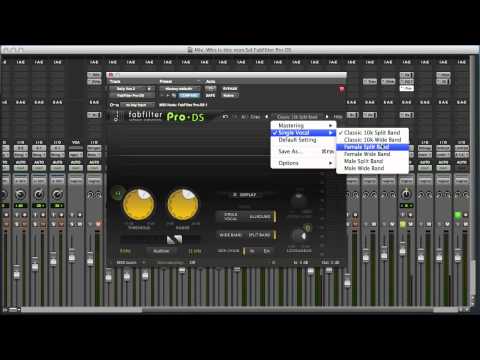
Can not help you much, Pro-DS is probably your first choice.
If you feel your acoustic guitar sound hinders your vocal, you can pick Pro-MB to see what part of guitar spectrum you want to adjust for your vocal track, it is the correlated movement of those spectrums concerns you, So Pro-MB is your second choice.
.
Another useful app is useful for you is Vectorscope, You can bundle your purchase with m/s processor app. Easy to use, when you confuse about how much the depth from mid or sides being effected!
@necrome said:
Another example of Pro-DS reducing sibilance sound
Thanks @kaikoo ! Just read an article saying that the Pro-MB does de-essing well, so confused! >_<
No! you should straight to Pro-DS! The rest of can be solved easier. Because you are the singer.
Take this in the best way possible- it is meant to help. Do not buy plugins expecting them to solve all problems. You can certainly drop $150 on all of the fabfilter plugins, they are very good quality. But, why do you need each? Ask that question and that will let you know what you need. If you are going to call up a preset on pro-c and expect good results, you will be disappointed. But, if you learn about what it is doing and why you'd want to use it in particular situations , then you will be very happy with it.
I saw the word upgrade mentioned in a post, as in "old timer being an upgrade to channel strip." The answer is no, it is not an upgrade, but it is different and is a very good compressor with not too many options, which can be a good thing. But, the "why am I using this now, what is it doing to the audio?" Still needs an answer or else you're just slapping "magic boxes" on your audio. Most often that leads to disappointment.
Normalizing and limiting are completely different. I haven't tried pro-L but am sure it is excellent. So is the limiter on auria's master output. Pro-L will make a bigger difference once the knowledge of using it gets involved.
I recorded all week in Maine. In the past years I have engineered. We got decent sounds with my engineering. This year a friend engineered who has been an engineer for over 20 years in many situations. He used digital performer, motu interfaces, an sm pro preamp, and some basic mics, the fanciest of which was a bluebird. I realized just how much I don't know watching him work. They worked the room acoustics before I arrived (we record in a barn/ garage), tuned the drums extensively, etc. He got incredible sounds. I mic'ed a piano in the house, got a decent sound with his oktava 219's. He moved them slightly- damn!
So, I say that because he brought 20 years of knowledge and experience to the gear and completely changed the sounds I was getting to something that really is fantastic quality. His rough mixes with just a very basic reverb and delay, no compression or eq, or very minimal at that already sound better than the mixes I did for our first album.
Anyone can buy gear or plugins. Watching someone REALLY know how to work it- totally different experience.
I'm guessing any chance of a fabfilter endorsement just disappeared, huh? ;-)
Getting more and more apps to get something done, that could have been done since ages with minimalistic tools is something I would really like to overcome. But on the other side it is fun to try so many great apps for small money. Waiting for the right toolset to come, can easily be a never ending story. Somewhat like waiting for the developer, instead of developing myself.
Excellent post. In other words learn to work with the already capable tools you have before you jump on the buying bandwagon.
It's good to hear an experienced person's view of what is already in Auria.
Hehe! no idea what will be disappearing? Love Fabfilters more than all the effects apps! I have Pro-G, Volcano, Timeless, Saturn, and Pro-MB. Never complains a things. I wasn't hurry for all buying, I was slowly taking up those plugins. The only one I have not played much is Timeless, because it is too gigantic and leave it untill Twin2 on piano roll for Auria.
Quick question on Auria automation...
Is it possible to delete all automation on one parameter of a plugin (i.e. that particular lane of automation) but not delete "all automation on the track" (i've seen that option).
So for example, on say Turnado, delete all automation of knob 1 across the whole track, but not knob 2?
Thanks...
@Matt_Fletcher_2000
"To clear automation points on a particular track, you highlight all the points you want to clear (using double tap and hold), then select Clear Automation Points."
From http://www.wavemachinelabs.com/forum/viewtopic.php?f=19&t=9473
To view the particular automation, on the track view look and scroll in the tiny window above the 'rec' icon.