Loopy Pro: Create music, your way.
What is Loopy Pro? — Loopy Pro is a powerful, flexible, and intuitive live looper, sampler, clip launcher and DAW for iPhone and iPad. At its core, it allows you to record and layer sounds in real-time to create complex musical arrangements. But it doesn’t stop there—Loopy Pro offers advanced tools to customize your workflow, build dynamic performance setups, and create a seamless connection between instruments, effects, and external gear.
Use it for live looping, sequencing, arranging, mixing, and much more. Whether you're a live performer, a producer, or just experimenting with sound, Loopy Pro helps you take control of your creative process.
Download on the App StoreLoopy Pro is your all-in-one musical toolkit. Try it for free today.
Arturia BeatStep Pro users?
![[Deleted User]](https://secure.gravatar.com/avatar/adaeae8b8928d4cd93842943077b6d98/?default=https%3A%2F%2Fvanillicon.com%2F913d4b4537460ca5fa7ae882577be29d_200.png&rating=g&size=200)
is anyone using this midi controller with iPad?
Comments
You mean Beatstep Pro?
Yes exactly, sorry I didn't specify
Used it with iPad for a few minutes just to test it out. Worked fine, though I needed a powered hub.
Was there anything specific you were wondering about?
Were they somehow lying and the sequencers are poly and not mono? cries
Thanks Zymos,
Basically I wonder if it is a sequencer/controller more fit with hardware than software...
I like the features, sequencers etc, but most videos I've seen are hooked up to hardware and with CV etc...
So I'm worried that even if it's a great machine I'd be wasting money using it with iPad...only...and since I got iPad I am mostly on that
I wish someone would say no:)....it's greeeeaaat for iPad
PS thanks for fixing the title
I think it should be as good for iPad as with hardware. It's also class compliant, though it does need a hub for power. It's really customizable (using the PC editor), but probably apps that have a more flexible MIDI implentation are going to be easier to use with it, as far as setting it up as a control surface, getting channels set, etc.
The sequencers are mono, that is a fact.
Except the drum sequencer. I spent a while trying to program some chords into it, and I still think it's possible, but was not able to PLAY the chords into it with an external keyboard, like you can record notes on the 2 other sequencers. But if you have it all mapped to say, an octave, then what would be bass drum, snare and clap (just a random example), could instead just play C, E and G on a synth.That's my theory anyway, still unproven.
Also, you could set the 2 sequencers to the same channel, so there's duophony at least.
I'm looking to pick one up myself next month or October, but yeah mostly for my hardware. The iPad has enough great sequencers itself that it may seem a bit redundant, I dunno.
On the other hand, it would give you a way of altering the sequence during a performance while you have the synth up for tweaking on the screen.
What I like about playing/sequencing iPad apps with things like the BeatStep Pro and the Electribe is you're not hitting a flat peice of glass.
Thanks everybody for your input, appreciate it:-) While back I was looking at the Arturia Beatstep and then the PRO came out...I know it's an overkill (Pro) for iPad only but what else is there? Quneo is same $$$ but does only midi, no sequencers, (I think), so I am a bit undecided...
Exactly:-) I hope that you can assign CCs to several apps, run sequencers etc and mainly SYNC it all with the Beatstep Pro? Having it's own clock, it does sync ipad apps, right?
I will download the manual;)
I don't have the pro yet but the original Beat Step syncs like a champ. I use loopy or MIDI Flow as a clock source usually. Also sends sync well.
Thanks @syrupcore, out of curiosity, why don't you use the midi clock from Beat Step? I have MidiBus but would prefer not to use that, prefer to switch apps in AB. Isn't external hardware more reliable? Beat step?
Just depends on what I'm doing I guess. One problem with the original Beat Step (which they've fixed in the Pro) is that there is no read out for things like tempo.
I do find external clocks to be most reliable though and often use my Alesis MMT-8 or Alesis drum machine as the master. But if I'm working on something that's already started within the iPad, I usually just go with it. MIDI Flow feels pretty solid.
I love MIDIFlow. I use it with a iConnect to remap the drum sequencer notes sent from the BSP back out to my Electribe (each part on different MIDI channel) if I just want to use the BSP sequencer.
Electribe2 sequencer is no joke either. Made some posts on korgforums about using Step Jump mode with the record button (yes you can do that!). BSP and Electribe/Sampler are killer sequencers.
Mobile device CPU clocks are throttled up and down constantly thus are their MIDI clocks. We all know there are solutions out there to mitigate it but nothing beats a clock from dedicated hardware.
Good demo
I was thinking of getting Attack and controlling it from the BSP. Attack supposedly (I can't see this in the manual, but developer said on Discchord) uses a different channel for each sound.
So, using MIDIFlow, I could set it up send a certain MIDI note on channel 1, a different MIDI note on channel 2, etc?
@Zymos yeah. You can basically route any incoming midi message to any outgoing midi message. You'd set it up as a bunch of different filters(one per BS note). This is a common enough use case that it might be nice to see a single note mapping module.
@Zymos. This is the way I'm handing it and, oddly enough, round trip latency is not a problem. I'm also using a iPad Air 2 and iConnectAudio4+ so maybe that has something to do with it.
One lane for each channel. Each listening on channel 10. Each responding to a single input note (My BSP is setup for KORG Volca Beats). Each mapping to a single output note (C4 on the Electribe2). Each out to the corresponding midi channel. You will see that only one lane (first) is handling clock.
Also, this has been suggested on the Arturia forums site. It's not rocket science to implement this scheme in the firmware and MCC. They're already mapping notes and channels within the device. The MCC view wouldn't be complicated either. I just don't think they're picking up on it. A shame it's stuck in the world of drum machines on "channel 10".
Thanks for the help, both of you. Now- spend the 6 bucks, or wait and see if Arturia implements a fix?
Hadn't considered latency, and for drums, I really should.
3rd option- program drum sounds on my Blofeld. I don't really like using it multitimbrally, but I should be OK with a half dozen one shots. Make take the money I would have used on Attack plus MIDIFlow and buy the Attack Blofeld soundest.
Fwiw, MIDI Flow rose to the rank of 'indespensible' pretty quickly on my phone and iPad.
I'm getting one. Only because I have analog synths I can use it with. It really shines if you have an analog drum machine with CV/Gate inputs. Waiting for Arturia to make an affordable good sounding analog drum machine in the same price range as the Minibrute.
No kidding. That would probably be great. I'm still having a ton of fun with the Volca Beats however. People complain about the snare which is not an issue to me. Easy to use and layer one of the PCM percussion parts on top of it to get exactly the timber you want. To me that's a feature. The kick drum on it is badass too. Seriously have to keep that in check on a PA. Cheap like a toy, but not.
Arturia analog drummachine.. YES!!!
Oooh, this is nice to hear since I've also got the iCA4+, Electribe 2, and iPad Air. Are you using an iOS DAW? I'm a bit apprehensive since I work on Cubasis which seems to double my hardware clocks every time I try to sync them. So I'm hoping the BSP well sync tightly with Cubasis.
Anyone using their BSP with Cubasis?
I use Multitrack DAW and sometimes Mastering and AltiSpace.
What he asked. 8)
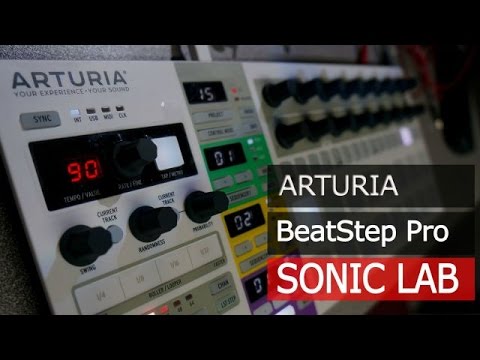
Sonicstate on the Beatstep Pro including info on Clock sync in and out etc
Cubasis report: Cubasis doubles the BSP clock when I try and sync it, but when I sync Live 9 with Cubasis, the BSP works like a charm!
Yes the viddy above mentions the sync clock settings in the MIDI Control Center software that I can mess with too. Lots of settings and controls.
Just wow.
I would love it if they make a beatstep poly. Just 2 poly sequencers. Pair the two together and you have 2 mono 2 poly and a drum sequencer. That would be amazing
I've seen lots of bitter complaints on their forum about sync problems and stuck notes.
It's been trouble free for me.
I'm syncing it via USB from Live 9, then sending MIDI out both through 5 pin and back to Live through USB.
I've had the drum sequencer playing Blofed through 5 pin, and a Karma drum pattern on Korg M3, which is also synced to Live by USB. Three different times I've started it up, walked away for 15 minutes, came back and the Korg's pattern is still starting right on step 1 of the BSP.
To Beatstep Pro users: would you say that BSP sort of solves the midi sync problem in iPad? Maybe not entirely but at least for a drum machine and two synthesisers, or 3 sequencer based apps, all in AB?
The more I am reading about the BSP the more it sounds like an ideal controller for iPad:)