Loopy Pro: Create music, your way.

What is Loopy Pro?Loopy Pro is a powerful, flexible, and intuitive live looper, sampler, clip launcher and DAW for iPhone and iPad. At its core, it allows you to record and layer sounds in real-time to create complex musical arrangements. But it doesn’t stop there—Loopy Pro offers advanced tools to customize your workflow, build dynamic performance setups, and create a seamless connection between instruments, effects, and external gear.

Use it for live looping, sequencing, arranging, mixing, and much more. Whether you're a live performer, a producer, or just experimenting with sound, Loopy Pro helps you take control of your creative process.

Download on the App Store

Loopy Pro is your all-in-one musical toolkit. Try it for free today.

Skram - Electronic Music Maker, new iOS app by Liine

1456810

Comments

  • edited April 2016

    @OscarSouth said:

    @OscarSouth said:

    @mschenkel.it said:

    @OscarSouth said:

    2. I was just thinking this morning that the tonality wheels could be a widget with some chance to be sequenced. I completely support the "change at bar" with a little twist: change at quantum(1/2/3/4 bars). This would give the chance to queue the pattern change while building the transition for some wow effect when the new pattern kicks in.

    We're on the same wavelength.

    @liine_nick said:

    @OscarSouth said:

    @mschenkel.it said:

    @OscarSouth said:

    2. I was just thinking this morning that the tonality wheels could be a widget with some chance to be sequenced. I completely support the "change at bar" with a little twist: change at quantum(1/2/3/4 bars). This would give the chance to queue the pattern change while building the transition for some wow effect when the new pattern kicks in.

    We're on the same wavelength.

    Very early sketches could sequence the harmonies. I could maybe dig up some of the old Lemur + Max for Live prototypes at one point if you're curious... (we're talking two years ago here, completely unrecognizable design from what Skram is today, but the concept was sketched out)

    Now I'm feeling even more excited about future updates!!

    O

    I'm glad to hear that! To be clear though, I really love discussing ideas, and perhaps sharing my old prototypes, but please don't take these discussions as firm plans of when any particular feature might come out! Sequencing harmonies for example is a very cool idea, but there's loads of other things we need to do first (like, for example, some of the connectivity options we've talked about such as Link). The list of things we want to do with the app is huge, and we can only do so many things imultaneously... so we choose very carefully which features we do now, and which ones we do later. Of course, discussions like these do weigh in to those decisions!

  • edited April 2016

    @liine_nick said:

    @OscarSouth said:

    @OscarSouth said:

    @mschenkel.it said:

    @OscarSouth said:

    2. I was just thinking this morning that the tonality wheels could be a widget with some chance to be sequenced. I completely support the "change at bar" with a little twist: change at quantum(1/2/3/4 bars). This would give the chance to queue the pattern change while building the transition for some wow effect when the new pattern kicks in.

    We're on the same wavelength.

    @liine_nick said:

    @OscarSouth said:

    @mschenkel.it said:

    @OscarSouth said:

    2. I was just thinking this morning that the tonality wheels could be a widget with some chance to be sequenced. I completely support the "change at bar" with a little twist: change at quantum(1/2/3/4 bars). This would give the chance to queue the pattern change while building the transition for some wow effect when the new pattern kicks in.

    We're on the same wavelength.

    Very early sketches could sequence the harmonies. I could maybe dig up some of the old Lemur + Max for Live prototypes at one point if you're curious... (we're talking two years ago here, completely unrecognizable design from what Skram is today, but the concept was sketched out)

    Now I'm feeling even more excited about future updates!!

    O

    I'm glad to hear that! To be clear though, I really love discussing ideas, and perhaps sharing my old prototypes, but please don't take these discussions as firm plans of when any particular feature might come out! Sequencing harmonies for example is a very cool idea, but there's loads of other things we need to do first (like, for example, some of the connectivity options we've talked about such as Link). The list of things we want to do with the app is huge, and we can only so so much... so we choose very carefully which features we do now, and which ones we do later.

    Of course! It goes without saying. My excitement is not tied to a specific idea but on the enthusiasm and ingenuity that I've seen in every idea and every interaction with the Skram dev team.

    O

  • @OscarSouth said:
    Of course! It goes without saying. My excitement is not tied to a specific idea but on the enthusiasm and ingenuity that I've seen in every idea and every interaction with the Skram dev team.

    Nice one! We're on the same wavelength then.. let's keep this ball rolling at 160 bpm. :)

  • edited April 2016

    Just made this little reference. Enjoy.

    EDIT: fixed patter 15. I'm not able to delete the wrong attachments so for your reference the wrong one hasn't a pause for last on pattern 2

  • @mschenkel.it

    Brilliant. Wonderful. THANK YOU!!

    O

  • Oops forgot a pause on pattern 2

  • @mschenkel.it said:
    Just made this little reference. Enjoy.

    15 is wrong, here's the official reference:

    1 [1,0,0,0,0,0,0,0,0,0,0,0,0,0,0,0]
    2 [1,0,0,0,0,0,0,0,1,0,0,0,0,0,0,0]
    3 [1,0,0,0,0,0,1,0,0,0,0,0,1,0,0,0]
    4 [1,0,0,0,1,0,0,0,1,0,0,0,1,0,0,0]
    5 [1,0,0,1,0,0,1,0,0,1,0,0,1,0,0,0]
    6 [1,0,0,1,0,0,1,0,0,1,0,0,1,0,1,0]
    7 [1,0,0,1,0,0,1,0,1,0,1,0,1,0,1,0]
    8 [1,0,1,0,1,0,1,0,1,0,1,0,1,0,1,0]
    9 [1,1,0,1,0,1,1,0,1,0,0,1,0,0,1,0]
    10 [1,0,1,0,1,0,1,1,0,1,0,1,0,1,1,0]
    11 [1,1,0,1,1,0,1,1,0,1,0,1,1,1,1,0]
    12 [1,1,1,1,1,0,1,0,1,0,1,1,0,1,1,0]
    13 [1,0,1,1,1,0,1,1,1,0,1,1,1,1,1,0]
    14 [1,0,1,1,1,1,1,0,1,1,1,1,0,1,1,0]
    15 [1,1,1,1,1,0,1,1,1,1,1,0,1,1,1,0]
    16 [1,1,1,1,1,1,1,1,1,1,1,1,1,1,1,1]

  • Thanks nick

  • @Nathan said:
    But, nothing beats Samplr.

    Aye, cap'n.

  • @mschenkel.it said:

    @liine_nick said:

    @carol said:

    @liinegareth said:
    No Audiobus, IAA, Link or MIDI sync in this first release. You can currently record a performance and get it out by emailing in-app or you can find it in "File Sharing" in the "Apps" tab in iTunes.

    Can you do this via the iPad or do we need to connect to a computer to access the files ? Would like to buy this app but concerned over the hassle involved in recording the output

    You can email the recording, from the iPad, without being connected to a computer.

    As said in another thread you can "send by mail", don't send anything and save draft and then download the attachment from drafts

    Sorry , how do I download the attachment from drafts ? Ive bought the app and emailed a tune without sending , and can see the email and attachment in my drafts folder but can't seem to access the file . Thanks .

    @liinegareth please , please , please make it easier for us to save our recordings !!!

  • @carol said:
    @liinegareth please , please , please make it easier for us to save our recordings !!!

    We will!

  • So... when could we possibly expect a new update?

  • @Johnba said:
    So... when could we possibly expect a new update?

    We're a very small team, we're working as fast as we can. I can't promise an exact date, but please rest assured that we are literally devoting every working minute to Skram.

  • @liine_nick said:

    @carol said:
    @liinegareth please , please , please make it easier for us to save our recordings !!!

    We will!

    Good news ! In the mean time could you please tell me how do I download the attachment from drafts ? Thnx

  • Just wanted to chime in and say that I took the plunge and became a Skram early adopter ;) I can totally see the promise in this app provided it gets scene saving and a healthy choice of varied modules, although what's already there is quite a lot of fun!

    Well done guys :)

  • I'm looking forward to an update. I wrote an initial impression for Audio News Room, but I will write a full review when certain features are added.

    I see much promise in this one :)

  • edited April 2016

    @liine_nick said:

    @kobamoto said:
    Even though I know we differ in opinion about the sampling and production aspects of skrams future it looks like we share some of the same iOS dreams. The thing about skram is that I don't think anyone has brought this type of ethos to the sampling and production side of things, I think skram is about to break some new and useful ground.
    I'm also a fan of the qualities of skrams immediacy like just like you, and to fit sample slicing/mangling etc.. into this paradigm is going to kind of be a mild game changer of sorts to say the least. I believe Nick can do it, and the fact that everything is based on widgets means we'll be able to put it together however we want so I think it's possible to still maintain and enjoy the functionality that we have now.

    Thanks for the vote of confidence!

    Would love to know what are some of your favorite sample slicing/manglers. Personally, I was blown away by Sektor last year! (and of course I've been using MaxMSP for years to do my own sample obliteration)

    Hey Nick, I'm envisioning (per your consideration of course :) 3 types of slicer widgets, or maybe all 3 in 1. First of all the utility type like recycle or even better beat cleaver here's a vid
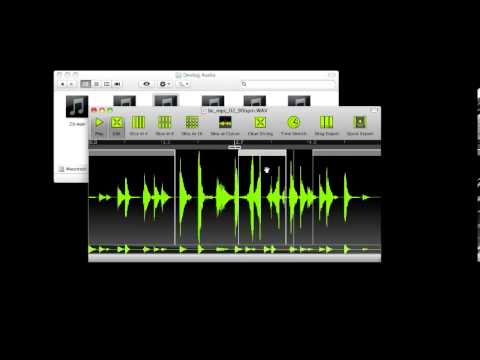
    1. since your a max user you already know where I'm coming from with the ableton live slicing and abilities especially with that latest update they just put out and the Push 2.

    2. and this one is what I haven't seen before, I've never seen anybody take sample slicing features like say egoist etc... and have something like the ikaossilator style interface be the front end while you've got features like max 4 live/ egoist under the hood. Imagine the slices arranged on the x/y pad like ikaossilator arranges notes. At the top of the x/y square maybe there's 4 slices, the second row maybe 8, the next row maybe slices it into 16 etc... , then at the very bottom of the x/y square you have 5 0r 6 icons, tap and icon and the x/y pad switches to controlling that particular feature of the slicing so if the first one was 'slicing', then maybe the next icon is like skramulizer (granulizer) , maybe the next one is frequency shifting, harmonizing, gotta have a juggler icon-tap that and it gives a bunch of choices for juggling the loop and scrambling it up by touching in different areas of the x/y etc... choice of sync and non-syced would be cool... anyways I could have given you some super detail but I just wanted to pitch a visual etc... don't want to pester you too much, I appreciate what you guys are doing and what you're open to doing.

    skram has the potential to be so cool for so many different kinds of users, people who never touch samples could continue to never touch them and people who even only wanted to use samples could load up a gang of sample widgets and go to town being creative with them in all sorts of ways if they wanted and everything inbetween.

    as far as my fav manglers I'd love a ableton max/monome mlr widget, a metasynth widget, a kyma widget, and an absynth widget :blush: but whatever you guys come up with I thank you for it in advance!

  • I was experiencing dropouts after first downloading.
    Air 2 iOS 9.2.1
    After a hard reset there have been no further dropouts ( over the course of an hour of playing ).

  • @chimp_spanner said:
    Just wanted to chime in and say that I took the plunge and became a Skram early adopter ;) I can totally see the promise in this app provided it gets scene saving and a healthy choice of varied modules, although what's already there is quite a lot of fun!

    Well done guys :)

    Thanks man! If you could take a little moment to leave a 5-star rating and a positive review, that would be a huge help for us!

  • @kobamoto said:
    2. since your a max user you already know where I'm coming from with the ableton live slicing and abilities especially with that latest update they just put out and the Push 2.

    1. and this one is what I haven't seen before, I've never seen anybody take sample slicing features like say egoist etc... and have something like the ikaossilator style interface be the front end while you've got features like max 4 live/ egoist under the hood. Imagine the slices arranged on the x/y pad like ikaossilator arranges notes. At the top of the x/y square maybe there's 4 slices, the second row maybe 8, the next row maybe slices it into 16 etc... , then at the very bottom of the x/y square you have 5 0r 6 icons, tap and icon and the x/y pad switches to controlling that particular feature of the slicing so if the first one was 'slicing', then maybe the next icon is like skramulizer (granulizer) , maybe the next one is frequency shifting, harmonizing, gotta have a juggler icon-tap that and it gives a bunch of choices for juggling the loop and scrambling it up by touching in different areas of the x/y etc... choice of sync and non-syced would be cool... anyways I could have given you some super detail but I just wanted to pitch a visual etc... don't want to pester you too much, I appreciate what you guys are doing and what you're open to doing.

    Many years ago, I used to do live resampling performances. We would go on stage with absolutely no audio material prepared, I was on laptop with my MaxMSP patch and my bandmate was playing drums. I'd sample and slice on the fly, every control was in absolute realtime. No editing, no previewing. I would hear the audio at the same time as my drummer and the audience. You can be sure that if and when we do a sampler/slicer in Skram, it'll be very realtime, very live, and very fun. =)

  • @liine_nick said:

    @kobamoto said:
    2. since your a max user you already know where I'm coming from with the ableton live slicing and abilities especially with that latest update they just put out and the Push 2.

    1. and this one is what I haven't seen before, I've never seen anybody take sample slicing features like say egoist etc... and have something like the ikaossilator style interface be the front end while you've got features like max 4 live/ egoist under the hood. Imagine the slices arranged on the x/y pad like ikaossilator arranges notes. At the top of the x/y square maybe there's 4 slices, the second row maybe 8, the next row maybe slices it into 16 etc... , then at the very bottom of the x/y square you have 5 0r 6 icons, tap and icon and the x/y pad switches to controlling that particular feature of the slicing so if the first one was 'slicing', then maybe the next icon is like skramulizer (granulizer) , maybe the next one is frequency shifting, harmonizing, gotta have a juggler icon-tap that and it gives a bunch of choices for juggling the loop and scrambling it up by touching in different areas of the x/y etc... choice of sync and non-syced would be cool... anyways I could have given you some super detail but I just wanted to pitch a visual etc... don't want to pester you too much, I appreciate what you guys are doing and what you're open to doing.

    Many years ago, I used to do live resampling performances. We would go on stage with absolutely no audio material prepared, I was on laptop with my MaxMSP patch and my bandmate was playing drums. I'd sample and slice on the fly, every control was in absolute realtime. No editing, no previewing. I would hear the audio at the same time as my drummer and the audience. You can be sure that if and when we do a sampler/slicer in Skram, it'll be very realtime, very live, and very fun. =)

    That's really great, but could you please tell me how do I download the attachment from drafts ? I dont want to setup my email account on my ipad so at the moment im using a dummy account and saving the draft . I can see the attachment in my drafts email folder but cant access the file . Ive recorded a nice track but cant get to it and cant record another as you say itll record over the last one .Thnx

  • edited April 2016

    @carol said:
    That's really great, but could you please tell me how do I download the attachment from drafts ? I dont want to setup my email account on my ipad so at the moment im using a dummy account and saving the draft . I can see the attachment in my drafts email folder but cant access the file . Ive recorded a nice track but cant get to it and cant record another as you say itll record over the last one .Thnx

    "Downloading from Drafts" is not a supported feature. I did notice other users talking about this, but I'm not quite sure how they achieved that, nor have I been able to reproduce that workflow here.

    If email is not working, you can retrieve the recording by plugging your iPad to your computer with the standard Thunderbolt-to-USB cable. Open iTunes, click on your iPad (top-left corner) and go to the Apps section. Scroll down to "File Sharing" (right-hand side section) and click on Skram. You will see here "skram_recording.m4a", you can click "Save to..." or simply drag and drop it to a Finder window.

  • @liine_nick said:

    "Downloading from Drafts" is not a supported feature. I did notice other users talking about this, but I'm not quite sure how they achieved that, nor have I been able to reproduce that workflow here.

    If email is not working, you can retrieve the recording by plugging your iPad to your computer with the standard Thunderbolt-to-USB cable. Open iTunes, click on your iPad (top-left corner) and go to the Apps section. Scroll down to "File Sharing" (right-hand side section) and click on Skram. You will see here "skram_recording.m4a", you can click "Save to..." or simply drag and drop it to a Finder window.

    ok thnx for the response , but really this is the way the very first ios apps used to work 5 or 6 years ago , I was hoping at least I could download it from my drafts folder lol

  • @liine_nick said:

    @kobamoto said:
    2. since your a max user you already know where I'm coming from with the ableton live slicing and abilities especially with that latest update they just put out and the Push 2.

    1. and this one is what I haven't seen before, I've never seen anybody take sample slicing features like say egoist etc... and have something like the ikaossilator style interface be the front end while you've got features like max 4 live/ egoist under the hood. Imagine the slices arranged on the x/y pad like ikaossilator arranges notes. At the top of the x/y square maybe there's 4 slices, the second row maybe 8, the next row maybe slices it into 16 etc... , then at the very bottom of the x/y square you have 5 0r 6 icons, tap and icon and the x/y pad switches to controlling that particular feature of the slicing so if the first one was 'slicing', then maybe the next icon is like skramulizer (granulizer) , maybe the next one is frequency shifting, harmonizing, gotta have a juggler icon-tap that and it gives a bunch of choices for juggling the loop and scrambling it up by touching in different areas of the x/y etc... choice of sync and non-syced would be cool... anyways I could have given you some super detail but I just wanted to pitch a visual etc... don't want to pester you too much, I appreciate what you guys are doing and what you're open to doing.

    Many years ago, I used to do live resampling performances. We would go on stage with absolutely no audio material prepared, I was on laptop with my MaxMSP patch and my bandmate was playing drums. I'd sample and slice on the fly, every control was in absolute realtime. No editing, no previewing. I would hear the audio at the same time as my drummer and the audience. You can be sure that if and when we do a sampler/slicer in Skram, it'll be very realtime, very live, and very fun. =)

    !!!

  • edited April 2016

    @carol said:

    @liine_nick said:

    "Downloading from Drafts" is not a supported feature. I did notice other users talking about this, but I'm not quite sure how they achieved that, nor have I been able to reproduce that workflow here.

    If email is not working, you can retrieve the recording by plugging your iPad to your computer with the standard Thunderbolt-to-USB cable. Open iTunes, click on your iPad (top-left corner) and go to the Apps section. Scroll down to "File Sharing" (right-hand side section) and click on Skram. You will see here "skram_recording.m4a", you can click "Save to..." or simply drag and drop it to a Finder window.

    ok thnx for the response , but really this is the way the very first ios apps used to work 5 or 6 years ago , I was hoping at least I could download it from my drafts folder lol

    I sincerely apologise for the limited options for exporting audio. Like I said, I do believe it's possible to retrieve the file from the Drafts folder, but since that is not a feature we explicitly built and support, I really can't explain how that might work. In the meantime though, I can assure you the devs are hard at work on implementing modern methods for sharing audio.

  • I do hope that in the plans for Skram you will be able to have multiple instances of the same synth on screen if desired, that would be great, especially if you don't want to use available drum synth. Then layering sounds could be interesting too.

    Also perhaps a dice button on each synth control screen for randomising sounds could also be useful for shaking it up.

  • @Carnbot said:
    I do hope that in the plans for Skram you will be able to have multiple instances of the same synth on screen if desired, that would be great, especially if you don't want to use available drum synth. Then layering sounds could be interesting too.

    Also perhaps a dice button on each synth control screen for randomising sounds could also be useful for shaking it up.

    great ideas both. and true randomizers.

  • Bought it and it's kinda fun...but is there no way to save something (not the record>export option) you've created or am I missing something?

  • ^@oddSTAR, no you haven't missed anything, perhaps the best thing to do is read through this thread and then you will be up to date on requests and features. There are omissions in this first release, but essential connectivity issues and future features seem to be well under way.

Sign In or Register to comment.